
Reverse IP Lookup | Passive Reverse IP Domain Intelligence
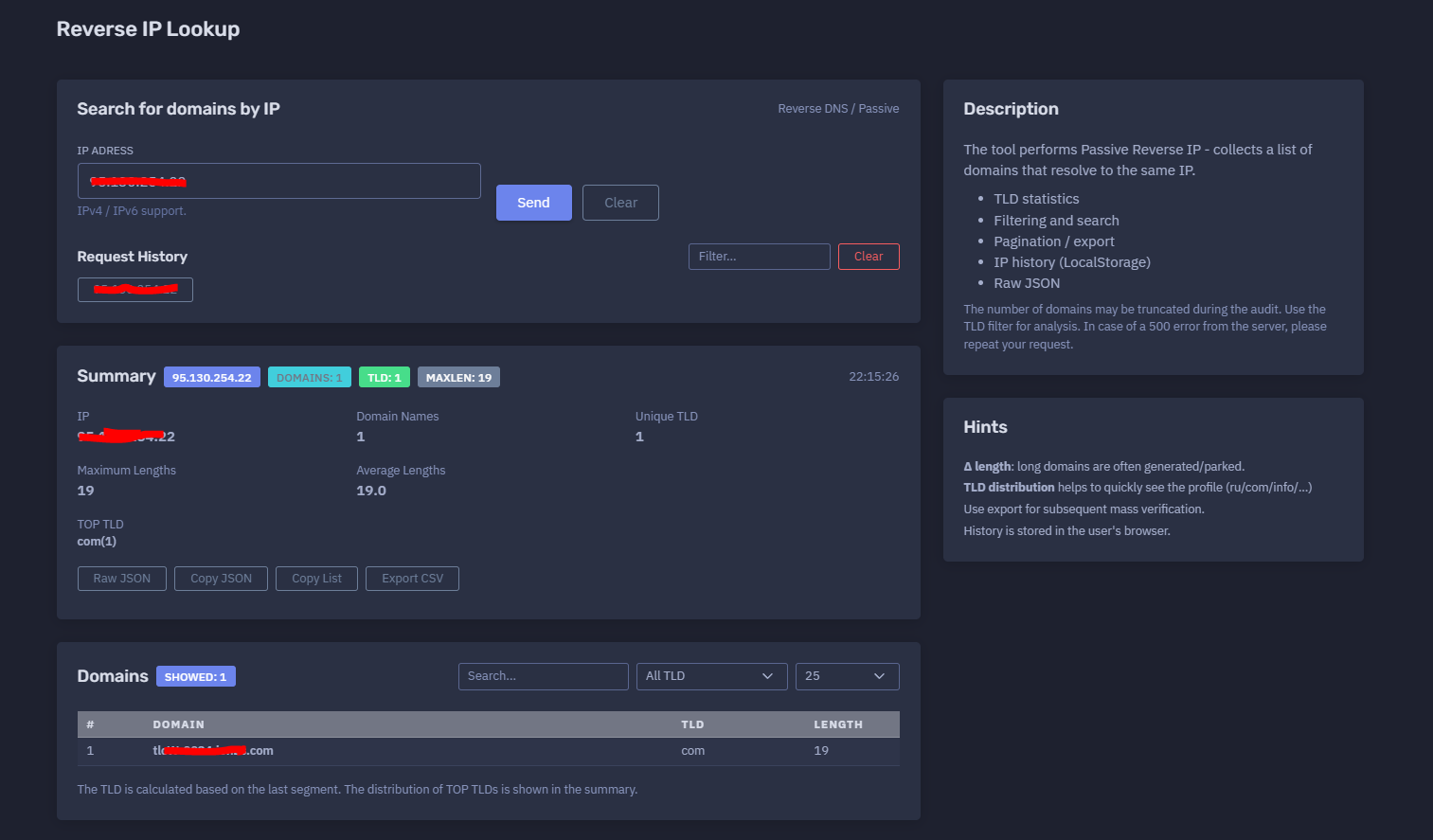
The platform available at https://dash.niamonx.io/ripip — known as Reverse IP Lookup — is a passive reverse IP intelligence tool within the NiamonX platform. It allows users to search for domain names associated with a specific IPv4 or IPv6 address using passive DNS and reverse DNS-style intelligence sources.
Overview of the Service
Reverse IP Lookup is designed to help analysts identify which domains have been observed resolving to the same IP address.
The tool is useful for cybersecurity analysts, SOC teams, OSINT researchers, infrastructure owners, incident responders, fraud investigators, domain researchers, and compliance teams who need to understand the domain footprint connected to a specific IP.
A single IP address can host one domain, many unrelated domains, parked domains, generated domains, CDN-backed assets, customer websites, phishing infrastructure, malware infrastructure, or shared hosting environments. Reverse IP Lookup helps expose these relationships in a clean and structured format.
The tool performs Passive Reverse IP analysis, meaning it collects known or observed domain associations for the IP rather than actively scanning the server.
🔍 How the Tool Works
When a user enters an IP address, Reverse IP Lookup searches passive DNS / reverse intelligence data for domains that have been observed resolving to that IP.
The result contains a summary and a domain table.
The system may return:
-
Total number of domains
-
Number of unique TLDs
-
Maximum domain length
-
Average domain length
-
Top TLD distribution
-
Domain list
-
TLD filter
-
Search filter
-
Pagination
-
Export options
-
Raw JSON
-
Local browser request history
Example input:
95.130.254.22
Example result summary:
IP: 95.130.254.22
Domains: 1
Unique TLD: 1
MaxLen: 19
Average Length: 19.0
Top TLD: com(1)
This gives users a quick view of how many domains are connected to the IP and what kind of domain distribution was observed.
🧩 What Can Be Searched
Reverse IP Lookup supports IP-based lookup.
Supported input types:
-
IPv4 address
-
IPv6 address
Valid examples:
95.130.254.22
1.1.1.1
2001:4860:4860::8888
Unsupported input examples:
example.com
https://example.com
95.130.254.22:443
example.com/path
The tool expects only a clean IPv4 or IPv6 address. Domain-to-IP resolution should be performed in a separate DNS or IP / Domain Explorer module before using Reverse IP Lookup.
📌 What Passive Reverse IP Means
Passive Reverse IP means that the tool uses collected or observed DNS intelligence to identify domains linked to an IP address.
It is different from:
-
Active port scanning
-
Web crawling
-
Directory brute-forcing
-
Service exploitation
-
Live server enumeration
Passive Reverse IP focuses on known domain-to-IP associations.
This approach is useful because it allows analysts to understand the visible domain footprint of an IP without directly interacting with hosted websites or services.
⚙️ Interface Structure
The Reverse IP Lookup interface contains several key areas.
IP Address Input
The main field where the user enters an IPv4 or IPv6 address.
Example:
95.130.254.22
The interface supports IPv4 and IPv6.
Request History
Displays previous IP lookups stored locally in the browser.
Summary
Shows total domain statistics for the queried IP.
Domains Table
Displays the domain names associated with the IP.
TLD Filter
Allows users to filter domains by top-level domain.
Search Filter
Allows users to search within the returned domain list.
Raw JSON
Provides structured technical output for advanced analysis.
📊 Summary Section
The summary section provides a quick statistical overview of the IP’s domain footprint.
Typical fields include:
| Field | Description |
|---|---|
| IP | Queried IPv4 or IPv6 address |
| Domains | Total number of returned domain names |
| Domain Names | Count of domain records |
| Unique TLD | Number of unique top-level domains |
| Maximum Lengths | Longest domain length in the result set |
| Average Lengths | Average domain length |
| TOP TLD | Most frequent TLDs and their counts |
| Timestamp | Time when the lookup was performed |
Example:
IP: 95.130.254.22
Domain Names: 1
Unique TLD: 1
Maximum Lengths: 19
Average Lengths: 19.0
TOP TLD: com(1)
This helps users quickly determine whether the IP is associated with a small, focused set of domains or a large, diverse hosting footprint.
🌐 Domains Table
The Domains table displays the domains associated with the queried IP.
Typical columns include:
| Column | Description |
|---|---|
| # | Row number |
| Domain | Domain name observed on the IP |
| TLD | Top-level domain |
| Length | Domain length |
Example safe table format:
| # | Domain | TLD | Length |
|---|---|---|---|
| 1 | example-host.example.com | com | 24 |
The table is designed for filtering, review, pagination, and export.
🏷️ TLD Statistics
Reverse IP Lookup calculates TLD distribution from returned domains.
Example:
TOP TLD: com(1)
The TLD is calculated based on the last segment of the domain.
Examples:
| Domain | Calculated TLD |
|---|---|
example.com |
com |
test.org |
org |
site.co.uk |
uk |
portal.net |
net |
TLD distribution helps analysts quickly understand the profile of domains on an IP.
For example:
-
Many
.comdomains may indicate commercial hosting. -
Many country-code TLDs may indicate regional infrastructure.
-
Many unusual TLDs may require closer review.
-
Mixed TLDs may indicate shared hosting, parking, CDN usage, or multi-customer infrastructure.
📏 Domain Length Metrics
The tool calculates maximum and average domain length.
Fields:
-
Maximum Lengths
-
Average Lengths
Long domains may be useful signals during investigation.
Possible interpretations of unusually long domains:
-
Generated domains
-
Tracking domains
-
Parked domains
-
Temporary infrastructure
-
Phishing kits
-
Campaign-specific infrastructure
-
Randomized hostnames
-
Bulk-created domains
Important: long domain length alone does not prove malicious activity. It is a triage signal that should be reviewed with additional context.
🔎 Filtering and Search
The interface includes filtering tools to make large result sets easier to analyze.
Users can filter by:
-
Domain text
-
TLD
-
Visible table rows
-
Page size
Example use cases:
-
Show only
.comdomains -
Search for a brand name
-
Search for a specific keyword
-
Review only suspicious-looking domains
-
Separate regional TLDs
-
Find domains with shared naming patterns
Filtering is especially useful when an IP has many associated domains.
📄 Pagination
Reverse IP Lookup supports pagination for large result sets.
The user can control how many rows are shown per page.
Example:
25
Pagination helps keep the interface fast and readable when many domains are returned.
For very large responses, the number of domains may be truncated during the audit. Users should use TLD filtering and export options for deeper analysis.
📤 Export
The tool supports export for further analysis.
Export is useful for:
-
Bulk verification
-
Domain reputation checks
-
Threat intelligence enrichment
-
Spreadsheet analysis
-
SOC case documentation
-
Incident response reports
-
Passive DNS comparison
-
Brand abuse monitoring
-
Infrastructure mapping
Exported data may include:
-
Domain
-
TLD
-
Length
-
IP
-
Summary metadata
Exported results should be stored securely when they are used in investigations.
🧾 Raw JSON
Reverse IP Lookup can expose raw JSON output.
Raw JSON may include:
-
Queried IP
-
Domain list
-
TLD statistics
-
Counts
-
Length metrics
-
Backend metadata
-
Response status
-
Timestamp
Raw JSON is useful for:
-
Technical diagnostics
-
API-style workflows
-
Evidence preservation
-
SOC automation
-
Case management
-
Comparing normalized and raw output
-
Internal reporting
Raw JSON should be handled carefully when it contains sensitive investigation context.
🕓 Request History
The tool stores IP lookup history locally in the user’s browser.
Important behavior:
History is stored in the user's browser.
History may include:
-
Queried IP
-
Timestamp
-
Result count
-
Summary data
-
Search mode
Local history is useful for repeating checks and reviewing previous analysis.
Because it is stored locally, it may be cleared when the user deletes browser data, switches devices, or uses another browser profile.
🧠 Key Features
Passive Reverse IP Lookup
Finds domains observed resolving to the same IP address.
IPv4 and IPv6 Support
Supports both IPv4 and IPv6 inputs.
Domain List
Displays associated domains in a structured table.
TLD Statistics
Calculates unique TLD count and top TLD distribution.
Domain Length Metrics
Shows maximum and average domain length.
Filtering and Search
Allows filtering by domain text and TLD.
Pagination
Supports large result sets through paginated display.
Export
Allows results to be exported for further analysis.
Raw JSON
Provides structured technical output for advanced users.
Local History
Stores IP lookup history locally in the browser.
🔍 Common Use Cases
Reverse IP Lookup supports many cybersecurity and OSINT workflows.
Shared Hosting Analysis
Identify domains hosted on the same IP address.
Threat Intelligence
Incident Response
Check whether a malicious IP hosts other domains that may be part of the same campaign.
Brand Protection
Search for domains on suspicious hosting infrastructure that may imitate a brand.
Phishing Investigation
Identify clusters of domains hosted on the same IP.
Infrastructure Mapping
Understand which domains are connected to an owned or third-party IP.
Asset Discovery
Find forgotten or related domains pointing to company infrastructure.
Fraud Investigation
Identify domains linked to suspicious hosting or repeated abuse patterns.
Malware Infrastructure Review
Check whether C2, landing, or payload domains share the same IP.
Compliance and Audit
Document domain exposure associated with organizational IPs.
🧠 Result Interpretation
Reverse IP data should be interpreted carefully.
Important notes:
-
Domain associations may be historical.
-
A domain resolving to an IP does not prove ownership of that IP.
-
Shared hosting can contain many unrelated domains.
-
CDN and proxy infrastructure may show domains from many customers.
-
Passive DNS records may be outdated.
-
Some domains may no longer resolve to the IP.
-
A small result set does not mean the IP hosts only those domains.
-
A large result set does not automatically mean malicious activity.
-
TLD distribution is a profile signal, not a verdict.
-
Long domains are often worth reviewing but are not proof of abuse.
Reverse IP Lookup should be used as an intelligence enrichment tool and correlated with DNS, WHOIS, TLS, HTTP, crawler, and reputation data.
🚨 Server Errors and Truncated Data
The tool notes that the number of domains may be truncated during the audit.
This means returned results may represent only part of the full available dataset.
If a server error occurs, such as a 500 response, users should repeat the request.
Recommended handling:
-
Retry after a short delay.
-
Use TLD filters to reduce result size.
-
Export visible results for offline analysis.
-
Compare with other NiamonX tools.
-
Do not assume a failed response means no domains exist.
✅ Recommended Analyst Workflow
A practical reverse IP investigation should follow these steps.
1. Enter a Clean IP Address
Use only an IPv4 or IPv6 address.
2. Review the Summary
Check total domains, unique TLDs, maximum length, average length, and top TLDs.
3. Inspect the Domain Table
Review domain names and look for obvious patterns.
4. Use Search and TLD Filters
Filter by suspicious terms, brand names, TLDs, or naming structures.
5. Review Long Domains
Long or unusual domains may indicate generated, parked, or campaign-style infrastructure.
6. Export Results
Use export for bulk verification or deeper investigation.
7. Correlate With Other Tools
Check interesting domains with DNS, GeoDNS, WHOIS, TLS, IP intelligence, web fingerprinting, or reputation tools.
8. Validate Current Resolution
Confirm whether selected domains still resolve to the IP.
9. Preserve Evidence
Save relevant records and timestamps for reports or incident cases.
10. Avoid Overclaiming
Treat associations as leads until confirmed by additional evidence.
🛡️ Security, Privacy & Responsible Use
Reverse IP Lookup is intended for lawful cybersecurity, OSINT, infrastructure analysis, incident response, and defensive research.
Acceptable use cases include:
-
Checking your own IP infrastructure
-
Investigating suspicious IPs
-
Mapping domains on shared infrastructure
-
Enriching threat intelligence
-
Supporting SOC triage
-
Reviewing phishing or malware infrastructure
-
Discovering exposed company assets
-
Brand protection
-
Compliance documentation
-
Research and reporting
Users should follow responsible use rules:
-
Do not use results to attack hosted domains.
-
Do not harass domain owners or hosting providers.
-
Do not assume all domains on an IP are related.
-
Do not treat passive DNS as current truth without validation.
-
Do not use the tool for unauthorized access, abuse, phishing, or exploitation.
-
Validate findings before operational, legal, or public reporting.
-
Treat exported results as sensitive investigation data.
⚙️ Technical Highlights
-
Passive Reverse IP lookup tool
-
Available at
dash.niamonx.io/ripip -
Searches for domains associated with an IP address
-
Supports IPv4
-
Supports IPv6
-
Uses reverse DNS / passive intelligence sources
-
Summary with domain count
-
Unique TLD count
-
Top TLD distribution
-
Maximum domain length
-
Average domain length
-
Domain table
-
TLD filter
-
Text search
-
Pagination
-
Export support
-
Raw JSON support
-
LocalStorage IP history
-
Handles potentially truncated responses
-
Retry recommended on server-side 500 errors
-
Suitable for SOC, OSINT, threat intelligence, incident response, fraud analysis, and infrastructure mapping
📌 Usage Hints
-
Enter only an IPv4 or IPv6 address.
-
Use the TLD filter for large result sets.
-
Use search to find brand names, suspicious keywords, or patterns.
-
Long domains are often generated, parked, or campaign-related, but require validation.
-
TLD distribution helps quickly understand the domain profile.
-
Export results for later mass verification.
-
Validate whether domains currently resolve to the IP.
-
Use Raw JSON for technical workflows.
-
Retry the request if a server-side 500 error occurs.
-
Remember that passive data can be historical or incomplete.
-
History is stored locally in the browser.
📬 Contact Information
For technical, legal, abuse, privacy, or support-related inquiries, users can contact the NiamonX team directly:
support@niamonx.io — Technical Support
other@niamonx.io — General Inquiries
takedown@niamonx.io — Privacy or Data Removal Requests
legal@niamonx.io — Legal and Compliance Matters
Alternative contact channel:
🔗 Helpdesk: https://support.niamonx.io/
Summary
NiamonX Reverse IP Lookup is a passive reverse IP intelligence tool that identifies domains observed resolving to the same IPv4 or IPv6 address.
It provides domain counts, unique TLD statistics, top TLD distribution, domain length metrics, filtering, search, pagination, export, Raw JSON, and local browser history.
The tool is designed for lawful OSINT, SOC triage, threat intelligence enrichment, phishing investigation, malware infrastructure analysis, asset discovery, brand protection, and infrastructure mapping. Results should be treated as passive intelligence leads and validated before conclusions or action.