
CrossTrace | Username & Email Intelligence
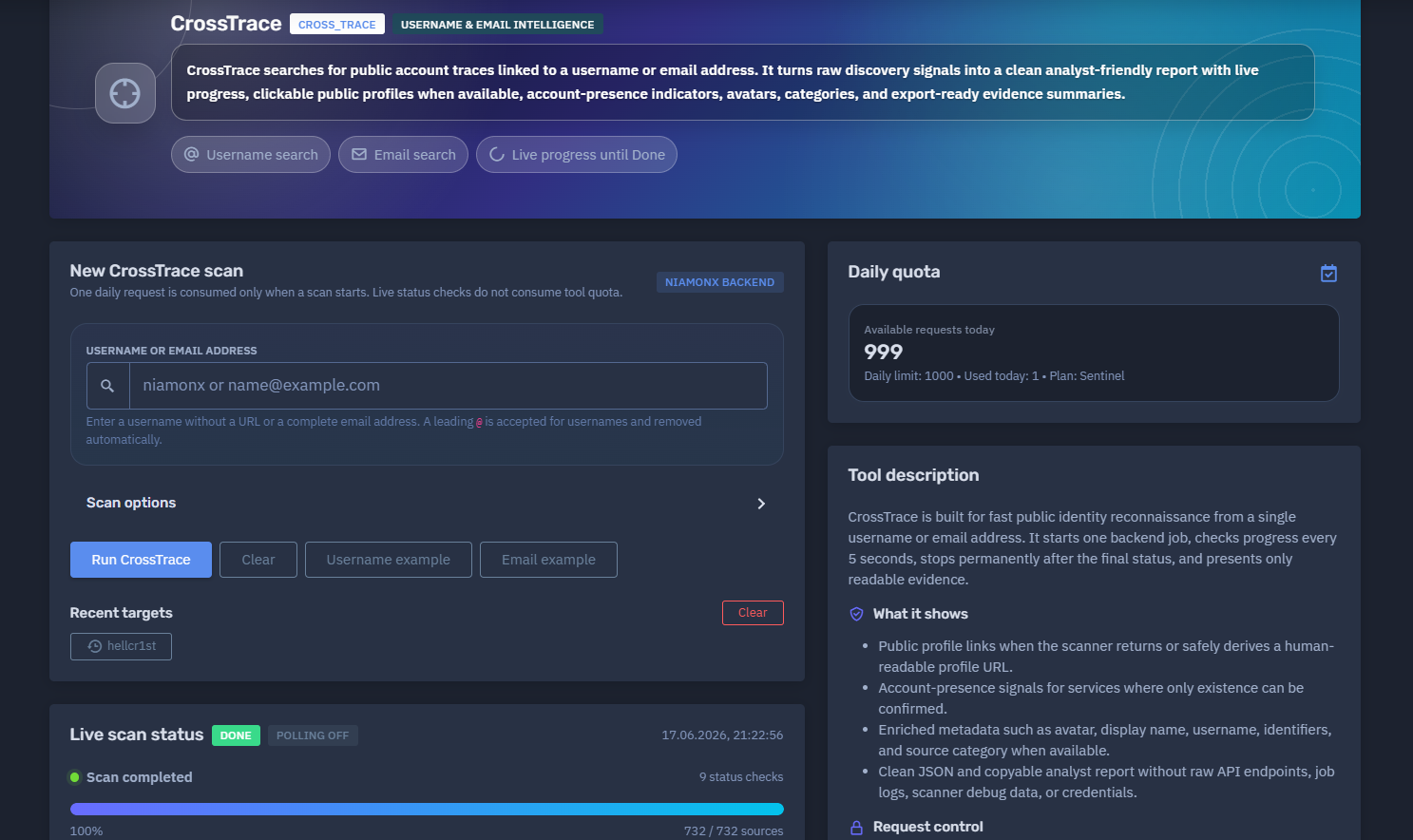
The platform available at dash.niamonx.io/cross_trace — known as CrossTrace — is a fast public identity intelligence module within the NiamonX platform. It is designed to search for public account traces connected to a username or email address and convert raw discovery signals into a clean, analyst-friendly report.
Overview of the Service
CrossTrace helps users discover public account-presence signals and profile traces associated with a single username or email address. The tool checks multiple public sources through the NiamonX backend, tracks scan progress live, removes technical scanner noise, and displays only readable, useful findings.
The module is designed for cybersecurity analysts, OSINT researchers, SOC teams, fraud investigators, compliance departments, brand protection teams, and authorized users who need to quickly understand where a username or email may appear across public platforms.
CrossTrace supports two main investigation modes:
-
Username search
-
Email search
The final report may include clickable public profiles, account-presence indicators, avatars, platform categories, confidence scores, extracted public details, clean JSON, and a copyable analyst report.
CrossTrace is not intended to prove account ownership automatically. A username match or email-presence signal should be treated as an investigative lead and manually verified using additional context.
🔍 How the Scan Works
When a user starts a CrossTrace scan, the system creates one backend job through the NiamonX infrastructure.
The backend checks supported public sources for traces linked to the submitted username or email address. While the job is running, the browser checks the scan status every few seconds using the existing scan ID.
Only the initial scan consumes one daily request. Live status checks do not consume additional tool quota.
Typical workflow:
-
The user enters a username or email address.
-
CrossTrace validates and normalizes the input.
-
A backend scan starts.
-
The interface displays live scan progress.
-
The backend checks supported public sources.
-
Raw scanner responses are cleaned and deduplicated.
-
Technical API endpoints, debug data, and noisy records are hidden.
-
The final report displays public traces, profile links, presence signals, categories, avatars, and scores.
Polling stops immediately after a final status is reached, such as Done, failed, cancelled, or error.
🧩 What Can Be Searched
CrossTrace supports two target types.
Username
A username can be entered with or without a leading @.
Examples:
niamonx
@niamonx
If the username starts with @, the symbol is accepted and removed automatically.
Allowed username characters:
-
Letters
-
Numbers
-
Dot
-
Underscore
-
Hyphen
The user should not enter a URL.
A complete email address can be submitted as an email target.
Example:
name@example.com
CrossTrace automatically detects the target as an email when the submitted value is a valid email address.
🚫 Unsupported Input
CrossTrace is focused on usernames and email addresses only.
The user should not submit:
-
Full URLs
-
Domains only
-
IP addresses
-
Phone numbers
-
Full names
-
Passwords
-
Wildcards
-
Search operators
-
Multi-field composite queries
-
Private tokens or API keys
For domain, IP, breach, ULP, Google, or advanced identity reports, users should use the appropriate dedicated NiamonX module.
⚙️ New CrossTrace Scan Interface
The scan interface contains the main controls required to start a new investigation.
Main fields and panels:
| Element | Description |
|---|---|
| Username or email address | Main target input field |
| Scan options | Optional scan configuration |
| Recent targets | Quick access to recent local targets |
| Live scan status | Real-time backend job progress |
| Summary | Final report statistics |
| Found traces | Cleaned and deduplicated results |
| Daily quota | Plan-based request usage |
The interface clearly states that one daily request is consumed only when a scan starts. Live status checks do not consume tool quota.
📡 Live Scan Status
The Live Scan Status section shows real-time progress until the scan reaches a final state.
It may display:
-
Current status
-
Polling state
-
Timestamp
-
Current scan phase
-
Number of status checks
-
Progress percentage
-
Number of checked sources
-
Completion state
Example status structure:
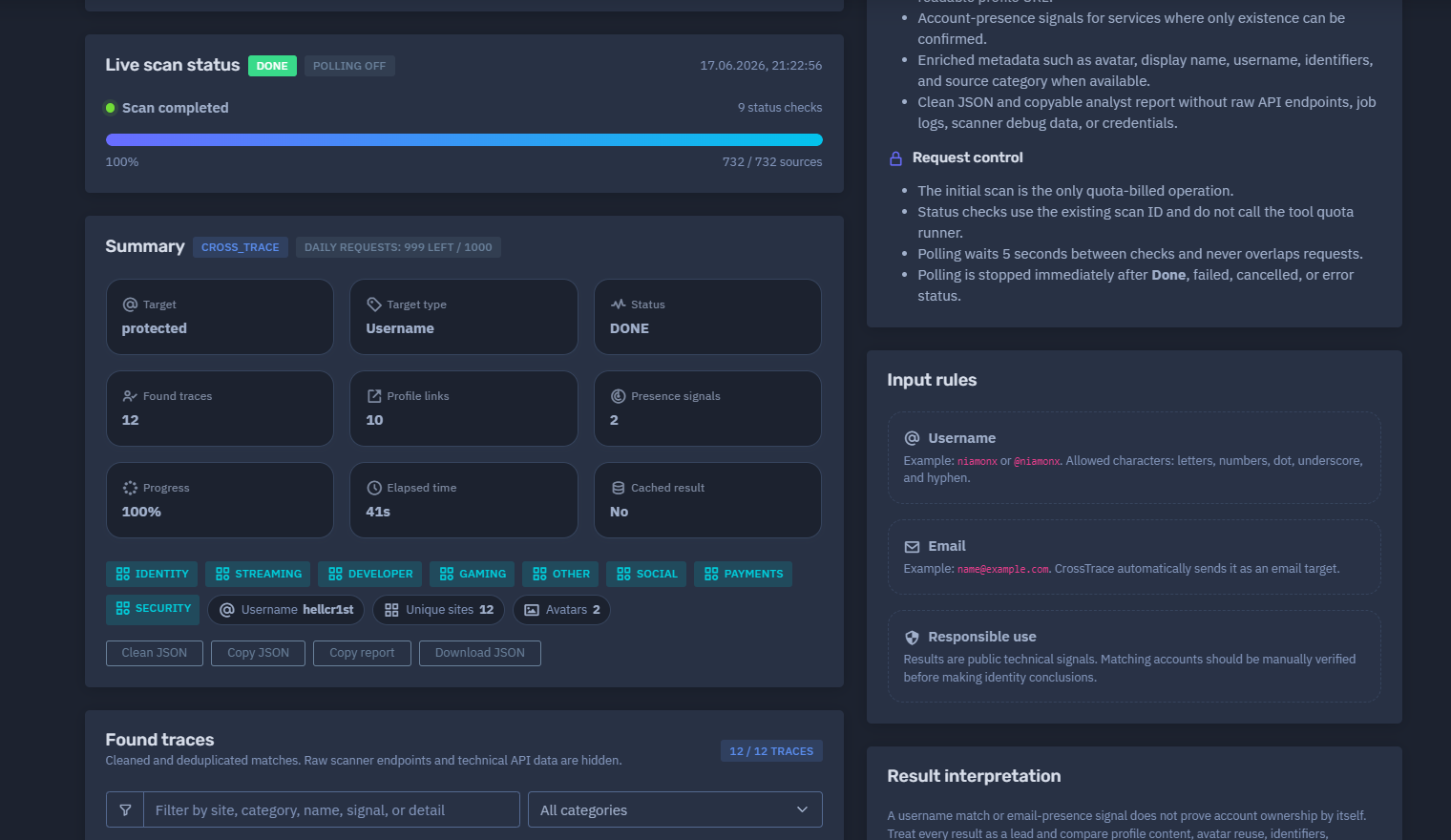
DONE
Polling off
Scan completed
9 status checks
100%
732 / 732 sources
Polling behavior:
-
Waits several seconds between checks
-
Uses the existing scan ID
-
Does not consume additional quota
-
Does not overlap requests
-
Stops permanently after a final status
This makes CrossTrace suitable for live interactive analysis without wasting daily request limits on status checks.
📊 Summary Section
After the scan completes, CrossTrace generates a summary of the discovered traces.
The summary may include:
-
Tool name
-
Daily requests remaining
-
Target
-
Target type
-
Status
-
Found traces
-
Profile links
-
Presence signals
-
Progress
-
Elapsed time
-
Cache status
-
Identity categories
-
Unique sites
-
Avatar count
Example summary format:
Tool: cross_trace
Target: username
Target type: Username
Status: DONE
Found traces: 12
Profile links: 10
Presence signals: 2
Progress: 100%
Elapsed time: 41s
Cached result: No
Unique sites: 12
Avatars: 2
The summary helps analysts quickly understand how many useful public traces were found and how many of them include direct profile links.
🧠 Key Features
Username and Email Intelligence
CrossTrace can search public traces for both usernames and email addresses.
Fast Backend Scan
The tool starts one backend job and tracks it until completion.
Live Progress
The user can monitor scan progress in real time.
Quota-Safe Status Checks
Only the initial scan is quota-billed. Status checks use the existing scan ID and do not call the tool quota runner.
Cleaned Results
CrossTrace removes raw scanner endpoints, technical API data, debug logs, credentials, and noisy low-value records.
Deduplication
Repeated matches are merged into clean, unique traces.
Public Profile Links
When the scanner returns or safely derives a human-readable public profile URL, CrossTrace displays it as a clickable profile link.
Account-Presence Signals
Some services expose only whether an account appears to exist. CrossTrace labels these as account-presence signals.
Avatars
When available, public avatars are displayed for easier manual correlation.
Categories
Results are grouped into useful categories such as Identity, Streaming, Developer, Gaming, Social, Payments, Security, and Other.
Confidence Scores
Each trace may include a score to help analysts prioritize review.
Clean JSON and Copyable Report
CrossTrace can produce clean JSON and a copyable analyst report without raw API endpoints, job logs, scanner debug data, or credentials.
📋 Found Traces
The Found Traces section displays cleaned and deduplicated results only.
Each trace card may include:
| Field | Description |
|---|---|
| Site | Platform or source where the trace was found |
| Category | Source category, such as Identity, Gaming, Developer, or Social |
| Name | Public name or username shown by the source |
| Signal type | Direct profile or account-presence signal |
| Score | Confidence or relevance score |
| Avatar | Public avatar, if available |
| Details | Extra public metadata, if returned |
| Profile link | Clickable profile URL, when available |
The interface may also include filtering by:
-
Site
-
Category
-
Name
-
Signal
-
Detail
This helps analysts focus on specific source types or high-value findings.
🔗 Profile Links vs Presence Signals
CrossTrace separates findings into two important types.
Public Profile Links
A public profile link is a human-readable URL that can be opened and manually reviewed.
Examples of profile-link evidence may include:
-
Public user profile
-
Public developer profile
-
Public gaming profile
-
Public streaming profile
-
Public social profile
-
Public avatar profile
These links are useful because they allow the analyst to manually verify the account.
Account-Presence Signals
An account-presence signal means the system detected that a username or email appears to be associated with a service, but a public profile link may not be available.
This may happen when:
-
A service exposes only availability checks
-
A profile is not publicly accessible
-
The source confirms existence but does not return public metadata
-
The scanner can detect the account but cannot safely derive a readable profile URL
CrossTrace labels these results clearly as account signals.
Presence signals are useful leads, but they should be interpreted more cautiously than direct profile links.
🧮 Score and Confidence
Each trace may include a score.
The score helps prioritize review and indicates the strength of the public signal.
Example interpretation:
| Score Range | Interpretation |
|---|---|
| 90–100 | Very strong trace, usually a direct or enriched profile |
| 80–89 | Strong trace, often a direct profile with reliable matching |
| 70–79 | Useful trace, worth manual validation |
| 60–69 | Presence signal or weaker public account indicator |
| Below 60 | Low-confidence signal, if displayed |
A high score does not prove account ownership. It only indicates that the trace is technically strong or relevant enough to review first.
🏷️ Categories
CrossTrace groups results into categories to make the report easier to understand.
Common categories include:
| Category | Description |
|---|---|
| Identity | Identity or avatar-related services |
| Streaming | Streaming and creator platforms |
| Developer | Code, developer, and repository platforms |
| Gaming | Gaming accounts and game-related platforms |
| Social | Social networking services |
| Payments | Payment, donation, or monetization platforms |
| Security | Cybersecurity, breach, or threat-intelligence related sources |
| Other | Sources that do not fit a main category |
Categories help analysts understand the type of public footprint connected to the target.
For example, a username appearing across Developer and Gaming categories may suggest reuse across technical and gaming communities, while Identity or avatar services may help with cross-platform correlation.
🖼️ Avatars and Public Images
Some CrossTrace results may include public avatars.
Avatars can help analysts compare public profiles across platforms.
Useful avatar-based correlation signals:
-
Same image reused across multiple services
-
Similar image style
-
Matching display name
-
Matching profile bio
-
Same username and avatar combination
-
Same linked accounts
Avatar similarity should not be treated as proof of identity by itself. It should be combined with usernames, platform IDs, profile content, timelines, and additional evidence.
🧬 Enriched Metadata
When available, CrossTrace may show enriched metadata for a trace.
Possible metadata includes:
-
Display name
-
Username
-
Avatar
-
Platform identifier
-
Source category
-
Signal type
-
Profile URL
-
Public account details
Some traces may return no extra public details. In that case, the interface clearly indicates that no extra public details were returned for that trace.
This keeps the report transparent and avoids inventing unsupported information.
🧾 Clean JSON and Analyst Report
CrossTrace can provide export-ready evidence summaries.
The clean report may include:
-
Target
-
Target type
-
Scan status
-
Found traces
-
Unique sites
-
Profile links
-
Presence signals
-
Categories
-
Scores
-
Avatars
-
Public details
-
Timing information
-
Cache status
The clean JSON output is useful for:
-
SOC workflows
-
Case management systems
-
OSINT documentation
-
Fraud investigations
-
Threat intelligence pipelines
-
Compliance records
-
Internal reporting
-
Automation and enrichment pipelines
The output intentionally excludes raw API endpoints, job logs, scanner debug data, and credentials.
🚦 Daily Quota
CrossTrace uses plan-based daily request limits.
Example quota display:
Available requests today: 999
Daily limit: 1000
Used today: 1
Plan: Sentinel
Quota behavior:
-
One request is consumed when a scan starts.
-
Status checks do not consume quota.
-
Polling uses the existing scan ID.
-
Polling stops after a final status.
-
Daily limits depend on the user’s plan.
This prevents unnecessary quota usage while still allowing live progress tracking.
💾 Recent Targets
The interface may include a Recent Targets section.
This helps users quickly rerun or review recent username and email checks.
Recent target history should be treated carefully because usernames and emails may be sensitive in an investigation context.
🧠 Result Interpretation
CrossTrace results are public technical signals.
A username match or email-presence signal does not prove that an account belongs to a specific person.
Each result should be treated as a lead.
Recommended validation checks:
-
Open public profile links when available.
-
Compare display names.
-
Compare avatars.
-
Review usernames and spelling.
-
Check platform-specific identifiers.
-
Compare account creation dates when available.
-
Review public activity and linked accounts.
-
Check whether the profile references the same websites, locations, interests, or aliases.
-
Compare the result with other NiamonX modules such as Alias Radar, Google Footprint, Identity360, ULP Search, or breach intelligence.
Some services expose only account availability signals. CrossTrace labels those as account signals and hides technical endpoints to keep the report safe and readable.
✅ Recommended Analyst Workflow
A careful CrossTrace investigation should follow this process.
1. Choose the Correct Target Type
Use a username for alias-based checks or a complete email address for email-based traces.
2. Start the Scan
Submit the target and let the backend job complete.
3. Review the Summary
Check found traces, profile links, presence signals, unique sites, avatars, elapsed time, and cache status.
4. Prioritize Direct Profiles
Start with direct profile links because they allow manual review.
5. Review High-Score Results
High-score traces should be checked first.
6. Separate Profile Links From Presence Signals
Presence signals are useful but weaker than direct public profile links.
7. Compare Public Details
Use avatars, display names, usernames, linked accounts, and identifiers for correlation.
8. Avoid Overclaiming
Use cautious wording such as “possible trace,” “public signal,” or “account-presence indicator” unless ownership is verified.
9. Export Evidence
Use clean JSON or the copyable analyst report for internal documentation.
10. Store Results Securely
Treat reports as sensitive investigation data, especially when they contain emails, usernames, avatars, or account-presence signals.
🛡️ Security, Privacy & Ethics
CrossTrace is intended for lawful OSINT, defensive cybersecurity, fraud prevention, brand protection, compliance, and authorized investigation.
Users must follow strict ethical rules:
-
Search only usernames or email addresses that you own or are authorized to investigate.
-
Do not use CrossTrace to stalk, harass, shame, threaten, or target individuals.
-
Do not claim identity ownership based only on a username match or presence signal.
-
Do not use account traces for phishing, impersonation, social engineering, fraud, or extortion.
-
Do not attempt to access private accounts or bypass platform restrictions.
-
Do not publish personal information discovered through the tool.
-
Do not contact individuals aggressively based on unverified results.
-
Validate all findings before legal, HR, compliance, or operational decisions.
-
Treat exported reports as sensitive intelligence material.
Responsible interpretation is essential because public account discovery can produce false positives, especially when usernames are reused by different people.
⚙️ Technical Highlights
-
Username and email intelligence module
-
Powered by NiamonX Backend
-
Supports username search
-
Supports email search
-
Live progress until Done
-
One backend job per scan
-
One daily request consumed only when the scan starts
-
Status checks do not consume tool quota
-
Polling interval between checks
-
No overlapping status requests
-
Polling stops after Done, failed, cancelled, or error status
-
Checks hundreds of public sources
-
Cleaned and deduplicated matches
-
Raw scanner endpoints hidden
-
Technical API data hidden
-
Public profile links when available
-
Account-presence signal labeling
-
Avatars when available
-
Category grouping
-
Confidence scores
-
Clean JSON output
-
Copyable analyst report
-
Recent targets support
-
Suitable for OSINT, SOC, fraud, compliance, and identity correlation workflows
📌 Usage Hints
-
Enter a username without a URL.
-
A leading
@is accepted for usernames and removed automatically. -
Enter a complete email address for email-based checks.
-
Review direct profile links first.
-
Treat presence signals as weaker leads.
-
Use scores to prioritize review.
-
Compare avatars, names, identifiers, timelines, and linked accounts.
-
Do not assume all matching usernames belong to the same person.
-
Use clean JSON for internal workflows and evidence storage.
-
Treat exported results as sensitive investigation material.
-
Validate findings manually before taking action.
📬 Contact Information
For technical, legal, abuse, privacy, or takedown-related inquiries, users can contact the NiamonX team directly:
support@niamonx.io — Technical Support
other@niamonx.io — General Inquiries
takedown@niamonx.io — Data Removal / Privacy Takedown Requests
legal@niamonx.io — Legal and Compliance Matters
Alternative contact channel:
🔗 Helpdesk: https://support.niamonx.io/
Summary
NiamonX CrossTrace is a fast username and email intelligence module that searches for public account traces and account-presence signals across supported public sources.
It starts one backend scan, tracks progress live, cleans and deduplicates raw results, hides technical scanner data, and presents a readable analyst report with profile links, presence signals, avatars, categories, scores, clean JSON, and export-ready summaries.
The tool is designed for lawful OSINT, defensive cybersecurity, fraud investigation, brand protection, SOC workflows, compliance review, and identity correlation. All results should be treated as public technical signals and manually verified before making conclusions about identity or ownership.