
DMARC Policy & Configuration | DMARC Record Analysis Tool
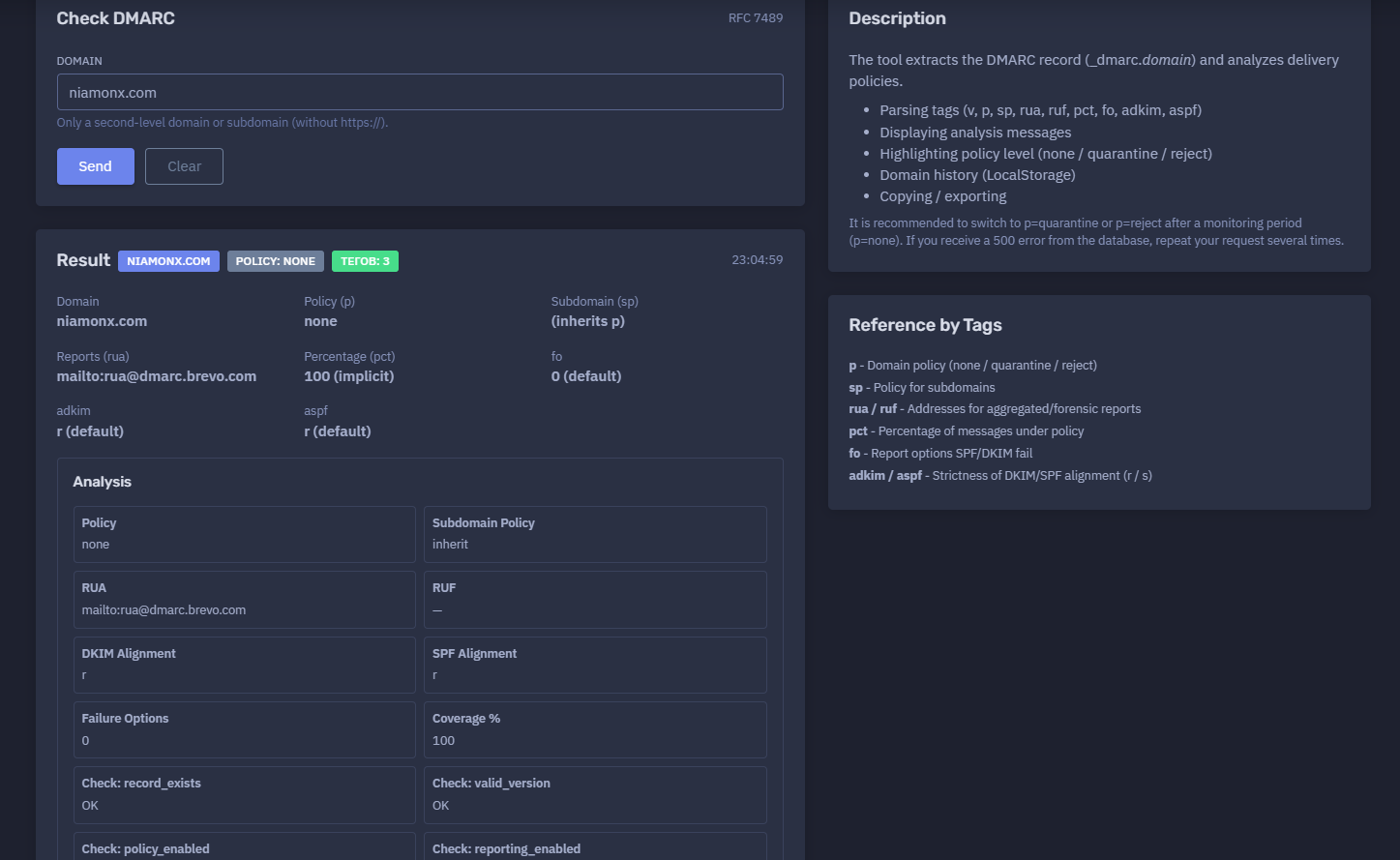
The platform available at https://dash.niamonx.io/dmarc_check — known as DMARC Policy & Configuration — is an e-mail domain security analysis tool within the NiamonX platform. It checks whether a domain has a valid DMARC record, extracts and parses DMARC tags, identifies the active policy, analyzes reporting configuration, evaluates alignment settings, highlights security gaps, and provides a practical risk score.
The tool helps domain owners, security teams, SOC analysts, administrators, compliance teams, and investigators understand how a domain handles unauthenticated e-mail and whether its DMARC configuration is strong enough to protect against spoofing and phishing.
Overview of the Service
DMARC Policy & Configuration analyzes the DMARC record published at:
_dmarc.domain
DMARC, which stands for Domain-based Message Authentication, Reporting, and Conformance, is an e-mail authentication policy framework. It works together with SPF and DKIM to help receiving mail servers determine whether messages claiming to come from a domain are legitimate.
The tool checks the DMARC TXT record, parses its tags, displays the active policy, and evaluates whether the domain is using a monitoring-only policy or an enforcement policy.
The module can analyze:
-
DMARC record existence
-
DMARC version validity
-
domain policy
-
subdomain policy
-
aggregate reporting addresses
-
forensic reporting addresses
-
DKIM alignment mode
-
SPF alignment mode
-
failure reporting options
-
policy coverage percentage
-
security posture
-
risk score
-
parsed DMARC tags
-
analysis checks
-
exportable results
This makes the tool useful for e-mail security audits, anti-phishing hardening, domain protection, compliance reviews, brand protection, SOC workflows, and infrastructure security assessments.
🔍 How the Tool Works
When a user enters a domain, the tool queries the DMARC TXT record for that domain and analyzes the returned policy.
Example input:
Domain: niamonx.com
The tool checks the DNS location:
_dmarc.niamonx.com
Example result:
Domain: niamonx.com
Policy: none
Tags: 3
23:04:59
Example parsed DMARC record:
v=DMARC1; p=none; rua=mailto:rua@dmarc.brevo.com
Example analysis result:
record_exists: OK
valid_version: OK
policy_enabled: FAIL
reporting_enabled: OK
strict_alignment: FAIL
Risk Score: 40 / 100
The result helps users understand whether DMARC is present, whether it is only monitoring mail, whether reports are enabled, and whether stricter protection should be considered.
🧩 Supported Input
DMARC Policy & Configuration accepts second-level domains and subdomains.
Correct examples:
niamonx.com
example.com
sub.example.com
company.org
Incorrect examples:
https://niamonx.com
http://example.com
https://example.com/path
user@example.com
192.168.1.1
_dmarc.example.com
Interface guidance:
Only a second-level domain or subdomain (without https://).
Users should enter only the domain or subdomain. The tool automatically checks the correct DMARC DNS location by querying _dmarc. in front of the submitted domain.
📊 Result Section
The Result section provides a quick summary of the DMARC configuration.
Example:
niamonx.com
Policy: none
Tags: 3
23:04:59
Typical fields include:
| Field | Description |
|---|---|
| Domain | The checked domain |
| Policy | Active DMARC domain policy |
| Tags | Number of parsed DMARC tags |
| Time | Query or result timestamp |
The Result section is useful for quick triage. It immediately shows whether the domain has a DMARC policy and whether that policy is monitoring-only or enforcement-based.
🧾 Domain Details
The detailed result view shows the parsed DMARC configuration.
Example:
Domain: niamonx.com
Policy (p): none
Subdomain (sp): (inherits p)
Reports (rua): mailto:rua@dmarc.brevo.com
Percentage (pct): 100 (implicit)
fo: 0 (default)
adkim: r (default)
aspf: r (default)
This view helps users understand both explicit and implicit DMARC values.
Some values may be shown as default because they were not explicitly present in the DNS record but are defined by DMARC behavior.
🛡️ Policy Field
The Policy (p) field defines what receiving mail servers should do when a message fails DMARC validation.
Example:
Policy (p): none
DMARC supports three main policy levels:
| Policy | Meaning |
|---|---|
| none | Monitor only; do not request enforcement |
| quarantine | Treat failing messages as suspicious |
| reject | Reject failing messages |
p=none
Example:
p=none
p=none means that the domain is collecting DMARC information but is not asking receivers to quarantine or reject failing messages.
This is useful during initial deployment and monitoring, but it does not provide strong spoofing protection by itself.
p=quarantine
Example:
p=quarantine
p=quarantine requests that receiving mail servers treat DMARC-failing messages as suspicious. These messages may be placed in spam or quarantine.
p=reject
Example:
p=reject
p=reject is the strongest policy. It requests that receiving mail servers reject messages that fail DMARC validation.
For mature configurations, p=reject is usually the strongest anti-spoofing posture.
🧭 Subdomain Policy
The Subdomain Policy (sp) field controls how DMARC should apply to subdomains.
Example:
Subdomain (sp): (inherits p)
If sp is not defined, subdomains inherit the main domain policy.
Example:
p=none
sp not defined
Result: subdomains inherit p=none
Possible sp values include:
sp=none
sp=quarantine
sp=reject
The subdomain policy is important because attackers may try to spoof or abuse subdomains if the root domain has incomplete enforcement.
Recommended practice:
-
define
spexplicitly for high-value domains; -
use
sp=quarantineorsp=rejectwhen subdomain mail flows are understood; -
review legitimate subdomain mail senders before enforcement.
📬 Aggregate Reports: RUA
The rua tag defines where aggregate DMARC reports should be sent.
Example:
rua=mailto:rua@dmarc.brevo.com
Aggregate reports provide summarized information about mail claiming to come from the domain.
They may include:
-
sending IP addresses;
-
authentication results;
-
SPF alignment results;
-
DKIM alignment results;
-
message counts;
-
policy evaluation results;
-
receiver information;
-
pass/fail statistics.
In the tool result, RUA may be shown as:
Reports (rua): mailto:rua@dmarc.brevo.com
Reporting is important because it allows domain owners to monitor legitimate and unauthorized e-mail sources before moving to stricter policies.
🧪 Forensic Reports: RUF
The ruf tag defines where forensic or failure reports may be sent.
Example:
ruf=mailto:forensic@example.com
If no forensic report address is configured, the tool may show:
RUF: —
Forensic reports can contain more detailed failure information, but support varies between receivers and privacy restrictions may limit their availability.
RUF should be configured carefully because failure reports may contain sensitive message details or metadata.
📈 Percentage: PCT
The pct tag defines the percentage of messages to which the DMARC policy should be applied.
Example:
pct=100
If pct is not explicitly defined, the tool may show:
Percentage (pct): 100 (implicit)
This means the policy applies to 100% of relevant messages by default.
Use cases for pct:
-
gradual enforcement rollout;
-
testing quarantine or reject policies;
-
limiting impact during migration;
-
phased deployment for large mail environments.
Example phased rollout:
p=quarantine; pct=25
p=quarantine; pct=50
p=quarantine; pct=100
p=reject; pct=25
p=reject; pct=50
p=reject; pct=100
⚙️ Failure Options: FO
The fo tag controls failure reporting options.
Example default:
fo: 0 (default)
Common values include:
| Value | Meaning |
|---|---|
| 0 | Generate reports if both SPF and DKIM fail to produce an aligned pass |
| 1 | Generate reports if either SPF or DKIM fails |
| d | Generate reports if DKIM fails |
| s | Generate reports if SPF fails |
The default value is:
fo=0
Failure options are mainly relevant when forensic reporting is configured and supported.
🔐 DKIM Alignment: ADKIM
The adkim tag defines DKIM alignment strictness.
Example default:
adkim: r (default)
Possible values:
| Value | Meaning |
|---|---|
| r | Relaxed alignment |
| s | Strict alignment |
Relaxed DKIM alignment allows organizational-domain alignment.
Strict DKIM alignment requires a closer match between the DKIM signing domain and the visible From domain.
Example:
adkim=s
Strict alignment provides stronger control but may break legitimate mail if third-party senders are not configured properly.
🔐 SPF Alignment: ASPF
The aspf tag defines SPF alignment strictness.
Example default:
aspf: r (default)
Possible values:
| Value | Meaning |
|---|---|
| r | Relaxed alignment |
| s | Strict alignment |
Relaxed SPF alignment allows organizational-domain alignment between the SPF-authenticated domain and the visible From domain.
Strict SPF alignment requires a closer match.
Example:
aspf=s
Strict SPF alignment can improve security but should be enabled only after confirming all legitimate mail sources are correctly aligned.
🧾 Parsed Tags Table
The tool displays parsed DMARC tags in a structured table.
Example:
| Tag | Value | Description |
|---|---|---|
| v | DMARC1 | Protocol version |
| p | none | Policy for domain |
| rua | mailto:rua@dmarc.brevo.com | Aggregate report URIs |
Example record:
v=DMARC1; p=none; rua=mailto:rua@dmarc.brevo.com
The tag table helps users understand exactly which DMARC values are present in the DNS record.
🧠 Analysis Section
The Analysis section translates raw DMARC tags into practical configuration meaning.
Example:
Policy: none
Subdomain Policy: inherit
RUA: mailto:rua@dmarc.brevo.com
RUF: —
DKIM Alignment: r
SPF Alignment: r
Failure Options: 0
Coverage %: 100
This section is useful for both technical and non-technical review because it explains the active DMARC posture in a structured format.
✅ Configuration Checks
The tool performs several checks to evaluate DMARC health.
Example:
Check: record_exists
OK

Check: valid_version
OK

Check: policy_enabled
FAIL

Check: reporting_enabled
OK

Check: strict_alignment
FAIL
record_exists
Checks whether a DMARC record exists.
Example:
record_exists: OK
If this check fails, the domain does not have a detectable DMARC record.
valid_version
Checks whether the record uses a valid DMARC version tag.
Example:
valid_version: OK
A valid DMARC record should include:
v=DMARC1
policy_enabled
Checks whether the domain uses an enforcement policy.
Example:
policy_enabled: FAIL
This may fail when the policy is:
p=none
p=none is valid for monitoring, but it does not request quarantine or rejection of failing messages.
reporting_enabled
Checks whether DMARC reporting is configured.
Example:
reporting_enabled: OK
This usually means that rua is present.
Example:
rua=mailto:rua@dmarc.brevo.com
strict_alignment
Checks whether strict alignment is configured.
Example:
strict_alignment: FAIL
This may fail when both alignment tags use relaxed mode or default relaxed behavior:
adkim=r
aspf=r
Strict alignment is not always required, but it can improve protection for mature domains after legitimate senders are validated.
📊 Risk Score
The tool provides a risk score to help prioritize remediation.
Example:
Risk Score: 40 / 100
A lower score may indicate a weaker DMARC posture, while a higher score may indicate stronger protection.
The score may be influenced by:
-
whether a DMARC record exists;
-
whether the version is valid;
-
whether the domain uses
p=none,p=quarantine, orp=reject; -
whether aggregate reporting is enabled;
-
whether forensic reporting is configured;
-
whether strict alignment is enabled;
-
whether coverage is set to 100%;
-
whether subdomain policy is defined;
-
whether required tags are present.
Example interpretation:
| Score Range | General Meaning |
|---|---|
| 0–30 | Weak or missing DMARC protection |
| 31–60 | Basic monitoring or partial configuration |
| 61–80 | Good configuration with some improvement areas |
| 81–100 | Strong DMARC enforcement posture |
The score should be treated as a practical guidance indicator, not as the only measure of e-mail security.
📚 Reference by Tags
v — Version
Defines the DMARC protocol version.
Example:
v=DMARC1
This tag is required.
p — Domain Policy
Defines the policy for the main domain.
Example:
p=none
Possible values:
none
quarantine
reject
sp — Subdomain Policy
Defines the policy for subdomains.
Example:
sp=reject
If sp is not present, subdomains inherit the main p policy.
rua — Aggregate Reports
Defines addresses for aggregate DMARC reports.
Example:
rua=mailto:rua@example.com
Multiple report destinations may be separated by commas.
ruf — Forensic Reports
Defines addresses for forensic or failure reports.
Example:
ruf=mailto:forensic@example.com
Support for RUF varies across mail receivers.
pct — Policy Percentage
Defines what percentage of messages the policy applies to.
Example:
pct=100
If omitted, the default is 100.
fo — Failure Options
Defines reporting behavior for SPF and DKIM failures.
Example:
fo=0
Common values:
0
1
d
s
adkim — DKIM Alignment
Defines DKIM alignment strictness.
Example:
adkim=s
Possible values:
r
s
r means relaxed.s means strict.
aspf — SPF Alignment
Defines SPF alignment strictness.
Example:
aspf=s
Possible values:
r
s
r means relaxed.s means strict.
🧪 Example DMARC Configurations
Monitoring-Only DMARC
v=DMARC1; p=none; rua=mailto:dmarc-reports@example.com
Meaning:
-
DMARC exists.
-
Reports are enabled.
-
No enforcement is requested.
-
Good for initial monitoring.
-
Not strong enough for anti-spoofing enforcement.
Best for:
-
first deployment;
-
mail source discovery;
-
monitoring legitimate senders;
-
preparing for enforcement.
Quarantine Policy
v=DMARC1; p=quarantine; rua=mailto:dmarc-reports@example.com; pct=100
Meaning:
-
DMARC is enabled.
-
Failing messages should be treated as suspicious.
-
Aggregate reports are enabled.
-
Policy applies to 100% of messages.
Best for:
-
intermediate enforcement;
-
reducing spoofing risk;
-
phased rollout before rejection.
Reject Policy
v=DMARC1; p=reject; rua=mailto:dmarc-reports@example.com; pct=100
Meaning:
-
Strong DMARC enforcement is enabled.
-
Failing messages should be rejected.
-
Aggregate reports are enabled.
-
Policy applies to all messages.
Best for:
-
mature domains;
-
high-value brands;
-
anti-phishing protection;
-
domains with verified mail sources.
Strict Alignment Policy
v=DMARC1; p=reject; sp=reject; rua=mailto:dmarc-reports@example.com; adkim=s; aspf=s; pct=100
Meaning:
-
Strong enforcement for domain and subdomains.
-
Strict DKIM alignment.
-
Strict SPF alignment.
-
Aggregate reports enabled.
-
Full coverage.
Best for:
-
high-security domains;
-
mature e-mail infrastructure;
-
brands with high spoofing risk;
-
organizations with controlled sender inventory.
🧠 Recommended DMARC Deployment Workflow
A practical DMARC deployment workflow should be gradual.
1. Publish a Monitoring Policy
Start with:
v=DMARC1; p=none; rua=mailto:dmarc-reports@example.com
This allows the organization to collect reports without affecting mail delivery.
2. Analyze Reports
Review aggregate reports to identify all legitimate senders.
Check:
-
corporate mail provider;
-
marketing platforms;
-
CRM systems;
-
support systems;
-
transactional e-mail services;
-
billing systems;
-
cloud applications;
-
legacy mail servers;
-
third-party vendors.
3. Fix SPF and DKIM Alignment
Make sure legitimate senders pass SPF or DKIM alignment.
Review:
SPF pass and aligned
DKIM pass and aligned
Visible From domain
Return-Path domain
DKIM d= domain
4. Move to Quarantine
After monitoring, move to:
v=DMARC1; p=quarantine; rua=mailto:dmarc-reports@example.com; pct=100
Optionally start with a lower percentage:
pct=25
Then increase gradually.
5. Move to Reject
After confirming legitimate mail is aligned, move to:
v=DMARC1; p=reject; rua=mailto:dmarc-reports@example.com; pct=100
This gives stronger protection against spoofing.
6. Define Subdomain Policy
Add an explicit subdomain policy.
Example:
sp=reject
This helps protect unused or unmanaged subdomains.
7. Consider Strict Alignment
After confirming all senders are properly configured, consider:
adkim=s; aspf=s
Strict alignment should be tested carefully before production deployment.
🚨 Common DMARC Issues
Missing DMARC Record
The domain has no detectable DMARC TXT record.
Risk:
-
spoofing protection is weak;
-
no DMARC reports are received;
-
attackers can impersonate the domain more easily.
Recommended action:
Publish a DMARC record at _dmarc.domain with at least p=none and a valid rua address.
Policy Is Set to None
Example:
p=none
Risk:
-
reports may be collected;
-
failing mail is not quarantined or rejected;
-
spoofing protection is limited.
Recommended action:
After monitoring legitimate mail sources, move to p=quarantine or p=reject.
Reporting Is Not Enabled
Missing rua.
Risk:
-
no aggregate visibility;
-
difficult to identify legitimate senders;
-
difficult to safely move toward enforcement.
Recommended action:
Add rua=mailto:dmarc-reports@example.com or use a trusted DMARC reporting provider.
Subdomain Policy Not Defined
Missing sp.
Risk:
-
subdomains inherit the main policy;
-
weak root policy may also weaken subdomain protection;
-
attackers may abuse unused subdomains.
Recommended action:
Define sp=quarantine or sp=reject after reviewing legitimate subdomain mail usage.
Relaxed Alignment
Example:
adkim=r
aspf=r
Risk:
-
relaxed alignment is easier to operate;
-
strict identity matching is not enforced;
-
some spoofing scenarios may be harder to restrict.
Recommended action:
Consider strict alignment only after all legitimate senders are validated.
Low Policy Coverage
Example:
pct=25
Risk:
-
only part of failing mail is affected by the enforcement policy;
-
spoofing protection is partial.
Recommended action:
Gradually increase pct to 100 after validating mail delivery.
🔎 Common Use Cases
Domain Anti-Spoofing Review
Check whether a domain is protected against spoofed e-mail.
Phishing Defense
Evaluate whether attackers can easily send unauthenticated mail using the domain in the visible From address.
Brand Protection
Review DMARC enforcement for high-value brand domains and customer-facing domains.
SOC Triage
Quickly check DMARC posture during phishing investigations.
Mail Security Audit
Review policy, reporting, SPF alignment, DKIM alignment, and subdomain behavior.
Compliance Documentation
Document whether e-mail authentication controls are deployed.
Vendor Mail Review
Confirm whether third-party senders are included in SPF and DKIM alignment before enforcement.
Migration Monitoring
Monitor DMARC reports when moving mail providers or adding new sending services.
Subdomain Protection Review
Check whether subdomain policy is inherited or explicitly enforced.
Risk Prioritization
Use the risk score and checks to prioritize remediation.
🧾 Recommended Reporting Format
When documenting a DMARC check, use a consistent format.
Example:
Domain: niamonx.com
Check time: 23:04:59

DMARC Status:
Record exists: OK
Valid version: OK
Policy enabled: FAIL
Reporting enabled: OK
Strict alignment: FAIL

Policy:
p=none
sp=inherits p
pct=100 implicit
fo=0 default
adkim=r default
aspf=r default

Reports:
RUA: mailto:rua@dmarc.brevo.com
RUF: —

Risk Score:
40 / 100

Parsed tags:
v=DMARC1
p=none
rua=mailto:rua@dmarc.brevo.com
Recommended remediation note:
The domain has a valid DMARC record with aggregate reporting enabled, but the policy is set to p=none. This is suitable for monitoring, but it does not enforce protection against spoofed messages. After reviewing reports and confirming legitimate senders, move gradually to p=quarantine and then p=reject.
🛡️ Security, Privacy & Responsible Use
DMARC Policy & Configuration is intended for lawful e-mail security analysis, domain protection, compliance, anti-phishing review, and defensive cybersecurity workflows.
Acceptable use cases include:
-
checking your own domains;
-
auditing customer domains with authorization;
-
reviewing anti-spoofing posture;
-
preparing DMARC deployment;
-
monitoring mail authentication readiness;
-
supporting phishing investigations;
-
documenting compliance controls;
-
reviewing brand protection risks;
-
validating mail provider migrations;
-
checking subdomain policy inheritance.
Users should follow responsible use principles:
-
Do not assume a weak DMARC policy proves compromise.
-
Do not use DMARC results alone for attribution.
-
Validate findings with SPF, DKIM, DNS, and mail-flow evidence.
-
Review aggregate reports before moving to enforcement.
-
Coordinate changes with mail administrators and vendors.
-
Avoid publishing strict policies without testing legitimate senders.
-
Store reports securely because DMARC reports may reveal mail infrastructure.
-
Use authorized workflows when checking third-party domains.
DMARC is a powerful control, but incorrect enforcement can disrupt legitimate mail delivery.
🚦 Server Errors and Retry Behavior
In some cases, the system may return a server-side error.
Interface note:
If you receive a 500 error from the database, repeat your request several times.
Temporary errors may be caused by:
-
database processing issues;
-
DNS lookup failure;
-
network timeout;
-
upstream resolver issue;
-
temporary backend error;
-
malformed or unusual DNS response.
If the error persists, repeat the query later and compare results with raw DNS tools or another validation method.
📊 Interpreting Results Correctly
DMARC results should be interpreted carefully.
Important notes:
-
p=noneis valid but monitoring-only. -
p=quarantineprovides partial enforcement. -
p=rejectprovides the strongest enforcement. -
ruaenables aggregate visibility. -
Missing
ruamakes monitoring harder. -
Missing
spmeans subdomains inherit the main policy. -
pct=100may be implicit even if not written in the record. -
adkim=randaspf=rare relaxed defaults. -
Strict alignment can improve security but may break legitimate mail if deployed too early.
-
DMARC depends on SPF and DKIM alignment.
-
DMARC does not replace SPF or DKIM.
-
DMARC does not stop all phishing, especially lookalike domains.
-
DMARC protects the visible From domain from direct spoofing.
-
Enforcement should be deployed gradually after monitoring.
A strong e-mail security posture normally includes SPF, DKIM, DMARC, secure DNS, monitored reports, vendor governance, and domain abuse monitoring.
⚙️ Technical Highlights
-
DMARC policy analysis tool
-
Available at
dash.niamonx.io/dmarc_check -
Checks
_dmarc.domain -
Supports second-level domains and subdomains
-
Accepts domains without protocol
-
Parses DMARC TXT records
-
Supports RFC 7489-style DMARC analysis
-
Parses
v,p,sp,rua,ruf,pct,fo,adkim, andaspf -
Displays active policy level
-
Highlights
none,quarantine, andreject -
Shows aggregate report URIs
-
Shows forensic report URIs
-
Displays DKIM alignment mode
-
Displays SPF alignment mode
-
Shows failure reporting options
-
Shows policy coverage percentage
-
Performs record existence check
-
Performs version validation check
-
Performs policy enforcement check
-
Performs reporting check
-
Performs strict alignment check
-
Calculates risk score
-
Displays parsed tag table
-
Shows analysis messages
-
Supports domain history in LocalStorage
-
Supports copying and exporting
-
Suitable for e-mail security audits, anti-phishing defense, SOC workflows, compliance, and brand protection
📌 Usage Hints
-
Enter only the domain, such as
example.com. -
Do not include
https://orhttp://. -
Do not enter
_dmarc.example.com; enterexample.com. -
Start by checking whether the record exists.
-
Confirm that
v=DMARC1is present. -
Review the active
ppolicy. -
Treat
p=noneas monitoring-only. -
Use
ruato collect aggregate reports. -
Review whether
spis explicitly configured. -
Check whether
pctis 100. -
Review
adkimandaspfalignment modes. -
Move gradually from
p=nonetop=quarantineand thenp=reject. -
Validate legitimate senders before enforcing rejection.
-
Use the risk score to prioritize improvements.
-
Export results for compliance and audit documentation.
-
Repeat the request several times if a temporary 500 error occurs.
-
Combine DMARC analysis with SPF, DKIM, DNS, and mail-flow review.
📬 Contact Information
For technical, legal, abuse, privacy, or support-related inquiries, users can contact the NiamonX team directly:
support@niamonx.io — Technical Support
other@niamonx.io — General Inquiries
takedown@niamonx.io — Privacy or Data Removal Requests
legal@niamonx.io — Legal and Compliance Matters
Alternative contact channel:
🔗 Helpdesk: https://support.niamonx.io/
Summary
NiamonX DMARC Policy & Configuration is a DMARC analysis tool for checking e-mail domain protection. It extracts the DMARC record from _dmarc.domain, parses tags such as v, p, sp, rua, ruf, pct, fo, adkim, and aspf, displays policy level, reporting configuration, alignment settings, analysis checks, and risk score.
The tool is designed for anti-phishing defense, brand protection, SOC triage, compliance review, domain security auditing, mail provider migration, and DMARC deployment planning. A domain with p=none can collect reports, but stronger protection normally requires a phased move to p=quarantine or p=reject after monitoring legitimate mail sources and confirming SPF / DKIM alignment.