
Alias Radar | Username Intelligence
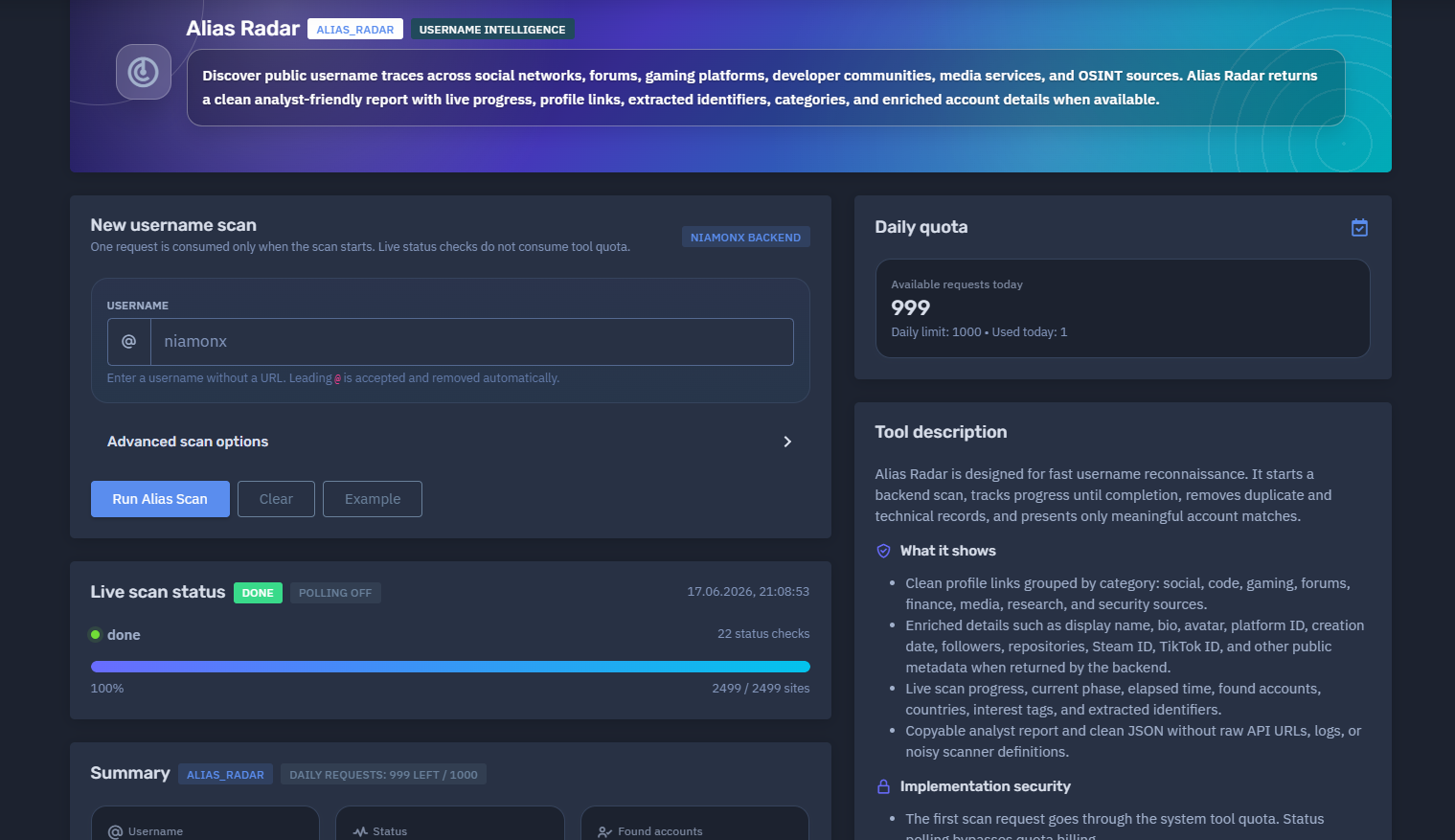
The platform available at dash.niamonx.io/alias_radar — known as Alias Radar — is an advanced username intelligence module within the NiamonX platform. It is designed to discover public username traces across social networks, forums, gaming platforms, developer communities, media services, financial platforms, OSINT sources, and other publicly accessible digital spaces.
Overview of the Service
Alias Radar helps analysts investigate whether a username appears across public platforms and online communities. The tool performs a backend-powered username scan, tracks progress in real time, removes duplicate and technical scanner noise, and returns a clean analyst-friendly report with meaningful account matches only.
The service is intended for cybersecurity analysts, OSINT researchers, SOC teams, fraud investigators, compliance teams, brand protection specialists, and authorized users who need to identify public username presence across multiple online sources.
Alias Radar is not designed to prove identity ownership automatically. A matching username should be treated as an investigative lead and verified manually by comparing public profile content, avatars, creation dates, platform IDs, bios, linked accounts, activity patterns, and other contextual signals.
🔍 How the Scan Works
When a user submits a username, Alias Radar starts a backend scan through the NiamonX infrastructure.
The scan checks the submitted username across thousands of supported sites and services. The system then processes raw matches, removes technical API noise, deduplicates repeated results, enriches profiles where possible, and presents only useful clickable findings.
One request is consumed only when the scan starts. Live status checks do not consume additional tool quota.
The browser checks scan progress every few seconds and stops polling permanently after the backend returns a final status.
Typical scan flow:
-
User enters a username.
-
The scan request is sent to the NiamonX backend.
-
The backend checks supported public platforms.
-
Live progress is displayed in the browser.
-
Raw results are cleaned and deduplicated.
-
Enriched account details are extracted when available.
-
The final report is generated with categories, scores, identifiers, and profile links.
🧩 What Can Be Searched
Alias Radar accepts usernames only.
Valid examples:
niamonx
@niamonx
If a username starts with @, the symbol is accepted and removed automatically before scanning.
The tool does not accept:
-
Full URLs
-
Email addresses
-
Phone numbers
-
Domains
-
IP addresses
-
Search operators
-
Wildcards
-
Full names
-
Passwords
-
Multi-field composite queries
Input rules:
| Rule | Requirement |
|---|---|
| Input type | Username only |
| Allowed characters | Letters, numbers, dot, underscore, hyphen |
| Length | 2–64 characters |
Leading @ |
Accepted and removed automatically |
| URLs | Not allowed |
| Email addresses | Not allowed |
⚙️ Scan Interface
The Alias Radar interface contains the following main sections.
New Username Scan
This section allows the user to start a new scan.
Main fields:
-
Username input
-
Advanced scan options
-
Scan start button
-
Backend source indicator
-
Quota information
The interface reminds users to enter a username without a URL.
Advanced Scan Options
Advanced scan options may allow the system to adjust how the username scan is performed.
Depending on platform configuration, these options may control scan depth, enrichment behavior, supported source groups, or backend processing preferences.
Advanced settings are designed for users who need more detailed reconnaissance while keeping the final output clean and analyst-friendly.
Live Scan Status
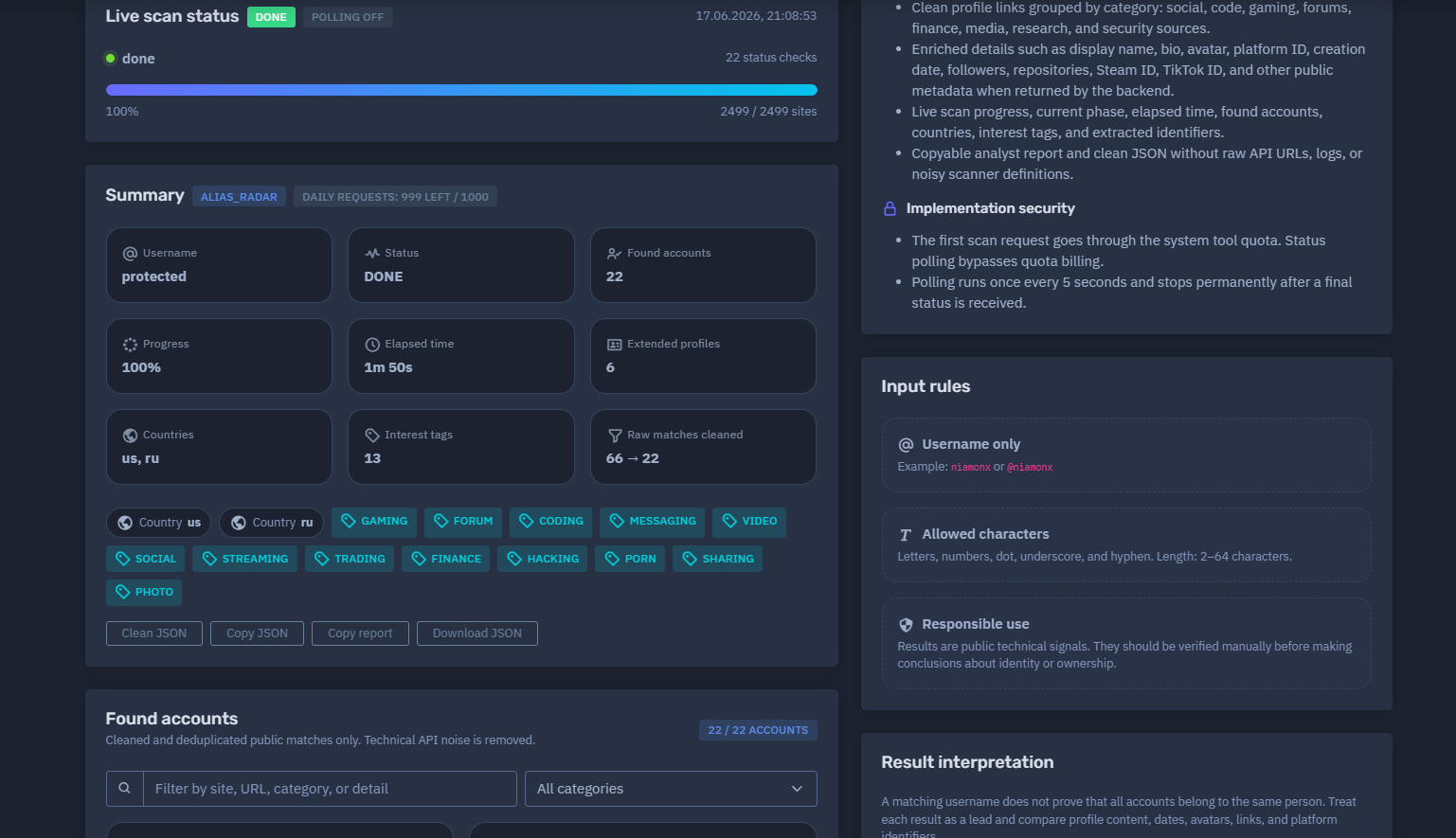
The live scan status panel shows the current state of the scan.
It may display:
-
Current status
-
Current phase
-
Polling state
-
Number of status checks
-
Scan percentage
-
Number of checked sites
-
Completion timestamp
-
Elapsed time
Example status values:
DONE
Polling off
100%
2499 / 2499 sites
Polling runs once every few seconds and stops permanently after a final scan status is received.
📊 Summary Section
After a scan is completed, Alias Radar generates a structured summary.
The summary may include:
-
Tool name
-
Daily request quota
-
Submitted username
-
Scan status
-
Found accounts
-
Progress percentage
-
Elapsed time
-
Extended profiles
-
Countries
-
Interest tags
-
Raw matches before and after cleaning
Example summary structure:
Tool: alias_radar
Status: DONE
Found accounts: 22
Progress: 100%
Elapsed time: 1m 50s
Extended profiles: 6
Raw matches cleaned: 66 → 22
The “raw matches cleaned” value is important because automated username scans often return noisy technical responses. Alias Radar filters those raw results and keeps only useful public matches.
🧠 Key Features
Public Username Reconnaissance
Alias Radar checks whether a username appears across public platforms and online communities.
Large Source Coverage
The scan can check thousands of supported sites and services.
Example interface output may show:
2499 / 2499 sites
Live Progress Tracking
The user can follow the scan in real time while the backend processes supported platforms.
Quota-Safe Polling
Only the initial scan request consumes tool quota. Status polling does not consume additional daily requests.
Cleaned Results
Technical API noise, duplicate records, scanner definitions, and low-value diagnostic responses are removed before the final report is displayed.
Deduplication
The system merges duplicate matches and presents clean account-level findings.
Analyst-Friendly Report
Results are displayed as readable account cards with profile links, categories, scores, and extracted details.
Enriched Account Details
Where available, Alias Radar extracts useful public metadata, such as:
-
Display name
-
Bio
-
Avatar
-
Platform user ID
-
Username
-
Account creation date
-
Follower count
-
Following count
-
Repository count
-
Steam ID
-
Channel ID
-
Profile URL
-
Public platform-specific identifiers
Categories and Interest Tags
The tool groups results by categories and interest tags to help analysts understand the target’s public footprint.
Possible categories may include:
Country Signals
When available, the report may show country indicators inferred from public platform data or source metadata.
Country signals should be treated as contextual hints, not confirmed residence or nationality.
Extracted Identifiers
Alias Radar extracts useful identifiers from public profiles and enriched records.
Examples:
-
Username
-
Platform user ID
-
Steam ID
-
Twitch channel ID
-
Gravatar hash
-
GitHub user ID
-
Profile URL
-
Display name
Copyable Report and Clean JSON
The tool can provide a copyable analyst report and clean JSON output without raw API URLs, scanner logs, or noisy technical definitions.
📋 Found Accounts
The Found Accounts section displays cleaned and deduplicated public matches only.
Each account card may include:
| Field | Description |
|---|---|
| Site | Platform or service where the username was found |
| Category | Platform category such as Social, Code, Gaming, Forum, Finance, or Media |
| Display name | Public name shown on the profile, if available |
| Username | Matched username |
| Score | Confidence or relevance score |
| Avatar | Public profile image, if available |
| Profile link | Clickable link to the public profile |
| Metadata | Extracted public details returned by the backend |
The interface may also include a filter field.
Users can filter results by:
-
Site
-
URL
-
Category
-
Detail
-
Username
-
Public metadata
🧮 Score and Confidence
Each found account may include a score.
The score helps analysts prioritize results.
Higher scores usually indicate stronger signals, such as:
-
Exact username match
-
Direct public profile
-
Enriched platform metadata
-
Public avatar
-
Stable platform identifier
-
Matching display name
-
Strong profile availability
Lower scores may still be useful but should be reviewed more carefully.
Example interpretation:
| Score Range | Meaning |
|---|---|
| 90–100 | Strong match or highly relevant public profile |
| 70–89 | Good match, usually worth manual review |
| 50–69 | Possible match or weaker public signal |
| Below 50 | Low-confidence signal, if shown |
A score does not prove that all accounts belong to the same person. It only helps prioritize manual investigation.
🧬 Extended Profiles
Some platforms return richer public data than others.
An extended profile may include:
-
Public avatar
-
Display name
-
Bio
-
Creation date
-
Platform ID
-
Follower count
-
Following count
-
Public repositories
-
Public gists
-
Channel ID
-
Nickname
-
Account-specific metadata
Examples of enriched platforms may include social networks, developer communities, gaming platforms, media services, and avatar providers.
Extended profiles are especially useful for correlation because they provide additional public context beyond a simple username match.
🏷️ Categories and Interest Tags
Alias Radar groups discovered accounts into categories and interest tags.
Categories help analysts understand where the username appears.
Possible categories:
| Category | Description |
|---|---|
| Social | Social networking platforms |
| Code | Developer platforms and code communities |
| Gaming | Gaming profiles and game-related services |
| Forum | Public forums and discussion boards |
| Messaging | Messaging or communication platforms |
| Video | Video platforms |
| Streaming | Streaming services |
| Finance | Finance, trading, donation, or payment-related platforms |
| Media | Media, avatar, and content platforms |
| Security | Cybersecurity, breach, or OSINT-related sources |
| Other | Platforms that do not fit a primary category |
-
gaming
-
forum
-
coding
-
messaging
-
video
-
social
-
streaming
-
trading
-
finance
-
security
-
sharing
-
photo
-
media
🌍 Country Signals
Alias Radar may show country indicators when country-related signals are available.
Example format:
Countries: us, ru
Country indicators can come from public platform data, source metadata, or backend enrichment.
They should be interpreted carefully. A country signal may reflect platform region, profile metadata, content language, account history, or source classification. It does not necessarily confirm the person’s nationality, current location, or legal residence.
🔎 Extracted Identifiers
The Extracted Identifiers section collects useful identifiers discovered during the scan.
Possible extracted identifiers include:
| Identifier Type | Example Use |
|---|---|
| Username | Confirms the matched alias |
| Steam ID | Useful for gaming profile correlation |
| GitHub ID | Useful for developer profile correlation |
| Twitch Channel ID | Useful for streaming or gaming analysis |
| Gravatar hash | Useful for avatar and email-hash correlation |
| Platform UID | Stable account identifier on a specific service |
| Profile URL | Direct link for manual verification |
Extracted identifiers help analysts connect results across platforms, but they must be validated before conclusions are made.
💾 Clean Analyst Report
Alias Radar is designed to provide a clean report that can be copied into internal notes, SOC cases, OSINT documentation, or compliance workflows.
The report may include:
-
Username
-
Scan status
-
Found accounts
-
Categories
-
Scores
-
Profile links
-
Enriched details
-
Countries
-
Interest tags
-
Extracted identifiers
-
Cleaned match count
-
Scan metadata
The clean report intentionally avoids unnecessary scanner internals, noisy logs, raw API definitions, and irrelevant technical records.
🧾 Clean JSON Output
In addition to the visual report, Alias Radar can provide clean JSON output.
This is useful for:
-
API workflows
-
Internal dashboards
-
Case management systems
-
Threat intelligence pipelines
-
SOC automation
-
Evidence storage
-
Compliance reporting
-
Repeated monitoring
Clean JSON should contain meaningful normalized results rather than noisy low-level scanner output.
🚦 Daily Quota
Alias Radar uses daily plan-based request limits.
The interface may display:
Available requests today: 999
Daily limit: 1000
Used today: 1
Important quota behavior:
-
One request is consumed only when the scan starts.
-
Live status checks do not consume tool quota.
-
Polling runs every few seconds.
-
Polling stops permanently after a final status is received.
-
Daily limits depend on the user’s plan.
This design allows users to monitor long-running scans without wasting quota on status checks.
🛡️ Implementation Security
Alias Radar includes several security and reliability protections.
Quota Protection
Only the initial scan request is billed against the tool quota. Repeated status checks are not counted as additional scan requests.
Controlled Polling
Polling runs at a fixed interval and stops permanently after a final status is received.
Input Normalization
Leading @ symbols are automatically removed.
Input Restriction
The tool accepts only usernames with allowed characters and length limits.
Noise Reduction
Technical scanner noise, duplicated raw matches, rate-limit artifacts, and irrelevant diagnostic records are removed from the final view.
Analyst-Safe Output
The final report focuses on public account traces and avoids exposing unnecessary backend internals.
📌 Result Interpretation
Alias Radar results are public technical signals.
A matching username does not prove that all accounts belong to the same person.
Users should treat each result as a lead and validate it manually.
Recommended validation signals:
-
Profile avatar
-
Display name
-
Bio
-
Account creation date
-
Public posts or activity
-
Linked accounts
-
Platform-specific ID
-
Language
-
Location hints
-
Reused profile images
-
Cross-platform links
-
Similar interests or categories
-
Historical username usage
Some platforms may block automated checks, enforce rate limits, return uncertain responses, or expose only partial public data. Alias Radar hides noisy diagnostic records and focuses on useful clickable findings.
✅ Recommended Analyst Workflow
A careful review process should follow these steps.
1. Start With High-Score Results
Review accounts with the highest scores first.
2. Check Enriched Profiles
Prioritize profiles with avatars, bios, creation dates, public IDs, or activity metadata.
3. Compare Public Signals
Compare usernames, display names, avatars, links, and platform identifiers.
4. Separate Confirmed Signals From Leads
Do not treat every username match as confirmed ownership.
5. Review Categories
Use categories to understand whether the username appears mostly in social, gaming, code, forum, finance, or media contexts.
6. Extract Stable Identifiers
Record stable IDs such as Steam ID, GitHub ID, Gravatar hash, or platform UID.
7. Preserve Evidence Carefully
Save only what is necessary and permitted under applicable policy and law.
8. Avoid Overclaiming
Use cautious wording such as “possible match,” “public trace,” or “correlation lead” unless ownership is verified.
🧠 Common Use Cases
Alias Radar can support many legitimate workflows.
Personal Digital Footprint Review
Users can check where their own username appears publicly.
Cybersecurity Investigation
Security teams can identify public platform presence connected to known aliases.
Threat Intelligence
Analysts can map usernames used in forums, developer spaces, gaming communities, or public OSINT sources.
Fraud and Abuse Investigation
Brand and Executive Protection
Organizations can monitor usernames related to executives, employees, projects, or brands.
SOC and Incident Response
Alias Radar can help correlate usernames found in logs, breach records, stealer logs, or suspicious activity.
Compliance and Risk Review
Teams can document public account exposure in a structured and repeatable format.
🛡️ Security, Privacy & Ethics
Alias Radar is intended for lawful OSINT, defensive cybersecurity, fraud prevention, compliance, and authorized investigation.
Users must follow strict ethical rules:
-
Search only usernames that you own or are authorized to investigate.
-
Do not use the tool to stalk, harass, threaten, shame, or target individuals.
-
Do not claim identity ownership based only on username matches.
-
Do not publish personal information discovered through the tool.
-
Do not use public traces for social engineering, phishing, extortion, or impersonation.
-
Do not attempt to bypass platform restrictions or access private data.
-
Do not contact individuals aggressively based on unverified results.
-
Validate all findings before operational, legal, HR, or compliance actions.
-
Treat reports as sensitive intelligence when used in investigations.
Responsible use is essential because username reconnaissance can create false positives if interpreted incorrectly.
⚙️ Technical Highlights
-
Username intelligence module
-
Powered by NiamonX Backend
-
Public username reconnaissance across thousands of sites
-
Supports usernames with letters, numbers, dot, underscore, and hyphen
-
Leading
@accepted and removed automatically -
Live scan status
-
Fixed-interval polling
-
Polling stops after final status
-
Only initial scan consumes quota
-
Cleaned and deduplicated results
-
Technical API noise removal
-
Analyst-friendly account cards
-
Profile links
-
Category grouping
-
Score-based prioritization
-
Enriched account details when available
-
Extracted identifiers
-
Country signals when available
-
Interest tags
-
Copyable analyst report
-
Clean JSON output
-
Suitable for OSINT, SOC, fraud, compliance, and identity correlation workflows
📌 Usage Hints
-
Enter only a username, not a URL.
-
A leading
@is accepted and removed automatically. -
Use 2–64 characters.
-
Allowed characters are letters, numbers, dot, underscore, and hyphen.
-
Review high-score results first.
-
Treat each account as a lead, not proof.
-
Compare avatars, bios, creation dates, public IDs, and links.
-
Use extracted identifiers for stronger correlation.
-
Check categories and interest tags for quick triage.
-
Remember that some sites may block or limit automated checks.
-
Use clean JSON for integrations and internal workflows.
-
Store reports securely when used for investigations.
📬 Contact Information
For technical, legal, abuse, privacy, or takedown-related inquiries, users can contact the NiamonX team directly:
support@niamonx.io — Technical Support
other@niamonx.io — General Inquiries
takedown@niamonx.io — Data Removal / Privacy Takedown Requests
legal@niamonx.io — Legal and Compliance Matters
Alternative contact channel:
🔗 Helpdesk: https://support.niamonx.io/
Summary
NiamonX Alias Radar is a username intelligence tool that discovers public username traces across social networks, forums, gaming platforms, developer communities, media services, finance-related platforms, security sources, and OSINT databases.
It starts a backend scan, tracks progress live, removes duplicate and technical records, enriches account details when available, extracts identifiers, groups results by category, and produces a clean analyst-friendly report.
The tool is designed for lawful OSINT, defensive cybersecurity, identity correlation, fraud prevention, SOC workflows, and digital footprint analysis. Results should always be treated as public technical signals and manually verified before making conclusions about identity or ownership.