
ASN Information | Autonomous System Intelligence
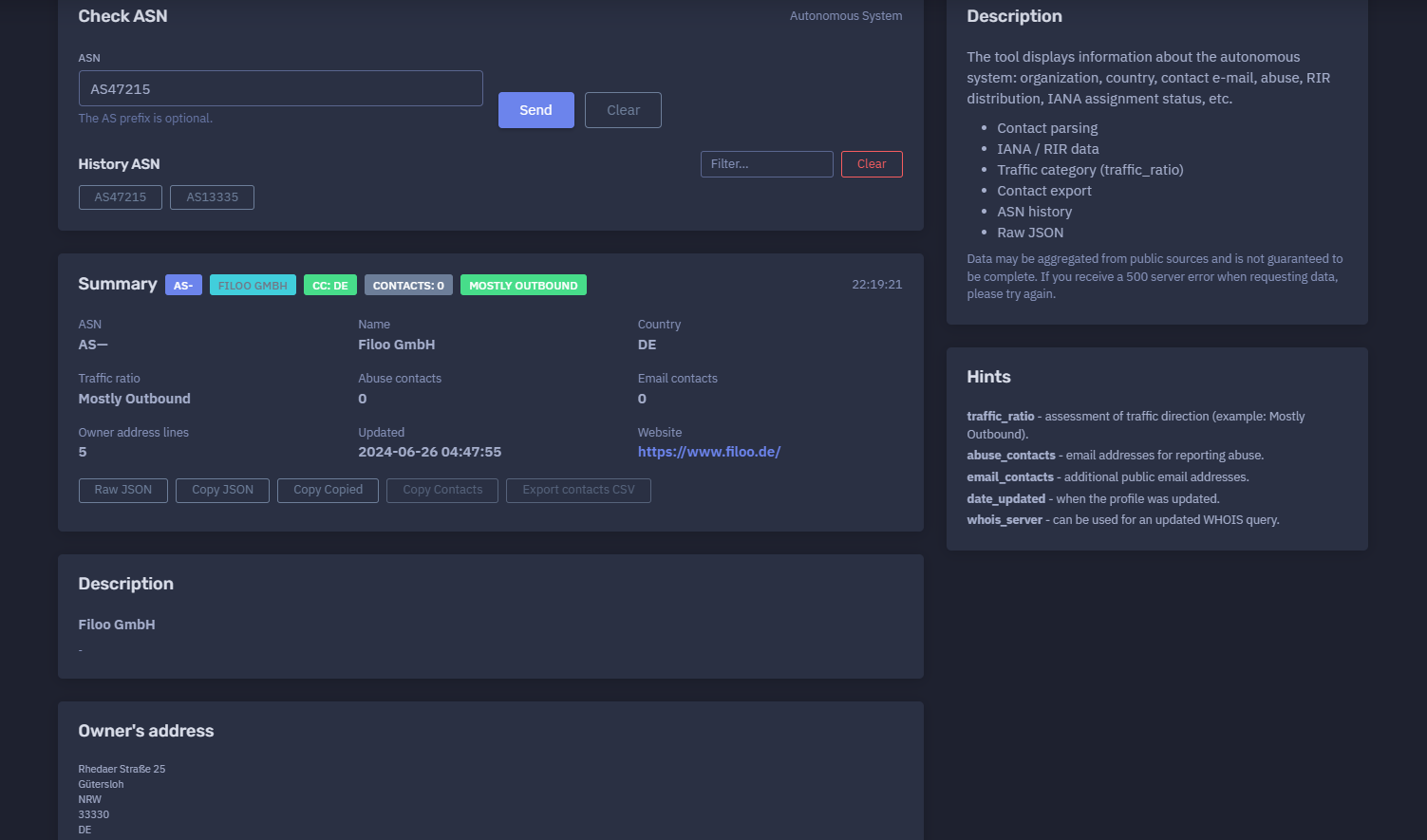
The platform available at https://dash.niamonx.io/asnchecked — known as ASN Information — is an autonomous system intelligence tool within the NiamonX platform. It allows users to check detailed public information about an Autonomous System Number, including organization profile, country, routing scope, traffic category, IPv4 and IPv6 prefix counts, contact information, abuse contacts, RIR status, owner address, policies, website, and raw ASN metadata.
Overview of the Service
ASN Information is designed to help analysts, network engineers, SOC teams, infrastructure owners, cybersecurity researchers, and OSINT specialists quickly understand the public profile of an Autonomous System.
An Autonomous System, or AS, is a network or group of networks operated under a single routing policy on the Internet. Each AS is identified by an ASN, such as:
AS13335
or:
47215
The tool accepts ASN values with or without the AS prefix and returns a structured report containing routing, ownership, policy, contact, traffic, and organization information.
ASN Information is useful for network attribution, abuse reporting, infrastructure mapping, threat intelligence enrichment, routing analysis, vendor review, hosting-provider identification, and incident response.
🔍 How the Tool Works
When a user enters an ASN, the tool queries public and internal intelligence sources and returns the available ASN profile.
The result may include:
-
ASN number
-
Organization name
-
Country code
-
Traffic ratio
-
Traffic volume category
-
Network type
-
IPv4 prefix count
-
IPv6 prefix count
-
Routing scope
-
RIR status
-
Last updated date
-
Abuse contacts
-
General email contacts
-
Website
-
Owner address
-
Peering policy
-
IRR AS-SET
-
Route server information
-
Looking glass information
-
Social media or website links
-
Associated prefixes
-
Raw JSON
Data may be aggregated from public routing, RIR, IANA, peering, WHOIS, and organization sources. Because ASN data can come from multiple public datasets, it should be treated as intelligence context and validated before critical decisions.
🧩 What Can Be Checked
ASN Information accepts Autonomous System Numbers.
Supported input examples:
AS47215
47215
The AS prefix is optional.
Unsupported input examples:
example.com
1.1.1.1
https://example.com
AS47215/example
For IP addresses, domains, ports, or service-level intelligence, users should use the relevant NiamonX IP or DNS modules.
⚙️ Interface Structure
The ASN Information interface contains several main areas.
ASN Input
The user enters an Autonomous System Number.
Example:
AS47215
The tool normalizes the value and performs the lookup.
History ASN
The interface includes ASN history stored locally in the browser. This allows users to quickly repeat previous ASN checks.
Summary
The summary card shows the most important ASN profile fields.
ASN Info
The ASN Info section displays technical routing, policy, and network metadata.
Organization
The Organization section displays owner-related information such as name, address, country, website, and public organization metadata.
Prefixes
The Prefixes section lists IPv4 and IPv6 ranges associated with the ASN when available.
Raw JSON
Raw JSON provides the structured technical response for advanced analysis and integrations.
📊 Summary Section
The summary section gives a fast overview of the ASN.
Typical fields include:
| Field | Description |
|---|---|
| ASN | Autonomous System Number |
| Name | Organization or network name |
| Country | Country code associated with the ASN |
| Traffic ratio | Estimated traffic direction profile |
| Abuse contacts | Number of abuse contact emails |
| Email contacts | Number of general public email contacts |
| Owner address lines | Number of owner address lines available |
| Updated | Last profile update timestamp |
| Website | Official website, if available |
| Description | Short organization or ASN description |
Example summary format:
ASN: AS47215
Name: Example Network GmbH
Country: DE
Traffic ratio: Mostly Outbound
Abuse contacts: 0
Email contacts: 0
Updated: 2024-06-26 04:47:55
Website: https://example.com/
This section is useful for quick triage before reviewing the full technical profile.
🏢 Organization Information
The Organization section displays the entity associated with the ASN.
Possible fields include:
| Field | Description |
|---|---|
| Name | Organization name |
| Name long | Extended organization name, if available |
| AKA | Alternative names |
| Address | Owner address lines |
| City | Organization city |
| State | State or region |
| Zipcode | Postal code |
| Country | Country code |
| Website | Organization website |
| Social media | Public organization links |
| Notes | Additional public notes |
| Status | Organization status |
The owner address can help analysts understand the legal or operational entity behind the ASN. However, organization address data may be incomplete, outdated, or formatted differently depending on the source.
🌐 ASN Info Section
The ASN Info section contains technical and routing-related metadata.
Possible fields include:
| Field | Description |
|---|---|
info_ipv6 |
Whether IPv6 information is available |
info_multicast |
Whether multicast is indicated |
info_unicast |
Whether unicast routing is indicated |
info_prefixes4 |
Number of IPv4 prefixes |
info_prefixes6 |
Number of IPv6 prefixes |
info_ratio |
Traffic direction category |
info_scope |
Geographic or routing scope |
info_traffic |
Approximate traffic category |
info_types |
Network type labels |
irr_as_set |
IRR AS-SET value |
policy_general |
General peering policy |
policy_locations |
Peering location requirement |
policy_contracts |
Contract requirement |
policy_ratio |
Ratio policy indicator |
policy_url |
Policy URL, if available |
rir_status |
RIR status |
rir_status_updated |
Last RIR status update |
route_server |
Route server information |
looking_glass |
Looking glass URL, if available |
website |
Website URL |
This information helps users understand how the ASN participates in Internet routing, peering, traffic exchange, and prefix advertisement.
🛣️ Prefixes
The Prefixes section lists network ranges associated with the ASN.
Example format:
109.75.176.0/20
141.101.32.0/21
185.13.210.0/23
185.134.240.0/24
Prefixes are useful for:
-
Network attribution
-
Firewall rules
-
Threat intelligence enrichment
-
Asset mapping
-
Provider analysis
-
Routing review
-
Incident response
-
Abuse reporting
-
Infrastructure monitoring
Important: prefix lists can change over time. Always validate current route announcements with routing tools, RIR data, or BGP sources when making operational decisions.
📡 IPv4 and IPv6 Support Indicators
ASN Information may show whether IPv4 and IPv6 routing data is available.
Example fields:
info_prefixes4: 30
info_prefixes6: 5
info_ipv6: true
IPv4 Prefix Count
Shows how many IPv4 prefixes are associated with the ASN in the returned profile.
IPv6 Prefix Count
Shows how many IPv6 prefixes are associated with the ASN in the returned profile.
IPv6 Indicator
Shows whether the ASN has IPv6-related information or support in the returned dataset.
These fields are useful for understanding the network’s routing footprint and protocol support.
📈 Traffic Ratio
The traffic_ratio or info_ratio field describes the estimated direction of network traffic.
Example:
Mostly Outbound
Possible categories may include:
-
Mostly Outbound
-
Mostly Inbound
-
Balanced
-
Heavy Outbound
-
Heavy Inbound
-
Unknown
This value is an assessment and should be treated as a routing or peering profile indicator, not as a precise measurement.
Interpretation
A Mostly Outbound network may primarily send more traffic than it receives. This can be common for hosting providers, content providers, certain infrastructure operators, or networks serving outbound-heavy workloads.
A Mostly Inbound network may receive more traffic, which can be common for access networks, eyeball networks, or consumer ISPs.
🌍 Scope and Traffic Category
The tool may show routing scope and traffic volume category.
Example fields:
info_scope: Europe
info_traffic: 1-5Gbps
Scope
Indicates the likely geographic or operational scope of the network.
Examples:
-
Europe
-
North America
-
Global
-
Regional
-
Unknown
Traffic Category
Shows approximate traffic volume category.
Examples:
-
100Mbps-1Gbps
-
1-5Gbps
-
5-10Gbps
-
10-20Gbps
-
20Gbps+
-
Unknown
These fields are estimates and should not be interpreted as guaranteed real-time bandwidth measurements.
🧾 Contacts
ASN Information may display contact counts and contact-related fields.
Important contact types:
| Contact Type | Description |
|---|---|
| Abuse contacts | Email addresses for abuse reporting |
| Email contacts | General public contact emails |
| Contact export | Exportable contact information when available |
Abuse Contacts
abuse_contacts are used to report abuse such as spam, phishing, malware, scanning, botnet traffic, or other malicious activity.
Example use cases:
-
Reporting malicious traffic
-
Submitting phishing complaints
-
Notifying a network operator about compromised systems
-
Escalating security incidents
-
Abuse desk routing
Email Contacts
email_contacts may include additional public email addresses for administrative or technical communication.
Contact data may be incomplete or missing depending on the source.
🏛️ IANA and RIR Data
The tool may include IANA and RIR-related fields.
Possible data includes:
-
RIR status
-
RIR status update date
-
IANA assignment status
-
WHOIS-related source fields
-
whois_serverwhen available
RIR Status
The RIR status indicates whether the ASN profile appears valid or active in the returned registry data.
Example:
rir_status: ok
rir_status_updated: 2024-06-26 04:47:55
Regional Internet Registries include organizations such as RIPE NCC, ARIN, APNIC, LACNIC, and AFRINIC.
This data is important for attribution, validation, and abuse-reporting workflows.
🤝 Peering and Routing Policy
The ASN profile may include policy-related fields.
Possible fields:
| Field | Description |
|---|---|
policy_general |
General peering policy |
policy_locations |
Peering location requirements |
policy_contracts |
Contract requirements |
policy_ratio |
Whether traffic ratio is considered in policy |
policy_url |
URL to public peering policy |
irr_as_set |
IRR AS-SET for routing policy |
route_server |
Route server participation |
looking_glass |
Looking glass system, if available |
Example:
policy_general: Open
policy_contracts: Not Required
irr_as_set: AS-FILOO
These fields are useful for peering research, network operations, IX participation analysis, and BGP routing review.
🔎 IRR AS-SET
An IRR AS-SET is a routing registry object that groups ASNs or routes for routing policy purposes.
Example:
AS-FILOO
IRR AS-SET values are useful for:
-
Route filtering
-
Peering configuration
-
BGP policy review
-
Network operations
-
Prefix validation
-
Transit and peering analysis
IRR data should be validated because registry objects can become outdated.
🔭 Looking Glass
A looking glass is a public network diagnostic tool offered by some network operators.
It may allow users to check:
-
BGP routes
-
Ping results
-
Traceroute results
-
Route server visibility
-
Peering paths
If a looking glass URL is available, the ASN Information tool may show it in the profile.
If it is not available, the field may show:
—
🧬 Raw JSON
The tool provides Raw JSON for advanced analysis.
Raw JSON may include:
-
ASN profile
-
Organization data
-
Prefix list
-
Contact data
-
Policy fields
-
Peering metadata
-
RIR status
-
Website and social links
-
Routing scope
-
Traffic category
-
Internal status fields
Raw JSON is useful for:
-
SOC workflows
-
API-style integrations
-
Case management
-
Evidence preservation
-
Automated enrichment
-
Network inventory systems
-
BGP research
-
Compliance reporting
Raw data should be handled carefully when used in investigations or internal reports.
🕓 ASN History
The tool stores ASN lookup history locally in the browser.
History entries may include:
-
ASN value
-
Organization name
-
Country
-
Lookup timestamp
-
Summary fields
Local history helps users repeat previous ASN checks and compare recent lookups.
Because it is stored locally, it may be cleared when the user clears browser data, switches devices, or uses a different browser profile.
🧠 Key Features
ASN Lookup
Checks Autonomous System information by ASN.
Optional AS Prefix
Accepts ASN values with or without the AS prefix.
Organization Profile
Displays organization name, website, address, country, and related fields.
Country and Scope
Shows country code and routing scope.
Traffic Ratio
Displays estimated traffic direction, such as Mostly Outbound.
Prefix Overview
Shows IPv4 and IPv6 prefix counts and prefix lists.
Contact Parsing
Displays abuse contact counts and public email contact counts when available.
IANA / RIR Data
Includes registry status and update timestamps.
Policy Metadata
Shows peering and routing policy fields where available.
IRR AS-SET
Displays routing registry AS-SET information.
Contact Export
Supports contact export when contact data is available.
Raw JSON
Provides structured technical output for advanced workflows.
ASN History
Stores recent ASN checks locally in the browser.
🔍 Common Use Cases
ASN Information can support many technical and security workflows.
Network Attribution
Identify which organization operates an ASN.
Abuse Reporting
Find abuse contacts or organization information for reporting malicious traffic.
Threat Intelligence
Enrich suspicious IPs by mapping them to ASN ownership and prefix ranges.
SOC Triage
Quickly understand whether an alert involves hosting, access, cloud, or network service provider infrastructure.
BGP and Routing Research
Review prefixes, AS-SET, scope, policy, and traffic ratio.
Vendor and Provider Review
Understand network providers, hosting companies, and traffic profiles.
Infrastructure Mapping
Identify IP ranges associated with an organization.
Compliance and Risk Review
Document ASN ownership and routing metadata for audit workflows.
Incident Response
Determine who to contact and which prefixes may be related to an incident.
⚠️ Result Interpretation Notes
ASN data should be interpreted carefully.
Important points:
-
Public ASN data may be incomplete.
-
Contact fields may be missing or outdated.
-
Prefix lists may change over time.
-
Traffic categories are estimates.
-
RIR status does not guarantee current operational behavior.
-
WHOIS and registry data may differ from real-world operations.
-
ASNs can be used by hosting providers, enterprises, ISPs, CDNs, or transit networks.
-
A malicious IP inside an ASN does not mean the ASN owner is malicious.
-
Abuse contacts may be absent even for active networks.
-
Always validate important findings with live BGP, WHOIS, RIR, and provider sources.
If a server-side 500 error occurs during lookup, repeat the request.
✅ Recommended Analyst Workflow
A practical ASN investigation should follow these steps.
1. Enter the ASN
Use either AS47215 or 47215.
2. Review the Summary
Check organization name, country, traffic ratio, contacts, update date, and website.
3. Check Contact Data
Look for abuse contacts and public email contacts.
4. Review Organization Details
Check address, country, website, and status.
5. Review ASN Info
Inspect IPv4 / IPv6 support, prefix counts, traffic category, routing scope, network type, and policy fields.
6. Review Prefixes
Use prefix lists for mapping, filtering, or threat intelligence enrichment.
7. Check RIR Status
Review registry status and update timestamp.
8. Use Raw JSON
Open Raw JSON for deeper technical workflows or export.
9. Correlate With Other Tools
Use IP lookup, reverse IP, DNS, BGP, WHOIS, and vulnerability tools for deeper analysis.
10. Validate Before Action
Confirm important conclusions before contacting providers, blocking ranges, or publishing reports.
🛡️ Security, Privacy & Responsible Use
ASN Information is intended for lawful network intelligence, security analysis, routing research, abuse reporting, and infrastructure review.
Acceptable use cases include:
-
Checking public ASN information
-
Identifying network ownership
-
Enriching IP intelligence
-
Finding abuse contacts
-
Reviewing prefixes
-
Supporting SOC triage
-
Investigating suspicious infrastructure
-
Researching routing policies
-
Documenting provider information
-
Supporting compliance and incident response
Users should follow responsible use principles:
-
Do not harass network operators.
-
Do not assume an ASN owner is responsible for every hosted customer action.
-
Do not block large ASN ranges without careful validation.
-
Do not publish inaccurate attribution based on incomplete data.
-
Validate abuse contacts before escalation.
-
Treat exported data as investigation material.
-
Use the tool only for lawful and ethical analysis.
⚙️ Technical Highlights
-
ASN lookup tool
-
Available at
dash.niamonx.io/asnchecked -
Accepts ASN with or without
ASprefix -
Displays organization profile
-
Shows country code
-
Shows traffic ratio
-
Shows traffic category
-
Shows network scope
-
Shows network type labels
-
Displays IPv4 prefix count
-
Displays IPv6 prefix count
-
Lists associated prefixes
-
Parses abuse contacts
-
Parses public email contacts
-
Includes IANA / RIR data
-
Shows RIR status and update date
-
Displays owner address
-
Shows website and social links
-
Shows peering policy fields
-
Shows IRR AS-SET
-
Shows route server and looking glass fields when available
-
Supports contact export
-
Supports Raw JSON
-
Stores ASN history locally
-
Suitable for SOC, OSINT, routing research, abuse reporting, threat intelligence, and infrastructure mapping
📌 Usage Hints
-
The
ASprefix is optional. -
Use ASN lookup after identifying an IP’s ASN in IP intelligence tools.
-
Check
traffic_ratioto understand traffic direction profile. -
Use
abuse_contactsfor abuse reports when available. -
Use
email_contactsfor additional public contacts. -
Check
date_updatedor RIR update fields to understand profile freshness. -
Use
whois_serverwhen available for updated WHOIS queries. -
Review prefixes before creating firewall or monitoring rules.
-
Validate prefix lists with live BGP when accuracy is critical.
-
Use Raw JSON for deeper analysis and integrations.
-
If a server-side
500error occurs, repeat the request. -
Remember that public ASN data may be incomplete.
📬 Contact Information
For technical, legal, abuse, privacy, or support-related inquiries, users can contact the NiamonX team directly:
support@niamonx.io — Technical Support
other@niamonx.io — General Inquiries
takedown@niamonx.io — Privacy or Data Removal Requests
legal@niamonx.io — Legal and Compliance Matters
Alternative contact channel:
🔗 Helpdesk: https://support.niamonx.io/
Summary
NiamonX ASN Information is an autonomous system intelligence tool for checking public ASN profile data, organization information, routing scope, traffic ratio, prefix lists, abuse contacts, RIR status, peering policy, website, owner address, and Raw JSON.
It is designed for lawful network intelligence, SOC triage, OSINT enrichment, abuse reporting, routing research, infrastructure mapping, compliance, and incident response. Data may be aggregated from public sources and should be validated before critical operational or legal decisions.