
Reverse Image Search 18+ (OSINT) | Adult Public Model Image Intelligence
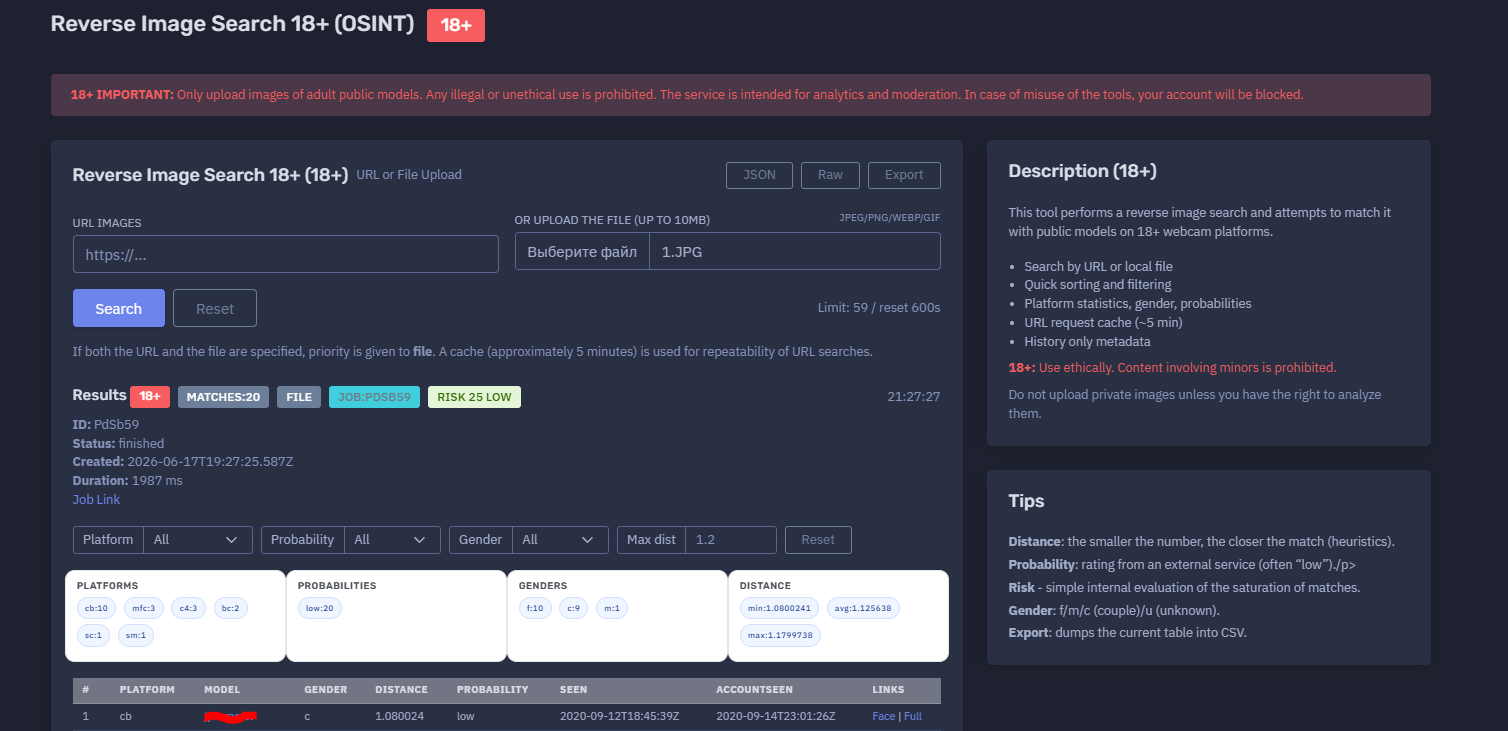
The platform available at https://dash.niamonx.io/reverse_image_search — known as Reverse Image Search 18+ (OSINT) — is a specialized 18+ image intelligence module within the NiamonX platform. It is designed to perform reverse image search against public adult-model sources and return structured, analyst-friendly matches for moderation, brand protection, content verification, and lawful OSINT analysis.
18+ Important Notice
Reverse Image Search 18+ is strictly limited to adult public-model analysis.
Users may only upload or submit images when they have a lawful and ethical right to analyze them. Any illegal, abusive, non-consensual, exploitative, or privacy-invasive use is strictly prohibited.
The service is intended for:
-
Adult-content analytics
-
Platform moderation
-
Public model verification
-
Duplicate or repost detection
-
Brand and creator protection
-
Authorized OSINT investigation
-
Safety and compliance workflows
The service must not be used for stalking, harassment, doxxing, deanonymization of private individuals, non-consensual identification, or analysis of minors. Any content involving minors is strictly prohibited. Misuse of the tool may result in immediate account blocking or termination.
Overview of the Service
Reverse Image Search 18+ (OSINT) allows users to search for visual matches across public adult webcam and model-related platforms. The tool accepts either an image URL or a local file upload and attempts to find visually similar public model records.
The system returns a structured report containing potential matches, platform statistics, gender indicators, probability ratings, distance metrics, seen timestamps, account-seen timestamps, risk score, and links to available match views.
The tool is built for analysts who need a clean, controlled, and reviewable interface for checking whether an adult public-model image appears across supported 18+ sources.
Results are heuristic and should be interpreted carefully. A visual match does not automatically prove identity, ownership, consent status, or account control.
🔍 How the Search Works
A user can start a search in one of two ways:
-
Submit an image URL
-
Upload a local image file
Supported upload formats include:
-
JPEG
-
PNG
-
WebP
-
GIF
Maximum file size:
10 MB
If both a URL and a file are specified, the uploaded file has priority.
For URL-based searches, the system may use a short cache window of approximately five minutes. This improves repeatability and avoids unnecessary repeated processing of the same URL.
After the request is submitted, the backend creates a search job, processes the image, compares it against supported public 18+ model sources, and returns a ranked list of possible matches.
🧩 What Can Be Searched
The tool supports reverse image analysis for adult public-model content only.
Accepted inputs:
| Input Type | Description |
|---|---|
| Image URL | Direct or supported image URL |
| Local file upload | JPEG, PNG, WebP, or GIF file |
| Adult public-model images | Images that the user is authorized to analyze |
Unsupported or prohibited inputs:
-
Images of minors
-
Private images without permission
-
Non-consensual intimate images
-
Images used for harassment or stalking
-
Images of private individuals for identification
-
Illegal sexual content
-
Screenshots or images submitted to bypass platform rules
-
Files larger than the supported limit
-
Unsupported file formats
Users must ensure that every submitted image is lawful, authorized, and appropriate for adult-public-model analysis.
⚙️ Search Interface
The main search interface includes several core controls.
URL Images
Users can paste an image URL.
Example format:
https://...
URL searches may use short-term caching for repeatability.
File Upload
Users can upload a local image file.
Supported formats:
jpeg / png / webp / gif
Maximum size:
10 MB
If both URL and file are provided, the file upload is processed first.
Search Limit
The interface displays the current request limit and reset time.
Example:
Limit: 59 / reset 600s
This helps users understand remaining availability and rate-limit reset timing.
📊 Results Section
After a job is completed, the tool displays a structured results panel.
Possible result fields include:
| Field | Description |
|---|---|
| Matches | Total number of returned matches |
| Job ID | Unique backend job identifier |
| Status | Processing status, such as finished |
| Created | Job creation timestamp |
| Duration | Backend processing duration |
| Risk | Internal risk score |
| Risk level | Low, medium, high, or another internal level |
| Platform statistics | Match distribution by platform |
| Probability distribution | Probability summary |
| Gender distribution | f / m / c / u indicators |
| Distance metrics | Minimum, average, and maximum distance |
| Job link | Link to the job report, when available |
Example status structure:
Status: finished
Duration: 1987 ms
Matches: 20
Risk: 25 Low
The results should be treated as investigative leads and manually reviewed.
🧠 Key Features
Reverse Image Search for 18+ OSINT
The tool performs visual search against public adult-model sources and returns possible matches.
URL or File Search
Users can submit an image URL or upload a local file.
File Priority Logic
If both URL and file are submitted, the uploaded file is prioritized.
Short-Term URL Cache
URL searches may use an approximately five-minute cache window to improve repeatability and reduce unnecessary repeated processing.
Job-Based Processing
Each search creates a backend job with its own status, ID, creation timestamp, duration, and result set.
Platform Statistics
The system summarizes matches by source platform.
Example platform statistics may appear in a compact format such as:
cb:10 mfc:3 c4:3 bc:2 sc:1 sm:1
Platform labels are internal or source-specific abbreviations and should be interpreted according to the platform documentation or analyst context.
Distance Metrics
The tool provides distance values to help estimate visual similarity.
The smaller the distance value, the closer the match according to the system’s heuristic.
Probability Rating
The probability field shows an external or backend-provided rating.
This value may often be “low” and should not be treated as a final confidence conclusion by itself.
Risk Score
The risk score is a simple internal evaluation based on the saturation and characteristics of returned matches.
It is intended for triage and prioritization, not as a legal or identity conclusion.
Filtering
Users can filter results by:
-
Platform
-
Probability
-
Gender
-
Maximum distance
Export
The current results table can be exported to CSV for internal review or case documentation.
Metadata-Only History
Request history stores only metadata such as URL hash or file hash. Images are not saved.
📋 Results Table
The results table displays potential visual matches in a structured format.
Main columns may include:
| Column | Description |
|---|---|
| # | Result position |
| Platform | Source platform abbreviation |
| Model | Public model/account name returned by the system |
| Gender | Gender indicator |
| Distance | Visual similarity distance |
| Probability | Probability rating |
| Seen | First or related seen timestamp |
| AccountSeen | Account-level seen timestamp |
| Links | Available match views, such as Face or Full |
Example link types:
-
Face — face-focused match view
-
Full — full-image or full-result view
These links are intended for analyst review and should be accessed only for lawful, authorized purposes.
📏 Distance Interpretation
The Distance value is one of the most important technical indicators in the report.
General interpretation:
| Distance | Meaning |
|---|---|
| Lower value | Closer visual match |
| Higher value | Weaker visual similarity |
| Similar range | Requires manual comparison |
Distance is heuristic. It does not prove identity, model ownership, account control, consent, or exact duplication.
Analysts should compare multiple factors before making conclusions:
-
Face similarity
-
Full-image similarity
-
Platform source
-
Model/account name
-
Seen timestamp
-
AccountSeen timestamp
-
Probability rating
-
Result rank
-
Visual context
-
Duplicate patterns across platforms
🎯 Probability Interpretation
The Probability field reflects an external or backend-provided rating.
Common values may include:
-
Low
-
Medium
-
High
-
Unknown
In many cases, returned results may be marked as “low,” even when the visual distance is close. Probability should therefore be interpreted together with distance, source platform, result rank, and manual review.
A low probability does not automatically mean the result is irrelevant. A high probability does not automatically prove identity.
🚦 Risk Score
The Risk value is an internal evaluation that helps summarize the saturation and possible relevance of returned matches.
Example:
Risk 25 Low
Risk may consider signals such as:
-
Number of matches
-
Platform distribution
-
Distance range
-
Probability spread
-
Repeated model/account appearances
-
Density of similar results
-
Availability of face and full-image links
Risk is intended for triage. It should not be used as a final judgment.
🧬 Gender Indicators
The results may include gender indicators.
Common values:
| Indicator | Meaning |
|---|---|
| f | Female |
| m | Male |
| c | Couple |
| u | Unknown |
Gender indicators are source or model metadata signals and may not always be accurate. They should be treated as descriptive metadata, not identity verification.
🌐 Platform Statistics
The platform statistics section summarizes how results are distributed across supported source platforms.
Example:
Platforms
cb:10 mfc:3 c4:3 bc:2 sc:1 sm:1
This helps analysts understand whether matches are concentrated on one source or spread across multiple platforms.
A high number of matches on one platform may suggest repeated appearances, duplicate records, or platform-specific similarity clustering.
A broad spread across multiple platforms may require closer manual review.
🕒 Seen and AccountSeen
The report may include two timestamp fields.
Seen
The Seen value usually refers to when a specific visual match, image, or record was observed by the source system.
AccountSeen
The AccountSeen value usually refers to when the related account or model profile was observed.
These timestamps are useful for understanding historical presence and recency.
They do not prove that the account is currently active.
🔗 Face and Full Links
Results may provide links such as:
-
Face
-
Full
These links help analysts review the matched content from different perspectives.
Face
A face-focused view may help compare facial similarity.
Full
A full-image view may help compare broader context, body position, background, outfit, image composition, or duplicated content.
Analysts should use both views when available and avoid relying on a single visual cue.
💾 Request History
The Request History (18+) section stores previous search metadata.
Important privacy behavior:
Only stores search metadata (URL SHA1 / file SHA1). Images are not saved.
History may include:
-
Source type
-
Job ID
-
Number of matches
-
Platform summary
-
Top match names
-
File hash or URL hash
-
Risk score
-
Timestamp
This allows users to review past searches without storing the original uploaded images.
Request history should still be treated as sensitive metadata because it may reveal investigative activity.
📤 Export
The export function dumps the current results table into CSV.
CSV export may include:
-
Platform
-
Model/account name
-
Gender
-
Distance
-
Probability
-
Seen timestamp
-
AccountSeen timestamp
-
Links
Exported files should be stored securely and shared only with authorized recipients.
When used for moderation, compliance, or investigation, exports should follow internal data-handling policies.
✅ Recommended Analyst Workflow
A careful review process should follow these steps.
1. Confirm Authorization
Before uploading any image, confirm that the image is lawful to analyze and belongs to an adult public model or an authorized moderation workflow.
2. Choose Input Method
Use either a URL or a local file. If both are submitted, remember that the file takes priority.
3. Run the Search
Submit the request and wait for the job to finish.
4. Review the Summary
Check match count, job status, duration, risk score, platform distribution, probability distribution, gender distribution, and distance range.
5. Sort by Distance
Prioritize lower-distance results for manual review.
6. Check Face and Full Views
Use both visual perspectives where available.
7. Compare Context
Compare visual details, platform names, timestamps, and repeated matches.
8. Avoid Overclaiming
Use cautious language such as “possible match,” “visual similarity,” or “candidate result” unless verified by additional evidence.
9. Export Only When Needed
Export CSV only for authorized internal workflows.
10. Store Evidence Securely
Treat all results, links, hashes, and exports as sensitive investigation material.
🛡️ Security, Privacy & Ethics
Reverse Image Search 18+ is a sensitive tool and must be used responsibly.
Strictly prohibited use includes:
-
Uploading images of minors
-
Searching for private individuals without consent or lawful basis
-
Uploading non-consensual intimate images
-
Harassment, stalking, or doxxing
-
Deanonymizing private people
-
Publishing or redistributing sensitive matches
-
Using results for blackmail, extortion, impersonation, or abuse
-
Attempting to bypass platform restrictions
-
Misrepresenting heuristic matches as verified identity proof
Acceptable use cases include:
Users must manually verify results and interpret them as technical similarity signals, not final identity conclusions.
⚙️ Technical Highlights
-
18+ reverse image search module
-
Designed for adult public-model OSINT only
-
Available at
dash.niamonx.io/reverse_image_search -
Supports image URL search
-
Supports local file upload
-
Supported formats: JPEG, PNG, WebP, GIF
-
Maximum upload size: 10 MB
-
File upload takes priority over URL when both are provided
-
URL request cache of approximately five minutes
-
Job-based backend processing
-
Job ID, status, creation time, and duration display
-
Match count
-
Internal risk score
-
Platform statistics
-
Probability distribution
-
Gender distribution
-
Distance metrics
-
Filters by platform, probability, gender, and maximum distance
-
Result table with platform, model, gender, distance, probability, timestamps, and links
-
Face and Full review links
-
CSV export
-
Request history stores only metadata
-
Images are not saved in request history
-
Intended for analytics, moderation, and authorized OSINT
📌 Usage Hints
-
Upload only lawful adult public-model images.
-
Do not upload private images unless you have the right to analyze them.
-
Never upload or analyze images involving minors.
-
Use lower distance values as stronger visual-similarity candidates.
-
Treat probability as an additional rating, not a final conclusion.
-
Use risk score for triage only.
-
Filter by platform, gender, probability, or maximum distance when reviewing many results.
-
Compare both Face and Full views when available.
-
Export CSV only for authorized internal use.
-
Remember that request history stores hashes and metadata, not images.
-
Treat all matches as investigative leads until manually verified.
📬 Contact Information
For technical, legal, abuse, privacy, or takedown-related inquiries, users can contact the NiamonX team directly:
support@niamonx.io — Technical Support
other@niamonx.io — General Inquiries
takedown@niamonx.io — Data Removal / Privacy Takedown Requests
legal@niamonx.io — Legal and Compliance Matters
Alternative contact channel:
🔗 Helpdesk: https://support.niamonx.io/
Summary
NiamonX Reverse Image Search 18+ (OSINT) is a specialized reverse image search tool for adult public-model intelligence, analytics, and moderation. It supports URL and file-based searches, compares images against supported public 18+ model sources, and returns structured results with platform statistics, visual distance metrics, probability ratings, gender indicators, risk score, timestamps, and review links.
The tool is designed for lawful, ethical, adult-only analysis. It must never be used for private-person identification, non-consensual searches, minors, harassment, doxxing, or abuse. All matches should be treated as heuristic visual-similarity leads and manually verified before any conclusion or action.