
IP Calculator | IPv4 Subnet, Converter & Network Toolkit
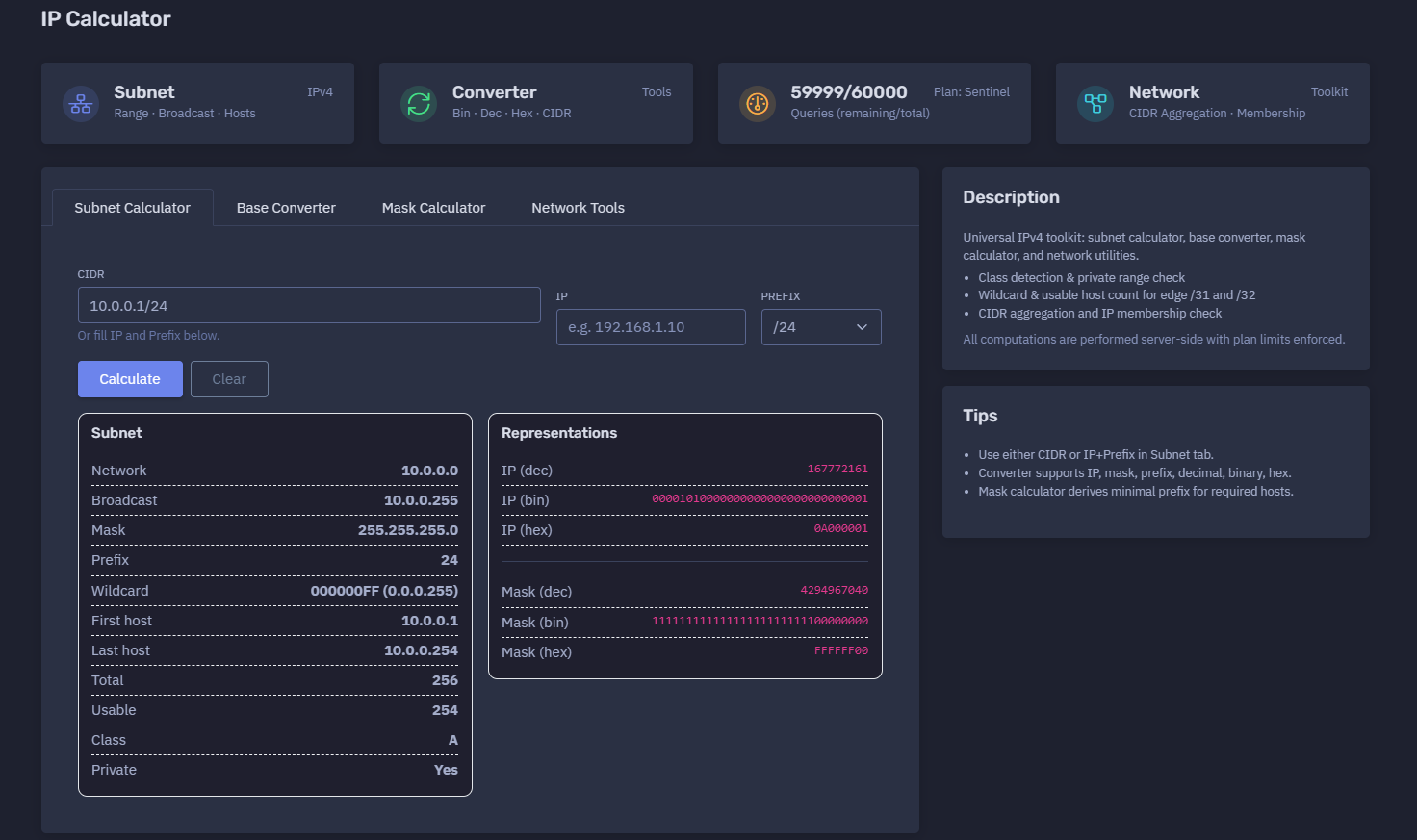
The platform available at https://dash.niamonx.io/ipcalc_net — known as IP Calculator — is a universal IPv4 network toolkit within the NiamonX platform. It helps users calculate subnets, convert IPv4 values between different representations, derive subnet masks, check address ranges, calculate usable hosts, work with wildcard masks, and perform practical network planning tasks.
Overview of the Service
IP Calculator is designed for network engineers, system administrators, cybersecurity analysts, DevOps teams, students, and technical users who need a fast and reliable way to calculate IPv4 subnet information.
The tool combines several network utilities in one interface:
-
Subnet Calculator
-
Base Converter
-
Mask Calculator
-
Network Tools
-
CIDR Aggregation
-
IP Membership Check
It can calculate network address, broadcast address, subnet mask, wildcard mask, first host, last host, total addresses, usable hosts, IP class, private range status, decimal representation, binary representation, hexadecimal representation, and mask representations.
All computations are performed server-side, and access is controlled through plan-based query limits.
🔍 How the Tool Works
The user can either enter a full CIDR value or provide an IP address and prefix separately.
Example CIDR input:
10.0.0.1/24
The tool parses the address, applies the prefix, and calculates the full subnet range.
For example, for:
10.0.0.1/24
the tool returns:
Network: 10.0.0.0
Broadcast: 10.0.0.255
Mask: 255.255.255.0
First host: 10.0.0.1
Last host: 10.0.0.254
Total: 256
Usable: 254
The interface also shows technical representations of both the IP address and subnet mask in decimal, binary, and hexadecimal formats.
🧩 Main Tool Modules
IP Calculator includes several practical modules.
Subnet Calculator
Calculates subnet boundaries and host ranges from an IPv4 address and CIDR prefix.
Useful for:
-
Network planning
-
IP range validation
-
Firewall rule preparation
-
Routing configuration
-
Infrastructure documentation
-
Lab exercises
-
Security segmentation
Base Converter
Converts IPv4 values between different formats.
Supported conversion types may include:
-
IP address
-
Subnet mask
-
Prefix
-
Decimal
-
Binary
-
Hexadecimal
Mask Calculator
Calculates subnet mask and prefix information.
It can also derive the minimal prefix required for a desired number of hosts.
Network Tools
Provides additional utilities for CIDR aggregation, range operations, and membership checks.
CIDR Aggregation
Helps combine compatible networks into a shorter aggregated CIDR block when possible.
IP Membership Check
Checks whether a specific IP address belongs to a selected subnet or range.
⚙️ Interface Structure
The interface is divided into practical tabs and panels.
Main sections:
| Section | Purpose |
|---|---|
| Subnet Calculator | Calculate subnet range and host information |
| Base Converter | Convert IP values between decimal, binary, hex, and CIDR formats |
| Mask Calculator | Calculate prefix, mask, wildcard, and host capacity |
| Network Tools | Work with aggregation, ranges, and membership checks |
| Request History | Review recent local calculations |
The interface also displays daily query limits based on the current plan.
Example:
59999 / 60000
Queries remaining / total
Plan: Sentinel
🧮 Subnet Calculator
The Subnet Calculator is the main module for IPv4 subnet analysis.
Users can provide input in two ways:
CIDR Input
Example:
10.0.0.1/24
IP + Prefix Input
Example:
IP: 192.168.1.10
Prefix: /24
Both input methods produce the same type of subnet output.
📊 Subnet Output Fields
After calculation, the tool displays the subnet details.
| Field | Description |
|---|---|
| Network | First address of the subnet |
| Broadcast | Broadcast address of the subnet |
| Mask | Subnet mask in dotted decimal format |
| Prefix | CIDR prefix length |
| Wildcard | Inverse subnet mask |
| First host | First usable host address |
| Last host | Last usable host address |
| Total | Total number of addresses in the subnet |
| Usable | Number of usable host addresses |
| Class | IPv4 class |
| Private | Whether the address belongs to a private range |
Example result:
Network: 10.0.0.0
Broadcast: 10.0.0.255
Mask: 255.255.255.0
Prefix: 24
Wildcard: 0.0.0.255
First host: 10.0.0.1
Last host: 10.0.0.254
Total: 256
Usable: 254
Class: A
Private: Yes
🌐 Network Address
The Network field shows the first address of the subnet.
Example:
10.0.0.0
The network address identifies the subnet itself and is normally not assigned to a regular host.
📡 Broadcast Address
The Broadcast field shows the last address of the subnet.
Example:
10.0.0.255
In traditional IPv4 networking, the broadcast address is used to send packets to all hosts in the subnet.
For most standard subnets, the broadcast address is not assigned to a normal host.
🎭 Subnet Mask
The Mask field shows the subnet mask in dotted decimal notation.
Example:
255.255.255.0
A subnet mask defines which part of the IP address belongs to the network and which part belongs to host addressing.
🧱 Prefix
The Prefix field shows the CIDR prefix length.
Example:
/24
The prefix indicates how many bits are used for the network portion.
Common prefixes:
| Prefix | Mask | Typical Use |
|---|---|---|
| /8 | 255.0.0.0 | Large private or enterprise blocks |
| /16 | 255.255.0.0 | Medium-sized internal networks |
| /24 | 255.255.255.0 | Common LAN subnet |
| /30 | 255.255.255.252 | Point-to-point links |
| /31 | 255.255.255.254 | Point-to-point links with special handling |
| /32 | 255.255.255.255 | Single host route |
🃏 Wildcard Mask
The Wildcard field shows the inverse of the subnet mask.
Example:
000000FF (0.0.0.255)
Wildcard masks are commonly used in:
-
ACL rules
-
Routing policies
-
Network matching
-
Firewall logic
-
Cisco-style configurations
For a /24 subnet, the mask is:
255.255.255.0
and the wildcard is:
0.0.0.255
🖥️ First and Last Host
The tool calculates the usable host range.
Example for /24:
First host: 10.0.0.1
Last host: 10.0.0.254
These are the first and last usable IP addresses in the subnet.
For special prefixes such as /31 and /32, usable host logic is handled as an edge case.
🔢 Total and Usable Addresses
The Total field shows the total number of addresses in the subnet.
The Usable field shows how many addresses can typically be assigned to hosts.
Example:
Total: 256
Usable: 254
For most IPv4 subnets, usable addresses exclude the network and broadcast addresses.
Special cases:
-
/31is commonly used for point-to-point links. -
/32represents a single host route.
The tool accounts for usable host count in these edge cases.
🏷️ Class Detection
The tool detects the traditional IPv4 class of the entered address.
IPv4 class ranges:
| Class | Range | Notes |
|---|---|---|
| A | 1.0.0.0 – 126.255.255.255 | Large networks |
| B | 128.0.0.0 – 191.255.255.255 | Medium networks |
| C | 192.0.0.0 – 223.255.255.255 | Smaller networks |
| D | 224.0.0.0 – 239.255.255.255 | Multicast |
| E | 240.0.0.0 – 255.255.255.255 | Reserved / experimental |
Class detection is useful for educational and compatibility contexts, although modern networking primarily uses CIDR.
🔐 Private Range Check
The Private field indicates whether the IP belongs to a private IPv4 range.
Private IPv4 ranges:
| Range | CIDR |
|---|---|
| 10.0.0.0 – 10.255.255.255 | 10.0.0.0/8 |
| 172.16.0.0 – 172.31.255.255 | 172.16.0.0/12 |
| 192.168.0.0 – 192.168.255.255 | 192.168.0.0/16 |
Example:
Private: Yes
Private addresses are normally used inside internal networks and are not directly routed on the public Internet.
🔄 Representations
The Representations section shows the IP address and mask in multiple numeric bases.
For the IP:
10.0.0.1
the tool may show:
IP (dec): 167772161
IP (bin): 00001010000000000000000000000001
IP (hex): 0A000001
For the mask:
255.255.255.0
the tool may show:
Mask (dec): 4294967040
Mask (bin): 11111111111111111111111100000000
Mask (hex): FFFFFF00
These representations are useful for:
-
Low-level networking
-
Binary subnetting exercises
-
Debugging address calculations
-
Protocol analysis
-
Security tooling
-
Developer workflows
🔢 Base Converter
The Base Converter supports conversion between IP-related formats.
Supported values may include:
-
IPv4 dotted decimal
-
Decimal integer
-
Binary
-
Hexadecimal
-
Prefix
-
Mask
-
Wildcard
Example decimal value:
4294967295
Example binary value:
11111111111111111111111111111111
Example hexadecimal value:
FFFFFFFF
The converter helps users move between human-readable IP formats and machine-level representations.
🎯 Mask Calculator
The Mask Calculator can derive subnet information from a prefix or from required host capacity.
Example prefix input:
prefix = 24
Expected output:
/24
255.255.255.0
The mask calculator can also derive the minimal prefix for a required number of hosts.
Example use case:
Required hosts: 200
The tool calculates the smallest subnet that can contain the requested number of usable addresses.
This is useful for:
-
VLAN planning
-
Office network planning
-
Cloud subnet sizing
-
Lab design
-
Address allocation
-
Avoiding wasted IP space
🧩 CIDR Aggregation
CIDR aggregation helps combine adjacent networks into a shorter summary route when possible.
Example use cases:
-
Route summarization
-
Firewall rule simplification
-
ACL optimization
-
Cloud network planning
-
Reducing routing table entries
-
Grouping related subnets
Aggregation should be used carefully because an overly broad summary may include addresses that should not be covered by a rule.
✅ IP Membership Check
The membership check helps determine whether an IP belongs to a given subnet.
Example question:
Does 192.168.1.50 belong to 192.168.1.0/24?
Expected result:
Yes
This is useful for:
-
Firewall troubleshooting
-
VPN routing checks
-
Access control validation
-
Network segmentation review
-
Incident response
-
Log analysis
🕓 Request History
The tool stores recent calculations locally in the user’s browser.
Example behavior:
We store the last 200 queries locally in your browser.
History entries may include:
-
Tool mode
-
Input value
-
Calculated range
-
Timestamp
-
Conversion type
-
Result summary
Example history item:
subnet
10.0.0.1/24
10.0.0.0..10.0.0.255
17.06.2026, 21:53:23
Request history is useful for repeating calculations, reviewing previous subnet work, and documenting network planning sessions.
Because history is stored locally in the browser, it may be cleared by deleting browser data or using another device.
🚦 Query Limits and Plan Access
IP Calculator uses plan-based query limits.
Example:
59999 / 60000
Queries remaining / total
Plan: Sentinel
Important points:
-
Computations are performed server-side.
-
Plan limits are enforced.
-
Remaining query count is displayed in the interface.
-
Local history does not replace server-side usage limits.
🧠 Key Features
Universal IPv4 Toolkit
Combines subnet calculation, conversion, mask calculation, and network utilities.
CIDR Support
Accepts CIDR notation such as:
192.168.1.10/24
IP + Prefix Input
Users can enter IP and prefix separately.
Subnet Range Calculation
Returns network, broadcast, first host, last host, total addresses, and usable addresses.
Wildcard Mask
Calculates wildcard mask in hexadecimal and dotted decimal formats.
Base Conversion
Converts IP and mask values to decimal, binary, and hexadecimal.
Class Detection
Detects traditional IPv4 class.
Private Range Detection
Checks whether an IP belongs to RFC1918-style private address ranges.
Edge Case Handling
Handles usable host calculations for /31 and /32.
Mask Calculator
Derives prefix and mask values, including host-based sizing.
CIDR Aggregation
Supports network summarization workflows.
Membership Check
Checks whether an IP belongs to a specific subnet.
Local Request History
Stores up to 200 recent calculations in the browser.
📌 Practical Examples
Example 1: Standard LAN Subnet
Input:
192.168.1.10/24
Result:
Network: 192.168.1.0
Broadcast: 192.168.1.255
Mask: 255.255.255.0
Usable hosts: 254
Private: Yes
Use case:
-
Office LAN
-
Home network
-
Small VLAN
Example 2: Larger Private Subnet
Input:
192.168.1.10/20
Result:
Network: 192.168.0.0
Broadcast: 192.168.15.255
Use case:
-
Larger internal segment
-
Lab environment
-
Department-level subnet
Example 3: Decimal Conversion
Input:
4294967295
Possible output:
IP: 255.255.255.255
Binary: 11111111111111111111111111111111
Hex: FFFFFFFF
Use case:
-
Low-level networking
-
Binary conversion
-
Developer debugging
Example 4: Prefix to Mask
Input:
prefix: 24
Output:
/24
255.255.255.0
Wildcard: 0.0.0.255
Use case:
-
Firewall rules
-
Router configuration
-
Documentation
✅ Recommended Workflow
A practical workflow depends on the user’s goal.
For Subnet Planning
-
Enter CIDR notation or IP + prefix.
-
Review network and broadcast address.
-
Check usable host count.
-
Confirm private/public status.
-
Copy mask and wildcard values for configuration.
For Firewall Rules
-
Calculate subnet and wildcard mask.
-
Validate range boundaries.
-
Check membership for test IPs.
-
Avoid overly broad CIDR blocks.
For Cloud Networking
-
Calculate required host capacity.
-
Use Mask Calculator to derive minimal prefix.
-
Reserve space for growth.
-
Validate non-overlap with existing networks.
For Troubleshooting
-
Convert IPs to binary or decimal.
-
Compare masks.
-
Check IP membership.
-
Confirm network boundaries.
🛡️ Security and Responsible Use
IP Calculator is a technical utility intended for legitimate network planning, education, administration, and cybersecurity workflows.
Acceptable use cases include:
-
Subnet planning
-
VLAN design
-
Firewall configuration
-
Routing documentation
-
Cloud network sizing
-
VPN troubleshooting
-
Incident response
-
Log analysis
-
Security lab exercises
-
Network education
Users should apply results carefully:
-
Validate configurations before deploying them.
-
Avoid overly broad firewall rules.
-
Confirm CIDR ranges before adding routes.
-
Check overlap between networks.
-
Use membership checks before changing access controls.
-
Document subnet decisions clearly.
-
Treat local history as potentially sensitive on shared devices.
⚙️ Technical Highlights
-
Universal IPv4 network toolkit
-
Available at
dash.niamonx.io/ipcalc_net -
Subnet Calculator
-
Base Converter
-
Mask Calculator
-
Network Tools
-
CIDR input support
-
IP + Prefix input support
-
Network address calculation
-
Broadcast address calculation
-
Subnet mask calculation
-
Wildcard mask calculation
-
First and last host calculation
-
Total and usable address count
-
IPv4 class detection
-
Private range check
-
Decimal representation
-
Binary representation
-
Hexadecimal representation
-
Mask conversion
-
Prefix conversion
-
Wildcard conversion
-
CIDR aggregation
-
IP membership check
-
Edge handling for
/31and/32 -
Server-side computation
-
Plan-based query limits
-
Local browser history
-
Stores last 200 queries locally
-
Suitable for network engineering, DevOps, SOC, education, and infrastructure planning
📌 Usage Hints
-
Use either CIDR or IP + Prefix in the Subnet tab.
-
Converter supports IP, mask, prefix, decimal, binary, and hex.
-
Mask Calculator can derive the minimal prefix for required hosts.
-
Use wildcard masks for ACL and firewall logic.
-
Check private/public status before routing decisions.
-
Use membership checks before changing firewall rules.
-
Be careful with aggregation because it may include extra addresses.
-
Recheck
/31and/32behavior when working with point-to-point or host routes. -
Store exported or copied calculations carefully if they describe internal infrastructure.
-
Clear local history on shared devices.
📬 Contact Information
For technical, legal, abuse, privacy, or support-related inquiries, users can contact the NiamonX team directly:
support@niamonx.io — Technical Support
other@niamonx.io — General Inquiries
takedown@niamonx.io — Privacy or Data Removal Requests
legal@niamonx.io — Legal and Compliance Matters
Alternative contact channel:
🔗 Helpdesk: https://support.niamonx.io/
Summary
NiamonX IP Calculator is a universal IPv4 subnet and conversion toolkit for calculating network ranges, broadcast addresses, subnet masks, wildcard masks, usable hosts, decimal / binary / hexadecimal representations, CIDR aggregation, and IP membership.
It is designed for network planning, routing, firewall configuration, cloud infrastructure, SOC workflows, DevOps, education, and troubleshooting. The tool performs calculations server-side, enforces plan-based limits, and stores the last 200 queries locally in the browser for convenience.