
PageRank | Open PageRank Domain Ranking Tool
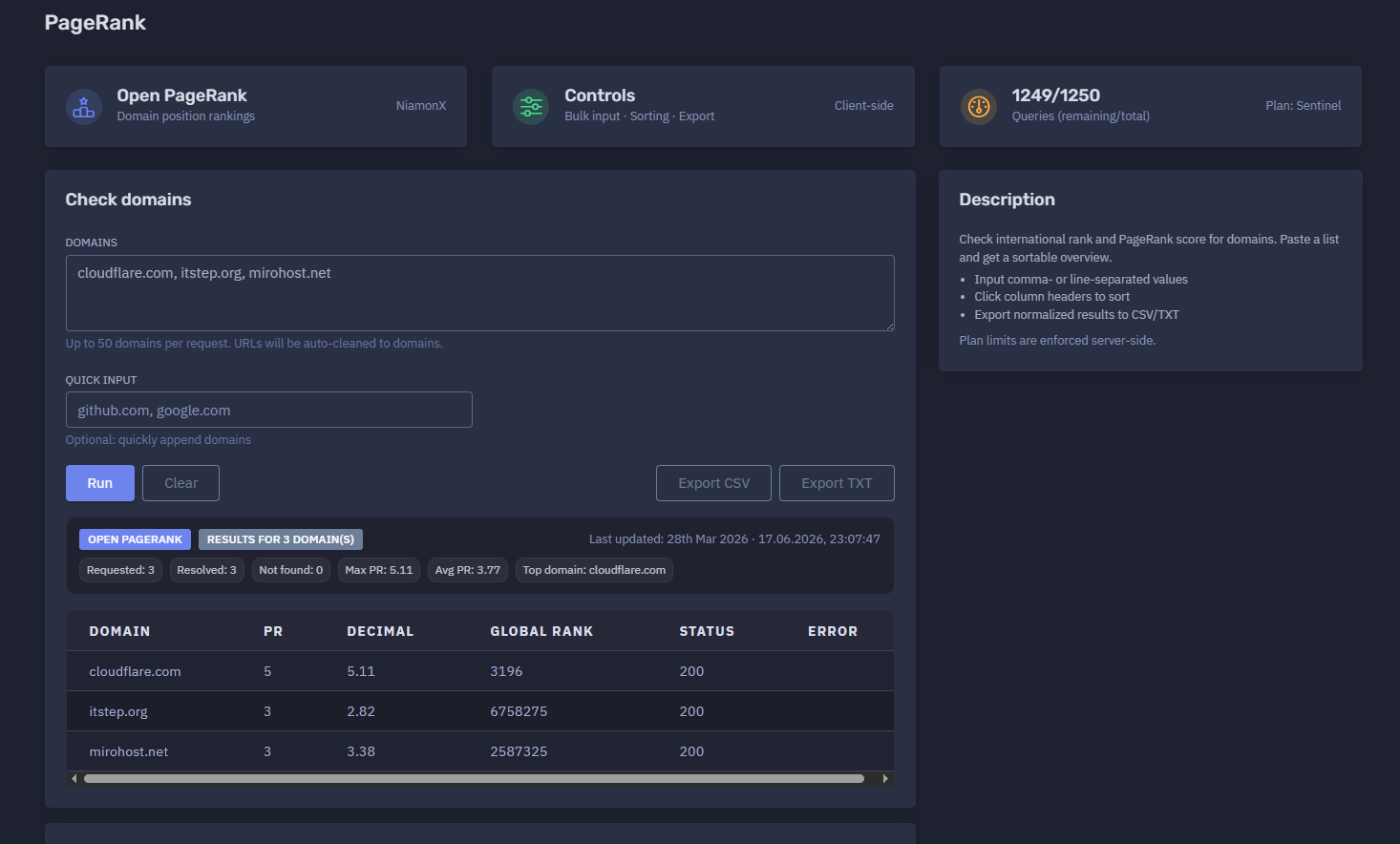
The platform available at https://dash.niamonx.io/pagerank — known as PageRank — is a domain ranking and Open PageRank lookup tool within the NiamonX platform. It allows users to check international ranking metrics, PageRank score, ranking position, availability status, and comparative authority signals for one or multiple domains.
The tool supports bulk domain input, automatic URL cleanup, quick input presets, sortable result tables, export options, request history, and plan-based query limits.
Overview of the Service
PageRank is designed to help users evaluate the relative authority and ranking position of domains using Open PageRank-style metrics. It provides a fast way to compare multiple domains and understand which domain has stronger ranking signals.
The tool is useful for:
-
SEO analysis
-
OSINT research
-
domain reputation review
-
competitive analysis
-
backlink and authority research
-
marketing research
-
brand protection
-
domain portfolio review
-
threat intelligence enrichment
-
website credibility checks
-
investigation reports
-
content and publishing strategy
-
technical due diligence
Users can paste a list of domains, run a lookup, and receive a sortable overview containing rank, PageRank score, position, and response status for each domain.
Example input:
cloudflare.com, itstep.org, mirohost.net
Example summary:
Results for 3 domain(s)
Last updated: 28th Mar 2026 · 17.06.2026, 23:07:47
Requested: 3
Resolved: 3
Not found: 0
Max PR: 5.11
Avg PR: 3.77
Top domain: cloudflare.com
🔍 How the Tool Works
The user enters one or more domains into the input field. The tool normalizes the submitted values, removes URL formatting when needed, sends the cleaned domain list for ranking lookup, and displays the results in a table.
The tool can process:
-
comma-separated domains;
-
line-separated domains;
-
copied domain lists;
-
URLs that can be cleaned to domains;
-
quick input values appended to the main list.
Example input:
cloudflare.com, itstep.org, mirohost.net
Example normalized domains:
cloudflare.com
itstep.org
mirohost.net
Example result table:
cloudflare.com    5    5.11    3196       200
itstep.org        3    2.82    6758275    200
mirohost.net      3    3.38    2587325    200
The result allows users to compare ranking strength and authority signals across domains.
🧩 Supported Input
PageRank supports domain-based input.
Valid examples:
cloudflare.com
itstep.org
mirohost.net
github.com, google.com
Line-separated input is also supported:
cloudflare.com
itstep.org
mirohost.net
URLs may be automatically cleaned to domains.
Example submitted URL:
https://www.cloudflare.com/products/
Possible normalized domain:
cloudflare.com
Unsupported or poor input examples:
not a domain
user@example.com
localhost
192.168.1.1
https://
Recommended input format:
domain.com
or:
domain1.com, domain2.org, domain3.net
⚙️ Main Function: Check Domains
The main panel allows users to submit domains for PageRank lookup.
Example:
Check domains
Domains:
cloudflare.com, itstep.org, mirohost.net
The tool supports up to 50 domains per request.
Interface note:
Up to 50 domains per request. URLs will be auto-cleaned to domains.
This makes the tool suitable for quick comparisons, bulk checks, and domain list analysis.
⚡ Quick Input
The Quick Input field allows users to quickly append domains to the main input.
Example:
github.com, google.com
Interface note:
Optional: quickly append domains
Quick input is useful when users already have a main list but want to add commonly checked domains or comparison benchmarks without rewriting the entire input.
Example workflow:
Main input:
cloudflare.com, itstep.org, mirohost.net

Quick input:
github.com, google.com

Final checked set:
cloudflare.com, itstep.org, mirohost.net, github.com, google.com
🚦 Plan Limits and Usage
PageRank uses plan-based query limits.
Example:
1249 / 1250
Queries remaining / total
Plan: Sentinel
Important points:
-
Server-side plan limits are enforced.
-
Each request may consume plan quota.
-
Bulk requests may count according to platform rules.
-
Up to 50 domains can be submitted per request.
-
If plan limits are exceeded, new requests may be blocked.
-
Previous results may remain visible after a failed request.
-
Users should monitor remaining queries when running repeated checks.
Interface note:
Plan limits are enforced server-side.
📊 Results Summary
After a successful lookup, PageRank displays a result summary.
Example:
Results for 3 domain(s)
Last updated: 28th Mar 2026 · 17.06.2026, 23:07:47
Requested: 3
Resolved: 3
Not found: 0
Max PR: 5.11
Avg PR: 3.77
Top domain: cloudflare.com
Typical summary fields include:
| Field | Description |
|---|---|
| Results for | Number of domains included in the displayed result |
| Last updated | Date of the ranking dataset or source update |
| Requested | Number of submitted domains |
| Resolved | Number of domains successfully found or processed |
| Not found | Number of domains without available ranking data |
| Max PR | Highest PageRank score in the result set |
| Avg PR | Average PageRank score across resolved domains |
| Top domain | Domain with the highest PageRank score in the submitted set |
The summary helps users quickly understand the overall strength of the checked domain group.
🧾 Results Table
The results table displays ranking data for each domain.
Example:
cloudflare.com    5    5.11    3196       200
itstep.org        3    2.82    6758275    200
mirohost.net      3    3.38    2587325    200
A typical table may include:
| Column | Description |
|---|---|
| Domain | Checked domain |
| Rank | Rounded or categorized PageRank value |
| PageRank Score | More precise PageRank score |
| Position | International ranking position |
| Status | HTTP or API response status |
Example interpretation:
cloudflare.com
Rank: 5
PageRank Score: 5.11
Position: 3196
Status: 200
This means the domain was found, returned successfully, and has the strongest PageRank score among the checked examples.
🏷️ Domain Column
The Domain column shows the normalized domain checked by the tool.
Example:
cloudflare.com
The tool may clean URLs and reduce them to domains before lookup.
Example:
Input: https://www.cloudflare.com/products/
Normalized: cloudflare.com
This helps users paste mixed URL lists without manually cleaning each entry.
📈 Rank Column
The Rank column shows a simplified PageRank value.
Example:
Rank: 5
This value provides a quick category-like view of domain authority.
A higher value generally indicates stronger ranking authority or broader visibility in the ranking dataset.
Example comparison:
cloudflare.com → Rank 5
itstep.org → Rank 3
mirohost.net → Rank 3
In this example, cloudflare.com has a stronger rank than the other two domains.
📊 PageRank Score
The PageRank Score column shows a more precise score.
Example:
PageRank Score: 5.11
This score allows more detailed comparison than the rounded rank.
Example:
itstep.org: 2.82
mirohost.net: 3.38
Although both domains may have Rank 3, the PageRank score shows that mirohost.net has a higher score than itstep.org in this result set.
🌍 Position Ranking
The Position column shows the domain’s international ranking position.
Example:
Position: 3196
A lower position number generally indicates a stronger or more prominent domain in the ranking dataset.
Example comparison:
cloudflare.com → 3196
mirohost.net → 2587325
itstep.org → 6758275
In this example, cloudflare.com has a significantly stronger international position.
Position rankings are useful for:
-
competitive comparison;
-
domain authority review;
-
SEO research;
-
domain reputation analysis;
-
prioritizing investigation targets;
-
comparing partner or vendor domains;
-
evaluating digital footprint strength.
✅ Status Column
The Status column shows the response status for each checked domain.
Example:
Status: 200
A status of 200 usually indicates that the ranking lookup completed successfully for that domain.
Possible status meanings may include:
| Status | General Meaning |
|---|---|
| 200 | Successfully resolved or returned |
| 404 | Domain not found in the ranking dataset |
| 400 | Invalid or malformed request |
| 429 | Rate limit or quota issue |
| 500 | Server-side processing error |
Exact status behavior depends on backend implementation and upstream source responses.
🔃 Sorting Results
The table supports sorting by column headers.
Interface note:
Click column headers to sort
Sorting helps users quickly identify:
-
highest PageRank score;
-
lowest PageRank score;
-
best international ranking position;
-
domains that were not found;
-
domains with successful or failed status;
-
strongest domains in a bulk list;
-
weakest domains in a comparison set.
Recommended sorting workflows:
| Goal | Sort By |
|---|---|
| Find strongest domain | PageRank Score descending |
| Find weakest domain | PageRank Score ascending |
| Find best international rank | Position ascending |
| Find missing domains | Status or Not Found |
| Compare bulk list | PageRank Score descending |
| Identify outliers | Position or PR score |
📤 Export Options
PageRank supports exporting normalized results.
Interface note:
Export normalized results to CSV/TXT
Export options are useful for:
-
SEO reports;
-
competitor analysis;
-
domain portfolio review;
-
spreadsheet analysis;
-
client reports;
-
OSINT case notes;
-
brand protection documentation;
-
threat intelligence enrichment;
-
compliance evidence;
-
historical comparison.
📄 CSV Export
CSV export is useful when users want to analyze results in spreadsheet tools.
Example CSV-style output:
Domain,Rank,PageRank Score,Position,Status
cloudflare.com,5,5.11,3196,200
itstep.org,3,2.82,6758275,200
mirohost.net,3,3.38,2587325,200
CSV is recommended for:
-
Excel or Google Sheets;
-
reporting dashboards;
-
ranking comparison;
-
data enrichment;
-
client deliverables;
-
domain portfolio analysis.
📄 TXT Export
TXT export is useful for simple lists or plain-text reports.
Example TXT-style output:
cloudflare.com | Rank: 5 | PR: 5.11 | Position: 3196 | Status: 200
itstep.org | Rank: 3 | PR: 2.82 | Position: 6758275 | Status: 200
mirohost.net | Rank: 3 | PR: 3.38 | Position: 2587325 | Status: 200
TXT export is useful for:
-
quick notes;
-
internal documentation;
-
chat sharing;
-
case summaries;
-
Markdown reports;
-
simple evidence logs.
🕓 Request History
PageRank stores recent requests locally in the browser.
Example interface note:
Request History
Filter...
Stores last 100 requests in your browser.
Example history entry:
cloudflare.com, itstep.org, mirohost.net
Count: 3
17.06.2026, 23:07:47
The history helps users:
-
repeat previous checks;
-
review recent domain lists;
-
compare past requests;
-
continue research sessions;
-
filter old lookups;
-
preserve local workflow context.
Because request history is stored in the browser, it may be deleted when browser data is cleared or when the user changes devices, profiles, or private browsing sessions.
🧠 Understanding PageRank Metrics
PageRank-style metrics are designed to estimate the relative importance, authority, or ranking strength of a domain.
A higher PageRank score may indicate that the domain has stronger web visibility, authority signals, or link-based importance in the ranking dataset.
However, PageRank should be interpreted carefully.
Important notes:
-
PageRank is not the same as traffic.
-
PageRank is not a guarantee of trustworthiness.
-
A high score does not mean a domain is safe.
-
A low score does not automatically mean a domain is malicious.
-
Ranking data may be updated periodically.
-
Some domains may not be found in the dataset.
-
Scores should be compared within context.
-
Domain authority can change over time.
-
Different ranking providers may produce different values.
PageRank is best used as one signal among many.
🔎 Common Use Cases
SEO Research
Compare domain authority signals across competitors, partners, publishers, or content targets.
Competitive Analysis
Check which domains in a group have stronger ranking positions and higher PageRank scores.
OSINT Research
Enrich domain investigations with authority and ranking context.
Domain Reputation Review
Evaluate whether a domain appears to have established web presence or limited visibility.
Brand Protection
Compare suspicious domains, impersonation domains, or lookalike domains against legitimate brand domains.
Threat Intelligence Enrichment
Add ranking context to domains found in phishing kits, malware infrastructure, spam campaigns, or suspicious web activity.
Partner and Vendor Review
Check public ranking strength of vendor, partner, or customer-facing domains.
Domain Portfolio Analysis
Compare multiple owned domains to identify stronger and weaker assets.
Content Outreach
Evaluate domains before outreach, publication, partnership, or backlink analysis.
Investigation Prioritization
Use PageRank and position data to prioritize domains that may have broader reach or visibility.
🧪 Example Analysis
Example checked domains:
cloudflare.com, itstep.org, mirohost.net
Example results:
cloudflare.com
Rank: 5
PR: 5.11
Position: 3196
Status: 200

itstep.org
Rank: 3
PR: 2.82
Position: 6758275
Status: 200

mirohost.net
Rank: 3
PR: 3.38
Position: 2587325
Status: 200
Example interpretation:
cloudflare.com has the strongest PageRank score and best international position in this set. mirohost.net has a higher PageRank score and better position than itstep.org, even though both have the same rounded rank value. All three domains were resolved successfully with status 200.
🧠 Recommended Workflow
A practical PageRank workflow should follow these steps.
1. Prepare a Domain List
Collect domains that need to be compared.
Example:
cloudflare.com
itstep.org
mirohost.net
The list may be comma-separated or line-separated.
2. Paste Domains Into the Tool
Use the Domains field.
Example:
cloudflare.com, itstep.org, mirohost.net
Do not worry if some values are full URLs. The tool can auto-clean URLs to domains.
3. Add Quick Input if Needed
Use Quick Input for optional additional domains.
Example:
github.com, google.com
4. Run Open PageRank
Start the lookup.
Example:
Open PageRank
The tool will process the normalized domains and return ranking data.
5. Review the Summary
Check the overall result metrics.
Example:
Requested: 3
Resolved: 3
Not found: 0
Max PR: 5.11
Avg PR: 3.77
Top domain: cloudflare.com
6. Sort the Table
Click column headers to sort by PageRank score, position, status, or domain.
Recommended first sort:
PageRank Score descending
This quickly shows the strongest domains in the list.
7. Review Not Found Results
If any domains are not found, validate that the input is correct.
Possible reasons:
-
typo in domain;
-
newly created domain;
-
low-visibility domain;
-
domain missing from dataset;
-
invalid input;
-
unsupported domain format.
8. Export Results
Export normalized data to CSV or TXT for reporting.
Recommended exports:
CSV for spreadsheet analysis
TXT for quick documentation
9. Compare With Other Signals
Use PageRank as one signal and enrich with additional checks.
Recommended follow-up analysis:
-
DNS records;
-
WHOIS / RDAP;
-
SSL / TLS certificate data;
-
HTTP status;
-
website screenshot;
-
malware or phishing reputation;
-
backlink profile;
-
traffic estimates;
-
content quality;
-
domain age;
-
passive DNS;
-
threat intelligence feeds.
📊 Interpreting Results Correctly
PageRank results should be interpreted as comparative ranking intelligence, not as a final verdict.
Important interpretation notes:
-
Higher PageRank suggests stronger authority signals.
-
Lower position number usually means stronger global ranking.
-
A domain with a high PageRank can still be compromised.
-
A domain with a low PageRank can still be legitimate.
-
Newly registered domains may have no ranking data.
-
Parked or inactive domains may be ranked inconsistently.
-
Domains behind redirects may still normalize correctly.
-
URL cleanup may remove paths and focus only on the domain.
-
Ranking data may reflect the last dataset update date.
-
Scores may change between updates.
-
PageRank is not a security rating by itself.
-
Use additional technical checks before drawing conclusions.
Example:
A high PageRank score can indicate domain authority, but it does not prove that the current website content is safe or trustworthy.
🚨 Security Review Checklist
When using PageRank in security or OSINT workflows, review the following areas.
High-Ranking Suspicious Domains
A suspicious domain with a high PageRank may deserve priority review because it may have broader visibility or inherited authority.
Check:
-
current website content;
-
redirects;
-
ownership;
-
DNS records;
-
certificate history;
-
passive DNS;
-
compromise indicators;
-
malware reputation.
Low-Ranking Lookalike Domains
A low-ranking domain that resembles a brand may still be dangerous.
Check for:
-
typosquatting;
-
phishing pages;
-
fake login portals;
-
brand impersonation;
-
malicious redirects;
-
recently registered infrastructure.
Not Found Domains
Domains not found in ranking data may be:
-
newly registered;
-
low visibility;
-
inactive;
-
typo domains;
-
internal-only names;
-
suspicious disposable domains.
Not found does not mean safe.
Large Domain Lists
For bulk lists, sort by PageRank score and position to prioritize review.
Recommended triage:
1. High PageRank + suspicious context
2. Low PageRank + brand similarity
3. Not found + recent registration
4. Unexpected domains in known infrastructure
📈 Recommended Reporting Format
When documenting PageRank checks, use a consistent format.
Example:
Checked domains:
cloudflare.com, itstep.org, mirohost.net

Check time:
17.06.2026, 23:07:47

Dataset last updated:
28th Mar 2026

Summary:
Requested: 3
Resolved: 3
Not found: 0
Max PR: 5.11
Avg PR: 3.77
Top domain: cloudflare.com

Results:
1. cloudflare.com | Rank: 5 | PR: 5.11 | Position: 3196 | Status: 200
2. mirohost.net | Rank: 3 | PR: 3.38 | Position: 2587325 | Status: 200
3. itstep.org | Rank: 3 | PR: 2.82 | Position: 6758275 | Status: 200
Example analyst note:
Observation:
cloudflare.com has the highest PageRank score and strongest international ranking position in the checked set. mirohost.net ranks higher than itstep.org based on both PageRank score and position. All submitted domains were successfully resolved.
🛡️ Security, Privacy & Responsible Use
PageRank is intended for lawful domain analysis, SEO research, OSINT, reputation review, brand protection, compliance, and defensive cybersecurity workflows.
Acceptable use cases include:
-
checking your own domains;
-
comparing competitor domains;
-
reviewing domain reputation signals;
-
enriching investigation reports;
-
analyzing suspicious domains;
-
reviewing domain portfolios;
-
supporting brand protection;
-
performing authorized OSINT research;
-
preparing SEO or marketing analysis;
-
documenting domain authority context.
Users should follow responsible use principles:
-
Do not treat PageRank as proof of safety.
-
Do not treat low ranking as proof of maliciousness.
-
Do not use ranking data alone for attribution.
-
Validate security conclusions with technical evidence.
-
Respect authorization boundaries when investigating third-party domains.
-
Store exported domain lists securely when they involve customers or investigations.
-
Use ranking data as one supporting signal, not as a final decision.
⚙️ Technical Highlights
-
Open PageRank domain ranking tool
-
Available at
dash.niamonx.io/pagerank -
Checks international rank and PageRank score
-
Supports bulk domain input
-
Accepts comma-separated values
-
Accepts line-separated values
-
Supports up to 50 domains per request
-
Automatically cleans URLs to domains
-
Includes Quick Input for appending domains
-
Shows result dataset update date
-
Displays requested domain count
-
Displays resolved domain count
-
Displays not found count
-
Calculates maximum PageRank score
-
Calculates average PageRank score
-
Identifies top domain
-
Displays domain rank
-
Displays precise PageRank score
-
Displays international position
-
Displays status code
-
Supports sortable columns
-
Supports CSV export
-
Supports TXT export
-
Stores local request history
-
Keeps last 100 requests in the browser
-
Supports history filtering
-
Uses server-side plan limits
-
Suitable for SEO, OSINT, domain reputation review, brand protection, competitive analysis, and threat intelligence enrichment
📌 Usage Hints
-
Paste domains separated by commas or new lines.
-
You can submit up to 50 domains per request.
-
URLs are automatically cleaned to domains.
-
Use Quick Input to append common comparison domains.
-
Sort by PageRank score to find the strongest domains.
-
Sort by position to compare international ranking.
-
Check Not Found results for typos or low-visibility domains.
-
Export CSV for spreadsheet analysis.
-
Export TXT for quick notes or reports.
-
Use request history to repeat previous checks.
-
Monitor remaining plan queries.
-
Remember that plan limits are enforced server-side.
-
Treat PageRank as one signal, not a complete reputation score.
-
Combine results with WHOIS, DNS, TLS, HTTP, screenshot, and threat intelligence checks.
-
Clear local history on shared devices when checking sensitive domain lists.
📬 Contact Information
For technical, legal, abuse, privacy, or support-related inquiries, users can contact the NiamonX team directly:
support@niamonx.io — Technical Support
other@niamonx.io — General Inquiries
takedown@niamonx.io — Privacy or Data Removal Requests
legal@niamonx.io — Legal and Compliance Matters
Alternative contact channel:
🔗 Helpdesk: https://support.niamonx.io/
Summary
NiamonX PageRank is an Open PageRank domain ranking tool for checking PageRank score, domain rank, international position, response status, and comparative authority metrics. It supports bulk input, automatic URL cleanup, quick input, sortable results, CSV/TXT export, local request history, and server-side plan limits.
The tool is designed for SEO research, OSINT analysis, competitive comparison, domain reputation review, brand protection, threat intelligence enrichment, domain portfolio analysis, and reporting workflows. PageRank results should be treated as ranking and authority signals, not as final security or trust decisions, and should be combined with DNS, WHOIS, TLS, HTTP, screenshot, backlink, traffic, and threat intelligence data for deeper analysis.