
Flight Schedules | Departures, Arrivals & Airline Schedule Intelligence
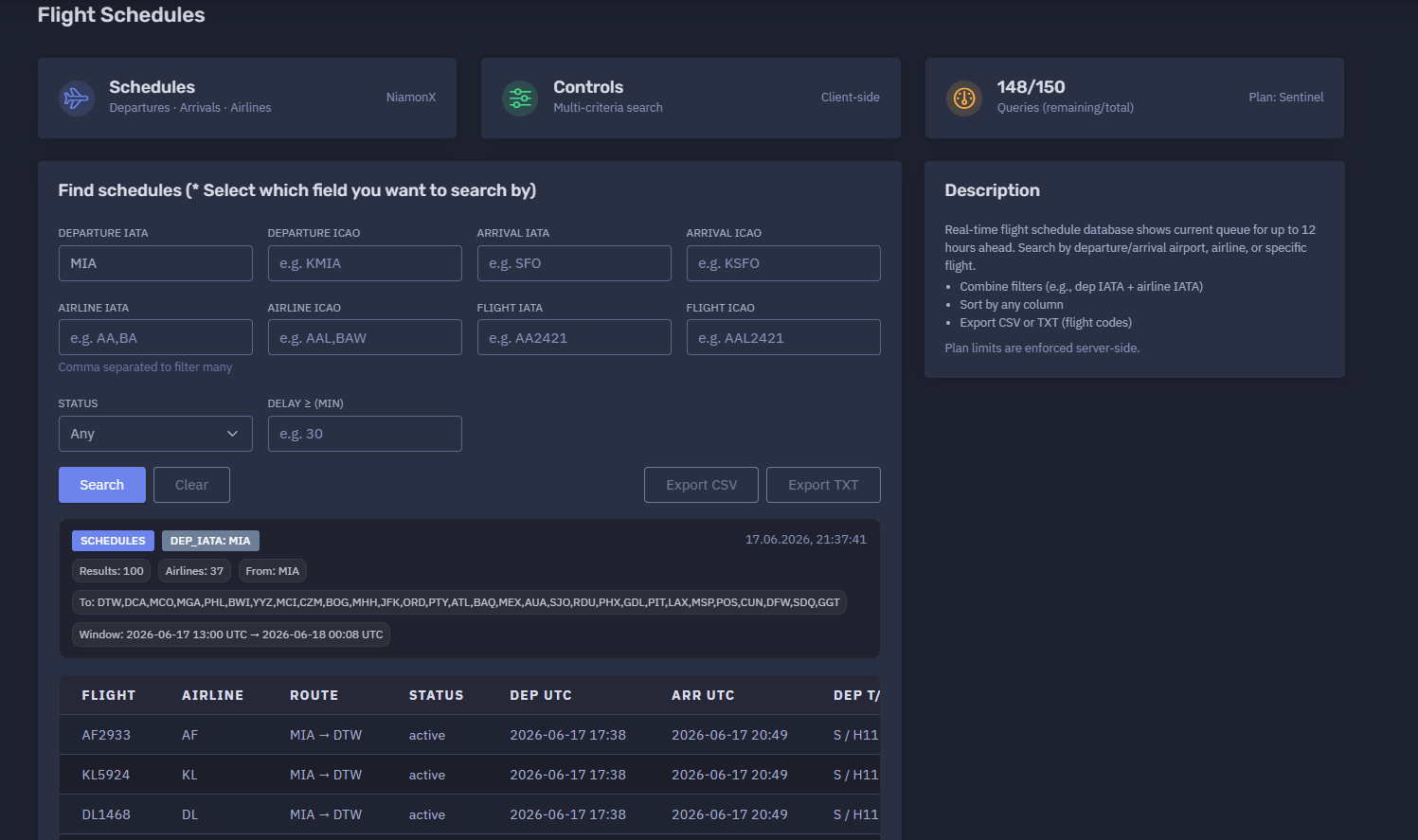
The platform available at https://dash.niamonx.io/flight_schedules — known as Flight Schedules — is a flight schedule intelligence tool within the NiamonX platform. It allows users to search real-time airport schedules by departure airport, arrival airport, airline, specific flight number, flight status, and delay filters.
Overview of the Service
Flight Schedules provides a structured view of current and near-future flight movements. The tool is designed to show departure and arrival queues for up to approximately 12 hours ahead, depending on the available data source and selected filters.
Unlike a single-flight lookup tool, Flight Schedules is built for broader schedule monitoring. It helps users analyze groups of flights from or to a specific airport, filter by airline, search for a specific flight, review operational status, identify delays, and export results for further analysis.
The module is useful for travel coordination, logistics, aviation OSINT, airport monitoring, corporate travel tracking, incident response support, executive protection workflows, and operational awareness.
Access depends on the user’s plan and daily tool limits.
🔍 How the Search Works
The user selects one or more search fields and submits a schedule query. The system then searches the flight schedule database and returns matching flights in a structured table.
The tool supports multi-criteria search, meaning users can combine multiple filters to narrow results.
Example search combinations:
-
Departure airport only
-
Arrival airport only
-
Departure airport + airline
-
Arrival airport + airline
-
Departure airport + arrival airport
-
Specific flight number
-
Airport + flight status
-
Airport + minimum delay
-
Airline + status
-
Airline + route
For example, a user can search all departures from Miami International Airport using:
Departure IATA: MIA
Or combine filters such as:
Departure IATA: MIA
Airline IATA: AA
Status: active
The result is a schedule table with flight numbers, route, airline, status, departure and arrival times, terminal and gate details, flight duration, and delay indicators when available.
🧩 What Can Be Searched
Flight Schedules supports several search fields.
Departure Airport
Users can search by departure airport using either IATA or ICAO code.
Examples:
MIA
KMIA
Arrival Airport
Users can search by arrival airport using either IATA or ICAO code.
Examples:
SFO
KSFO
Airline
Users can filter by airline using IATA or ICAO airline code.
Examples:
AA
AAL
Multiple airlines can be entered as a comma-separated list.
Example:
AA,BA,DL
Flight Number
Users can search for a specific flight by IATA or ICAO flight number.
Examples:
AA2421
AAL2421
Status
Users can filter schedules by operational status.
Possible values may include:
-
Any
-
Active
-
Scheduled
-
Landed
-
Cancelled
-
Delayed
-
Unknown
The exact available statuses depend on backend data.
Delay Filter
Users can search for flights with delay greater than or equal to a selected number of minutes.
Example:
Delay ≥ 30
This is useful for quickly identifying disrupted flights.
⚙️ Search Interface
The Flight Schedules interface contains several main search controls.
Departure IATA
Search by departure airport IATA code.
Example:
MIA
Departure ICAO
Search by departure airport ICAO code.
Example:
KMIA
Arrival IATA
Search by arrival airport IATA code.
Example:
SFO
Arrival ICAO
Search by arrival airport ICAO code.
Example:
KSFO
Airline IATA
Filter by one or more airline IATA codes.
Example:
AA,BA
Airline ICAO
Filter by one or more airline ICAO codes.
Example:
AAL,BAW
Flight IATA
Search by IATA-style flight number.
Example:
AA2421
Flight ICAO
Search by ICAO-style flight number.
Example:
AAL2421
Status
Filter by flight status.
Default value:
Any
Delay ≥
Filter flights with a delay greater than or equal to the selected number of minutes.
Example:
30
📊 Schedule Results
After a successful search, the tool displays a schedule summary and a table of matching flights.
The summary may include:
-
Search filter used
-
Timestamp of the query
-
Number of results
-
Number of airlines
-
Departure airport
-
Destination airports
-
Time window
-
Result table
Example summary structure:
DEP_IATA: MIA
Results: 100
Airlines: 37
From: MIA
To: DTW, DCA, MCO, MGA, PHL, BWI, YYZ
Window: 2026-06-17 13:00 UTC → 2026-06-18 00:08 UTC
This gives users a fast overview of the searched airport schedule and the range of returned flights.
📋 Results Table
The main results table displays flight records in a compact operational format.
Typical columns may include:
| Column | Description |
|---|---|
| Flight | Flight number |
| Airline | Airline IATA code |
| Route | Departure and arrival airports |
| Status | Flight status |
| Departure time | Scheduled or updated departure time |
| Arrival time | Scheduled or updated arrival time |
| Departure terminal / gate | Departure terminal and gate |
| Arrival terminal / gate | Arrival terminal and gate |
| Duration | Flight duration in minutes |
| Departure delay | Departure delay, if available |
| Arrival delay | Arrival delay, if available |
Example row:
AA3310 AA MIA → DCA active 2026-06-17 17:41 2026-06-17 20:25 N / D38 2 / C32 164
The table is intended for quick scanning and comparison.
Users can click column headers to sort results when sorting is available.
🛫 Departures
When searching by departure airport, the tool shows flights leaving the selected airport within the current schedule window.
Departure-focused use cases:
-
Checking airport departure queue
-
Monitoring outbound flights
-
Reviewing gate assignments
-
Checking airline activity from an airport
-
Identifying delayed departures
-
Tracking specific outbound routes
-
Exporting airport departure lists
Example:
Departure IATA: MIA
This returns flights departing from Miami International Airport.
🛬 Arrivals
When searching by arrival airport, the tool shows flights arriving at the selected airport within the current schedule window.
Arrival-focused use cases:
-
Passenger pickup planning
-
Airport arrival monitoring
-
Logistics coordination
-
Delay tracking
-
Airline arrival filtering
-
Destination airport analysis
Example:
Arrival IATA: EWR
This returns flights arriving at Newark Liberty International Airport.
🏢 Airline Filtering
The tool supports airline filtering by IATA or ICAO code.
This is useful when users need to focus on one airline or a group of airlines.
Example:
Airline IATA: AA,BA
This can return only flights operated or listed under American Airlines and British Airways codes, depending on backend data.
Airline filtering is especially useful for:
-
Airline operations review
-
Codeshare analysis
-
Corporate travel monitoring
-
Disruption analysis
-
Airport activity by carrier
✈️ Flight Number Search
Users can search for a specific flight using IATA or ICAO flight number fields.
Examples:
Flight IATA: EK164
Flight ICAO: UAE164
This is useful when a user wants schedule-table context for one specific flight rather than a full airport queue.
If the exact flight is not found, users should verify whether the flight number is IATA or ICAO and try the matching field.
⏱️ Time Window
Flight Schedules shows the current queue for up to approximately 12 hours ahead.
The result summary may show the schedule window in UTC.
Example:
Window: 2026-06-17 13:00 UTC → 2026-06-18 00:08 UTC
The time window helps users understand which period is covered by the returned results.
Important interpretation notes:
-
The schedule window may shift depending on current time and backend data.
-
Results may include active, landed, scheduled, or delayed flights.
-
UTC is useful for cross-time-zone comparison.
-
Local airport times may differ from the displayed UTC values depending on interface configuration.
🧠 Key Features
Multi-Criteria Search
Users can combine departure airport, arrival airport, airline, flight number, status, and delay filters.
Departure and Arrival Monitoring
The tool supports both outbound and inbound schedule analysis.
Airline Filtering
Users can filter by one or more airlines using comma-separated codes.
Specific Flight Lookup
The module supports direct flight number filtering.
Status Filtering
Users can narrow results by operational status.
Delay Filtering
The delay filter helps identify flights with disruption above a selected threshold.
Sortable Results
Users can sort schedule rows by table columns.
CSV Export
Schedule results can be exported to CSV for spreadsheets, reporting, or operational workflows.
TXT Export
Flight codes can be exported as TXT for simple lists, scripts, or copy-paste workflows.
Local Request History
The last 100 schedule queries are stored locally in the browser.
Plan-Based Limits
Daily query limits depend on the user’s subscription plan and are enforced server-side.
📤 Export Options
Flight Schedules supports export for operational and analytical workflows.
CSV Export
CSV export is useful for:
-
Spreadsheet analysis
-
Reporting
-
Airport operations review
-
Logistics planning
-
Delay tracking
-
Airline comparison
-
Internal documentation
TXT Export
TXT export can provide a plain list of flight codes.
This is useful for:
-
Quick sharing
-
Batch checking
-
Operational watchlists
-
Copying flight numbers into another tool
-
Lightweight reporting
Exported files should be stored appropriately when they contain operationally sensitive travel information.
🕓 Request History
The Request History section stores the last 100 queries in the user’s browser.
History entries may include:
-
Departure filter
-
Arrival filter
-
Airline filter
-
Flight filter
-
Query timestamp
-
Route summary
-
Search mode or selected fields
Example history entry:
MIA → —
Airlines: any
Flight: any
17.06.2026, 21:37:41
Request history is stored locally and helps users quickly repeat previous searches.
Because it is browser-based, history may be cleared when the user deletes local browser data or switches devices.
🚦 Daily Queries and Plan Limits
Flight Schedules uses plan-based query limits.
Example:
148 / 150
Queries remaining / total
Plan: Sentinel
Important points:
-
Access depends on the user’s plan.
-
Daily tool limits are enforced server-side.
-
Users should monitor remaining queries when performing many searches.
-
Exporting already loaded data does not necessarily require a new schedule query.
🧭 IATA and ICAO Codes
The tool supports both IATA and ICAO code formats.
Airport Codes
IATA airport codes are usually three letters.
Examples:
MIA
SFO
EWR
ICAO airport codes are usually four letters.
Examples:
KMIA
KSFO
KEWR
Airline Codes
IATA airline codes are usually two characters.
Examples:
AA
BA
DL
ICAO airline codes are usually three letters.
Examples:
AAL
BAW
DAL
Flight Numbers
IATA flight numbers usually start with an IATA airline code.
Example:
AA2421
ICAO flight numbers usually start with an ICAO airline code.
Example:
AAL2421
Using the correct code type improves result accuracy.
🧠 Result Interpretation
Flight schedule data should be interpreted as operational information that may change quickly.
Important notes:
-
Gates can change before departure or arrival.
-
Terminals can change due to operational conditions.
-
Delay values may update frequently.
-
Codeshare flights may appear as multiple flight numbers for the same physical flight.
-
Airline filters may include codeshare or marketing flight numbers depending on backend data.
-
A missing field does not always mean the information does not exist; it may simply not be returned.
-
Schedule windows are time-limited and should not be interpreted as a full-day flight list.
-
For critical travel or logistics decisions, confirm with official airline or airport sources.
✅ Recommended Workflow
A practical schedule search workflow should follow these steps.
1. Choose the Search Field
Select whether you want to search by departure, arrival, airline, flight number, status, or delay.
2. Enter Airport or Airline Codes
Use IATA or ICAO codes depending on the field.
3. Combine Filters When Needed
For example, use departure airport plus airline code to narrow results.
4. Review the Summary
Check number of results, airlines, route coverage, and time window.
5. Sort the Table
Sort by departure time, arrival time, status, airline, route, or delay.
6. Identify Codeshares
Look for rows with identical route and times but different airline codes.
7. Check Delays
Use the delay filter or delay columns to identify disruptions.
8. Export Results
Export CSV for structured analysis or TXT for flight code lists.
9. Use History for Repeated Queries
Open recent searches from browser history when checking the same airport repeatedly.
10. Verify Critical Data
Confirm important travel or operational decisions through official sources.
🛡️ Security, Privacy & Responsible Use
Flight Schedules is intended for lawful aviation schedule lookup and operational awareness.
Acceptable use cases include:
-
Airport departure monitoring
-
Airport arrival monitoring
-
Travel planning
-
Passenger pickup coordination
-
Logistics planning
-
Airline schedule review
-
Aviation OSINT
-
Corporate travel monitoring
-
Incident response support
-
Executive protection workflows
-
Delay analysis
-
Exporting operational flight lists
Users should follow responsible use principles:
-
Do not use schedule data for stalking, harassment, or physical harm.
-
Do not misuse flight data to target individuals.
-
Do not treat schedule data as perfectly real-time or complete.
-
Do not make safety-critical decisions based only on one source.
-
Verify important travel, airport, or operational data with official sources.
-
Treat local request history as potentially sensitive on shared devices.
⚙️ Technical Highlights
-
Flight schedule search module
-
Available at
dash.niamonx.io/flight_schedules -
Real-time schedule database
-
Shows current queue for up to approximately 12 hours ahead
-
Supports departures and arrivals
-
Supports airport IATA and ICAO filters
-
Supports airline IATA and ICAO filters
-
Supports specific flight IATA and ICAO filters
-
Supports status filtering
-
Supports minimum delay filtering
-
Multi-criteria search
-
Comma-separated airline filtering
-
Client-side controls
-
Sortable result table
-
CSV export
-
TXT export for flight codes
-
Local browser request history
-
Stores last 100 queries in the browser
-
Plan-based daily query limits
-
Server-side limit enforcement
-
Suitable for aviation monitoring, travel coordination, logistics, OSINT, and operational awareness
📌 Usage Hints
-
Select which field you want to search by.
-
Use Departure IATA for airport departure queues.
-
Use Arrival IATA for airport arrival queues.
-
Use ICAO codes when IATA results are ambiguous.
-
Combine filters, such as departure airport plus airline IATA.
-
Use comma-separated airline codes to filter multiple carriers.
-
Use status filtering to focus on active, landed, scheduled, or delayed flights.
-
Use Delay ≥ to find disrupted flights.
-
Sort by any column for faster analysis.
-
Export CSV for full schedule analysis.
-
Export TXT when you only need flight codes.
-
Remember that schedule data can change quickly.
-
Access depends on your plan and daily tool limits.
-
Local request history stores the last 100 queries in your browser.
📬 Contact Information
For technical, legal, abuse, privacy, or support-related inquiries, users can contact the NiamonX team directly:
support@niamonx.io — Technical Support
other@niamonx.io — General Inquiries
takedown@niamonx.io — Privacy or Data Removal Requests
legal@niamonx.io — Legal and Compliance Matters
Alternative contact channel:
🔗 Helpdesk: https://support.niamonx.io/
Summary
NiamonX Flight Schedules is a real-time flight schedule intelligence tool for searching departures, arrivals, airlines, specific flights, statuses, and delays.
It supports multi-criteria search by airport IATA / ICAO, airline IATA / ICAO, flight IATA / ICAO, operational status, and minimum delay. The tool returns structured schedule tables with routes, times, terminals, gates, durations, delays, result summaries, export options, and browser-based request history.
Flight Schedules is designed for travel coordination, airport monitoring, aviation OSINT, logistics, corporate travel visibility, and operational awareness. Results should be treated as informational and verified with official airline or airport sources when used for critical decisions.