
Flight Information | Flight Search & Aviation Intelligence
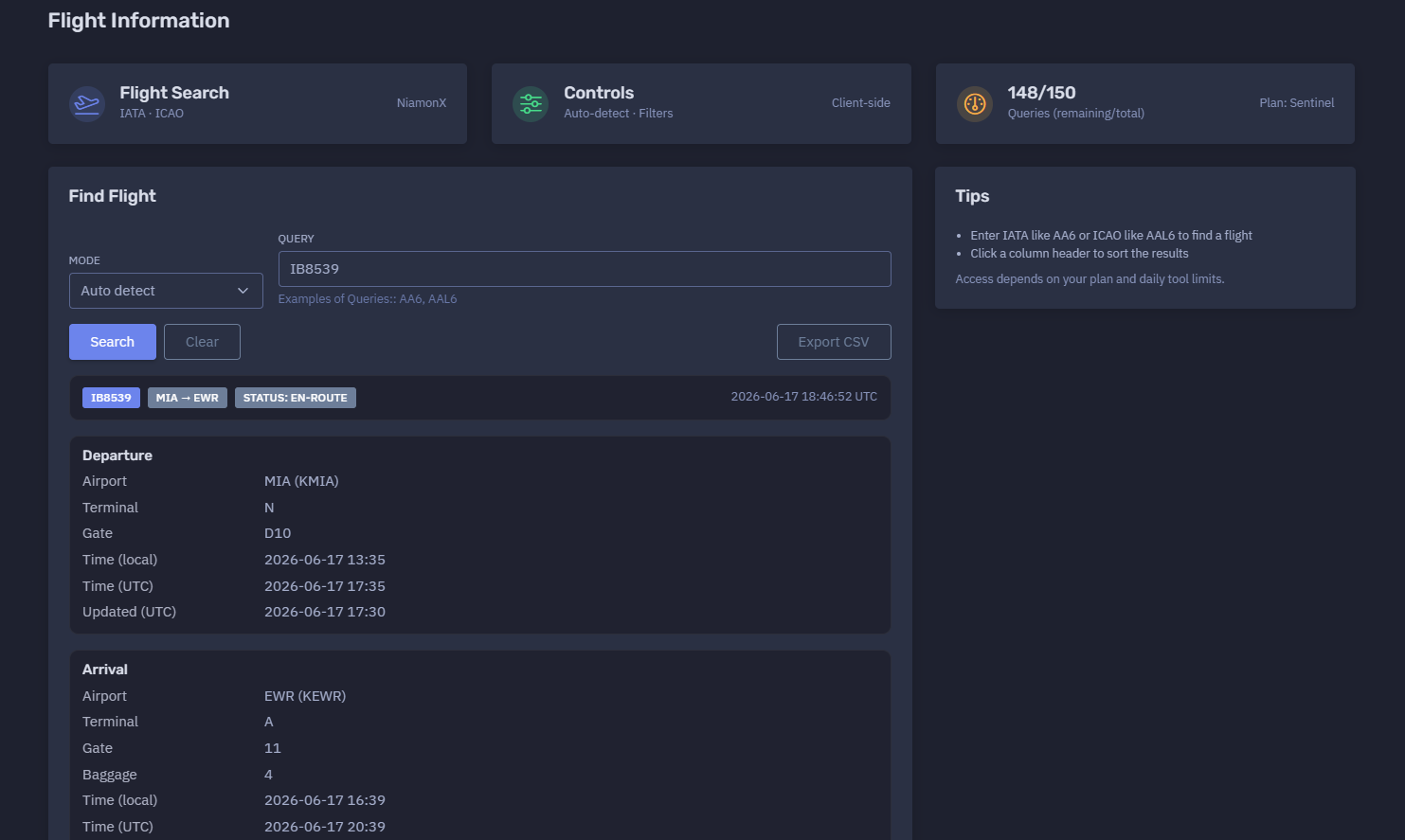
The platform available at https://dash.niamonx.io/flightinfo — known as Flight Information — is an aviation intelligence and flight lookup tool within the NiamonX platform. It allows users to search for flight information by IATA or ICAO flight number and receive a structured report with route, status, departure details, arrival details, aircraft data, telemetry fields, timestamps, and local browser-based request history.
Overview of the Service
Flight Information is designed to help users quickly check the current or recent status of a commercial or private flight using standard aviation flight identifiers.
The tool supports both IATA and ICAO flight number formats and can automatically detect the correct query mode. It returns a clean, structured flight summary that is useful for aviation monitoring, travel verification, logistics coordination, OSINT workflows, executive protection, airport operations review, and general flight status checks.
The interface is built to be simple and fast. A user enters a flight number, selects or keeps auto-detection mode, and receives a readable flight report containing departure and arrival airports, gates, terminals, scheduled or updated times, status, route, and available aircraft or telemetry fields.
Access depends on the user’s plan and daily tool limits.
🔍 How the Search Works
When a user enters a flight number, the tool checks the query using the selected mode.
Available modes include:
-
Auto detect
-
IATA
-
ICAO
In Auto detect mode, the system attempts to determine whether the entered value is an IATA-style or ICAO-style flight number.
Examples:
AA6
AAL6
The backend then returns available flight information and displays it in a structured format.
If the flight is found, the report may include:
-
Flight number
-
Route
-
Current status
-
Departure airport
-
Departure terminal
-
Departure gate
-
Departure local time
-
Departure UTC time
-
Departure update timestamp
-
Arrival airport
-
Arrival terminal
-
Arrival gate
-
Baggage belt
-
Arrival local time
-
Arrival UTC time
-
Arrival update timestamp
-
Aircraft registration
-
Aircraft type
-
Aircraft model
-
Aircraft manufacturer
-
Engine information
-
Build year and age
-
Aircraft HEX
-
MSN
-
Telemetry fields
-
Request history entry
🧩 What Can Be Searched
Flight Information is intended for flight number lookup.
Supported query types:
| Query Type | Example | Description |
|---|---|---|
| IATA flight number | AA6 |
Airline IATA code + flight number |
| ICAO flight number | AAL6 |
Airline ICAO code + flight number |
| Auto-detected flight number | IB8539 |
The system detects the likely mode |
The user should enter only the flight identifier.
Recommended input examples:
IB8539
SK2624
SAS2624
Unsupported input examples:
Miami to Newark
MIA EWR 17 June
https://example.com/flight/IB8539
American Airlines flight from Miami tomorrow
For best results, users should enter a clean IATA or ICAO flight number.
⚙️ Controls and Interface
The Flight Information interface includes several core sections.
Controls
The controls area shows search mode, filters, query limits, and client-side interface status.
Example indicators:
Auto-detect · Filters
Client-side
Query Counter
The query counter shows remaining and total daily requests.
Example:
148 / 150
Queries remaining / total
Plan: Sentinel
This helps users understand how many flight searches remain under the current plan.
Find Flight
The Find Flight section is the main search area.
It contains:
-
Mode selector
-
Query input
-
Example queries
-
Search action
Example:
Mode: Auto detect
Query: IB8539
📊 Flight Result Summary
After a successful lookup, the tool displays the flight route and status.
Example structure:
IB8539
MIA → EWR
Status: en-route
2026-06-17 18:46:52 UTC
The summary helps the user quickly understand:
-
Which flight was found
-
Origin and destination
-
Current flight status
-
Last report or lookup time
Common flight statuses may include:
-
Scheduled
-
En-route
-
Landed
-
Delayed
-
Cancelled
-
Unknown
-
Diverted
The exact statuses depend on the data returned by the backend source.
🛫 Departure Section
The Departure section contains information about the origin airport and departure event.
Possible fields include:
| Field | Description |
|---|---|
| Airport | Departure airport in IATA and ICAO format |
| Terminal | Departure terminal |
| Gate | Departure gate |
| Time local | Local departure time at the airport |
| Time UTC | Departure time converted to UTC |
| Updated UTC | Last update timestamp for departure data |
Example departure structure:
Airport: MIA (KMIA)
Terminal: N
Gate: D10
Time local: 2026-06-17 13:35
Time UTC: 2026-06-17 17:35
Updated UTC: 2026-06-17 17:30
This section is useful for confirming where the flight departed from, whether gate or terminal information is available, and whether departure timing has been updated.
🛬 Arrival Section
The Arrival section contains information about the destination airport and arrival event.
Possible fields include:
| Field | Description |
|---|---|
| Airport | Arrival airport in IATA and ICAO format |
| Terminal | Arrival terminal |
| Gate | Arrival gate |
| Baggage | Baggage belt or claim area |
| Time local | Local arrival time at the airport |
| Time UTC | Arrival time converted to UTC |
| Updated UTC | Last update timestamp for arrival data |
Example arrival structure:
Airport: EWR (KEWR)
Terminal: A
Gate: 11
Baggage: 4
Time local: 2026-06-17 16:39
Time UTC: 2026-06-17 20:39
Updated UTC: 2026-06-17 20:23
This section is especially useful for travel coordination, passenger pickup planning, logistics, and airport operations review.
✈️ Aircraft Section
The Aircraft section displays available aircraft-related information.
Possible fields include:
| Field | Description |
|---|---|
| Registration | Aircraft tail number or registration |
| ICAO Type | ICAO aircraft type code |
| Model | Aircraft model |
| Manufacturer | Aircraft manufacturer |
| Engines | Engine information |
| Built / Age | Build year and aircraft age |
| HEX | Aircraft Mode-S / ADS-B hex identifier |
| MSN | Manufacturer serial number |
Some fields may be unavailable depending on the data provider, flight type, aircraft tracking availability, or privacy restrictions.
If aircraft details are unavailable, the interface may show:
—
This means the field was not returned or could not be confirmed for the selected flight.
📡 Telemetry Section
The Telemetry section displays live or recent aircraft movement data when available.
Possible telemetry fields include:
| Field | Description |
|---|---|
| Position | Current or last known position |
| Heading | Direction of travel |
| Altitude | Current or last known altitude |
| Speed | Ground speed or reported speed |
| V-Speed | Vertical speed |
| Squawk | Transponder squawk code |
Telemetry availability can depend on:
-
Aircraft ADS-B visibility
-
Data provider support
-
Flight status
-
Privacy filtering
-
Regional coverage
-
Time since last update
-
Aircraft type
-
Military, private, or restricted flight settings
Telemetry should be treated as informational and may not always be real-time.
🧾 Result Table
The tool may also display a compact row-based result table.
A row may include:
-
Flight number
-
Route
-
Status
-
Departure UTC time
-
Arrival UTC time
-
Aircraft fields
-
Lookup timestamp
Example compact format:
IB8539 MIA → EWR en-route 2026-06-17 17:35 2026-06-17 20:39
The table can help users compare repeated lookups or scan recent results quickly.
Users can click a column header to sort results when sorting is available in the interface.
🕓 Request History
The Request History section stores recent searches locally in the user’s browser.
Example history behavior:
Stores last 100 queries in your browser.
History entries may include:
-
Search mode
-
Original query
-
Normalized flight number
-
Route
-
Lookup timestamp
-
Flight status
-
Result metadata
Example history item:
auto
IB8539
MIA → EWR
17.06.2026, 21:35:37
Request history is useful for quickly revisiting previous flight checks without retyping the flight number.
Because the history is stored in the browser, it may be cleared if the user deletes browser data, switches devices, or uses another browser profile.
🧠 Key Features
IATA and ICAO Search
The tool supports both common flight identifier formats.
Auto-Detection
Auto mode attempts to detect whether the query is IATA or ICAO.
Structured Flight Report
Results are displayed in a readable layout with departure, arrival, aircraft, and telemetry sections.
Local and UTC Times
The report shows both local airport time and UTC time when available.
Gate, Terminal, and Baggage Details
The tool can display airport operation details such as terminal, gate, and baggage claim.
Aircraft Details
When available, the report includes aircraft registration, type, model, manufacturer, engines, HEX, and MSN.
Telemetry Fields
The tool can display position, heading, altitude, speed, vertical speed, and squawk when available.
Client-Side Controls
Filtering and interface controls are handled client-side for a fast user experience.
Request History
The last 100 queries are stored locally in the browser.
Plan-Based Access
Daily query limits depend on the user’s plan.
🚦 Daily Queries and Plan Limits
Flight Information uses plan-based daily query limits.
Example:
148 / 150
Queries remaining / total
Plan: Sentinel
Limits help control usage, protect backend availability, and provide predictable access across user plans.
Users should monitor the remaining query counter when performing multiple searches.
🧭 IATA vs ICAO
Flight Information supports both IATA and ICAO flight identifiers.
IATA Flight Number
IATA flight numbers usually use a two-character airline code followed by a flight number.
Example:
AA6
ICAO Flight Number
ICAO flight numbers usually use a three-letter airline code followed by a flight number.
Example:
AAL6
Auto Detect
Auto-detect mode tries to determine the correct format automatically.
If the result seems incorrect or no flight is found, users can manually switch between IATA and ICAO mode.
🧠 Result Interpretation
Flight data should be interpreted carefully.
Important interpretation notes:
-
Flight status can change quickly.
-
Gate and terminal assignments may change before departure or arrival.
-
Arrival times may be estimated and updated during flight.
-
Aircraft information may be unavailable for some flights.
-
Telemetry may be delayed, missing, or privacy-filtered.
-
Local times are based on airport time zones.
-
UTC times are useful for cross-region comparison.
-
A missing field does not always mean the information does not exist; it may simply not be returned by the provider.
The tool is useful for fast lookup and monitoring, but critical operational decisions should be confirmed with the airline, airport, or official aviation data source when necessary.
✅ Recommended Workflow
A practical flight lookup workflow should follow these steps.
1. Enter the Flight Number
Use a clean IATA or ICAO flight number.
2. Start With Auto Detect
Use Auto detect first unless you already know the identifier type.
3. Review the Route
Confirm that the origin and destination match the expected flight.
4. Check the Status
Look for status such as scheduled, en-route, landed, delayed, or cancelled.
5. Review Departure Details
Check departure airport, terminal, gate, local time, UTC time, and update timestamp.
6. Review Arrival Details
Check arrival airport, terminal, gate, baggage belt, local time, UTC time, and update timestamp.
7. Check Aircraft and Telemetry
Use aircraft and telemetry fields when available, but remember that they may be incomplete.
8. Save or Reuse History
Use local request history to revisit previous queries.
9. Verify Critical Details
For time-sensitive travel, logistics, or operational decisions, confirm with official airline or airport sources.
🛡️ Security, Privacy & Responsible Use
Flight Information is intended for lawful aviation information lookup and operational awareness.
Acceptable use cases include:
-
Checking your own flight
-
Travel planning
-
Passenger pickup coordination
-
Logistics monitoring
-
Aviation OSINT
-
Airport operations review
-
Corporate travel monitoring
-
Incident response support
-
Executive protection workflows
-
Historical query review
Users should follow responsible use principles:
-
Do not use flight information for stalking, harassment, or physical harm.
-
Do not misuse aircraft or route data to target individuals.
-
Do not assume telemetry is perfectly live or complete.
-
Do not make safety-critical decisions from a single data point.
-
Verify important travel or operational details with official sources.
-
Treat local request history as potentially sensitive on shared devices.
⚙️ Technical Highlights
-
Flight lookup module
-
Available at
dash.niamonx.io/flightinfo -
Supports IATA flight numbers
-
Supports ICAO flight numbers
-
Auto-detect mode
-
Client-side controls and filters
-
Plan-based daily query limits
-
Structured flight report
-
Route display
-
Flight status display
-
Departure airport, terminal, gate, local time, UTC time, and update timestamp
-
Arrival airport, terminal, gate, baggage, local time, UTC time, and update timestamp
-
Aircraft registration, type, model, manufacturer, engines, build year, age, HEX, and MSN when available
-
Telemetry fields for position, heading, altitude, speed, vertical speed, and squawk when available
-
Sortable result table
-
Local browser request history
-
Stores last 100 queries in the browser
-
Suitable for travel, logistics, OSINT, corporate monitoring, and aviation awareness workflows
📌 Usage Hints
-
Enter IATA flight numbers like
AA6. -
Enter ICAO flight numbers like
AAL6. -
Use Auto detect when unsure.
-
If a result looks wrong, manually switch between IATA and ICAO mode.
-
Check both local and UTC times.
-
Review update timestamps to understand data freshness.
-
Gate, terminal, and baggage details can change.
-
Telemetry may be unavailable or delayed.
-
Click column headers to sort result tables when available.
-
Access depends on your plan and daily tool limits.
-
Request history is stored locally in the browser.
-
Clear browser data on shared devices if flight history is sensitive.
📬 Contact Information
For technical, legal, abuse, privacy, or support-related inquiries, users can contact the NiamonX team directly:
support@niamonx.io — Technical Support
other@niamonx.io — General Inquiries
takedown@niamonx.io — Privacy or Data Removal Requests
legal@niamonx.io — Legal and Compliance Matters
Alternative contact channel:
🔗 Helpdesk: https://support.niamonx.io/
Summary
NiamonX Flight Information is a flight lookup and aviation intelligence tool that allows users to search for flights by IATA or ICAO identifier and receive a structured report with route, status, departure details, arrival details, aircraft fields, telemetry fields, timestamps, and local request history.
The tool is designed for travel verification, logistics support, aviation OSINT, corporate monitoring, passenger coordination, and operational awareness. Results should be treated as informational and verified with official airline or airport sources for critical decisions.