
Public Breached ULP Search | Email / Username Leak Intelligence
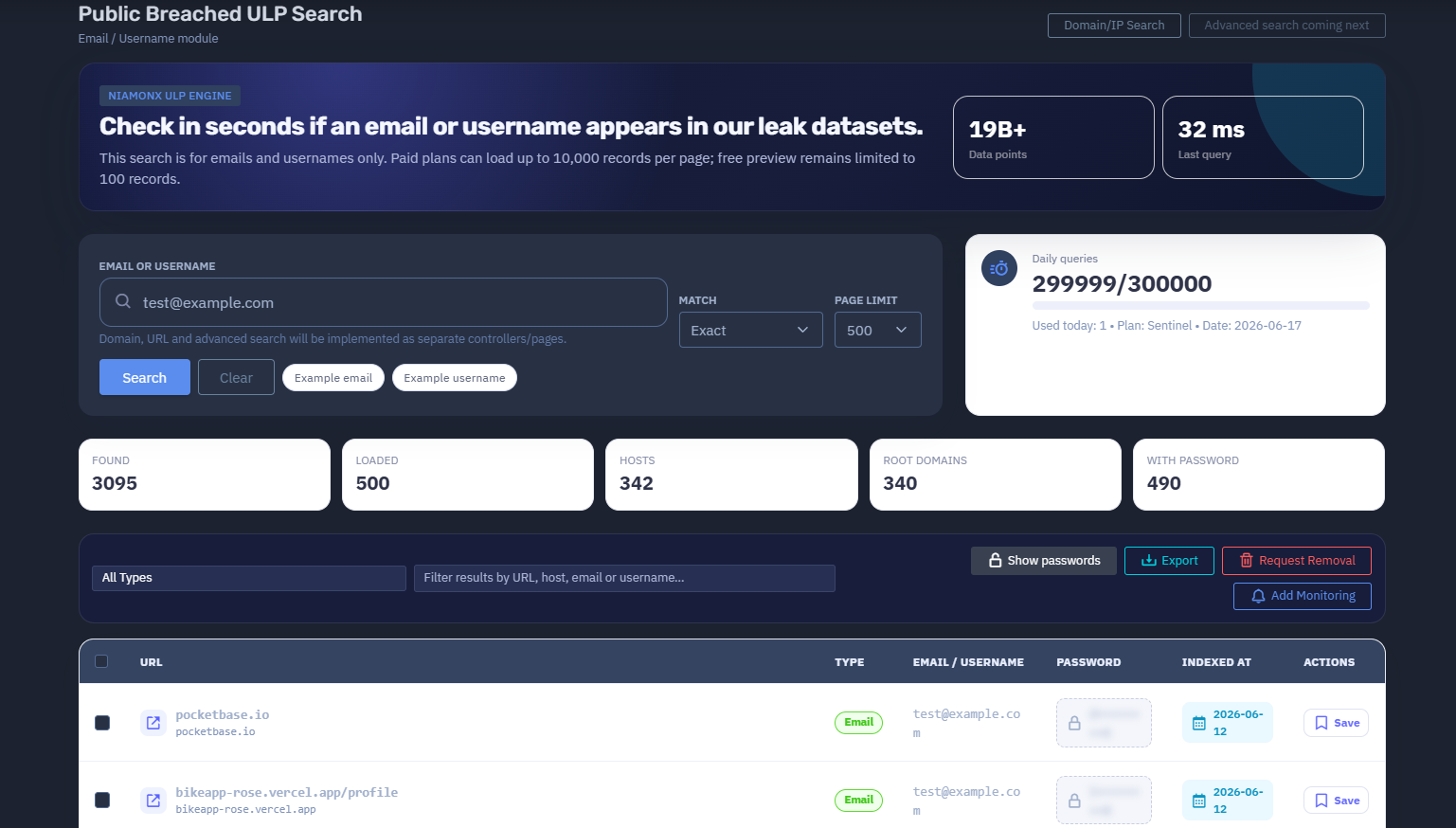
The platform available at dash.niamonx.io/ulp_account_search
Overview of the Service
Public Breached ULP Search is a dedicated NiamonX search module designed to check whether an email address or username appears in public leak datasets processed by the NiamonX ULP Engine.
The tool allows users to quickly verify exposure in large-scale public breach collections, with a focus on records related to emails, usernames, URLs, hosts, and associated credentials.
This module is specifically optimized for email and username lookups only. Domain search, URL search, and advanced search will be implemented separately through dedicated controllers and pages.
Public Breached ULP Search is intended for individuals, security analysts, SOC teams, compliance departments, and organizations that need to verify whether accounts, employees, or user identifiers have appeared in public leaked datasets.
🔍 How the Search Works
When a user enters an email address or username, the system performs a lookup through the NiamonX ULP Engine.
The search checks whether the submitted identifier appears in indexed public leak records. If matches are found, the system displays structured results containing related fields such as:
-
URL
-
Host
-
Email or username
-
Password
-
Indexed date
-
Record type
-
Available actions
The search is designed to return results in seconds and supports large result pages for paid plans.
Free preview access remains limited, while paid plans can load significantly more records per page.
🧩 What Can Be Searched
Public Breached ULP Search currently supports only two main identifier types:
-
Email address
-
Username
Examples:
test@example.org
username
This module does not support the following search types inside the current page:
-
Domain search
-
URL search
-
IP search
-
Phone search
-
Full name search
-
Password search
-
Composite queries
-
Advanced multi-field queries
These features may be available through separate NiamonX tools or future dedicated search pages.
⚙️ Search Interface
The interface contains several key search and filtering controls.
Email or Username
The main input field where the user enters an email address or username.
Example values:
-
test@example.org -
johnsmith -
company.employee -
security.user
Match Mode
The current matching mode is:
-
Exact
Exact matching helps reduce noise and ensures that results are directly related to the submitted email address or username.
Page Limit
The user can define how many records should be loaded per page.
Example:
Page limit: 500
Paid plans can load up to 10,000 records per page.
Free preview access remains limited to 100 records.
Example Email
A quick-fill example for testing email-based search.
Example Username
A quick-fill example for testing username-based search.
📊 Dataset Scale
Public Breached ULP Search is powered by the NiamonX ULP Engine and currently works with a large-scale leak intelligence index.
Main dataset indicator:
19B+ Data points
This means the system can check identifiers against more than 19 billion indexed data points related to public leak datasets.
The number may grow over time as new data is processed, cleaned, normalized, and indexed by the platform.
🧠 Key Features
Email and Username Search
The tool is focused specifically on checking whether an email or username appears in public leak datasets.
NiamonX ULP Engine
The module is powered by the internal NiamonX ULP Engine, which processes and indexes large-scale leak records for fast lookup.
Fast Lookup
Users can check exposure in seconds, depending on dataset size, search value, and current system load.
Exact Match Mode
Exact matching helps ensure that the returned records directly correspond to the searched identifier.
Large Page Limits for Paid Plans
Paid users can load up to 10,000 records per page, making the tool suitable for large-scale security investigations and enterprise workflows.
Free Preview Mode
Free preview access is limited to 100 records, allowing users to verify the presence of results before upgrading.
Structured Results Table
Search results are displayed in a structured table with fields such as URL, type, email or username, password, indexed date, and actions.
Password Visibility Control
Passwords are visible by default during a secured session and can be hidden with one click.
This allows analysts to verify exposure while still maintaining control over sensitive display fields.
Filtering System
Users can filter loaded results by:
-
URL
-
Host
-
Email
-
Username
-
Record type
Saved Records
Important records can be saved for later review and investigation.
Daily Query Limits
The tool displays daily query usage based on the user’s current plan.
Example:
Daily queries
300000 / 300000
Used today: 0
Plan: Sentinel
Date: 2026-06-17
📋 Results Table
After a successful search, results are displayed in a table.
Main columns include:
| Column | Description |
|---|---|
| URL | The URL connected to the leaked record |
| Type | The detected record type |
| Email / Username | The matched email address or username |
| Password | Associated password field, if available |
| Indexed at | Date or timestamp when the record was indexed |
| Actions | Available actions for the record |
If no search has been performed, the interface displays:
Run a search to see breach records.
No results loaded.
📈 Search Statistics
The interface provides quick summary indicators after a search.
Available statistics include:
Found
Shows the total number of matching records discovered.
Loaded
Shows the number of records currently loaded into the interface.
Hosts
Shows the number of unique hosts connected to the results.
Root Domains
Shows the number of unique root domains identified in the loaded records.
With Password
Shows how many matched records contain a password field.
These counters help users quickly understand the scope and severity of the exposure.
🔎 Filtering and Record Review
The tool includes a filtering field for quickly narrowing down results.
Users can filter by:
-
URL
-
Host
-
Email
-
Username
This is useful when a single email or username appears across many records and the analyst needs to focus on specific services, domains, or data types.
Example use cases:
-
Find all results from a specific host
-
Filter results related to one service
-
Check whether passwords are present
-
Identify repeated exposure across multiple websites
-
Review only records connected to corporate systems
🔐 Password Handling
Some records may include associated password fields.
In this secured session, passwords are visible by default and can be hidden with one click.
Users must handle password data carefully.
Passwords must only be used for defensive verification, account recovery, password reset decisions, or authorized security investigations.
Users must not:
-
Reuse leaked passwords
-
Attempt unauthorized account access
-
Share passwords publicly
-
Export passwords without authorization
-
Use leaked credentials for credential stuffing, phishing, fraud, or social engineering
Recommended defensive actions:
-
Reset exposed passwords immediately
-
Enable multi-factor authentication
-
Check whether the same password was reused elsewhere
-
Review account login history
-
Notify affected users where appropriate
-
Monitor for suspicious activity
🛡️ Security, Privacy & Ethics
Public Breached ULP Search is designed for lawful defensive cybersecurity work.
Acceptable use cases include:
-
Checking your own email or username
-
Verifying employee exposure with authorization
-
Investigating corporate account leaks
-
Supporting incident response
-
Performing compliance and security audits
-
Detecting credential reuse risks
-
Helping users secure compromised accounts
Users must follow strict ethical rules:
-
Search only identifiers you own or are authorized to investigate.
-
Do not use the tool to target, stalk, harass, or deanonymize people.
-
Do not use exposed credentials for unauthorized access.
-
Do not redistribute leaked personal data.
-
Do not publish passwords or private records.
-
Do not attempt to bypass platform limits or access controls.
-
Treat all results as sensitive security intelligence.
-
Validate findings before taking operational or legal action.
Abuse of the system may result in account restriction, suspension, or termination.
⚙️ Technical Highlights
-
Powered by NiamonX ULP Engine
-
Dedicated email and username search module
-
More than 19B+ indexed data points
-
Exact match search mode
-
Fast lookup in seconds
-
Paid plans support up to 10,000 records per page
-
Free preview limited to 100 records
-
Structured result table
-
URL, host, email, username, password, and indexing metadata
-
Result filtering by URL, host, email, or username
-
Password visibility toggle
-
Saved records
-
Daily query usage counter
-
Plan-based access limits
-
Separate future controllers for domain, URL, and advanced search
🚦 Plan Limits and Access
The module uses plan-based limits for daily queries and result loading.
Example plan information:
Daily queries: 300000 / 300000
Used today: 0
Plan: Sentinel
Date: 2026-06-17
Access differences may include:
| Access Level | Limitation |
|---|---|
| Free preview | Up to 100 records |
| Paid plans | Up to 10,000 records per page |
| Plan-based access | Daily query limits depend on subscription |
These limits help protect system stability, prevent abuse, and ensure fair access to large-scale breach intelligence.
📌 Usage Hints
-
Use this module only for emails and usernames.
-
Use exact values for the best results.
-
Do not enter domains or URLs in this module.
-
Use separate NiamonX tools for domain, URL, or advanced search.
-
Check the “Found” counter to understand total exposure.
-
Check “With password” to identify credential-related risk.
-
Use filters to narrow results by URL, host, email, or username.
-
Hide password fields when screen sharing or working in public environments.
-
Save important records for later investigation.
-
Treat all results as sensitive security data.
📬 Contact Information
For technical, legal, abuse, privacy, or takedown-related inquiries, users can contact the NiamonX team directly:
support@niamonx.io — Technical Support
other@niamonx.io — General Inquiries
takedown@niamonx.io — Data Removal / Privacy Takedown Requests
legal@niamonx.io — Legal and Compliance Matters
Alternative contact channel:
🔗 Helpdesk: https://support.niamonx.io/
Summary
NiamonX Public Breached ULP Search is a dedicated email and username leak intelligence module powered by the NiamonX ULP Engine.
It allows users to check in seconds whether an email address or username appears in large-scale public leak datasets containing more than 19 billion indexed data points.
The tool supports exact matching, structured results, password visibility control, filtering, saved records, plan-based daily query limits, and large page sizes for paid plans.
It is designed for lawful security checks, credential exposure validation, incident response, compliance reviews, and defensive cybersecurity investigations.