
Flight Delay | Real-Time Flight Delay Monitoring
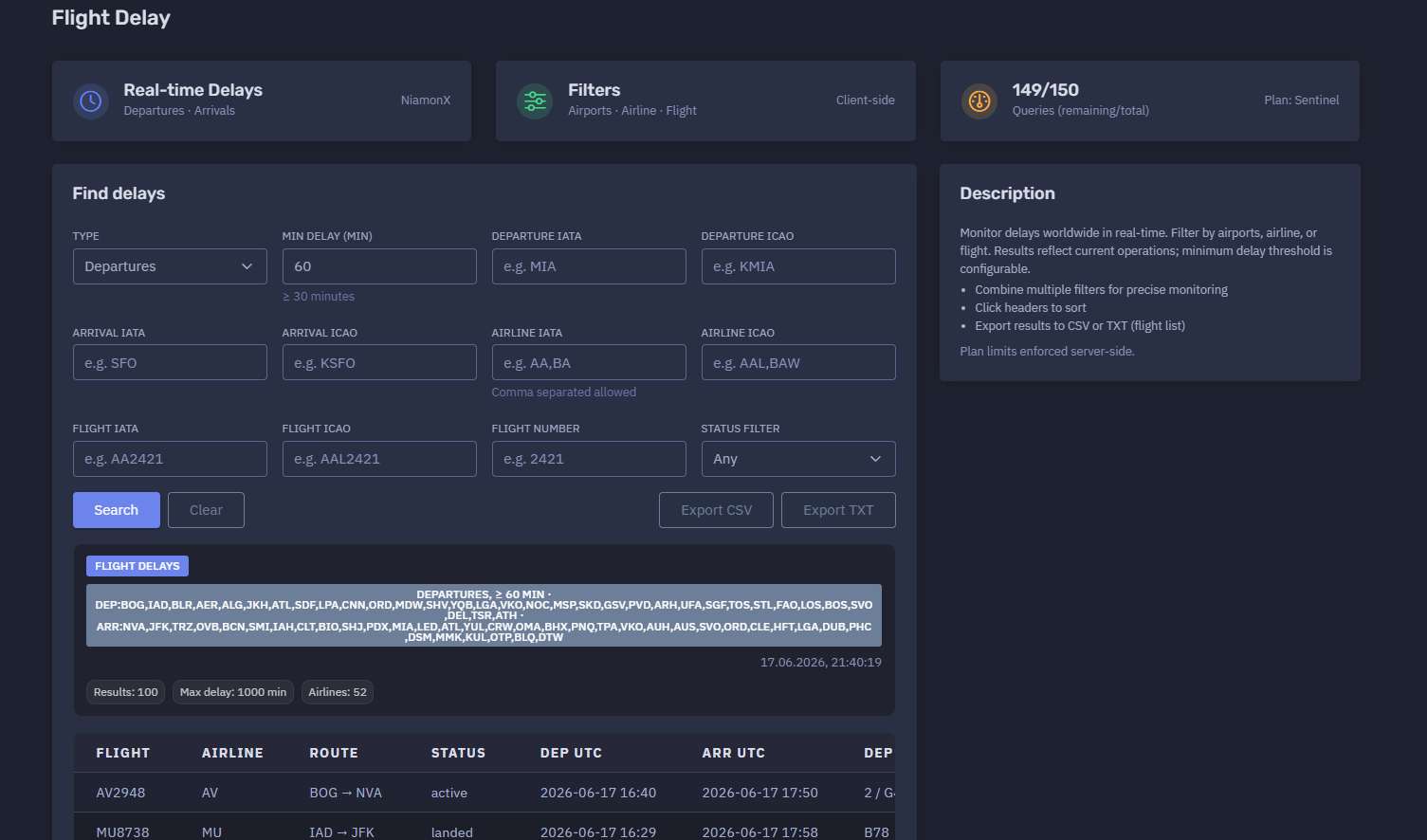
The platform available at https://dash.niamonx.io/flight_delay — known as Flight Delay — is a real-time aviation delay monitoring tool within the NiamonX platform. It allows users to track delayed departures and arrivals worldwide, filter results by airport, airline, flight number, status, and minimum delay threshold, and export delay intelligence for operational analysis.
Overview of the Service
Flight Delay is designed to help users monitor current flight disruptions in real time. The tool provides a structured view of delayed flights and allows users to focus on departures, arrivals, specific airports, airlines, routes, or individual flight numbers.
Unlike general flight search, which focuses on one flight, and flight schedules, which shows a broader airport queue, Flight Delay is optimized for disruption monitoring. It highlights flights affected by delay conditions and helps analysts quickly identify where operational problems are occurring.
The tool is useful for:
-
Airport operations monitoring
-
Airline disruption analysis
-
Passenger coordination
-
Logistics and cargo planning
-
Corporate travel monitoring
-
Aviation OSINT
-
Executive protection workflows
-
Incident response support
-
Travel risk monitoring
-
Delay trend analysis
Results reflect current operations and should be treated as operational intelligence that may change quickly.
🔍 How the Tool Works
The user selects whether they want to monitor Departures or Arrivals, sets a minimum delay threshold, and optionally adds filters such as airport, airline, flight number, or status.
The system then searches real-time delay data and returns matching flights in a structured table.
Example search configuration:
Type: Departures
Min delay: 60 minutes
Status: Any
The result table may include flights from many airports and airlines when no specific airport filter is applied. When airport, airline, or flight filters are added, the output becomes more focused.
The tool supports multi-criteria filtering, so users can combine several conditions for precise monitoring.
Example combinations:
Departures
Minimum delay: 60 minutes
Departure IATA: MIA
Airline IATA: AA
Arrivals
Minimum delay: 30 minutes
Arrival IATA: JFK
Status: active
Departures
Flight number: 2421
Minimum delay: 30 minutes
🧩 What Can Be Monitored
Flight Delay can monitor delayed flights using several types of filters.
Supported monitoring dimensions:
-
Departure delays
-
Arrival delays
-
Departure airport
-
Arrival airport
-
Airline
-
Flight IATA code
-
Flight ICAO code
-
Numeric flight number
-
Operational status
-
Minimum delay threshold
This allows users to monitor delays globally or narrow the view to a specific route, airline, airport, or flight.
⚙️ Filter Interface
The Flight Delay interface contains a set of filter controls.
Type
The user selects the delay type to monitor.
Available modes:
-
Departures
-
Arrivals
Departures focuses on delayed outbound flights.
Arrivals focuses on delayed inbound flights.
Min Delay
The minimum delay threshold determines which flights appear in the results.
Example:
Min delay: 60
This means only flights with a delay greater than or equal to 60 minutes should be returned.
The interface may also show quick helper text such as:
≥ 30 minutes
Common threshold examples:
| Threshold | Use Case |
|---|---|
| 15 minutes | Minor delay monitoring |
| 30 minutes | Standard disruption monitoring |
| 60 minutes | Significant delay monitoring |
| 90 minutes | Serious operational disruption |
| 120+ minutes | Major delay review |
A higher threshold produces fewer but more severe results.
Departure IATA
Filters results by departure airport using a three-letter IATA airport code.
Example:
MIA
Use this when monitoring delays for flights departing from a specific airport.
Departure ICAO
Filters results by departure airport using a four-letter ICAO airport code.
Example:
KMIA
ICAO codes are useful when IATA codes are ambiguous or when working with aviation-specific systems.
Arrival IATA
Filters results by arrival airport using a three-letter IATA airport code.
Example:
SFO
Use this when monitoring delayed flights arriving at a specific airport.
Arrival ICAO
Filters results by arrival airport using a four-letter ICAO airport code.
Example:
KSFO
Airline IATA
Filters results by airline using one or more IATA airline codes.
Example:
AA,BA
Comma-separated values are allowed, which makes it possible to monitor several airlines in one query.
Airline ICAO
Filters results by airline using one or more ICAO airline codes.
Example:
AAL,BAW
This is useful for aviation analysts who work with ICAO identifiers.
Flight IATA
Filters results by a full IATA-style flight code.
Example:
AA2421
Flight ICAO
Filters results by a full ICAO-style flight code.
Example:
AAL2421
Flight Number
Filters results by the numeric flight number only.
Example:
2421
This can be useful when the airline code is uncertain or when comparing codeshare flights.
Status Filter
Filters flights by operational status.
Default value:
Any
Possible status values may include:
-
Any
-
Active
-
Scheduled
-
Landed
-
Cancelled
-
Delayed
-
Unknown
The exact returned statuses depend on the backend aviation data source.
📊 Delay Results Summary
After a search is completed, the tool displays a summary of the returned delay data.
The summary may include:
-
Search type
-
Minimum delay threshold
-
Departure airports represented in the result set
-
Arrival airports represented in the result set
-
Query timestamp
-
Number of returned results
-
Maximum delay
-
Number of airlines
Example summary structure:
DEPARTURES, ≥ 60 min
Results: 100
Max delay: 1000 min
Airlines: 52
This summary helps users quickly understand the scale of current delays and whether the result set is broad or focused.
📋 Results Table
The results table displays delayed flights in a compact operational format.
Typical columns include:
| Column | Description |
|---|---|
| Flight | Flight code |
| Airline | Airline IATA code |
| Route | Departure and arrival airport |
| Status | Current operational status |
| Departure time | Scheduled or updated departure time |
| Arrival time | Scheduled or updated arrival time |
| Departure terminal / gate | Departure terminal and gate, if available |
| Arrival terminal / gate | Arrival terminal and gate, if available |
| Duration | Flight duration or scheduled travel time in minutes |
| Departure delay | Departure delay in minutes |
| Arrival delay | Arrival delay in minutes |
Example row format:
AA5395 AA SDF → CLT landed 2026-06-17 16:00 2026-06-17 17:37 B2 E43 102 102 95
The table is designed for fast scanning, sorting, and export.
🛫 Departure Delay Monitoring
When the type is set to Departures, the tool focuses on delayed outbound flights.
This mode is useful for:
-
Monitoring airport departure disruptions
-
Tracking delayed outbound routes
-
Checking departure gate impact
-
Identifying airlines with active delays
-
Reviewing large airport disruption events
-
Supporting passenger and crew coordination
-
Exporting delayed departure lists
Example use case:
Show all departures delayed by at least 60 minutes.
With additional filters:
Show all MIA departures delayed by at least 60 minutes.
🛬 Arrival Delay Monitoring
When the type is set to Arrivals, the tool focuses on delayed inbound flights.
This mode is useful for:
-
Passenger pickup planning
-
Airport arrival flow monitoring
-
Destination airport disruption analysis
-
Ground transport coordination
-
Hotel and transfer planning
-
Executive arrival monitoring
-
Cargo receiving workflows
Example use case:
Show all arrivals into JFK delayed by at least 30 minutes.
🏢 Airline Delay Filtering
The tool supports airline-based filtering using IATA or ICAO airline codes.
This is useful for identifying whether delays are concentrated around a specific carrier.
Example:
Airline IATA: AA,BA,DL
Airline filtering can help with:
-
Airline operations monitoring
-
Codeshare delay analysis
-
Corporate travel risk review
-
Carrier performance checks
-
Disruption response
-
Customer support workflows
✈️ Flight-Specific Delay Search
Users can filter by a specific flight using:
-
Flight IATA
-
Flight ICAO
-
Numeric flight number
Examples:
Flight IATA: AA2421
Flight ICAO: AAL2421
Flight number: 2421
This is useful when monitoring a particular flight that may be delayed, cancelled, or affected by operational changes.
⏱️ Delay Values
Delay values are shown in minutes.
The table may include several delay-related columns, depending on the returned data.
Common delay indicators:
| Delay Field | Meaning |
|---|---|
| Main delay | Overall delay value used for filtering |
| Departure delay | Delay affecting departure |
| Arrival delay | Delay affecting arrival |
For departures, the departure delay is usually most relevant.
For arrivals, the arrival delay is usually most relevant.
However, both values can be useful because a flight may depart late and recover some time en route, or depart with a small delay and arrive with a larger delay due to routing, congestion, weather, or holding patterns.
🚨 Max Delay
The summary may show a maximum delay value.
Example:
Max delay: 1000 min
This helps users quickly identify the severity of the largest delay in the current result set.
A very high delay value should be reviewed carefully because it may indicate:
-
Major operational disruption
-
Schedule rollover
-
Data-source anomaly
-
Cancelled or rescheduled service
-
Long ground delay
-
Airport disruption
-
Weather event
-
Regional traffic flow issue
For critical use, high-delay records should be validated with official airline or airport sources.
🧠 Key Features
Real-Time Delay Monitoring
The tool monitors current delayed flights and returns operationally relevant results.
Departures and Arrivals
Users can choose whether to focus on delayed departures or delayed arrivals.
Configurable Delay Threshold
Minimum delay can be adjusted to focus on minor, moderate, or severe disruptions.
Airport Filters
Users can filter by departure or arrival airport using IATA or ICAO codes.
Airline Filters
Users can filter by one or more airlines using comma-separated IATA or ICAO codes.
Flight Filters
Users can search by full IATA flight code, full ICAO flight code, or numeric flight number.
Status Filtering
Results can be filtered by operational status.
Sortable Table
Users can click table headers to sort results.
CSV Export
Results can be exported to CSV for structured analysis.
TXT Export
Flight lists can be exported to TXT for quick operational use.
Local Request History
Recent queries are stored locally in the browser.
Plan-Based Limits
Daily query limits are enforced server-side according to the user’s plan.
📤 Export Options
Flight Delay supports export for operational and analytical workflows.
CSV Export
CSV export is useful for:
-
Spreadsheet analysis
-
Delay reporting
-
Airline disruption review
-
Airport operations dashboards
-
Logistics documentation
-
Incident response records
-
Corporate travel reporting
TXT Export
TXT export is useful when users need a plain list of delayed flight numbers.
Possible use cases:
-
Watchlists
-
Batch checks
-
Quick sharing with operations teams
-
Copying into other aviation tools
-
Internal notifications
Exported delay data may contain operationally sensitive travel information and should be stored appropriately.
🕓 Request History
The Request History section stores recent delay searches locally in the browser.
Example behavior:
Stores last 100 queries in your browser.
History entries may include:
-
Search type
-
Route filters
-
Delay threshold
-
Airline filter
-
Flight filter
-
Query timestamp
Example history format:
DEPARTURES
— → —
≥ 60 min
Airline: any
Flight: any
17.06.2026, 21:40:19
Local history helps users repeat common monitoring queries quickly.
Because it is browser-local, history may be cleared by deleting browser data or using another device.
🚦 Query Limits and Plan Access
Flight Delay uses plan-based query limits.
Example:
149 / 150
Queries remaining / total
Plan: Sentinel
Important points:
-
Access depends on the user’s plan.
-
Daily tool limits are enforced server-side.
-
The user should monitor remaining query count during repeated searches.
-
Exporting already loaded results is separate from running new delay queries.
🧭 IATA and ICAO Reference
The tool supports both IATA and ICAO identifiers.
Airport IATA
Three-letter airport code.
Examples:
MIA
JFK
SFO
Airport ICAO
Four-letter airport code.
Examples:
KMIA
KJFK
KSFO
Airline IATA
Two-character airline code.
Examples:
AA
BA
DL
Airline ICAO
Three-letter airline code.
Examples:
AAL
BAW
DAL
Flight IATA
IATA airline code plus flight number.
Example:
AA2421
Flight ICAO
ICAO airline code plus flight number.
Example:
AAL2421
Using the correct identifier type improves result accuracy.
🧠 Result Interpretation
Flight delay data should be interpreted carefully because flight operations change quickly.
Important interpretation rules:
-
A delay value can change as the flight status updates.
-
A landed flight may still appear if it met the delay threshold.
-
Active flights can recover time en route.
-
Scheduled flights may show expected delay before departure.
-
Codeshare flights may appear as separate rows with identical times and routes.
-
A missing terminal or gate does not always mean the information is unavailable at the airport; it may simply not be returned.
-
Very high delay values should be validated.
-
Status and delay fields may differ depending on provider logic.
-
Operational decisions should be confirmed with official airline or airport sources.
The tool is designed for monitoring and analysis, not as a single source of truth for safety-critical decisions.
✅ Recommended Monitoring Workflow
A practical delay monitoring workflow should follow these steps.
1. Select Delay Type
Choose Departures or Arrivals depending on the monitoring objective.
2. Set Minimum Delay
Use 30 minutes for general disruption monitoring or 60+ minutes for more serious delay analysis.
3. Add Airport Filters
Use departure or arrival IATA / ICAO codes to focus on a specific airport.
4. Add Airline Filters
Use airline filters to monitor one or more carriers.
5. Add Flight Filters When Needed
Use full flight codes or numeric flight number for a specific flight.
6. Review Summary
Check result count, maximum delay, airlines, and route spread.
7. Sort the Table
Sort by delay, departure time, arrival time, route, airline, or status.
8. Identify Codeshares
Look for identical routes, times, and delays under different flight numbers.
9. Export Results
Use CSV for structured analysis or TXT for simple flight lists.
10. Verify Critical Cases
Confirm severe delays, cancellations, and passenger-impacting events with official sources.
🛡️ Security, Privacy & Responsible Use
Flight Delay is intended for lawful aviation monitoring and operational awareness.
Acceptable use cases include:
-
Monitoring delayed departures
-
Monitoring delayed arrivals
-
Airport disruption analysis
-
Airline delay tracking
-
Travel coordination
-
Passenger pickup planning
-
Logistics and cargo planning
-
Corporate travel monitoring
-
Aviation OSINT
-
Executive protection workflows
-
Incident response support
-
Operational reporting
Users should follow responsible use principles:
-
Do not use delay information for stalking, harassment, or physical harm.
-
Do not misuse flight data to target individuals.
-
Do not assume delay data is perfectly real-time or complete.
-
Do not make safety-critical decisions based only on one source.
-
Verify important travel and operational details with official sources.
-
Treat local request history as potentially sensitive on shared devices.
-
Use exports responsibly and store them securely when they contain operationally sensitive information.
⚙️ Technical Highlights
-
Real-time flight delay monitoring
-
Available at
dash.niamonx.io/flight_delay -
Supports departure delay monitoring
-
Supports arrival delay monitoring
-
Configurable minimum delay threshold
-
Airport filters by IATA and ICAO
-
Airline filters by IATA and ICAO
-
Comma-separated airline filtering
-
Flight filters by IATA, ICAO, and numeric flight number
-
Status filtering
-
Client-side filters and controls
-
Sortable result table
-
CSV export
-
TXT export for flight lists
-
Local browser request history
-
Stores last 100 queries in the browser
-
Plan-based query limits
-
Server-side limit enforcement
-
Suitable for aviation monitoring, travel coordination, logistics, OSINT, and operational awareness
📌 Usage Hints
-
Select Departures to monitor outbound delays.
-
Select Arrivals to monitor inbound delays.
-
Use 30 minutes for general delay monitoring.
-
Use 60 minutes or more for significant disruption tracking.
-
Use airport IATA codes such as
MIA,JFK, orSFO. -
Use airport ICAO codes such as
KMIA,KJFK, orKSFO. -
Use comma-separated airline codes to monitor several airlines.
-
Use flight IATA or ICAO for exact flight tracking.
-
Use the numeric flight number when the airline code is uncertain.
-
Click table headers to sort results.
-
Export CSV for analysis.
-
Export TXT for flight lists.
-
Confirm critical delay data with official airline or airport sources.
-
Access depends on your plan and daily tool limits.
-
Local request history stores the last 100 queries in your browser.
📬 Contact Information
For technical, legal, abuse, privacy, or support-related inquiries, users can contact the NiamonX team directly:
support@niamonx.io — Technical Support
other@niamonx.io — General Inquiries
takedown@niamonx.io — Privacy or Data Removal Requests
legal@niamonx.io — Legal and Compliance Matters
Alternative contact channel:
🔗 Helpdesk: https://support.niamonx.io/
Summary
NiamonX Flight Delay is a real-time delay monitoring tool for tracking delayed departures and arrivals worldwide.
It supports configurable minimum delay thresholds, airport filters, airline filters, flight filters, status filtering, sortable tables, CSV export, TXT flight-list export, local browser history, and plan-based query limits.
The tool is designed for aviation operations, travel coordination, airport disruption monitoring, logistics, corporate travel visibility, aviation OSINT, and incident response support. Results should be treated as current operational intelligence and verified with official airline or airport sources for critical decisions.