URL Shortener | Custom Short Link Creation Tool
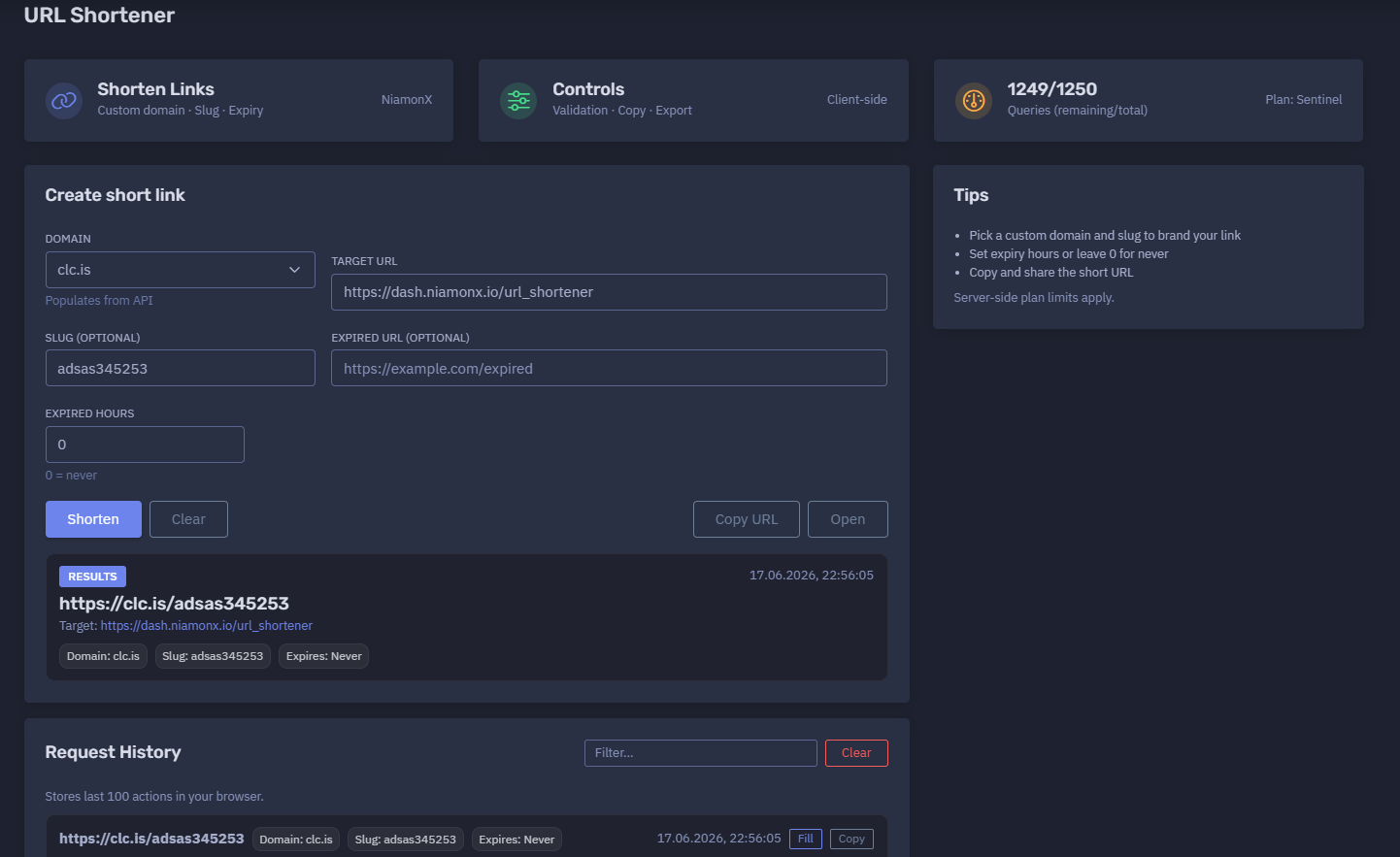
The platform available at https://dash.niamonx.io/url_shortener — known as URL Shortener — is a short link creation tool within the NiamonX platform. It allows users to create branded short URLs using available custom domains, optional custom slugs, optional expiration settings, and an optional expired redirect URL.
The tool is designed for fast and controlled link shortening, link branding, sharing, campaign routing, documentation links, support links, internal workflows, and security-aware URL management.
Overview of the Service
URL Shortener helps users convert long URLs into shorter, cleaner, and easier-to-share links. Instead of sending long dashboard URLs, documentation URLs, campaign links, or support links, users can generate compact short URLs using available NiamonX-connected domains.
The tool supports:
-
custom short link domains;
-
custom slugs;
-
target URL validation;
-
optional expired redirect URL;
-
optional expiration time in hours;
-
copy-friendly short links;
-
local request history;
-
plan-based query limits;
-
client-side controls;
-
export and reuse workflows.
Example generated link:
https://clc.is/adsas345253
Example target URL:
https://dash.niamonx.io/url_shortener
This makes the module useful for support teams, analysts, developers, marketing teams, internal documentation, OSINT workflows, SOC teams, customer communication, and controlled temporary link sharing.
🔍 How the Tool Works
The user selects a short link domain, enters the target URL, optionally defines a custom slug, optionally sets an expired URL, and optionally configures expiration hours.
The tool then creates a short URL that redirects users to the specified target destination.
Example configuration:
Domain: clc.is
Target URL: https://dash.niamonx.io/url_shortener
Slug: adsas345253
Expired URL: https://example.com/expired
Expired hours: 0
Example result:
https://clc.is/adsas345253
Target: https://dash.niamonx.io/url_shortener
Domain: clc.is
Slug: adsas345253
Expires: Never
17.06.2026, 22:56:05
If expiration is set to 0, the short link does not expire.
Example:
Expired hours: 0
0 = never
🧩 Main Use Cases
URL Shortener can be used for many link management workflows.
Common use cases include:
-
creating short links for dashboards;
-
sharing long URLs in a compact format;
-
creating branded support links;
-
creating temporary links;
-
routing expired links to a fallback page;
-
simplifying links for documentation;
-
sharing tools inside reports;
-
creating easy-to-read links for presentations;
-
tracking internal link creation history locally;
-
preparing links for customer support or analyst workflows.
Example:
Long URL:
https://dash.niamonx.io/url_shortener

Short URL:
https://clc.is/adsas345253
⚙️ Create Short Link
The main panel is used to create a new short URL.
Main fields include:
-
Domain
-
Target URL
-
Slug
-
Expired URL
-
Expired hours
Example interface section:
Create short link
Domain: clc.is
Target URL: https://dash.niamonx.io/url_shortener
Slug: adsas345253
Expired URL: https://example.com/expired
Expired hours: 0
After submission, the tool displays the generated short link and its configuration.
🌐 Domain
The Domain field controls which short domain will be used.
Example:
Domain: clc.is
The available domains are populated from the API.
Interface note:
Populates from API
Possible examples:
clc.is
clc.cx
The selected domain becomes the base of the short link.
Example:
https://clc.is/adsas345253
Domain selection is useful for:
-
branding links;
-
separating use cases;
-
choosing a shorter domain;
-
creating campaign-specific links;
-
organizing links by project;
-
using trusted short domains for internal workflows.
🔗 Target URL
The Target URL is the destination where users will be redirected when they open the short link.
Example:
https://dash.niamonx.io/url_shortener
The target should be a complete URL with protocol.
Recommended format:
https://example.com/page
Valid examples:
https://dash.niamonx.io/url_shortener
https://dash.niamonx.io/webscreen
https://support.niamonx.io/
Invalid or incomplete examples:
dash.niamonx.io/url_shortener
www.example.com/page
example.com
localhost
For reliable redirection, users should always include:
https://
or:
http://
🏷️ Slug
The Slug field defines the custom path part of the short link.
Example:
Slug: adsas345253
Generated short URL:
https://clc.is/adsas345253
The slug is optional.
If the user leaves the slug empty, the system may generate or assign a slug automatically, depending on backend behavior.
Example with a custom slug:
https://clc.is/url_shortener
Example with another custom slug:
https://clc.cx/petux
A slug can be useful for:
-
branded links;
-
memorable links;
-
campaign naming;
-
tool shortcuts;
-
documentation references;
-
support links;
-
internal workflow shortcuts.
Good slug examples:
webscreen
url_shortener
support-guide
case-2026-001
Less recommended slug examples:
444444444444444444444444444444
-
adsas345253
Although technical slugs may work, descriptive slugs are easier to manage, trust, and remember.
⏳ Expired URL
The Expired URL field defines where users should be redirected after the short link expires.
Example:
Expired URL: https://example.com/expired
This is optional.
Use cases for an expired URL:
-
redirect users to an expired campaign page;
-
send users to a support article;
-
show a deactivation notice;
-
redirect to a new landing page;
-
route old links to a safe fallback page;
-
prevent broken user experience after expiration.
Example behavior:
Before expiration:
https://clc.is/adsas345253 → https://dash.niamonx.io/url_shortener

After expiration:
https://clc.is/adsas345253 → https://example.com/expired
If no expired URL is provided, backend behavior may depend on platform configuration.
For best user experience, users should provide a clear expired destination when creating temporary links.
🕓 Expired Hours
The Expired hours field controls how long the short link remains active.
Example:
Expired hours: 0
Special value:
0 = never
This means the link does not expire.
Example:
Expires: Never
A non-zero value creates a temporary short link.
Example:
Expired hours: 1
This means the link expires after one hour.
Temporary links are useful for:
-
limited-time access;
-
short campaigns;
-
expiring support links;
-
temporary documentation access;
-
incident response sharing;
-
controlled internal workflows;
-
test links;
-
demo links.
Recommended expiration settings:
| Use Case | Suggested Expiry |
|---|---|
| Permanent documentation shortcut | 0 |
| Temporary support link | 1–24 hours |
| Campaign link | Based on campaign duration |
| Incident response link | 1–72 hours |
| Internal test link | 1–24 hours |
| Demo or training link | 24–168 hours |
| Long-term branded shortcut | 0 |
✅ Results Section
After successful creation, the Results section displays the generated short link and metadata.
Example:
17.06.2026, 22:56:05
https://clc.is/adsas345253
Target: https://dash.niamonx.io/url_shortener
Domain: clc.is
Slug: adsas345253
Expires: Never
Typical result fields include:
| Field | Description |
|---|---|
| Timestamp | Date and time when the short link was created |
| Short URL | The generated short link |
| Target | Destination URL |
| Domain | Selected short domain |
| Slug | Custom or generated slug |
| Expires | Expiration status |
The Results section is useful for quickly copying the generated link and verifying that it points to the correct destination.
📋 Request History
URL Shortener stores recent actions locally in the user’s browser.
Example interface note:
Request History
Filter...
Stores last 100 actions in your browser.
Example history item:
https://clc.is/adsas345253
Domain: clc.is
Slug: adsas345253
Expires: Never
17.06.2026, 22:56:05
Target: https://dash.niamonx.io/url_shortener
The request history helps users:
-
reuse recently created links;
-
check the target of a previous link;
-
copy a short URL again;
-
review slug and domain choices;
-
filter previous actions;
-
confirm expiration settings;
-
continue link management workflows.
Because the history is stored locally in the browser, it may be removed when users clear browser data, switch devices, use a different browser profile, or use private browsing mode.
🚦 Query Limits and Plan Access
URL Shortener uses plan-based query limits.
Example:
1249 / 1250
Queries remaining / total
Plan: Sentinel
Important points:
-
Each short link creation request may consume plan quota.
-
Limits depend on the user’s active plan.
-
Server-side plan limits apply.
-
If the limit is reached, new link creation may be blocked.
-
The interface may keep previous results visible even if a new request fails.
-
Users should monitor remaining queries when creating many links.
Example interface note:
Server-side plan limits apply.
Plan limits help control resource usage and prevent abuse.
🧠 Key Features
Custom Domain Selection
Users can choose from available short link domains provided by the API.
Custom Slug Support
Users can define their own slug for branded, readable, or workflow-specific links.
Target URL Validation
The tool validates the destination URL to reduce invalid or malformed link creation.
Optional Expiration
Users can configure links to expire after a specified number of hours.
Never-Expire Mode
Setting expiration hours to 0 creates a non-expiring link.
Expired Redirect URL
Users can define a fallback destination for expired links.
Copy-Friendly Results
Generated short URLs are displayed clearly for easy copying and sharing.
Local Request History
The tool stores the last 100 actions locally in the browser.
Filtering History
Users can filter request history to find previous links.
Plan-Based Limits
Short link creation is controlled by the user’s active plan.
Client-Side Controls
The interface provides validation, copy, and export-oriented controls on the client side.
🔎 Common Use Cases
Branded Short Links
Create short links using selected custom domains for cleaner and more recognizable sharing.
Example:
https://clc.is/webscreen
Dashboard Shortcuts
Create compact links to NiamonX tools or internal dashboard pages.
Example:
Target: https://dash.niamonx.io/webscreen
Slug: webscreen
Support Links
Create short links for support tickets, helpdesk responses, troubleshooting guides, or customer instructions.
Documentation Links
Create readable shortcuts for long documentation URLs.
Temporary Access Links
Use expiration hours to create time-limited links.
Example:
Expires: 1 h
Campaign or Announcement Links
Use custom slugs to create memorable campaign or announcement URLs.
Incident Response Sharing
Create controlled short links for reports, evidence packages, or internal incident documentation.
Training and Demo Links
Create short, easy-to-type links for presentations, workshops, and training sessions.
Link Routing After Expiry
Use expired URLs to send users to a fallback page after a campaign or temporary workflow ends.
🧾 Example Configurations
Permanent Short Link
Domain: clc.is
Target URL: https://dash.niamonx.io/url_shortener
Slug: url_shortener
Expired URL: —
Expired hours: 0
Result:
https://clc.is/url_shortener
Expires: Never
Best for:
-
stable documentation links;
-
internal tool shortcuts;
-
dashboards;
-
reusable references.
Temporary Short Link
Domain: clc.cx
Target URL: https://dash.niamonx.io/url_shortener
Slug: demo-link
Expired URL: https://example.com/expired
Expired hours: 1
Result behavior:
Active for: 1 hour
After expiry: redirects to https://example.com/expired
Best for:
-
demos;
-
temporary support;
-
time-limited sharing;
-
controlled campaigns;
-
short-lived internal workflows.
Tool Shortcut Link
Domain: clc.is
Target URL: https://dash.niamonx.io/webscreen
Slug: webscreen
Expired hours: 0
Result:
https://clc.is/webscreen
Best for:
-
easy tool access;
-
documentation;
-
team shortcuts;
-
presentations;
-
internal onboarding.
Automatically Assigned Slug
Domain: clc.is
Target URL: https://dash.niamonx.io/url_shortener
Slug: —
Expired hours: 0
Possible result:
(created)
Domain: clc.is
Slug: —
Expires: Never
Backend behavior may assign a slug automatically depending on platform configuration.
🧠 Recommended Workflow
A practical URL Shortener workflow should follow these steps.
1. Select a Domain
Choose the short link domain that should be used.
Example:
clc.is
Use a domain that matches the purpose of the link, brand, or workflow.
2. Enter the Target URL
Paste the full destination URL.
Example:
https://dash.niamonx.io/url_shortener
Make sure the URL includes https:// or http://.
3. Choose a Slug
Enter a custom slug if a readable or branded link is needed.
Example:
url_shortener
Leave it empty if automatic slug generation is preferred.
4. Configure Expiry
Set expiration hours.
Example for no expiration:
Expired hours: 0
Example for a temporary link:
Expired hours: 24
5. Add an Expired URL if Needed
For temporary links, add a fallback URL.
Example:
https://example.com/expired
This improves user experience after the link expires.
6. Create the Short Link
Submit the form and wait for the result.
Example result:
https://clc.is/adsas345253
7. Verify the Result
Check:
Target URL
Domain
Slug
Expiration
Timestamp
Make sure the link points to the intended destination before sharing it.
8. Copy and Share the Link
Copy the generated short URL and share it through the intended channel.
Examples:
-
support ticket;
-
documentation;
-
chat;
-
e-mail;
-
report;
-
presentation;
-
internal wiki;
-
campaign message.
9. Review Local History if Needed
Use request history to find recently created links.
Example:
Filter...
This is useful when the short link was created earlier in the same browser.
🔐 Security Considerations
Short links are convenient, but they should be used carefully.
Important security points:
-
Short links hide the final destination from the visible URL.
-
Users may be cautious when clicking unknown short links.
-
Sensitive target URLs should not be shortened unless necessary.
-
Links to private dashboards should be shared only with authorized users.
-
Expiration should be used for temporary or sensitive workflows.
-
Expired URLs should point to a safe and controlled page.
-
Slugs should not reveal secrets, tokens, credentials, or private case details.
-
Local history may expose previously created links.
-
Shared devices should not retain sensitive link history.
-
Custom slugs may be guessable if they use simple words.
-
Non-expiring links should be reviewed periodically.
Do not place sensitive information directly inside slugs.
Bad examples:
customer-password-reset-token
case-secret-token-123
private-client-incident-admin
Better examples:
case-2026-001
support-guide
webscreen
🛡️ Responsible Use
URL Shortener is intended for legitimate link management, support, documentation, internal workflow, campaign routing, and controlled sharing.
Acceptable use cases include:
-
shortening your own links;
-
creating branded support links;
-
sharing internal documentation;
-
creating temporary links;
-
routing expired links to safe fallback pages;
-
simplifying dashboard URLs;
-
preparing links for reports or presentations;
-
creating team shortcuts;
-
creating customer support references.
Users should follow responsible use principles:
-
Do not use short links for phishing.
-
Do not hide malicious destinations.
-
Do not impersonate trusted services.
-
Do not create misleading slugs.
-
Do not use short links to distribute malware.
-
Do not use the tool for spam campaigns.
-
Do not shorten URLs containing exposed secrets or tokens.
-
Do not share private links with unauthorized users.
-
Use expiration for temporary or sensitive links.
-
Use clear, trustworthy slugs where appropriate.
Short links should make access easier, not deceptive.
📊 Interpreting Results Correctly
A generated short link should be interpreted as a redirect object.
Important notes:
-
The short URL is not the same as the target URL.
-
The short URL redirects to the configured target.
-
The selected domain controls the visible short link base.
-
The slug controls the path of the short link.
-
Expiration controls how long the link remains active.
-
0expiration means the link does not expire. -
The expired URL is used only after expiration, when configured.
-
Local history is browser-side and may not reflect server-side link state.
-
Deleting browser history does not necessarily delete the created server-side short link.
-
Plan limits apply to link creation requests.
-
Users should verify generated links before sharing.
📋 Recommended Link Naming Guidelines
Good slugs should be:
-
readable;
-
short;
-
relevant;
-
non-sensitive;
-
easy to type;
-
easy to recognize;
-
appropriate for the audience;
-
not misleading.
Good examples:
webscreen
url-shortener
support
docs
incident-guide
Avoid slugs that are:
-
too long;
-
random without purpose;
-
offensive;
-
misleading;
-
secret-bearing;
-
impersonating another brand;
-
likely to be guessed when privacy matters.
🧾 Recommended Reporting Format
When documenting created short links, use a consistent format.
Example:
Created: 17.06.2026, 22:56:05
Short URL: https://clc.is/adsas345253
Target URL: https://dash.niamonx.io/url_shortener
Domain: clc.is
Slug: adsas345253
Expires: Never
Expired URL: https://example.com/expired
Plan: Sentinel
For temporary links, document the expiration:
Short URL: https://clc.cx/demo-link
Target URL: https://dash.niamonx.io/url_shortener
Expires: 1 hour
Expired URL: https://example.com/expired
Purpose: temporary demo link
For internal security workflows, also document:
Owner
Purpose
Creation time
Expected audience
Expiration policy
Review date
🧹 Managing Local History
The local request history stores the last 100 actions in the browser.
Example:
Stores last 100 actions in your browser.
Recommended practices:
-
filter history to find recent links;
-
copy previously created short links when needed;
-
clear history on shared devices;
-
avoid creating sensitive links on untrusted browsers;
-
do not rely on local history as the only record of important links;
-
document important links separately in official systems.
Local history is a convenience feature, not a full link management database.
⚙️ Technical Highlights
-
URL shortening tool
-
Available at
dash.niamonx.io/url_shortener -
Creates short links
-
Supports custom short domains
-
Domains populate from API
-
Supports custom slugs
-
Supports target URL validation
-
Supports optional expired URL
-
Supports expiration in hours
-
Supports never-expire mode with
0 -
Shows generated short URL
-
Shows target URL
-
Shows selected domain
-
Shows selected slug
-
Shows expiration status
-
Shows creation timestamp
-
Supports copy-friendly output
-
Stores request history locally
-
Keeps last 100 actions in the browser
-
Supports history filtering
-
Uses plan-based query limits
-
Server-side plan limits apply
-
Suitable for branded links, support links, documentation links, dashboards, temporary sharing, reports, and internal workflows
📌 Usage Hints
-
Pick a custom domain and slug to brand your link.
-
Use a complete target URL with
https://orhttp://. -
Keep slugs short and readable.
-
Do not put secrets or private data in slugs.
-
Set expiry hours for temporary links.
-
Use
0when the link should never expire. -
Add an expired URL for time-limited links.
-
Copy and test the short URL before sharing.
-
Use descriptive slugs for documentation and support links.
-
Use non-guessable slugs for sensitive workflows.
-
Monitor remaining plan queries.
-
Remember that server-side plan limits apply.
-
Use request history to find recently created links.
-
Clear browser history on shared or untrusted devices.
-
Treat short links as redirects and verify the destination before distribution.
📬 Contact Information
For technical, legal, abuse, privacy, or support-related inquiries, users can contact the NiamonX team directly:
support@niamonx.io — Technical Support
other@niamonx.io — General Inquiries
takedown@niamonx.io — Privacy or Data Removal Requests
legal@niamonx.io — Legal and Compliance Matters
Alternative contact channel:
🔗 Helpdesk: https://support.niamonx.io/
Summary
NiamonX URL Shortener is a custom short link creation tool for generating compact redirect URLs. It supports API-provided short domains, custom slugs, target URL validation, optional expired URLs, expiration in hours, never-expire mode, copy-friendly results, local request history, filtering, and plan-based query limits.
The tool is designed for branded short links, support workflows, documentation shortcuts, dashboard links, temporary sharing, campaign routing, internal communication, reports, and presentations. Users should choose clear slugs, verify target URLs before sharing, use expiration for temporary or sensitive workflows, and avoid placing secrets or private information in short links.