Subdomains Extended | Subdomain Discovery & DNS Inventory Tool
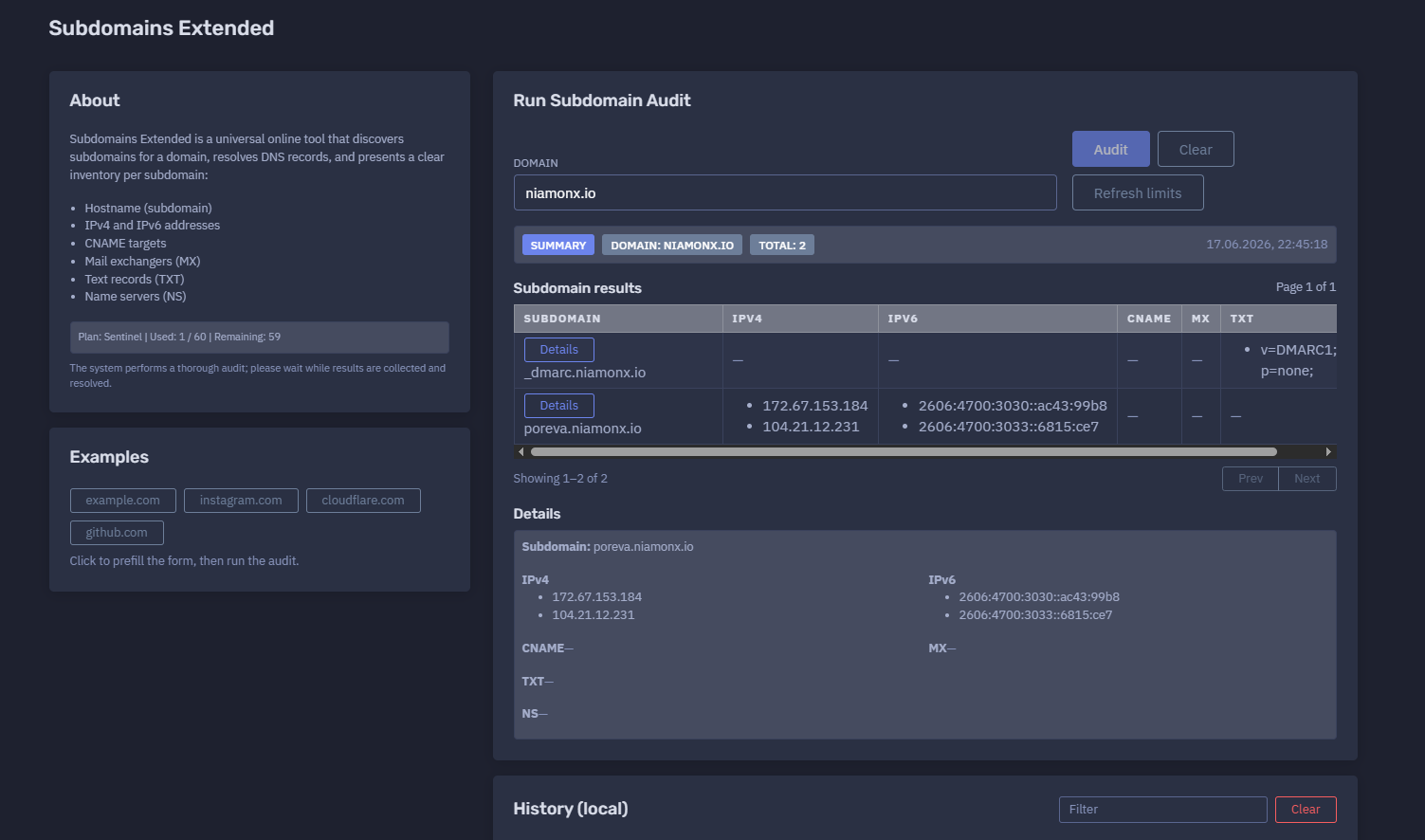
The platform available at https://dash.niamonx.io/subdomains_extended — known as Subdomains Extended — is a domain intelligence and DNS inventory tool within the NiamonX platform. It discovers subdomains for a target domain, resolves DNS records, and presents a clear technical inventory for each discovered hostname.
The tool helps users identify exposed subdomains, review DNS configuration, map public infrastructure, detect forgotten assets, verify mail and security-related records, and support OSINT, SOC, incident response, compliance, and attack surface management workflows.
Overview of the Service
Subdomains Extended is designed to perform a more detailed subdomain audit than a basic subdomain list. Instead of only returning discovered hostnames, it enriches each subdomain with DNS resolution data.
For every discovered subdomain, the tool may show:
-
Hostname
-
IPv4 addresses
-
IPv6 addresses
-
CNAME targets
-
MX records
-
TXT records
-
NS records
This makes the module useful not only for discovery, but also for understanding how each subdomain is connected to infrastructure, cloud services, mail systems, verification records, third-party services, CDN providers, and DNS delegation.
The tool is useful for:
-
OSINT analysts
-
SOC teams
-
Threat intelligence teams
-
Incident response teams
-
Bug bounty and security researchers
-
Brand protection teams
-
Compliance departments
-
System administrators
-
DevOps engineers
-
DNS administrators
-
Attack surface management teams
-
Infrastructure owners
-
Technical support teams
🔍 How the Tool Works
When a user enters a domain and starts an audit, Subdomains Extended searches for known or discoverable subdomains and resolves DNS records for each result.
Example audit input:
Domain: niamonx.io
Example summary result:
Domain: niamonx.io
Total: 2
17.06.2026, 22:45:18
Example discovered subdomains:
_dmarc.niamonx.io
poreva.niamonx.io
Example resolved DNS data:
poreva.niamonx.io
IPv4:
172.67.153.184
104.21.12.231

IPv6:
2606:4700:3030::ac43:99b8
2606:4700:3033::6815:ce7
The system performs a thorough audit and may require time to collect, resolve, and organize results.
Example interface note:
The system performs a thorough audit; please wait while results are collected and resolved.
🧩 What Can Be Audited
Subdomains Extended accepts a root domain as input.
Valid examples:
niamonx.io
example.com
company.org
security.example.net
Unsupported or invalid examples:
https://niamonx.io
http://example.com/page
192.168.1.1
user@example.com
localhost
*.example.com
Recommended input format:
domain.tld
Users should enter only the domain name, without protocol, path, wildcard prefix, query parameters, or URL fragments.
⚙️ Main Audit Function
Run Subdomain Audit
The main action starts the subdomain discovery and DNS resolution process.
Example:
Run Subdomain Audit
Domain: niamonx.io
After running the audit, the tool returns a summary and a structured table of discovered subdomains with DNS records.
The audit may include:
-
subdomain discovery;
-
DNS resolution;
-
IPv4 lookup;
-
IPv6 lookup;
-
CNAME lookup;
-
MX lookup;
-
TXT lookup;
-
NS lookup;
-
result grouping;
-
local history storage.
🚦 Plan Limits and Usage
Subdomains Extended uses plan-based query limits.
Example:
Plan: Sentinel
Used: 1 / 60
Remaining: 59
Important points:
-
Each audit may consume plan quota.
-
Query limits depend on the active user plan.
-
More thorough audits may require more processing time.
-
Large domains may produce more results.
-
DNS resolution may take longer for domains with many records.
-
Repeated audits may consume additional quota.
-
Results may change over time because DNS and subdomain exposure are dynamic.
Users should monitor remaining queries when auditing multiple domains, customer assets, investigation targets, or large infrastructure footprints.
📊 Summary Section
The Summary section provides a compact overview of the audit result.
Example:
Domain: niamonx.io
Total: 2
17.06.2026, 22:45:18
Typical fields include:
| Field | Description |
|---|---|
| Domain | The audited root domain |
| Total | Number of discovered subdomains |
| Timestamp | Date and time when the audit was completed |
The Summary section is useful for quick reporting and audit comparison. It allows users to see how many subdomains were discovered at a specific point in time.
📋 Subdomain Results Table
The Subdomain Results table displays discovered hostnames and their resolved DNS records.
Example table columns:
| Column | Description |
|---|---|
| Subdomain | Discovered hostname |
| IPv4 | A records resolved for the hostname |
| IPv6 | AAAA records resolved for the hostname |
| CNAME | Canonical name target |
| MX | Mail exchanger records |
| TXT | Text records |
| NS | Name server records |
Example result:
Subdomain: _dmarc.niamonx.io
IPv4: —
IPv6: —
CNAME: —
MX: —
TXT: v=DMARC1; p=none;
NS: —
Another example:
Subdomain: poreva.niamonx.io
IPv4:
172.67.153.184
104.21.12.231

IPv6:
2606:4700:3030::ac43:99b8
2606:4700:3033::6815:ce7

CNAME: —
MX: —
TXT: —
NS: —
If a record type is not available, the interface displays:
—
This means that no value was returned for that specific DNS record type during the audit.
🔎 Result Pagination
For domains with many discovered subdomains, results may be paginated.
Example:
Page 1 of 1
Showing 1–2 of 2
Pagination helps keep the interface readable when auditing larger domains.
Possible pagination information includes:
-
current page;
-
total pages;
-
visible result range;
-
total discovered subdomains.
For large domains, users should review all pages to avoid missing important records.
🧾 Details Panel
The Details panel shows a focused view of one selected subdomain.
Example:
Details
Subdomain: poreva.niamonx.io
IPv4:
172.67.153.184
104.21.12.231
IPv6:
2606:4700:3030::ac43:99b8
2606:4700:3033::6815:ce7
CNAME: —
MX: —
TXT: —
NS: —
The Details panel is useful when a subdomain has many records or when the user needs to copy, inspect, or document a specific hostname.
🌐 Hostname
The Hostname field shows the discovered subdomain.
Example:
poreva.niamonx.io
Hostnames may represent:
-
public websites;
-
API endpoints;
-
staging environments;
-
development systems;
-
mail-related records;
-
CDN endpoints;
-
third-party service integrations;
-
verification records;
-
delegated DNS zones;
-
forgotten or legacy assets.
Subdomain discovery is useful because organizations often expose services across many hostnames that are not visible from the main website.
🌍 IPv4 Records
IPv4 records show A records resolved for the subdomain.
Example:
172.67.153.184
104.21.12.231
IPv4 results help identify:
-
hosting providers;
-
CDN usage;
-
public-facing infrastructure;
-
shared IP ranges;
-
possible origin exposure;
-
network ownership;
-
security monitoring targets;
-
firewall or allowlist candidates.
A subdomain can resolve to one IPv4 address or multiple IPv4 addresses. Multiple addresses may indicate load balancing, CDN usage, high availability, or provider-managed routing.
🌐 IPv6 Records
IPv6 records show AAAA records resolved for the subdomain.
Example:
2606:4700:3030::ac43:99b8
2606:4700:3033::6815:ce7
IPv6 results help users identify modern dual-stack infrastructure.
IPv6 records are important because:
-
services may be reachable over IPv6 even when IPv4 is restricted;
-
firewall policies may differ between IPv4 and IPv6;
-
monitoring may miss IPv6 exposure;
-
misconfigured IPv6 services can create security gaps;
-
CDN and cloud services often publish IPv6 records automatically.
Security teams should review both IPv4 and IPv6 records when assessing exposure.
🔁 CNAME Records
CNAME records show canonical name targets for a subdomain.
Example:
CNAME: app.example.hosting-provider.com
CNAME records are useful for identifying:
-
third-party services;
-
SaaS integrations;
-
CDN aliases;
-
cloud-hosted applications;
-
landing page platforms;
-
verification targets;
-
takeover risk indicators;
-
redirected service ownership.
A missing CNAME is displayed as:
CNAME: —
Important security note: abandoned or misconfigured CNAME records may sometimes indicate potential subdomain takeover risk, especially when pointing to a third-party service that is no longer configured. Such findings should be validated carefully and responsibly.
📬 MX Records
MX records show mail exchangers associated with a subdomain.
Example:
MX: mail.example.com
MX records are useful for:
-
mail infrastructure mapping;
-
identifying mail providers;
-
detecting mail routing configuration;
-
reviewing security posture;
-
understanding subdomain-specific mail behavior;
-
verifying whether a subdomain can receive mail.
A missing MX record is displayed as:
MX: —
For most normal application subdomains, MX records may be absent. This is expected.
🧾 TXT Records
TXT records show text-based DNS records associated with a subdomain.
Example:
v=DMARC1; p=none;
TXT records may contain:
-
DMARC policies;
-
SPF records;
-
DKIM selectors;
-
domain verification records;
-
security policies;
-
ownership verification tokens;
-
service integration tokens;
-
configuration metadata.
Example discovered record:
Subdomain: _dmarc.niamonx.io
TXT: v=DMARC1; p=none;
TXT records are especially important for e-mail security and domain ownership verification.
Security teams should review TXT records for:
-
weak DMARC policies;
-
overly permissive SPF rules;
-
outdated verification tokens;
-
exposed internal metadata;
-
third-party service dependencies;
-
misconfigured mail security settings.
🛡️ DMARC Records
Subdomains Extended may discover DMARC-related records such as _dmarc.domain.tld.
Example:
_dmarc.niamonx.io
TXT: v=DMARC1; p=none;
DMARC records are used to define domain-level e-mail authentication policy.
A DMARC value such as:
v=DMARC1; p=none;
means that DMARC is present, but the policy is monitoring-only. It does not instruct receivers to quarantine or reject failing messages.
Common DMARC policies include:
| Policy | Meaning |
|---|---|
| p=none | Monitor only |
| p=quarantine | Treat failing mail as suspicious |
| p=reject | Reject failing mail |
For stronger protection against spoofing, organizations often move from p=none to p=quarantine or p=reject after monitoring and validation.
🧭 NS Records
NS records show name servers associated with a subdomain or delegated zone.
Example:
NS: ns1.example.net
NS records are useful for:
-
identifying delegated subdomains;
-
mapping DNS providers;
-
finding separate DNS zones;
-
reviewing infrastructure ownership;
-
detecting forgotten delegations;
-
identifying third-party DNS dependencies.
A missing NS record is displayed as:
NS: —
Delegated subdomains are important during security reviews because they may be managed separately from the main domain and may have different access controls, owners, or providers.
📚 Examples Section
The tool includes examples that can prefill the audit form.
Example interface note:
Examples
Click to prefill the form, then run the audit.
Examples help users quickly understand the correct input format and run a test audit without manually typing a domain.
🕓 Local History
Subdomains Extended stores recent audits locally in the user’s browser.
Example:
History (local)
Filter
Stored only in your browser (last 50 audits).
Example history item:
niamonx.io
Total: 2
17.06.2026, 22:45:18
Local history helps users:
-
repeat previous audits;
-
compare recent results;
-
continue an investigation session;
-
quickly return to previously checked domains;
-
filter audit history;
-
preserve local workflow context.
Because history is stored only in the browser, it may be removed when browser data is cleared, a different browser profile is used, or the user switches devices.
🔐 Why Subdomain Discovery Matters
Subdomains are often part of an organization’s public attack surface. Even when the main website is secure, exposed subdomains may reveal additional systems, legacy applications, development environments, staging panels, APIs, authentication portals, cloud services, or forgotten infrastructure.
Subdomain discovery helps identify:
-
forgotten services;
-
exposed staging environments;
-
abandoned DNS records;
-
third-party integrations;
-
cloud-hosted applications;
-
vulnerable legacy systems;
-
shadow IT assets;
-
takeover-prone CNAME records;
-
mail security records;
-
DNS delegation risks;
-
undocumented public infrastructure.
A complete subdomain inventory is an important foundation for attack surface management and defensive security.
🔎 Common Use Cases
Attack Surface Inventory
Create a list of public-facing subdomains and their DNS records to understand the visible infrastructure of a domain.
OSINT Research
Map publicly discoverable domain infrastructure during open-source intelligence investigations.
SOC Triage
Enrich alerts involving suspicious hostnames, unknown subdomains, or unusual DNS activity.
Incident Response
Check whether a suspicious subdomain is part of an organization’s known infrastructure.
Brand Protection
Identify suspicious, forgotten, or unexpected subdomains that may be used in impersonation, phishing, or brand abuse investigations.
Subdomain Takeover Review
Review CNAME records that point to third-party services and verify whether they are still properly configured.
DNS Security Audit
Inspect DNS records, including TXT, MX, NS, IPv4, and IPv6 records, for misconfigurations or unexpected exposure.
E-mail Security Review
Find DMARC, SPF, DKIM, MX, and TXT-related records that affect e-mail authentication and spoofing protection.
Cloud and CDN Mapping
Identify subdomains resolving to cloud providers, CDN endpoints, managed platforms, or external infrastructure.
Compliance Documentation
Create a record of public DNS exposure for compliance reviews, asset inventories, and audit documentation.
DevOps and Infrastructure Review
Help engineering teams identify public DNS entries and validate whether they match the intended infrastructure state.
🧠 Recommended Audit Workflow
A practical Subdomains Extended workflow should follow these steps.
1. Enter the Domain
Use only the domain name.
Example:
niamonx.io
Do not include:
https://
http://
/path
?query=value
#fragment
*
2. Run the Audit
Start the audit using the main action button.
Example:
Run Subdomain Audit
The tool will collect discovered subdomains and resolve their DNS records.
3. Review the Summary
Check the audited domain, total number of discovered subdomains, and timestamp.
Example:
Domain: niamonx.io
Total: 2
17.06.2026, 22:45:18
This gives a quick overview of the result set.
4. Review the Subdomain Table
Inspect each discovered hostname and its DNS records.
Important columns:
Subdomain
IPv4
IPv6
CNAME
MX
TXT
NS
Look for unexpected records, unknown hostnames, third-party dependencies, mail records, and delegated zones.
5. Open Details for Important Subdomains
Use the Details panel to inspect a selected subdomain more closely.
Example:
Subdomain: poreva.niamonx.io
IPv4:
172.67.153.184
104.21.12.231
IPv6:
2606:4700:3030::ac43:99b8
2606:4700:3033::6815:ce7
6. Review CNAME Records
CNAME records are especially important for third-party service mapping and takeover-risk review.
Questions to ask:
-
Does the CNAME point to a known provider?
-
Is the third-party service still active?
-
Is the target properly configured?
-
Is the subdomain still needed?
-
Does ownership of the service match the organization?
7. Review TXT Records
TXT records can reveal mail policies, verification records, and security configuration.
Important records to review:
DMARC
SPF
DKIM
domain verification
service ownership tokens
Example:
v=DMARC1; p=none;
8. Review MX Records
MX records should be checked to understand mail routing and possible subdomain-specific mail handling.
Questions to ask:
-
Does this subdomain need to receive mail?
-
Is the mail provider expected?
-
Are mail records consistent with the organization’s policy?
-
Are unused mail routes exposed?
9. Review NS Records
NS records may indicate delegated subdomains.
Questions to ask:
-
Is this subdomain intentionally delegated?
-
Who manages the delegated zone?
-
Is the DNS provider still active?
-
Are there stale delegations?
-
Does the delegated zone follow the same security standards?
10. Compare With Asset Inventory
Compare discovered results against the organization’s official asset list.
Focus on:
-
unknown subdomains;
-
unowned services;
-
staging environments;
-
legacy systems;
-
abandoned records;
-
cloud services;
-
unexpected IPs;
-
missing documentation.
11. Save or Document Findings
For professional workflows, document important results with timestamp and context.
Recommended record:
Domain: niamonx.io
Audit time: 17.06.2026, 22:45:18
Total subdomains: 2
Subdomain: poreva.niamonx.io
IPv4: 172.67.153.184, 104.21.12.231
IPv6: 2606:4700:3030::ac43:99b8, 2606:4700:3033::6815:ce7
CNAME: —
MX: —
TXT: —
NS: —
🚨 Security Review Checklist
When using Subdomains Extended for security auditing, review the following areas.
Unknown Subdomains
Check whether every discovered subdomain is known and authorized.
Questions:
-
Who owns this subdomain?
-
Which team manages it?
-
Is it documented?
-
Is it still required?
-
Does it expose a service?
Staging and Development Systems
Look for names such as:
dev
test
stage
staging
qa
uat
demo
internal
admin
panel
backup
old
legacy
Such systems are often less protected than production environments and may expose sensitive data or outdated software.
CNAME Takeover Indicators
Review CNAME targets pointing to third-party services.
Potential risk indicators:
-
target service no longer exists;
-
provider returns an unclaimed service page;
-
DNS points to a deleted cloud resource;
-
subdomain exists but application is not configured;
-
service ownership cannot be verified.
Any suspected takeover risk should be validated safely and responsibly without exploiting the domain.
Mail Security Records
MX
SPF
DKIM
DMARC
Potential issues:
-
missing DMARC;
-
DMARC set to monitoring only;
-
overly broad SPF records;
-
outdated verification records;
-
unexpected mail providers;
-
inconsistent mail routing.
IPv6 Exposure
Check whether services are exposed through IPv6.
Important questions:
-
Is IPv6 intentionally enabled?
-
Are IPv6 firewall rules aligned with IPv4?
-
Are monitoring and logging systems covering IPv6?
-
Are IPv6 addresses expected?
IPv6 exposure is sometimes overlooked during security reviews.
Delegated DNS Zones
Review NS records for delegated subdomains.
Potential issues:
-
forgotten delegated zones;
-
third-party DNS provider risk;
-
expired provider accounts;
-
inconsistent security controls;
-
weak access management;
-
stale name server configuration.
📊 Interpreting Results Correctly
Subdomain audit results should be interpreted carefully.
Important notes:
-
A discovered subdomain does not automatically mean a vulnerability exists.
-
A missing DNS record does not always mean the subdomain is unused.
-
DNS data changes over time.
-
CDN IP addresses may be shared by many customers.
-
Cloud provider addresses may not identify the final application owner.
-
TXT records may contain sensitive service metadata.
-
CNAME records require manual validation before risk conclusions.
-
IPv4 and IPv6 exposure should both be reviewed.
-
Some subdomains may resolve differently depending on DNS resolver, region, or time.
-
Some records may be cached or temporarily unavailable.
-
Passive discovery may miss private or newly created subdomains.
-
DNS inventory should be combined with HTTP, TLS, WHOIS, ASN, and screenshot evidence.
Subdomains Extended provides strong DNS inventory context, but conclusions should be validated with additional tools and evidence.
🧾 Recommended Reporting Format
When documenting a subdomain audit, use a consistent format.
Example:
Domain: niamonx.io
Audit timestamp: 17.06.2026, 22:45:18
Total discovered subdomains: 2

Subdomain: _dmarc.niamonx.io
IPv4: —
IPv6: —
CNAME: —
MX: —
TXT: v=DMARC1; p=none;
NS: —

Subdomain: poreva.niamonx.io
IPv4: 172.67.153.184, 104.21.12.231
IPv6: 2606:4700:3030::ac43:99b8, 2606:4700:3033::6815:ce7
CNAME: —
MX: —
TXT: —
NS: —
For security reports, add analyst notes:
Finding: DMARC policy is set to p=none.
Impact: Monitoring-only policy does not instruct receivers to reject or quarantine failing messages.
Recommendation: Review DMARC reports and consider phased migration to p=quarantine or p=reject when ready.
🛡️ Security, Privacy & Responsible Use
Subdomains Extended is intended for lawful domain analysis, OSINT, cybersecurity, compliance, infrastructure review, and defensive security workflows.
Acceptable use cases include:
-
auditing domains you own or are authorized to test;
-
reviewing public DNS exposure;
-
mapping public infrastructure;
-
investigating suspicious subdomains;
-
supporting incident response;
-
reviewing mail security records;
-
documenting compliance evidence;
-
identifying forgotten assets;
-
checking third-party dependencies;
-
supporting brand protection investigations.
Users should follow responsible use principles:
-
Do not use the tool for unauthorized targeting or harassment.
-
Do not attempt to exploit discovered services.
-
Validate findings responsibly.
-
Do not claim a vulnerability based only on DNS data.
-
Do not abuse discovered contact or infrastructure information.
-
Store audit results securely when they involve client or sensitive domains.
-
Follow applicable laws, policies, and authorization boundaries.
-
Report security issues through proper disclosure channels.
Subdomain discovery is a legitimate defensive and OSINT technique, but it must be used responsibly.
⚙️ Technical Highlights
-
Subdomain discovery tool
-
Available at
dash.niamonx.io/subdomains_extended -
Performs extended subdomain audits
-
Resolves DNS records per subdomain
-
Shows hostnames
-
Shows IPv4 addresses
-
Shows IPv6 addresses
-
Shows CNAME records
-
Shows MX records
-
Shows TXT records
-
Shows NS records
-
Displays audit summary
-
Shows total discovered subdomains
-
Displays timestamped results
-
Supports result pagination
-
Provides per-subdomain details
-
Includes example-based form prefilling
-
Stores local audit history
-
Keeps last 50 audits in the browser
-
Supports local history filtering
-
Uses plan-based query limits
-
Suitable for OSINT, SOC, attack surface management, incident response, compliance, DNS review, and infrastructure mapping
📌 Usage Hints
-
Enter only the domain name, not a full URL.
-
Do not include
https://,http://, paths, query strings, or wildcard prefixes. -
Use the Summary section to check total discovered subdomains.
-
Review all result pages for large domains.
-
Open Details for important subdomains.
-
Check IPv4 and IPv6 records separately.
-
Review CNAME records for third-party dependencies.
-
Validate CNAME records for possible takeover risk.
-
Review MX records for mail routing.
-
Review TXT records for DMARC, SPF, DKIM, and verification tokens.
-
Review NS records for delegated zones.
-
Treat missing records as “not returned,” not always as proof of absence.
-
Compare discovered subdomains with the official asset inventory.
-
Repeat audits over time because DNS exposure changes.
-
Store important findings with timestamp and context.
-
Clear local history on shared devices when auditing sensitive domains.
-
Use results responsibly and within authorization boundaries.
📬 Contact Information
For technical, legal, abuse, privacy, or support-related inquiries, users can contact the NiamonX team directly:
support@niamonx.io — Technical Support
other@niamonx.io — General Inquiries
takedown@niamonx.io — Privacy or Data Removal Requests
legal@niamonx.io — Legal and Compliance Matters
Alternative contact channel:
🔗 Helpdesk: https://support.niamonx.io/
Summary
NiamonX Subdomains Extended is an extended subdomain discovery and DNS inventory tool for public domains. It discovers subdomains, resolves DNS records, and presents a structured view of hostnames, IPv4 addresses, IPv6 addresses, CNAME targets, MX records, TXT records, and NS records.
The tool is designed for OSINT research, attack surface management, SOC workflows, incident response, DNS security reviews, brand protection, compliance documentation, cloud and CDN mapping, e-mail security analysis, and infrastructure inventory. Results should be interpreted as point-in-time DNS intelligence and combined with additional technical evidence such as HTTP responses, TLS certificates, WHOIS data, ASN information, screenshots, passive DNS, and asset inventory records.