Subdomains Check | Subdomain Enumeration Tool
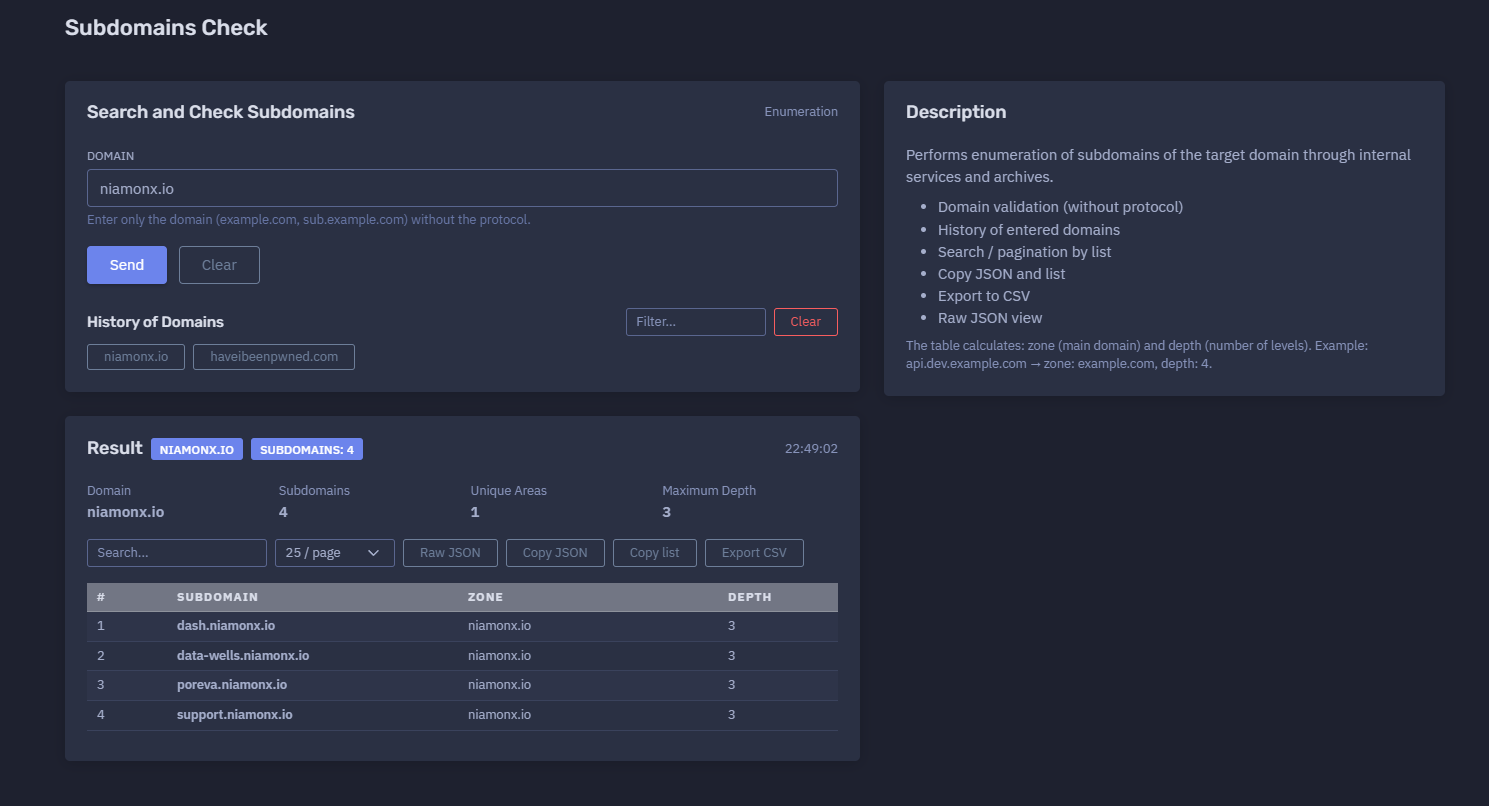
The platform available at https://dash.niamonx.io/subdomains_check — known as Subdomains Check — is a subdomain enumeration tool within the NiamonX platform. It helps users discover subdomains associated with a target domain by using internal services, archives, and available discovery sources. The tool returns a structured list of discovered hostnames and calculates useful metadata such as the main zone, subdomain depth, total number of subdomains, unique areas, and maximum depth.
Overview of the Service
Subdomains Check is designed to help users quickly enumerate known or discoverable subdomains for a domain. It provides a clean and focused inventory of hostnames without requiring the user to manually search archives, public datasets, or internal discovery sources.
The tool is useful for OSINT research, attack surface mapping, security audits, SOC workflows, incident response, brand protection, bug bounty reconnaissance, DNS inventory review, compliance checks, and infrastructure documentation.
Unlike tools that focus primarily on DNS resolution, Subdomains Check focuses on the discovery and organization of subdomain names. It helps users understand what hostnames exist or have been observed for a target domain and provides export options for further analysis.
The module is especially useful when users need to answer questions such as:
-
Which subdomains are known for this domain?
-
How many subdomains were discovered?
-
Which hostnames may belong to the same main zone?
-
How deep are the discovered subdomains?
-
Are there unexpected, forgotten, or suspicious hostnames?
-
Can the discovered list be copied, exported, or reviewed as raw JSON?
-
Can the results be filtered and paginated for easier analysis?
🔍 How the Tool Works
When a user enters a domain, Subdomains Check validates the input and performs enumeration through internal services and archives. The result is returned as a structured table of discovered subdomains.
Example input:
Domain: niamonx.io
Example result:
Domain: niamonx.io
Subdomains: 4
Unique Areas: 1
Maximum Depth: 3
22:49:02
Example discovered subdomains:
dash.niamonx.io
data-wells.niamonx.io
poreva.niamonx.io
support.niamonx.io
The tool calculates and displays:
-
discovered subdomain;
-
main zone;
-
hostname depth;
-
total subdomain count;
-
number of unique areas;
-
maximum depth;
-
query timestamp.
🧩 Supported Input
Subdomains Check accepts domain names only.
Correct input examples:
niamonx.io
example.com
sub.example.com
company.org
Incorrect input examples:
https://niamonx.io
http://example.com
https://example.com/path
*.example.com
user@example.com
192.168.1.1
localhost
The interface guidance is:
Enter only the domain (example.com, sub.example.com) without the protocol.
Users should not include:
https://
http://
/path
?query=value
#fragment
*
Recommended format:
domain.tld
⚙️ Main Function: Search and Check Subdomains
The main action performs subdomain enumeration for the entered domain.
Example:
Search and Check Subdomains
Domain: niamonx.io
After the query is processed, the tool returns a result summary and a searchable table of discovered hostnames.
The enumeration process may use:
-
internal discovery services;
-
archived records;
-
historical observations;
-
indexed subdomain sources;
-
platform-side enrichment logic.
This makes the tool useful for quickly building an initial subdomain inventory.
📊 Result Summary
The Result section provides a compact overview of the enumeration result.
Example:
Result
niamonx.io
Subdomains: 4
22:49:02
Detailed summary:
Domain: niamonx.io
Subdomains: 4
Unique Areas: 1
Maximum Depth: 3
Typical fields include:
| Field | Description |
|---|---|
| Domain | The domain that was checked |
| Subdomains | Total number of discovered subdomains |
| Unique Areas | Number of unique main zones or grouped areas found in the result |
| Maximum Depth | Highest hostname depth found among discovered subdomains |
| Time | Time when the result was generated or displayed |
The summary is useful for quick reporting and comparing enumeration results across multiple domains or repeated audits.
📋 Subdomain Results Table
The Subdomain Results table displays discovered hostnames and calculated metadata.
Example table:
| # | Subdomain | Zone | Depth |
|---|---|---|---|
| 1 | dash.niamonx.io | niamonx.io | 3 |
| 2 | data-wells.niamonx.io | niamonx.io | 3 |
| 3 | poreva.niamonx.io | niamonx.io | 3 |
| 4 | support.niamonx.io | niamonx.io | 3 |
The table helps users quickly review discovered assets and understand their relationship to the main domain.
🌐 Subdomain Field
The Subdomain column shows the discovered hostname.
Example:
dash.niamonx.io
A subdomain may represent:
-
public website;
-
dashboard;
-
API endpoint;
-
support portal;
-
data service;
-
staging environment;
-
development environment;
-
mail-related host;
-
CDN endpoint;
-
customer portal;
-
documentation site;
-
third-party integration;
-
forgotten or legacy asset.
Subdomains are important because they often reveal additional public infrastructure that is not visible from the main website.
🧭 Zone Field
The Zone column shows the main domain or area associated with the discovered subdomain.
Example:
dash.niamonx.io → zone: niamonx.io
Another example:
api.dev.example.com → zone: example.com
The zone helps group discovered hostnames under their main domain.
This is useful when:
-
analyzing multiple related domains;
-
grouping results by root zone;
-
identifying which main domain a hostname belongs to;
-
preparing asset inventories;
-
filtering large subdomain lists;
-
separating results from different areas.
📏 Depth Field
The Depth column shows the number of levels in the hostname.
Example:
dash.niamonx.io → depth: 3
Explanation:
dash.niamonx.io
1: dash
2: niamonx
3: io
Depth: 3
Another example:
api.dev.example.com → zone: example.com, depth: 4
Explanation:
api.dev.example.com
1: api
2: dev
3: example
4: com
Depth: 4
Depth is useful for identifying deeply nested assets such as:
api.dev.example.com
login.internal.stage.example.com
cdn.assets.app.example.com
Deep hostnames may indicate development structures, environment separation, internal naming conventions, or complex infrastructure.
🔢 Unique Areas
The Unique Areas value shows how many unique zones or grouped domain areas are present in the result.
Example:
Unique Areas: 1
For a simple domain audit, this value is often 1, because all discovered subdomains belong to the same main domain.
This field becomes more useful when results include hostnames that may be grouped into different areas or zones.
Use cases:
-
grouping discovered assets;
-
identifying separate domain areas;
-
reviewing multi-zone results;
-
organizing large inventories;
-
understanding result diversity.
📈 Maximum Depth
The Maximum Depth value shows the deepest hostname level found in the result set.
Example:
Maximum Depth: 3
If the tool discovers a deeply nested hostname such as:
api.dev.example.com
the maximum depth would be:
4
Maximum Depth helps users identify whether the domain has only simple subdomains or more complex nested infrastructure.
Higher depth may indicate:
-
development environments;
-
segmented services;
-
nested application structure;
-
regional infrastructure;
-
customer-specific hostnames;
-
internal naming conventions;
-
legacy systems;
-
multi-level service organization.
🔎 Search and Filtering
The results table includes a search field for filtering discovered subdomains.
Example:
Search...
Search is useful when working with large result sets.
Users can search for terms such as:
api
dev
support
admin
stage
Search can help analysts quickly locate interesting or risky hostnames.
📄 Pagination
The table supports pagination for easier review of large result sets.
Example:
25 / page
Pagination helps users:
-
keep large results readable;
-
review results page by page;
-
avoid browser overload;
-
focus on smaller groups of hostnames;
-
manage large enumeration results.
For complete analysis, users should review all result pages.
🕓 History of Domains
Subdomains Check stores entered domains locally in the browser history.
Example interface section:
History of Domains
Filter...
History helps users:
-
repeat previous checks;
-
continue an investigation session;
-
quickly access recently analyzed domains;
-
filter prior domain inputs;
-
compare repeated checks over time.
Because the history is local, it may be removed when browser data is cleared or when the user changes devices, browsers, or profiles.
📤 Copy and Export Features
Subdomains Check supports several output actions for using results in reports or external tools.
Available actions may include:
-
Copy JSON
-
Copy list
-
Export to CSV
-
View Raw JSON
These features are useful for:
-
security reports;
-
SOC tickets;
-
incident response notes;
-
asset inventory systems;
-
bug bounty documentation;
-
compliance evidence;
-
attack surface management;
-
internal escalation;
-
further processing in scripts or tools.
📋 Copy List
The Copy list option allows users to copy discovered subdomains as a plain list.
Example output:
dash.niamonx.io
data-wells.niamonx.io
poreva.niamonx.io
support.niamonx.io
This is useful for:
-
pasting into notes;
-
feeding into DNS tools;
-
importing into scanners;
-
sharing with a team;
-
creating allowlists or monitoring lists;
-
adding assets to documentation.
🧬 Copy JSON and Raw JSON
The Copy JSON and Raw JSON options provide structured machine-readable data.
Raw JSON is useful for:
-
technical validation;
-
automation;
-
integration with external systems;
-
preserving the original response;
-
debugging;
-
audit trails;
-
further enrichment;
-
evidence storage.
JSON output may include:
domain
subdomains
zone
depth
total
unique_areas
maximum_depth
timestamp
When accuracy matters, users should preserve the Raw JSON together with the visible table result.
📄 Export to CSV
The Export to CSV option allows users to download the subdomain table in a spreadsheet-friendly format.
The CSV may include:
-
index;
-
subdomain;
-
zone;
-
depth.
Example CSV-style structure:
#,Subdomain,Zone,Depth
1,dash.niamonx.io,niamonx.io,3
2,data-wells.niamonx.io,niamonx.io,3
3,poreva.niamonx.io,niamonx.io,3
4,support.niamonx.io,niamonx.io,3
CSV export is useful for:
-
reporting;
-
asset inventory;
-
spreadsheet review;
-
compliance records;
-
security audit evidence;
-
comparing results over time;
-
sharing findings with non-technical teams.
🔐 Why Subdomain Enumeration Matters
Subdomains are a critical part of an organization’s public attack surface. A company may secure its main website while leaving older, forgotten, or poorly maintained subdomains exposed.
Subdomain enumeration helps identify:
-
public applications;
-
admin panels;
-
dashboards;
-
APIs;
-
development environments;
-
staging systems;
-
support portals;
-
legacy services;
-
forgotten assets;
-
cloud-hosted systems;
-
third-party integrations;
-
takeover-prone records;
-
exposed documentation;
-
unexpected public endpoints.
A complete subdomain inventory is often the first step in attack surface management and external security review.
🔎 Common Use Cases
Attack Surface Mapping
Build a list of known public subdomains for a domain and use it as the foundation for further DNS, HTTP, TLS, and security analysis.
OSINT Research
Discover publicly known hostnames connected to an organization, product, brand, or domain.
SOC Triage
Check whether a suspicious hostname belongs to a known domain and determine whether it should be investigated further.
Incident Response
Brand Protection
Find suspicious or unexpected subdomains that may be relevant to impersonation, phishing, fraud, or unauthorized use of brand infrastructure.
Bug Bounty Reconnaissance
Collect in-scope hostnames for authorized security testing and further technical validation.
Asset Inventory
Create or update an inventory of public-facing hostnames associated with an organization.
Compliance Review
Document known public subdomains as part of security audits, risk reviews, or infrastructure governance.
Shadow IT Detection
Identify hostnames that may belong to undocumented systems, old projects, unmanaged services, or unknown teams.
Follow-Up DNS Analysis
Use the discovered list as input for tools that resolve IPv4, IPv6, CNAME, MX, TXT, NS, HTTP, TLS, or screenshot data.
🧠 Recommended Workflow
A practical Subdomains Check workflow should follow these steps.
1. Enter the Domain
Use only the domain name without protocol.
Example:
niamonx.io
Do not enter:
https://niamonx.io
2. Run the Enumeration
Start the search and wait for the result.
Example:
Search and Check Subdomains
The system will enumerate subdomains through internal services and archives.
3. Review the Result Summary
Check the domain, total number of subdomains, unique areas, maximum depth, and timestamp.
Example:
Domain: niamonx.io
Subdomains: 4
Unique Areas: 1
Maximum Depth: 3
4. Review the Subdomain Table
Inspect every discovered hostname.
Example:
dash.niamonx.io
data-wells.niamonx.io
poreva.niamonx.io
support.niamonx.io
Look for unusual names, old systems, staging environments, administrative portals, and unexpected assets.
5. Use Search for Interesting Keywords
Search for common high-risk terms.
Examples:
admin
dev
test
stage
backup
internal
These terms may indicate systems that require closer review.
6. Review Zone and Depth
Use the Zone and Depth fields to understand hostname structure.
Example:
api.dev.example.com → zone: example.com, depth: 4
Deep subdomains may reveal application structure, environment naming, or internal service organization.
7. Export the Results
Use copy or export actions to preserve the data.
Recommended exports:
Copy list
Copy JSON
Export to CSV
Raw JSON
8. Enrich the Subdomain List
After enumeration, enrich the discovered list with additional tools.
Recommended follow-up checks:
-
DNS A and AAAA records;
-
CNAME records;
-
MX, TXT, and NS records;
-
HTTP status codes;
-
screenshots;
-
TLS certificates;
-
IP WHOIS;
-
ASN information;
-
technology fingerprints;
-
historical DNS;
-
vulnerability scanning, when authorized.
9. Compare With Official Asset Inventory
Compare discovered subdomains with the organization’s known asset list.
Questions to ask:
-
Is this subdomain expected?
-
Who owns it?
-
Is it documented?
-
Is it still active?
-
Is it monitored?
-
Is it protected by the same security controls?
-
Does it expose sensitive functionality?
-
Should it be removed or consolidated?
🚨 Security Review Checklist
When reviewing subdomain enumeration results, pay special attention to suspicious or high-risk patterns.
Administrative Interfaces
Look for hostnames such as:
admin.example.com
dashboard.example.com
panel.example.com
portal.example.com
login.example.com
These may expose authentication portals or administrative systems.
Development and Testing Environments
Look for names such as:
dev.example.com
test.example.com
stage.example.com
staging.example.com
qa.example.com
uat.example.com
demo.example.com
These systems may have weaker security controls than production environments.
Legacy or Forgotten Assets
Look for names such as:
old.example.com
legacy.example.com
backup.example.com
archive.example.com
temp.example.com
Legacy assets may contain outdated software, expired certificates, weak authentication, or forgotten services.
Internal-Looking Names
Look for hostnames such as:
internal.example.com
intranet.example.com
vpn.example.com
private.example.com
corp.example.com
Even if the name suggests internal use, the hostname may still be publicly discoverable and should be reviewed.
API and Data Services
Look for names such as:
api.example.com
data.example.com
graphql.example.com
db.example.com
storage.example.com
files.example.com
These may expose backend services, APIs, file storage, or data-related endpoints.
Customer or Tenant Subdomains
Look for patterns such as:
customer1.example.com
client.example.com
tenant.example.com
org.example.com
Tenant-based subdomains may require special handling, access controls, and monitoring.
📊 Interpreting Results Correctly
Subdomain enumeration results should be interpreted carefully.
Important notes:
-
A discovered subdomain does not automatically mean the service is active.
-
A discovered subdomain does not automatically mean a vulnerability exists.
-
Some hostnames may be historical or archived.
-
Some subdomains may no longer resolve in DNS.
-
Some subdomains may be protected by access controls.
-
Internal services may still have public DNS names.
-
Results can change over time.
-
Discovery sources may not be complete.
-
Enumeration may miss newly created or private subdomains.
-
Hostname depth does not indicate risk by itself.
-
Zone grouping helps organization but does not prove ownership.
-
Further validation is required before making security conclusions.
Subdomains Check provides a discovery layer. For deeper investigation, combine results with DNS resolution, HTTP checks, TLS inspection, screenshots, IP WHOIS, ASN data, and authorized security testing.
🧾 Recommended Reporting Format
When documenting results, use a consistent structure.
Example:
Domain: niamonx.io
Enumeration time: 22:49:02
Total subdomains: 4
Unique areas: 1
Maximum depth: 3

Discovered subdomains:
1. dash.niamonx.io | Zone: niamonx.io | Depth: 3
2. data-wells.niamonx.io | Zone: niamonx.io | Depth: 3
3. poreva.niamonx.io | Zone: niamonx.io | Depth: 3
4. support.niamonx.io | Zone: niamonx.io | Depth: 3
For security reports, add analyst notes:
Observation:
The domain has 4 discovered subdomains. All discovered hostnames belong to the zone niamonx.io and have depth 3.

Recommended next step:
Resolve DNS records, check HTTP availability, review TLS certificates, capture screenshots, and compare the results against the official asset inventory.
🛡️ Security, Privacy & Responsible Use
Subdomains Check is intended for lawful domain analysis, OSINT research, security review, asset inventory, compliance, and defensive cybersecurity workflows.
Acceptable use cases include:
-
auditing domains you own or are authorized to review;
-
mapping public attack surface;
-
discovering known public hostnames;
-
supporting incident response;
-
enriching SOC investigations;
-
reviewing brand-related infrastructure;
-
preparing asset inventories;
-
checking for forgotten subdomains;
-
documenting public exposure;
-
supporting authorized bug bounty reconnaissance.
Users should follow responsible use principles:
-
Do not use the tool for unauthorized targeting or harassment.
-
Do not attempt to exploit discovered services.
-
Do not assume that discovery equals vulnerability.
-
Validate findings responsibly.
-
Follow authorization boundaries.
-
Store exported results securely.
-
Avoid sharing sensitive investigation results publicly.
-
Report security issues through proper disclosure channels.
Subdomain enumeration is a normal defensive and OSINT technique, but it should be used responsibly and legally.
⚙️ Technical Highlights
-
Subdomain enumeration tool
-
Available at
dash.niamonx.io/subdomains_check -
Searches and checks subdomains for a target domain
-
Uses internal services and archives
-
Accepts domains without protocol
-
Validates domain input
-
Shows total number of discovered subdomains
-
Shows unique areas
-
Shows maximum depth
-
Displays timestamped results
-
Provides searchable result table
-
Supports pagination
-
Calculates zone for each subdomain
-
Calculates depth for each subdomain
-
Maintains local domain history
-
Supports filtering domain history
-
Allows copying JSON
-
Allows copying subdomain list
-
Supports CSV export
-
Provides Raw JSON view
-
Suitable for OSINT, SOC, incident response, attack surface mapping, compliance, brand protection, and infrastructure inventory
📌 Usage Hints
-
Enter only the domain, such as
example.com. -
Do not include
https://orhttp://. -
Do not include paths, query strings, fragments, or wildcards.
-
Use the result summary for quick triage.
-
Review total subdomain count.
-
Check Unique Areas to understand grouping.
-
Check Maximum Depth to identify nested hostnames.
-
Use the search field to find interesting names.
-
Review all pages when the result set is large.
-
Copy the list for quick use in other tools.
-
Export CSV for reporting or spreadsheet review.
-
Use Raw JSON for technical validation and automation.
-
Compare discovered hostnames with the official asset inventory.
-
Enrich results with DNS, HTTP, TLS, screenshot, WHOIS, and ASN tools.
-
Repeat checks over time because subdomain exposure changes.
-
Clear local history on shared devices when analyzing sensitive domains.
-
Use results only within legal and authorized boundaries.
📬 Contact Information
For technical, legal, abuse, privacy, or support-related inquiries, users can contact the NiamonX team directly:
support@niamonx.io — Technical Support
other@niamonx.io — General Inquiries
takedown@niamonx.io — Privacy or Data Removal Requests
legal@niamonx.io — Legal and Compliance Matters
Alternative contact channel:
🔗 Helpdesk: https://support.niamonx.io/
Summary
NiamonX Subdomains Check is a focused subdomain enumeration tool for discovering and organizing subdomains of a target domain. It validates domain input, searches internal services and archives, displays discovered subdomains, calculates zone and depth, shows total count, unique areas, maximum depth, and provides search, pagination, local history, copy options, CSV export, and Raw JSON view.
The tool is designed for OSINT research, attack surface mapping, SOC triage, incident response, brand protection, compliance documentation, asset inventory, and authorized security workflows. Results should be treated as point-in-time discovery intelligence and enriched with DNS resolution, HTTP checks, TLS data, screenshots, IP WHOIS, ASN information, and official asset inventory validation before drawing security conclusions.