IP WHOIS | RDAP / WHOIS IP Intelligence Tool
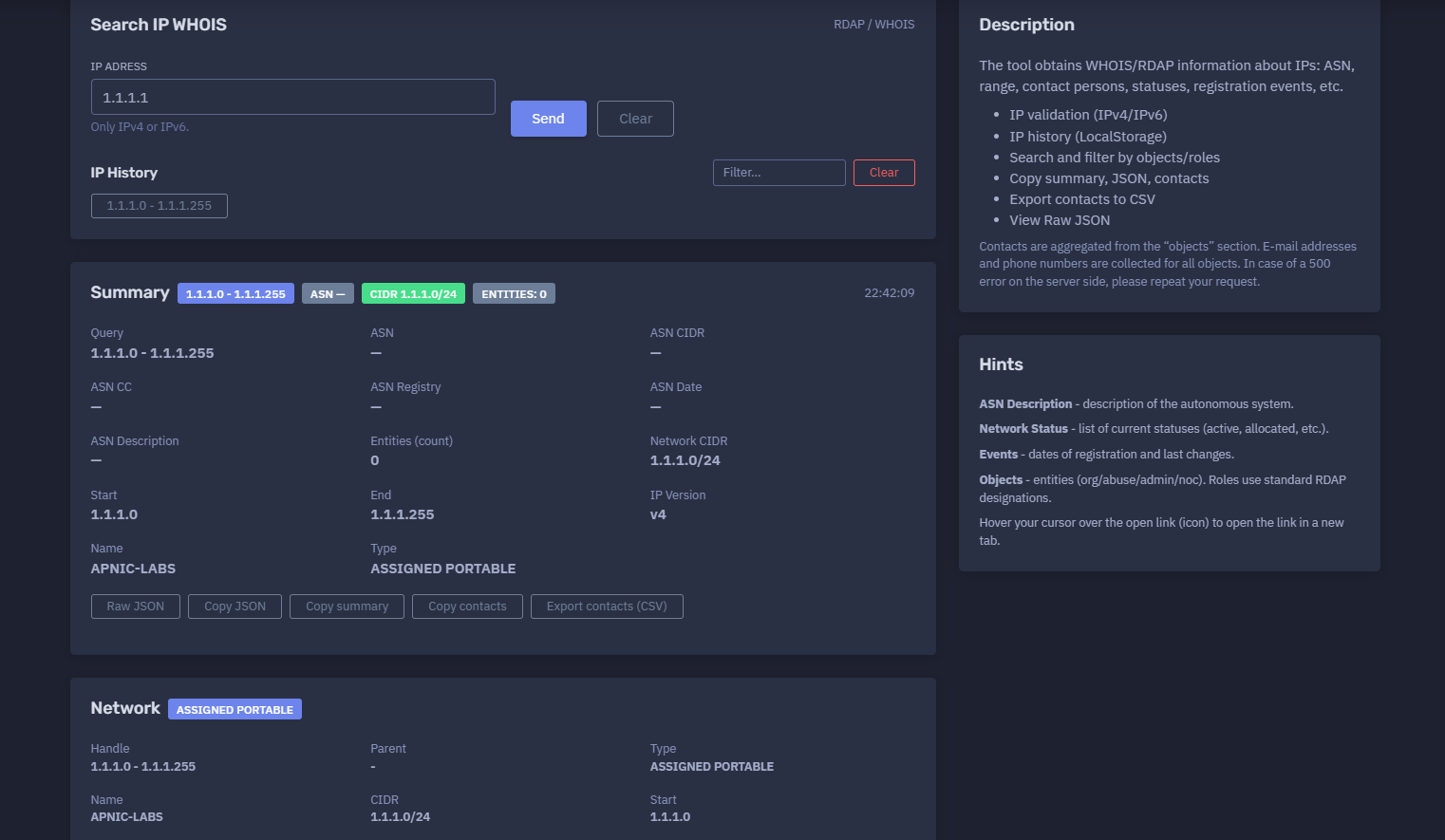
The platform available at https://dash.niamonx.io/ip_whois — known as IP WHOIS — is an IP intelligence and registration lookup tool within the NiamonX platform. It allows users to search RDAP / WHOIS information for IPv4 and IPv6 addresses, including network ranges, CIDR blocks, IP version, country, network name, allocation type, registration status, events, notices, remarks, related entities, contacts, abuse contacts, administrative contacts, technical contacts, RDAP links, and raw JSON data.
Overview of the Service
IP WHOIS is designed to help users investigate the public registration and network ownership information associated with an IP address. The tool retrieves structured RDAP / WHOIS data and presents it in an analyst-friendly interface.
It is useful for cybersecurity investigations, OSINT research, incident response, SOC triage, abuse reporting, infrastructure mapping, network ownership checks, threat intelligence enrichment, compliance review, and technical due diligence.
Instead of manually querying multiple WHOIS or RDAP endpoints, users can enter a single IP address and receive a structured summary of the network, related objects, contacts, events, statuses, and remarks.
The tool is especially helpful when users need to answer questions such as:
-
Which network range contains this IP address?
-
What CIDR block is associated with the IP?
-
Which organization or registry is linked to the network?
-
Is there an abuse contact for reporting malicious activity?
-
What administrative or technical contacts are listed?
-
What country is associated with the registration data?
-
What RDAP links are available for verification?
-
What registration events or update events exist?
-
What raw JSON data was returned by the source?
-
Which contacts can be exported for reporting or escalation?
🔍 How the Tool Works
When a user enters an IPv4 or IPv6 address, IP WHOIS validates the input and performs an RDAP / WHOIS lookup. The result is parsed and displayed in multiple structured sections.
Example query:
IP Address: 1.1.1.1
Example result summary:
Range: 1.1.1.0 - 1.1.1.255
CIDR: 1.1.1.0/24
Name: APNIC-LABS
Type: ASSIGNED PORTABLE
Country: AU
IP Version: v4
Objects: 3
The tool may display:
-
Network range
-
Network CIDR
-
Start IP
-
End IP
-
IP version
-
Network name
-
Allocation type
-
Country
-
ASN information, when available
-
Related RDAP links
-
Registration events
-
Network status
-
Notices
-
Remarks
-
Contact objects
-
E-mail addresses
-
Phone numbers
-
Physical addresses
-
Raw JSON response
-
Local query history
🧩 Supported Input
IP WHOIS supports direct lookup of IP addresses only.
Supported input types:
-
IPv4
-
IPv6
Valid examples:
1.1.1.1
8.8.8.8
2606:4700:4700::1111
2001:4860:4860::8888
Unsupported examples:
example.com
https://1.1.1.1
1.1.1.1/24
cloudflare.com
localhost
999.999.999.999
Important validation rule:
Only IPv4 or IPv6.
The tool is not intended for domain WHOIS lookups. Domain names, URLs, hostnames, and CIDR ranges should be checked with other dedicated tools.
📊 Summary Section
The Summary section provides a compact overview of the IP lookup result.
Example:
1.1.1.0 - 1.1.1.255
ASN —
CIDR 1.1.1.0/24
Entities: 0
22:42:09
Typical fields include:
| Field | Description |
|---|---|
| Range | The IP range containing the queried address |
| ASN | Autonomous System Number, if available |
| CIDR | Network block in CIDR notation |
| Entities | Number of related objects or contacts |
| Time | Lookup or display time |
The Summary section is useful for quick triage. It allows analysts to understand the basic network assignment without opening the full raw response.
🧾 Query Details
The Query section displays the main lookup data returned for the IP address and associated network.
Example:
Query: 1.1.1.0 - 1.1.1.255
ASN: —
ASN CIDR: —
ASN CC: —
ASN Registry: —
ASN Date: —
ASN Description: —
Entities Count: 0
Network CIDR: 1.1.1.0/24
Start: 1.1.1.0
End: 1.1.1.255
IP Version: v4
This section helps users separate the queried IP from the larger network block it belongs to.
🌐 Network Information
The network block describes the IP allocation or assignment returned by RDAP / WHOIS.
Example:
Name: APNIC-LABS
Type: ASSIGNED PORTABLE
Network: ASSIGNED PORTABLE
Handle: 1.1.1.0 - 1.1.1.255
Parent: -
CIDR: 1.1.1.0/24
Start: 1.1.1.0
End: 1.1.1.255
Version: v4
Country: AU
Name
The network name identifies the registered network object.
Example:
APNIC-LABS
The name may represent a registry project, organization, network allocation, ISP block, cloud provider range, hosting provider range, enterprise network, research prefix, or another registered resource.
Type
The type field describes the allocation or assignment category.
Example:
ASSIGNED PORTABLE
Common type values may include:
-
ALLOCATED
-
ASSIGNED
-
ASSIGNED PORTABLE
-
DIRECT ALLOCATION
-
DIRECT ASSIGNMENT
-
LEGACY
-
RESERVED
-
PROVIDER AGGREGATABLE
The exact values depend on the registry and RDAP source.
Handle
The handle is the identifier of the network object.
Example:
1.1.1.0 - 1.1.1.255
In some registries, the handle may be a textual object ID. In other cases, it may resemble the network range itself.
Parent
The parent field shows the parent network object if one is available.
Example:
Parent: -
A missing parent value does not necessarily mean that no broader allocation exists. It may simply mean that the source did not expose parent information in the returned object.
CIDR
CIDR shows the network prefix that contains the queried IP address.
Example:
1.1.1.0/24
CIDR is useful for:
-
firewall rules;
-
network grouping;
-
threat intelligence enrichment;
-
infrastructure mapping;
-
abuse escalation;
-
IP block analysis;
-
understanding the size of the allocation.
Start and End
Start and End define the first and last IP addresses in the returned network range.
Example:
Start: 1.1.1.0
End: 1.1.1.255
This helps users understand whether a suspicious IP belongs to a small network, a large provider allocation, a cloud range, or a specific assigned block.
IP Version
The version field identifies whether the network is IPv4 or IPv6.
Example:
Version: v4
Possible values:
v4
v6
Country
The country field displays the country code associated with the network registration.
Example:
Country: AU
Important note: the country value in WHOIS / RDAP data does not always represent the physical location of the server. It may represent the registration country, registry region, organization address, or administrative contact location.
For accurate infrastructure geolocation, the country field should be compared with IP geolocation, routing data, ASN information, DNS records, latency, and other technical signals.
🛰️ ASN Information
ASN data describes the Autonomous System associated with an IP address, when available.
The tool may display:
-
ASN
-
ASN CIDR
-
ASN country code
-
ASN registry
-
ASN date
-
ASN description
Example:
ASN: AS13335
ASN CIDR: 1.1.1.0/24
ASN CC: AU
ASN Registry: APNIC
ASN Date: 2011-08-11
ASN Description: CLOUDFLARENET
In some responses, ASN fields may be unavailable.
Example:
ASN: —
ASN CIDR: —
ASN CC: —
ASN Registry: —
ASN Date: —
ASN Description: —
Missing ASN data does not always mean that the IP is not routed. It may mean that the selected RDAP / WHOIS response did not include ASN enrichment.
For complete routing analysis, ASN data should be verified with BGP, RPKI, route collectors, passive DNS, and external network intelligence sources.
🔗 Links
The Links section displays RDAP or registry URLs related to the network or entity objects.
Example:
https://rdap.apnic.net/entity/AIC3-AP
Links are useful for:
-
opening the original registry record;
-
verifying NiamonX-parsed data against the source;
-
reviewing full RDAP entity pages;
-
checking related organization records;
-
copying references into investigation reports.
Interface hint:
Hover your cursor over the open link icon to open the link in a new tab.
📅 Events
Events describe registration-related actions associated with the network or contact objects.
Possible event types may include:
-
registration;
-
last changed;
-
last updated;
-
allocation;
-
assignment;
-
validation;
-
expiration, where applicable.
Example display:
Events:
action — -
action — -
Some RDAP responses contain complete event dates. Others may return incomplete or minimal event objects.
Events are useful for:
-
checking when a network was registered;
-
identifying recent ownership or metadata changes;
-
supporting timeline analysis;
-
enriching incident reports;
-
assessing whether infrastructure appears newly created or long-standing.
Important note: event availability depends on the source registry. Not every RDAP / WHOIS response includes complete event data.
✅ Status
The Status section shows the current state of the network object.
Example:
Status: active
Common statuses may include:
-
active;
-
allocated;
-
assigned;
-
validated;
-
reserved;
-
deprecated;
-
transferred;
-
locked;
-
inactive.
Status values depend on the registry and RDAP implementation.
A status such as active usually means the registration object is currently active in the registry database. It does not automatically mean that every IP inside the range is currently reachable, safe, or in use.
📌 Notices
Notices contain registry-provided informational messages, legal notices, terms of use, source information, or disclaimers.
Example:
Notices: No
If notices are present, they may include:
-
registry terms;
-
copyright statements;
-
acceptable use notices;
-
rate limit warnings;
-
referral information;
-
data accuracy notes;
-
RDAP service disclaimers.
Users should review notices when using WHOIS / RDAP data in legal, compliance, or official reporting workflows.
📝 Remarks
Remarks contain additional registry-provided descriptions or notes about the network.
Example:
description:
APNIC and Cloudflare DNS Resolver project,
Routed globally by AS13335/Cloudflare,
Research prefix for APNIC Labs

remarks:
---------------
All Cloudflare abuse reporting can be done via
resolver-abuse@cloudflare.com
---------------
Remarks are often highly valuable because they may contain:
-
project descriptions;
-
abuse reporting instructions;
-
routing notes;
-
service explanations;
-
operational comments;
-
special handling instructions;
-
registry-specific context.
For investigations, remarks should be reviewed carefully. They may contain the correct abuse escalation channel even when the main contact object is generic.
👥 Objects and Contacts
The Objects section shows related RDAP entities such as organizations, abuse contacts, administrative contacts, technical contacts, NOC contacts, and registrants.
Example:
Objects: 3
Objects may include:
-
organization;
-
registrant;
-
abuse contact;
-
administrative contact;
-
technical contact;
-
infrastructure contact;
-
NOC contact;
-
group;
-
role account.
The tool supports searching and filtering objects by role.
Example:
Search...
Role: all
🧑💼 Example Contact Object
Example object:
AIC3-AP
APNICRANDNET Infrastructure Contact
Kind: group
Roles:
administrative
technical
E-mails:
research@apnic.net
Phones:
+61 7 3858 3100
Addresses:
6 Cordelia St South Brisbane QLD 4101
Links:
https://rdap.apnic.net/entity/AIC3-AP
A contact object may contain:
| Field | Description |
|---|---|
| Handle | Unique entity identifier |
| Name | Display name of the entity |
| Kind | Entity type, such as group or org |
| Roles | RDAP roles assigned to the entity |
| E-mails | Contact e-mail addresses |
| Phones | Listed phone numbers |
| Addresses | Postal or office addresses |
| Links | RDAP links for the entity |
| Status | Entity status, if available |
| Events | Entity registration or update events |
| Remarks | Additional registry-provided notes |
🏷️ RDAP Roles
Objects use standard RDAP role designations.
Common roles include:
| Role | Meaning |
|---|---|
| registrant | Organization or entity associated with the registration |
| administrative | Administrative contact |
| technical | Technical contact |
| abuse | Abuse reporting contact |
| noc | Network Operations Center contact |
| billing | Billing contact |
| registrar | Registrar-related entity |
| reseller | Reseller-related entity |
| sponsor | Sponsoring organization |
Example:
Roles:
administrative
technical
Another example:
Roles:
abuse
Roles are important for choosing the correct escalation path. For malicious activity, the abuse role is usually the most relevant contact type.
🚨 Abuse Contacts
Abuse contacts are used to report malicious, unauthorized, or harmful activity associated with an IP address or network.
Example:
IRT-APNICRANDNET-AU
Roles:
abuse
E-mails:
helpdesk@apnic.net
Abuse contacts may be used for reports related to:
-
phishing;
-
malware;
-
spam;
-
scanning;
-
brute-force attacks;
-
botnet activity;
-
fraud infrastructure;
-
credential theft;
-
impersonation pages;
-
abusive hosting;
-
command-and-control infrastructure.
Before sending an abuse report, users should collect supporting evidence such as timestamps, URLs, logs, packet captures, screenshots, HTTP headers, DNS data, and affected systems.
📤 Copy and Export Features
IP WHOIS supports data extraction features that help users move results into reports or external workflows.
Available actions may include:
-
Copy summary
-
Copy JSON
-
Copy contacts
-
Export contacts to CSV
-
View Raw JSON
These features are useful for:
-
incident reports;
-
SOC tickets;
-
case management systems;
-
legal documentation;
-
abuse reports;
-
compliance records;
-
internal escalation;
-
customer support cases;
-
threat intelligence enrichment.
📄 Export Contacts to CSV
The Export contacts to CSV function allows users to export aggregated contact information from the objects section.
The exported data may include:
-
object handle;
-
object name;
-
kind;
-
roles;
-
e-mail addresses;
-
phone numbers;
-
addresses;
-
links;
-
remarks.
This is useful when an investigation involves multiple entities and the analyst needs to preserve contact data in a structured format.
Example use cases:
-
exporting abuse contacts for reporting;
-
collecting technical contacts for escalation;
-
saving organization details for a case file;
-
sharing contact information with an internal SOC team;
-
building an investigation evidence package.
🧬 Raw JSON
The Raw JSON view displays the original structured response returned by the RDAP / WHOIS source.
Raw JSON is useful for:
-
advanced technical review;
-
verifying parsed fields;
-
debugging incomplete records;
-
extracting fields not shown in the UI;
-
preserving source data;
-
integrating with other systems;
-
evidence storage;
-
analyst validation.
When accuracy matters, users should compare the visual UI fields with the raw JSON response.
🕓 Local IP History
IP WHOIS stores recent IP lookups locally in the browser.
Example interface section:
IP History
Filter...
History helps users:
-
repeat previous lookups;
-
filter investigated IPs;
-
continue an investigation session;
-
compare multiple IPs;
-
avoid retyping addresses.
Since the history is stored locally, it may be removed when browser data is cleared. It may also not sync between devices or browser profiles.
Security recommendation: clear local history on shared or untrusted devices when investigating sensitive IPs, customer incidents, or confidential infrastructure.
🔎 Common Use Cases
IP WHOIS supports many practical cybersecurity and OSINT workflows.
IP Ownership Investigation
Identify the registered network, organization, allocation type, and contact objects associated with an IP address.
SOC Alert Triage
Enrich suspicious IP addresses from alerts, logs, firewall events, EDR detections, IDS events, or SIEM correlations.
Abuse Reporting
Find abuse contacts and supporting registration details for reporting malicious activity.
Phishing Infrastructure Analysis
Investigate IP addresses hosting phishing pages, fake login portals, clone websites, or malicious redirects.
Malware Infrastructure Review
Check IP addresses linked to malware delivery, command-and-control servers, botnets, or payload hosting.
Brand Protection
Identify infrastructure behind impersonation websites, fake stores, unauthorized brand pages, or fraudulent campaigns.
Network Troubleshooting
Check which network block an IP belongs to and review registration details.
Threat Intelligence Enrichment
Add WHOIS / RDAP context to indicators of compromise.
Compliance and Audit
Preserve registration data for investigation files, audit trails, incident documentation, or legal review.
OSINT Research
Map public infrastructure, investigate hosting providers, and identify related contact entities.
🧠 Practical Investigation Workflow
A recommended IP WHOIS workflow should follow these steps.
1. Enter a Valid IP Address
Use only IPv4 or IPv6.
Example:
1.1.1.1
Avoid domains, URLs, hostnames, and CIDR input.
2. Review the Summary
Check the returned range, CIDR, ASN, entity count, and lookup time.
Example:
Range: 1.1.1.0 - 1.1.1.255
CIDR: 1.1.1.0/24
Entities: 3
3. Review Network Details
Check the network name, allocation type, country, start IP, end IP, version, and handle.
Example:
Name: APNIC-LABS
Type: ASSIGNED PORTABLE
Country: AU
Version: v4
4. Check ASN Information
Example:
ASN Description: description of the autonomous system.
If ASN data is missing, verify routing information using additional BGP or ASN lookup tools.
5. Review Status and Events
Check whether the network is active and whether registration or update events are available.
Example:
Network Status: active
Events can support timeline analysis and help identify recent changes.
6. Inspect Remarks
Read remarks carefully because they may contain special instructions, abuse reporting information, routing notes, or project descriptions.
Example:
All Cloudflare abuse reporting can be done via resolver-abuse@cloudflare.com
7. Inspect Objects and Roles
Important roles:
abuse
administrative
technical
registrant
noc
For reporting malicious activity, prioritize abuse contacts.
8. Copy or Export Data
Use copy and export features to preserve results.
Recommended items to save:
IP address
Network range
CIDR
Network name
Country
ASN data
Status
Events
Remarks
Contact objects
Abuse e-mails
Raw JSON
Lookup timestamp
9. Validate With Additional Evidence
For professional investigations, combine IP WHOIS data with:
-
DNS records;
-
passive DNS;
-
HTTP headers;
-
TLS certificate data;
-
screenshots;
-
webpage captures;
-
malware logs;
-
SIEM events;
-
firewall logs;
-
BGP routing data;
-
ASN intelligence;
-
geolocation data;
-
threat intelligence feeds.
WHOIS / RDAP data is only one part of the investigation.
📌 Field Interpretation Guide
ASN Description
The ASN Description field describes the autonomous system, when available.
Example meaning:
Description of the autonomous system.
This may identify an ISP, cloud provider, hosting provider, enterprise network, CDN, or other routing organization.
Network Status
Network Status shows the current status values associated with the network object.
Example:
active
Status values can indicate whether the object is active, allocated, assigned, reserved, or otherwise marked by the registry.
Events
Events show registration and change-related dates when the source provides them.
Possible examples:
registration
last changed
last updated
Events are useful for understanding when the object was created or modified.
Objects
Objects represent entities connected to the network.
Examples:
org
abuse
admin
technical
noc
registrant
Objects follow standard RDAP role designations and may contain names, e-mails, phones, addresses, links, statuses, events, and remarks.
⚠️ Limitations and Important Notes
WHOIS / RDAP data should be interpreted carefully.
Important limitations:
-
WHOIS / RDAP data may be incomplete.
-
ASN data may be missing from some responses.
-
Contact information may be outdated.
-
Some registries redact personal data.
-
Some records contain generic abuse contacts.
-
Country fields do not always indicate server location.
-
Cloud and CDN IPs may represent shared infrastructure.
-
Hosting providers may assign IPs to many different customers.
-
The listed organization may not be the actual end user.
-
Dynamic IPs may change ownership or customer assignment.
-
Events may be incomplete or unavailable.
-
RDAP sources may return inconsistent field names.
-
Server-side errors may occur.
-
Some registries may rate-limit or temporarily fail.
In case of a server-side 500 error, repeat the request.
Example note:
In case of a 500 error on the server side, please repeat your request.
🛡️ Security, Privacy & Responsible Use
IP WHOIS is intended for lawful cybersecurity, OSINT, compliance, reporting, infrastructure analysis, and network investigation workflows.
Acceptable use cases include:
-
checking your own IP infrastructure;
-
investigating suspicious IP addresses;
-
enriching SOC alerts;
-
identifying abuse contacts;
-
preparing abuse reports;
-
reviewing public registration data;
-
mapping public network ownership;
-
supporting incident response;
-
documenting threat intelligence findings;
-
validating public infrastructure records.
Users should follow responsible use principles:
-
Do not harass contacts listed in WHOIS / RDAP data.
-
Use abuse contacts only for legitimate abuse reports.
-
Include clear evidence when submitting reports.
-
Do not treat WHOIS data as definitive proof of attribution.
-
Do not expose sensitive investigation notes unnecessarily.
-
Store exported contact data securely.
-
Respect registry terms and privacy restrictions.
-
Validate critical findings with multiple independent sources.
WHOIS / RDAP data can support investigations, but it should not be used alone to accuse an organization or individual of malicious activity.
🧾 Recommended Abuse Report Context
When using IP WHOIS to prepare an abuse report, include enough evidence for the receiving team to understand and verify the issue.
Recommended report fields:
Source IP: 1.1.1.1
Observed activity: phishing / malware / scanning / spam / abuse
Timestamp with timezone: 17.06.2026, 22:42:09
Affected system or URL: relevant target
Evidence: logs, screenshots, headers, URLs, samples
WHOIS range: 1.1.1.0 - 1.1.1.255
CIDR: 1.1.1.0/24
Network name: APNIC-LABS
Abuse contact: listed abuse e-mail
Additional notes: analyst summary
A high-quality abuse report should be factual, concise, and evidence-based.
⚙️ Technical Highlights
-
IP WHOIS / RDAP lookup tool
-
Available at
dash.niamonx.io/ip_whois -
Supports IPv4 and IPv6 validation
-
Retrieves public IP registration data
-
Displays network range
-
Displays CIDR block
-
Displays start and end IP
-
Shows IP version
-
Shows network name
-
Shows allocation or assignment type
-
Shows country code
-
Shows ASN fields when available
-
Shows ASN description when available
-
Shows entity count
-
Displays RDAP links
-
Displays registration events
-
Displays network status
-
Displays notices
-
Displays remarks
-
Displays related objects and contacts
-
Supports object search
-
Supports role filtering
-
Aggregates contact e-mails
-
Aggregates phone numbers
-
Shows physical addresses when available
-
Allows copying summary
-
Allows copying JSON
-
Allows copying contacts
-
Supports contact export to CSV
-
Provides Raw JSON view
-
Stores IP history locally
-
Suitable for OSINT, SOC, incident response, abuse reporting, infrastructure mapping, and threat intelligence
📌 Usage Hints
-
Enter only a valid IPv4 or IPv6 address.
-
Do not enter domains, URLs, hostnames, or CIDR ranges.
-
Use the Summary section for quick triage.
-
Use the Network section to understand the assigned range.
-
Check CIDR before creating firewall or detection rules.
-
Review ASN Description to understand the autonomous system.
-
Review Network Status to understand the current object state.
-
Review Events for registration and update context.
-
Review Objects to find organization, abuse, administrative, and technical contacts.
-
Use role filtering to focus on abuse or technical contacts.
-
Check Remarks for special reporting instructions.
-
Open RDAP links to verify source records.
-
Copy summary for reports.
-
Copy JSON for technical analysis.
-
Export contacts to CSV for case management.
-
Use Raw JSON when parsed UI data appears incomplete.
-
Repeat the request if a server-side 500 error occurs.
-
Treat WHOIS / RDAP data as supporting evidence, not final attribution.
-
Combine results with DNS, HTTP, TLS, BGP, passive DNS, and threat intelligence data.
📬 Contact Information
For technical, legal, abuse, privacy, or support-related inquiries, users can contact the NiamonX team directly:
support@niamonx.io — Technical Support
other@niamonx.io — General Inquiries
takedown@niamonx.io — Privacy or Data Removal Requests
legal@niamonx.io — Legal and Compliance Matters
Alternative contact channel:
🔗 Helpdesk: https://support.niamonx.io/
Summary
NiamonX IP WHOIS is an RDAP / WHOIS lookup tool for IPv4 and IPv6 addresses. It provides structured IP registration intelligence, including network range, CIDR, start and end IP, IP version, network name, allocation type, country, ASN fields, status, events, notices, remarks, RDAP links, related objects, contacts, e-mails, phone numbers, addresses, raw JSON, local history, copy options, and CSV export.
The tool is designed for OSINT research, SOC workflows, incident response, abuse reporting, phishing investigations, malware infrastructure analysis, brand protection, compliance documentation, network troubleshooting, and threat intelligence enrichment. Results should be interpreted as public registration context and combined with additional technical evidence before making conclusions about ownership, infrastructure usage, or attribution.