Identity360 Report | Digital Footprint Intelligence
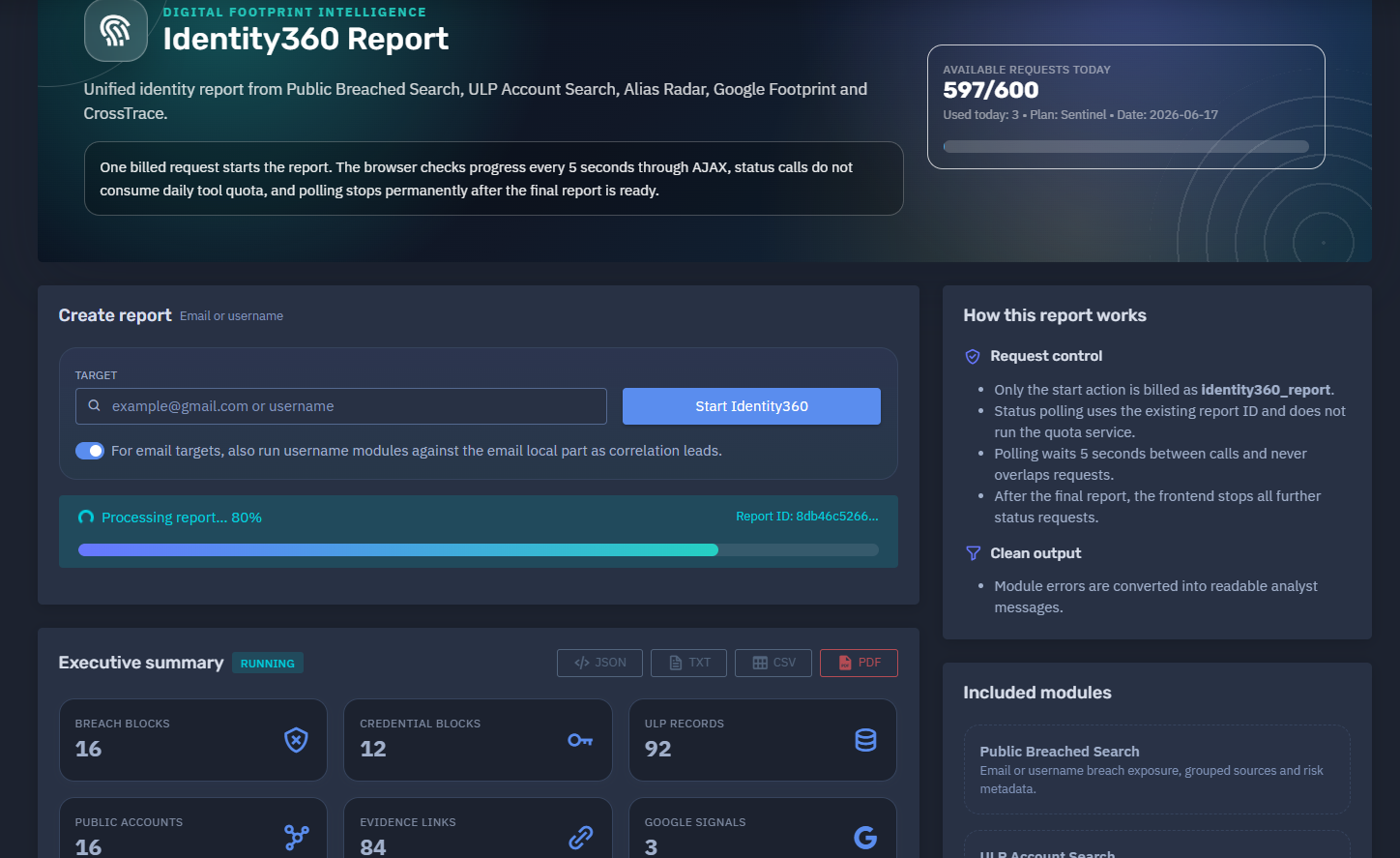
The platform available at dash.niamonx.io/identity360_report
Overview of the Service
Digital Footprint Intelligence is an advanced identity intelligence tool within the NiamonX platform. The main report generated by this module is called Identity360 Report.
Identity360 Report provides a unified digital identity overview by combining results from multiple NiamonX intelligence modules:
-
Public Breached Search
-
ULP Account Search
-
Alias Radar
-
Google Footprint
-
CrossTrace
The tool is designed to help individuals, cybersecurity analysts, SOC teams, compliance departments, investigators, and authorized security professionals understand how a specific email address or username appears across public breach datasets, stealer log evidence, public account traces, username reconnaissance sources, and Google ecosystem signals.
The report is built as a consolidated identity profile. Instead of checking each module manually, the user starts one report and receives a structured overview of exposure, related identifiers, public accounts, evidence links, breach blocks, ULP records, and analytical risk indicators.
🔍 How the Report Works
When a user creates an Identity360 report, the platform starts a multi-module investigation for the submitted target.
Supported target types:
-
Email address
-
Username
For email-based targets, the system may also derive the email local part and run username-focused modules against it as a correlation lead.
For example, if the target is:
example.name@domain.com
the platform may also check:
example.name
This derived username should be treated only as a correlation lead, not as confirmed ownership.
One billed request starts the report. After that, the browser checks the report progress through AJAX polling every few seconds. Status checks do not consume additional daily tool quota, and polling stops permanently after the final report is ready.
This design allows long-running intelligence modules to continue processing while the user sees real-time progress inside the interface.
🧩 Main Purpose
Identity360 Report helps answer questions such as:
-
Has this email address appeared in public breach datasets?
-
Are there credential-related records connected to this identity?
-
Are there ULP or stealer-log records for the email or username?
-
Are there public accounts connected to the identifier?
-
Are there usernames, names, phone numbers, domains, or other related identifiers?
-
Are there public profile traces across platforms?
-
What is the overall exposure risk?
-
Which evidence links support the findings?
-
Which modules found the strongest signals?
The tool is especially useful for identity exposure analysis, account compromise investigation, personal digital footprint review, employee risk monitoring, and incident response.
⚙️ Report Creation Interface
The report creation interface includes the following main elements.
Available Requests Today
Shows the number of remaining report requests available under the current plan.
Example format:
Available requests today
597 / 600
Used today: 3
Plan: Sentinel
Date: 2026-06-17
Create Report
Starts a new Identity360 report.
Target Type
The user selects or enters an email address or username.
Supported examples:
user@example.com
username
Email Local-Part Correlation
For email targets, the system can also run username modules against the email local part.
This is useful because many users reuse the same nickname across multiple public platforms.
However, these matches must be interpreted carefully.
A username match does not automatically prove that the account belongs to the same person.
📊 Report Progress
After the report starts, the interface displays processing status.
Example status elements:
Processing report… 60%
Report ID: ************
Executive summary: running
The report may show:
-
Processing percentage
-
Report ID
-
Module status
-
Executive summary status
-
Number of completed modules
-
Number of running modules
-
Number of pending modules
-
Error or skipped module indicators
The report is considered final only after all required modules finish, fail, or are skipped according to the backend state.
🧠 Processing Modules
Identity360 Report combines several intelligence modules into one unified profile.
Public Breached Search
Public Breached Search checks indexed public breach datasets for the submitted target.
It may return:
-
Breach blocks
-
Credential blocks
-
Source names
-
Personal identifiers
-
Exposed emails
-
Related phones
-
Related names
-
Password-related indicators
-
Risk signals
This module is useful for understanding whether the target appears in historical public breach collections.
ULP Account Search
ULP Account Search checks stealer-log and ULP-style account evidence by email or username.
It may return:
-
ULP records
-
Hosts
-
Account identities
-
Password evidence
-
URLs
-
Indexed dates
-
Related services
-
Evidence links
This module is especially important because ULP records may indicate that credentials were captured from infected devices, browser storage, or other compromise sources.
Alias Radar
Alias Radar performs detailed username reconnaissance across public platforms.
It may return:
-
Public profile matches
-
Platform names
-
Display names
-
Profile URLs
-
Avatars or profile images
-
Account metadata
-
Confidence scores
-
Extracted profile details
When Alias Radar is run from an email local part, matches should be treated as possible correlation leads rather than confirmed identity ownership.
Google Footprint
Google Footprint checks public Google account and Google ecosystem signals.
It may return:
If the module is skipped, pending, or incomplete, the report should clearly show that Google Footprint data is not available yet.
CrossTrace
CrossTrace performs fast public account-presence checks by email or username.
It may return:
-
Direct account presence traces
-
Platform-level signals
-
Public account indicators
-
Profile URLs
-
Confidence scores
-
Related usernames
-
Avatars or public images
CrossTrace is useful for fast identity correlation across public platforms.
📌 Executive Summary
The Executive Summary provides a high-level interpretation of the report.
It may include:
-
Overall risk level
-
Analytical risk score
-
Main exposure drivers
-
Number of breach blocks
-
Number of credential blocks
-
Number of ULP records
-
Number of public accounts
-
Number of evidence links
-
Number of Google signals
-
Key findings from completed modules
The summary helps users quickly understand whether the target has low, medium, high, or critical exposure.
🚨 Analytical Risk Score
Identity360 Report includes an Analytical Risk Score.
The score is calculated from multiple risk drivers, such as:
-
Credential exposure in breach blocks
-
ULP records containing password evidence
-
Public breach appearances
-
Public account footprint across platforms
-
Number of evidence links
-
Presence of sensitive identifiers
-
Cross-platform identity correlation
-
Volume and quality of confirmed signals
Example risk levels may include:
-
Low
-
Medium
-
High
-
Critical
A critical score means that the report contains strong exposure indicators, such as credential-related records, multiple breach appearances, or high-confidence public identity traces.
The risk score is an analytical indicator. It should support investigation, not replace human validation.
👤 Profile Summary
The Profile Summary aggregates identifiers discovered during the report.
Possible identifier types include:
-
Email addresses
-
Usernames
-
Phone numbers
-
Names
-
Domains
-
Public account handles
-
Related services
-
Evidence-linked platforms
This section helps analysts understand the broader digital identity graph connected to the target.
🔗 Evidence Links
The Evidence Links section collects links and source references discovered by the report.
Evidence links may come from:
-
ULP records
-
Public breach evidence
-
Alias Radar profiles
-
CrossTrace account traces
-
Google Footprint signals
-
Public platform checks
Each evidence link helps the user understand where a signal came from.
Evidence links may point to:
-
Public profiles
-
Service login pages
-
Account presence endpoints
-
Historical breach-related URLs
-
ULP-related hosts
-
Platform-specific account traces
Evidence links should be handled carefully and used only for lawful investigation and validation.
🌐 Public Accounts and Traces
The Public Accounts and Traces section displays public profile or account-presence findings.
A result may include:
| Field | Description |
|---|---|
| Platform | Name of the detected service or platform |
| Category | Social, media, Google, other, or another category |
| Display name | Public name found on the platform |
| Username | Username or handle, if available |
| Source module | Alias Radar, CrossTrace, or another module |
| Confidence | Estimated confidence score |
| Profile link | Link for manual validation |
Confidence scores help analysts prioritize review.
For example:
-
100 may indicate a strong direct signal.
-
70–80 may indicate a useful but still reviewable correlation.
-
Lower scores should be treated as weaker leads.
Public account traces do not always prove ownership. They should be validated before being used in legal, compliance, or operational decisions.
🧱 Breach Exposure
The Breach Exposure section summarizes public breach dataset appearances.
It may include:
-
Total breach blocks
-
Credential blocks
-
Risk level
-
Source names
-
Whether password-related data exists
-
Whether personal data exists
-
Field counts
-
Group counts
A breach block represents a structured group of fields from a particular breach source or collection.
Credential blocks are especially important because they may contain password-related evidence or login-related exposure.
🔐 ULP Account Evidence
The ULP Account Evidence section shows stealer-log or ULP-style account records connected to the target.
It may include:
| Column | Description |
|---|---|
| Date | Indexed or observed date |
| Host | Related service, domain, or application |
| Identity | Matched email or username |
| Password | Password field, if available and permitted |
| URL | Evidence or related service URL |
The section may also show summary counters:
-
Total ULP records
-
Loaded records
-
Unique hosts
-
Records with passwords
ULP evidence should be considered high-risk because it may indicate credential capture, malware compromise, browser credential theft, or reused credentials.
🔎 Filtering and Review
The report interface may include filters for accounts, traces, records, and evidence.
Users can review:
-
Public accounts
-
Breach sources
-
Credential blocks
-
ULP hosts
-
Evidence links
-
Related identifiers
-
Google signals
-
Module-specific findings
Filtering helps analysts focus on the most relevant signals, especially in large reports with many records.
🧾 Clean Report JSON
Identity360 Report can expose a clean structured JSON representation of the report.
This JSON may include:
-
Report status
-
Report ID
-
Target
-
Target type
-
Created timestamp
-
Updated timestamp
-
Finished timestamp
-
Polling interval
-
Module states
-
Progress
-
Counters
-
Risk score
-
Risk drivers
-
Identifiers
-
Evidence links
-
Public accounts
-
Photos
-
Timeline
-
Module-specific raw or normalized data
Clean JSON is useful for:
-
API integrations
-
SOC workflows
-
Internal dashboards
-
Case management systems
-
Threat intelligence pipelines
-
Compliance evidence
-
Automated reporting
Sensitive values should be masked or protected depending on user permissions, session security, and export policy.
🕒 Timeline
The report may include a timeline of discovered events and sources.
Timeline entries may include:
-
Breach source names
-
ULP record dates
-
Public account discovery events
-
Evidence timestamps
-
Module processing milestones
This helps analysts understand the chronological order of exposure indicators.
For example, ULP evidence dated recently may require more urgent response than older historical breach appearances.
🖼️ Photos and Avatars
Some modules may detect public profile images or avatars.
These may come from:
-
Public profiles
-
Avatar services
-
Social platforms
-
Account metadata
-
CrossTrace results
-
Alias Radar results
Profile images are useful for manual correlation, but they must not be treated as proof of identity without additional evidence.
🧠 Correlation Logic
Identity360 Report is built around correlation, not blind certainty.
The system combines multiple signal types:
-
Direct breach matches
-
Credential evidence
-
Email-based account traces
-
Username-based account traces
-
Public profile metadata
-
Evidence links
-
Related identifiers
-
Domain and host appearances
-
Module confidence scores
Strong findings usually come from multiple independent signals pointing to the same target.
Weak findings may be useful leads but should be validated before action.
🔐 Password and Sensitive Data Handling
Some records may contain password evidence or other sensitive fields.
Users must handle this data carefully.
Passwords and sensitive values must only be used for:
-
Defensive verification
-
Account recovery
-
Password reset decisions
-
Incident response
-
Internal security review
-
Authorized employee exposure investigation
Users must not:
When screen sharing, reporting, or exporting, sensitive values should be masked unless full visibility is strictly required and authorized.
🛡️ Security, Privacy & Ethics
Digital Footprint Intelligence is intended for lawful security work and authorized identity exposure analysis.
Acceptable use cases include:
-
Checking your own email or username
-
Investigating employee exposure with authorization
-
Supporting incident response
-
Reviewing public account footprint
-
Validating breach exposure
-
Detecting credential compromise
-
Monitoring executive or VIP exposure
-
Performing compliance and security audits
-
Helping users secure compromised accounts
Users must follow strict rules:
-
Search only targets you own or are authorized to investigate.
-
Do not use the report to stalk, harass, deanonymize, or target individuals.
-
Do not use exposed credentials for unauthorized access.
-
Do not redistribute leaked personal data.
-
Do not publish private identifiers or passwords.
-
Do not bypass platform limits, access controls, or masking.
-
Treat all findings as sensitive intelligence.
-
Validate results before legal, HR, compliance, or operational action.
Abuse of the system may result in account restriction, suspension, or termination.
✅ Recommended Remediation Workflow
When the report shows meaningful exposure, users should follow a structured response process.
1. Review the Executive Summary
Start with the risk score, risk level, and risk drivers.
2. Check Credential Blocks
Prioritize breach blocks that contain credential exposure.
3. Review ULP Evidence
ULP records with passwords should be treated as high priority.
4. Validate Public Accounts
Check public accounts and traces manually before drawing conclusions.
5. Reset Exposed Passwords
Reset affected passwords and remove reused credentials.
6. Enable MFA
Enable or enforce multi-factor authentication on affected accounts.
7. Review Login History
Check account activity, IAM logs, SSO events, VPN access, email logs, and cloud service logs.
8. Check for Password Reuse
Identify whether exposed passwords were reused across corporate or personal accounts.
9. Notify Affected Users
Notify the affected person or internal team when appropriate and legally permitted.
10. Save Evidence Securely
Store the report only in secure internal systems with restricted access.
11. Continue Monitoring
Repeat checks periodically or enable continuous monitoring for high-risk identities.
⚙️ Technical Highlights
-
Unified digital identity report
-
Combines Public Breached Search, ULP Account Search, Alias Radar, Google Footprint, and CrossTrace
-
Supports email and username targets
-
Email local-part correlation for username modules
-
One billed request starts the report
-
AJAX progress polling every few seconds
-
Status polling does not consume daily quota
-
Executive summary
-
Analytical risk score
-
Risk drivers
-
Breach blocks
-
Credential blocks
-
ULP account evidence
-
Public accounts and traces
-
Evidence links
-
Google ecosystem signals
-
Profile summary
-
Related identifiers
-
Public profile confidence scores
-
Photos and avatar collection
-
Timeline of evidence
-
Clean report JSON
-
Module-level status tracking
-
Suitable for SOC, OSINT, compliance, incident response, and identity exposure workflows
📌 Usage Hints
-
Use an email or username as the target.
-
For email targets, review local-part username matches as correlation leads only.
-
Start with the risk score and risk drivers.
-
Treat ULP records with passwords as high priority.
-
Validate public account traces manually.
-
Review confidence scores before making conclusions.
-
Use evidence links for verification.
-
Check module status to understand whether the report is complete.
-
Do not assume pending or skipped modules found nothing.
-
Use Clean Report JSON for integrations and internal workflows.
-
Mask sensitive values when exporting or sharing reports.
-
Treat every report as confidential security intelligence.
📬 Contact Information
For technical, legal, abuse, privacy, or takedown-related inquiries, users can contact the NiamonX team directly:
support@niamonx.io — Technical Support
other@niamonx.io — General Inquiries
takedown@niamonx.io — Data Removal / Privacy Takedown Requests
legal@niamonx.io — Legal and Compliance Matters
Alternative contact channel:
🔗 Helpdesk: https://support.niamonx.io/
Summary
NiamonX Digital Footprint Intelligence / Identity360 Report is a unified identity exposure report that combines breach intelligence, ULP account evidence, public username reconnaissance, Google ecosystem signals, and public account tracing into one structured profile.
The tool helps users understand whether an email or username is connected to public breaches, credential exposure, stealer-log records, public accounts, evidence links, and cross-platform identity traces.
It is designed for lawful defensive cybersecurity, personal exposure checks, employee risk monitoring, incident response, compliance review, and digital footprint analysis. All findings should be validated before action and handled as sensitive security intelligence.