Google Footprint | Google Account & Drive Intelligence
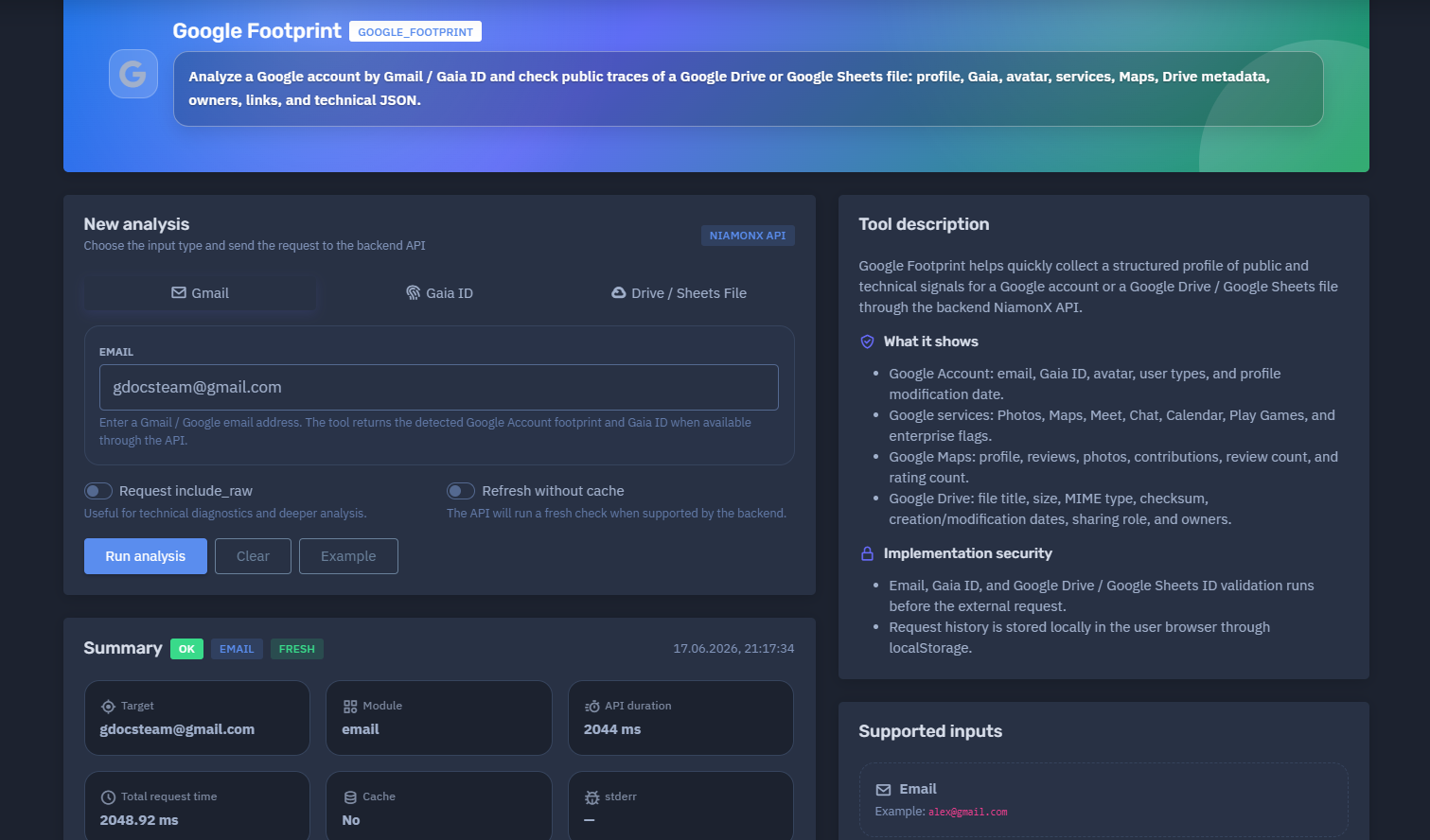
The platform available at dash.niamonx.io/google_footprint — known as Google Footprint — is a specialized intelligence module within the NiamonX platform designed to analyze public and technical traces of Google accounts, Gaia IDs, Google Drive files, and Google Sheets documents through the backend NiamonX API.
Overview of the Service
Google Footprint helps users collect a structured footprint of a Google identity or shared Google file. The tool can analyze a Gmail or Google email address, a Gaia ID, or a Google Drive / Google Sheets file identifier and return available public and technical signals.
The module is designed for cybersecurity analysts, OSINT researchers, SOC teams, compliance departments, fraud investigators, and authorized security professionals who need to validate Google-related public traces during an investigation.
Google Footprint can return information such as Google profile metadata, Gaia ID, avatar status, account type indicators, Google Chat signals, Maps profile availability, public contribution indicators, Drive file metadata, file owners, sharing role, technical JSON, and backend response diagnostics.
The tool does not provide unauthorized access to private Google data. It only returns signals available through supported public, technical, or backend-accessible checks.
🔍 How the Analysis Works
When a user starts a new analysis, the platform sends the selected input to the NiamonX backend API.
Supported input types include:
-
Gmail / Google email address
-
Gaia ID
-
Google Drive file ID
-
Google Sheets file ID
-
Full Google Drive or Google Sheets URL
Before the external request is performed, the system validates the input format. This helps prevent invalid requests, malformed values, unsupported identifiers, and accidental submission of unrelated data.
The backend then performs the supported checks and returns a structured response. The interface displays a summary, account profile information, Google service signals, Maps indicators, Drive metadata, links, and technical JSON when requested.
The result can be returned from cache or generated through a fresh backend check, depending on the request options and backend support.
🧩 What Can Be Analyzed
Google Footprint supports several Google-related input types.
A Gmail or Google account email address.
Example:
alex@gmail.com
This mode checks the detected Google Account footprint and may return a Gaia ID when available through the API.
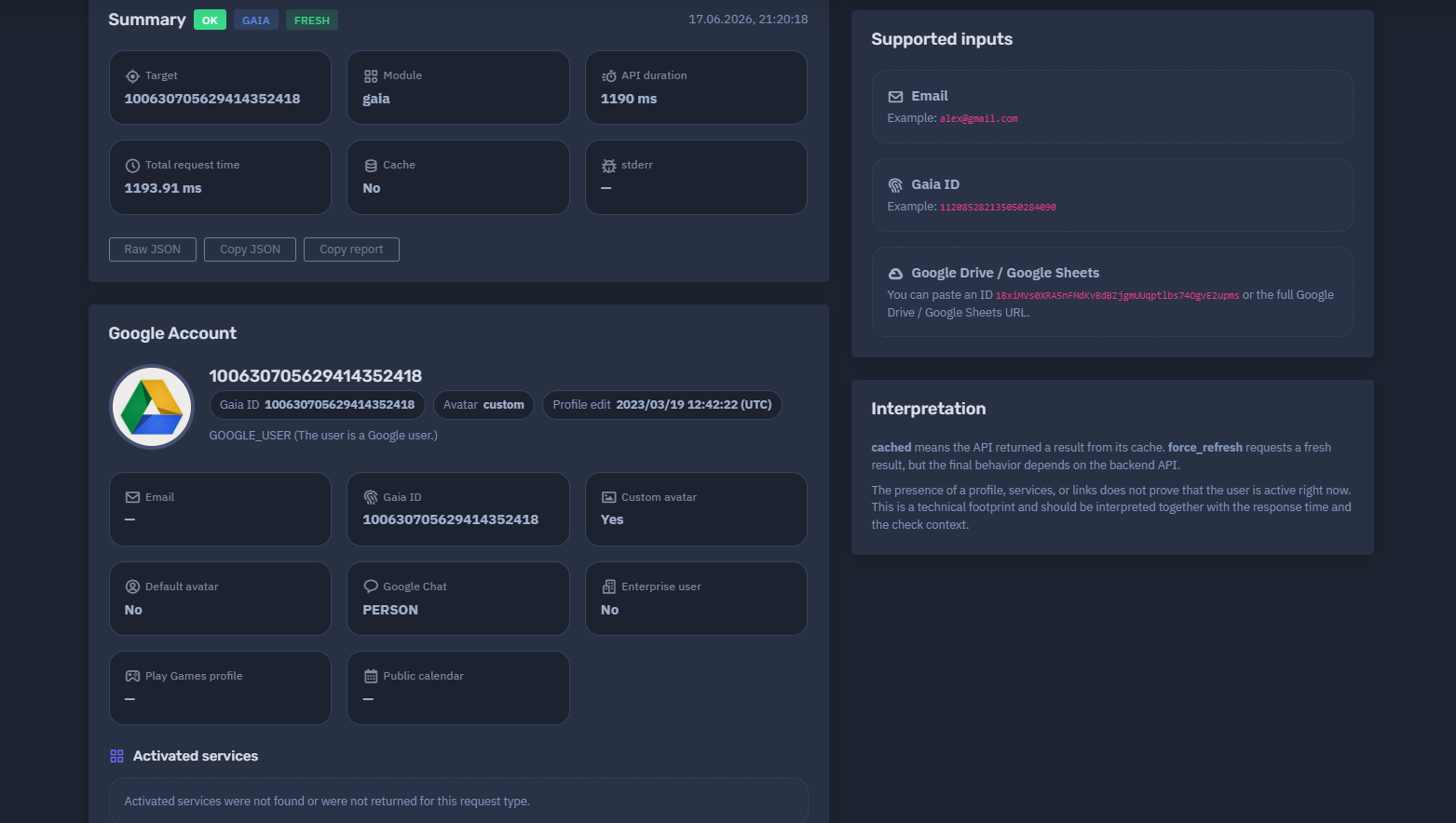
Gaia ID
A numeric Google Account identifier.
Example:
112085282135050284090
This mode is useful when the analyst already has a Gaia ID and needs to check related public or technical signals.
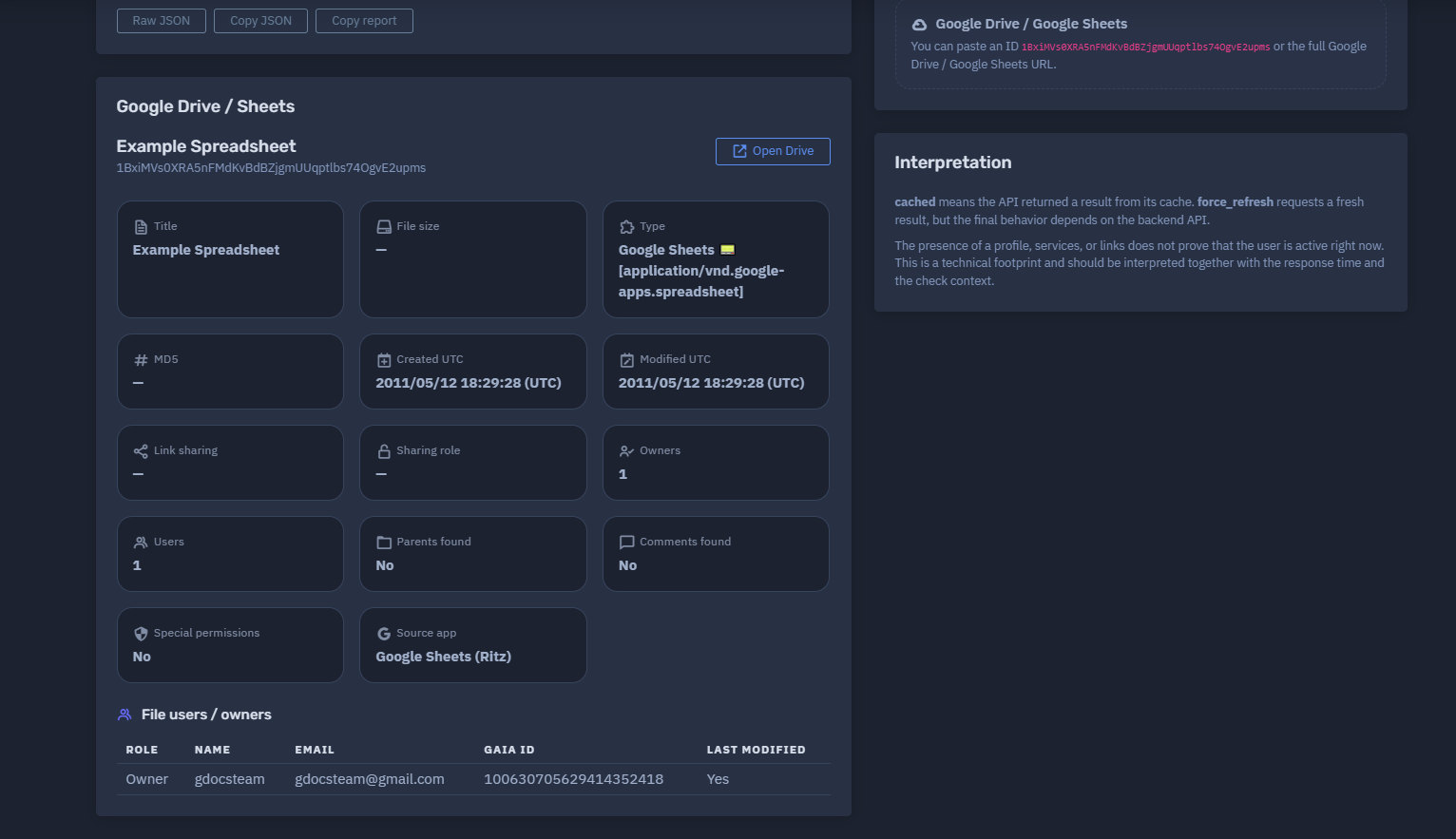
Google Drive / Google Sheets
A Google Drive or Google Sheets file can be analyzed by pasting either the file ID or the full URL.
Example file ID:
1BxiMVs0XRA5nFMdKvBdBZjgmUUqptlbs74OgvE2upms
Example supported inputs may include:
-
Google Drive file ID
-
Google Sheets document ID
-
Full Google Drive URL
-
Full Google Sheets URL
The tool may return file metadata, sharing role, owners, MIME type, checksum, title, size, creation date, modification date, and technical JSON depending on backend availability and file visibility.
⚙️ New Analysis Interface
The New Analysis section allows the user to choose the input type and submit the request to the backend API.
Main interface elements:
| Field | Description |
|---|---|
| Input type | Email, Gaia ID, Google Drive, or Google Sheets |
| Target value | The email, Gaia ID, file ID, or file URL to analyze |
Request include_raw |
Includes technical raw data for diagnostics and deeper analysis |
| Refresh without cache | Requests a fresh backend check when supported |
| Backend indicator | Shows that the request is processed through the NiamonX API |
🧠 Key Features
Google Account Analysis
The tool can analyze Google account signals connected to a Gmail or Google email address.
Possible returned fields include:
-
Email address
-
Gaia ID
-
Avatar type
-
Profile picture status
-
Profile modification date
-
Google user type
-
Google Chat entity type
-
Enterprise user flag
-
Public calendar flag
-
Play Games profile flag
Gaia ID Detection
When available, the tool returns the Google account’s Gaia ID.
A Gaia ID is a stable Google account identifier that can help analysts correlate technical Google signals across different public or semi-public contexts.
Avatar Analysis
Google Footprint can identify whether the account uses a custom avatar or a default Google avatar.
Possible values:
-
Custom avatar: Yes / No
-
Default avatar: Yes / No
-
Avatar URL or preview, when available
-
Profile picture availability
A custom avatar can be useful for manual correlation, but it should not be treated as proof of identity by itself.
Google Services Signals
The module may check for available signals connected to Google services.
Possible services and indicators include:
-
Google Photos
-
Google Maps
-
Google Meet
-
Google Chat
-
Google Calendar
-
Google Play Games
-
Enterprise account flags
Some service indicators may not be returned for every request type. If activated services are not found or not returned, the interface should clearly display that no service data was available for that request.
Google Maps / Contributions
The module can show available Google Maps public footprint signals.
Possible fields include:
-
Maps profile page availability
-
Reviews
-
Ratings
-
Photos
-
Contribution indicators
-
Review count
-
Rating count
The presence of a Maps profile does not prove current activity. It only indicates that a public or technical Maps-related signal was detected.
Google Drive / Sheets Metadata
For Google Drive or Google Sheets targets, the tool may return file-level metadata.
Possible fields include:
-
File title
-
File size
-
MIME type
-
Checksum
-
Creation date
-
Modification date
-
Sharing role
-
Owners
-
Links
-
Technical metadata
-
Raw JSON response
This is useful for validating public files, checking exposed shared documents, reviewing ownership indicators, and documenting Drive-related evidence.
Technical JSON
The tool can expose technical JSON for deeper diagnostics.
This is useful for:
-
SOC workflows
-
API integrations
-
Technical investigations
-
Internal documentation
-
Evidence preservation
-
Debugging backend responses
-
Comparing cached and fresh responses
Raw technical output should be handled carefully and shared only with authorized users.
📊 Summary Section
After an analysis is completed, Google Footprint displays a structured summary.
The summary may include:
-
Request status
-
Input type
-
Cache status
-
Timestamp
-
Target
-
Module type
-
API duration
-
Total request time
-
Backend stderr output, if any
Example structure:
Status: OK
Type: EMAIL
Cache: fresh
Module: email
API duration: 2044 ms
Total request time: 2048.92 ms
Cache: No
stderr: —
This section helps analysts understand how the result was generated and whether the response came from a fresh backend check or cached data.
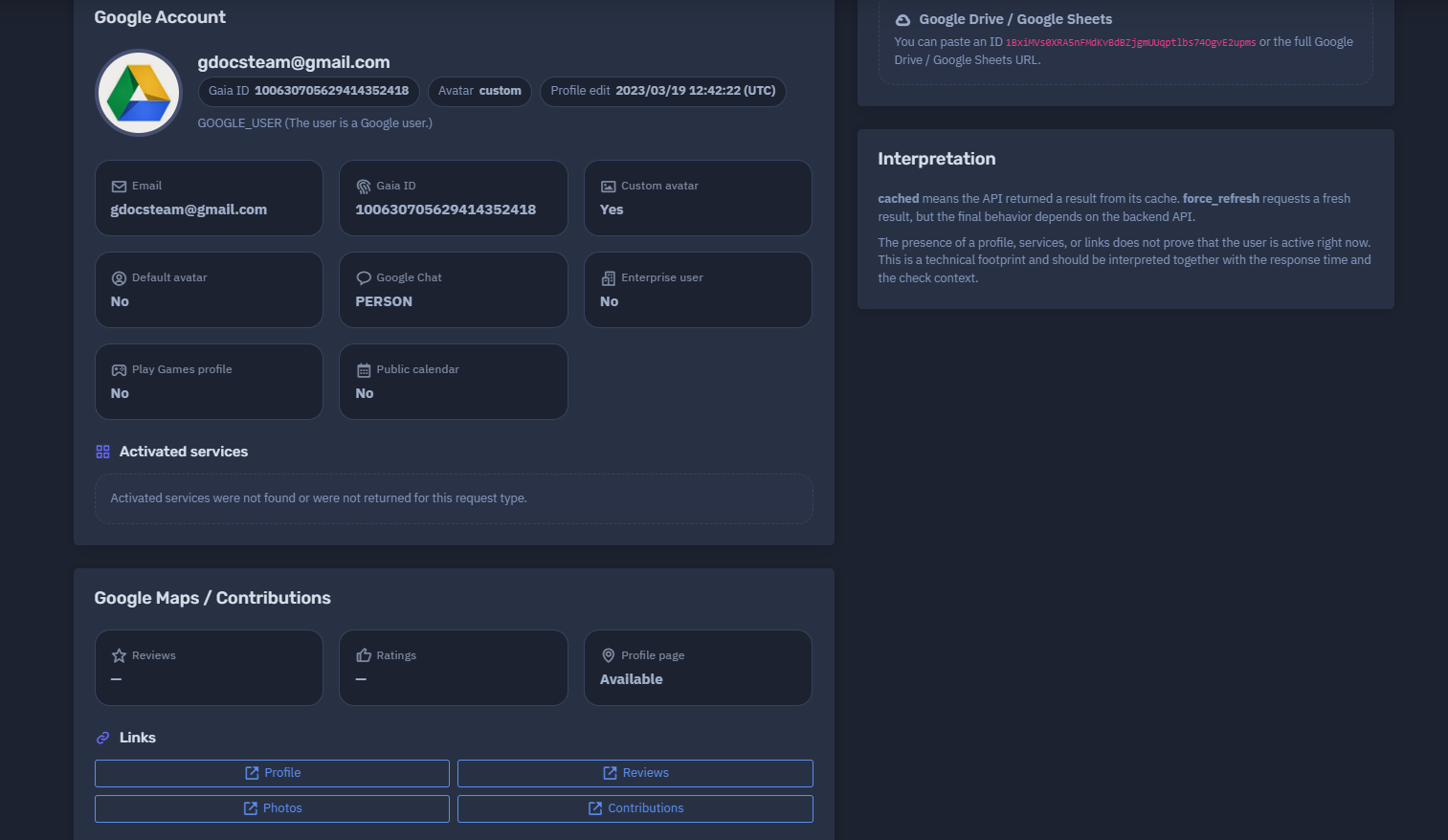
👤 Google Account Section
The Google Account section displays the primary account-level findings.
Possible fields include:
| Field | Description |
|---|---|
| Google or Gmail address analyzed by the tool | |
| Gaia ID | Google account identifier returned by the backend |
| Avatar | Avatar status or profile picture availability |
| Custom avatar | Indicates whether a custom avatar exists |
| Default avatar | Indicates whether the account uses the default avatar |
| Profile edit | Last detected profile edit timestamp, when available |
| User type | Google account type signal |
| Google Chat | Chat entity signal, such as PERSON |
| Enterprise user | Indicates whether enterprise-related account signals are detected |
| Play Games profile | Indicates whether Play Games profile data was found |
| Public calendar | Indicates whether public calendar signals were found |
The exact returned fields depend on the input type, backend support, Google-side availability, and cache/fresh request behavior.
🧬 Google User Types and Signals
Google Footprint may return technical account-type indicators.
Example signal:
GOOGLE_USER
This indicates that the checked identity is detected as a Google user through the supported backend logic.
Other service-related fields may show whether specific Google ecosystem signals were available.
Important: these indicators are technical signals. They should not be interpreted as complete account activity logs or proof that the user is currently active.
🖼️ Avatar and Profile Picture Analysis
Avatar data can help analysts correlate a Google account with other public identity traces.
Possible avatar-related indicators:
-
Profile picture exists
-
Custom avatar is used
-
Default avatar is not used
-
Avatar preview is available
-
Avatar URL is returned by the backend
A custom avatar may be useful for manual comparison with other platforms, but it should always be validated with additional context.
Recommended correlation signals:
-
Same profile image across platforms
-
Similar display name
-
Matching username
-
Same public links
-
Consistent timestamps
-
Related account metadata
-
Similar profile content
Avatar matching alone should not be treated as identity proof.
🗺️ Google Maps / Contributions
The Google Maps / Contributions section helps identify whether Maps-related public signals are available.
Possible fields include:
| Field | Description |
|---|---|
| Profile page | Indicates whether a Maps profile page is available |
| Reviews | Review data or count, if available |
| Ratings | Rating data or count, if available |
| Photos | Public contribution photos, if available |
| Contributions | Public contribution indicators |
If the report shows that a profile page is available but reviews or ratings are empty, it means that a Maps profile signal exists but no review or rating details were returned for that request.
This section is useful for OSINT, fraud analysis, identity correlation, and digital footprint review.
📁 Google Drive and Google Sheets Analysis
When a Google Drive or Google Sheets file is submitted, the module can check public and technical metadata associated with the file.
Possible metadata includes:
-
File title
-
MIME type
-
File size
-
Checksum
-
Created time
-
Modified time
-
Owners
-
Sharing status
-
User role
-
Public links
-
Technical JSON
This feature is useful for:
-
Checking exposed public documents
-
Reviewing shared file metadata
-
Validating ownership signals
-
Investigating leaked links
-
Documenting OSINT evidence
-
Understanding whether a Drive or Sheets file exposes metadata
The tool does not bypass Google permissions. Returned data depends on what is available to the backend check.
🔗 Links Section
The Links section collects available profile, Maps, Drive, or technical links returned by the backend.
Links may include:
-
Google profile links
-
Google Maps profile links
-
Google Drive file links
-
Google Sheets links
-
Avatar links
-
Public service links
Links are useful for manual validation and evidence review.
Users should avoid opening suspicious or unknown links outside a safe analysis environment.
🧾 Request Options
Google Footprint includes additional request options for deeper analysis and diagnostics.
include_raw
The include_raw option returns additional technical data when supported.
Use cases:
-
Debugging backend responses
-
Reviewing raw API fields
-
Comparing normalized vs raw output
-
Preserving technical evidence
-
Advanced analyst workflows
Raw output may contain verbose or sensitive technical details and should be handled carefully.
Refresh Without Cache
The refresh option requests a fresh backend check when supported.
This is useful when:
-
The analyst needs the newest available response
-
Previous data may be outdated
-
Cache behavior needs to be bypassed
-
A file or profile may have changed recently
Important: forcing refresh requests a fresh result, but the final behavior depends on backend API support and Google-side response behavior.
💾 Local Request History
Google Footprint stores request history locally in the user’s browser through localStorage.
This helps users access recent checks without server-side history navigation.
Local storage may include:
-
Recent targets
-
Input types
-
Request timestamps
-
Basic request metadata
Because the history is browser-local, it may be cleared if the user clears browser data, switches devices, or uses another browser profile.
Sensitive targets should be handled carefully, especially on shared devices.
🚦 Cache and Fresh Results
The interface may show whether a result was returned from cache or generated fresh.
Possible cache states:
| State | Meaning |
|---|---|
| cached | The API returned a previously stored result |
| fresh | A new check was performed or fresh data was returned |
| no cache | The result was not served from cache |
| force refresh | The user requested a fresh check |
A cached result can be useful for speed and stability, but it may not reflect the latest available state.
A force-refresh request asks the backend to perform a fresh check, but backend rules, provider limitations, and Google-side behavior may still affect the final response.
🧠 Result Interpretation
Google Footprint results should be interpreted as technical footprint signals.
The presence of a profile, Gaia ID, avatar, service signal, Maps page, or Drive metadata does not prove that the account is currently active.
Important interpretation rules:
-
A Google profile signal means the account was detected, not necessarily recently used.
-
A custom avatar helps with correlation, but does not prove identity alone.
-
A Gaia ID is a technical identifier, not a complete identity profile.
-
Maps signals may indicate public availability, not current activity.
-
Drive metadata depends on file permissions and backend visibility.
-
Cached results may reflect earlier checks.
-
Missing service data does not always mean the service is absent.
-
Backend-supported checks may vary by input type.
Analysts should combine Google Footprint results with other evidence, such as breach data, public profiles, account activity logs, OSINT findings, and internal investigation context.
✅ Recommended Analyst Workflow
A careful analysis process should follow these steps.
1. Select the Correct Input Type
Use Email for Gmail or Google account addresses, Gaia ID for known numeric identifiers, and Drive / Sheets for file investigations.
2. Validate the Target
Make sure the submitted value is correctly formatted before running the check.
3. Review the Summary
Check status, cache state, API duration, total request time, and backend diagnostics.
4. Review Google Account Signals
Look for Gaia ID, avatar status, user type, profile modification date, and service indicators.
5. Check Maps and Service Data
Review Maps profile availability, contribution signals, Calendar, Chat, Play Games, and enterprise flags.
6. Analyze Drive Metadata
For file targets, review title, MIME type, owners, sharing role, creation date, modification date, and links.
7. Use Raw JSON Carefully
Enable raw output only when technical details are needed for deeper analysis.
8. Compare With Other Sources
Correlate results with Alias Radar, CrossTrace, breach intelligence, ULP data, and manual OSINT checks.
9. Avoid Overclaiming
Treat all signals as technical indicators unless supported by additional evidence.
10. Store Evidence Securely
Keep reports and JSON output in secure internal systems when used for investigations.
🛡️ Security, Privacy & Ethics
Google Footprint is intended for lawful OSINT, defensive cybersecurity, fraud prevention, compliance review, and authorized investigation.
Users must follow strict ethical rules:
-
Analyze only accounts, Gaia IDs, or files that you own or are authorized to investigate.
-
Do not use the tool to stalk, harass, intimidate, shame, or target individuals.
-
Do not claim identity ownership based on a single Google signal.
-
Do not attempt to access private Google data or bypass permissions.
-
Do not use discovered links for phishing, impersonation, fraud, or social engineering.
-
Do not publish personal information discovered through the tool.
-
Do not misuse avatar, Maps, or Drive metadata to deanonymize people.
-
Validate all findings before legal, HR, compliance, or operational decisions.
-
Treat technical JSON and reports as sensitive investigation material.
The tool provides technical footprint intelligence. Responsible interpretation is required to avoid false positives and privacy harm.
⚙️ Technical Highlights
-
Google account footprint analysis
-
Supports Gmail / Google email addresses
-
Supports Gaia ID lookup
-
Supports Google Drive and Google Sheets file IDs or URLs
-
Powered by backend NiamonX API
-
Input validation before external request
-
Optional raw technical output with
include_raw -
Optional cache bypass with refresh request
-
Summary with status, module, cache, timing, and diagnostics
-
Google Account section with email, Gaia ID, avatar, user type, and profile modification data
-
Google services indicators
-
Google Maps / Contributions section
-
Google Drive metadata extraction
-
Owners, links, MIME type, checksum, size, and timestamps when available
-
Local browser request history through
localStorage -
Clean analyst-friendly interface
-
Suitable for OSINT, SOC, fraud analysis, compliance, and digital footprint investigations
📌 Usage Hints
-
Use Email mode for Gmail or Google account addresses.
-
Use Gaia ID mode when you already have a numeric Google account identifier.
-
Use Drive / Sheets mode for Google file IDs or full Google Drive / Google Sheets URLs.
-
Enable
include_rawfor technical diagnostics and deeper analysis. -
Use refresh without cache when the latest available result is important.
-
Check cache status before interpreting freshness.
-
A profile or Gaia ID does not prove recent activity.
-
Missing services do not always mean the services are absent.
-
Treat Google Maps and avatar signals as correlation hints.
-
Validate Drive metadata manually when used as evidence.
-
Store reports securely when used in investigations.
📬 Contact Information
For technical, legal, abuse, privacy, or takedown-related inquiries, users can contact the NiamonX team directly:
support@niamonx.io — Technical Support
other@niamonx.io — General Inquiries
takedown@niamonx.io — Data Removal / Privacy Takedown Requests
legal@niamonx.io — Legal and Compliance Matters
Alternative contact channel:
🔗 Helpdesk: https://support.niamonx.io/
Summary
NiamonX Google Footprint is a Google account and file intelligence module that helps collect structured public and technical signals for Gmail accounts, Gaia IDs, Google Drive files, and Google Sheets documents.
It can return account metadata, Gaia identifiers, avatar information, Google service signals, Maps profile indicators, Drive file metadata, owners, links, timing information, cache state, and technical JSON.
The tool is designed for lawful OSINT, defensive cybersecurity, fraud analysis, compliance checks, SOC workflows, and digital footprint investigations. All findings should be treated as technical signals and validated with additional context before making conclusions.