GlobeLine DNS | DNS Query & Record Intelligence
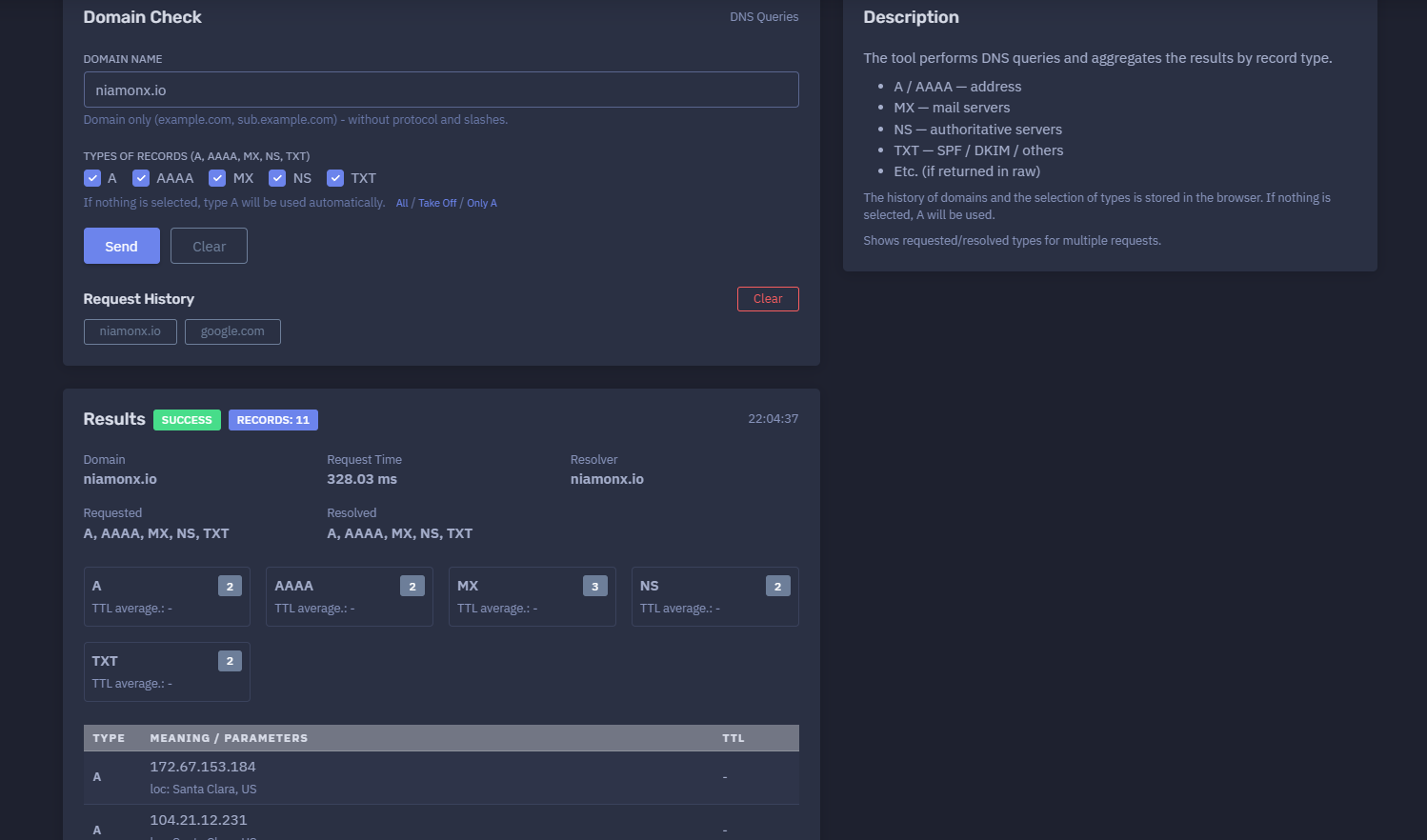
The platform available at https://dash.niamonx.io/gl_dns — known as GlobeLine DNS — is a DNS intelligence and domain record lookup tool within the NiamonX platform. It allows users to perform DNS queries for a domain name and aggregate the returned records by type, including A, AAAA, MX, NS, TXT, and other records when available in the raw response.
Overview of the Service
GlobeLine DNS is designed to help users quickly inspect DNS configuration for a domain or subdomain.
The tool performs DNS queries through the NiamonX resolver infrastructure and presents the results in a clean, structured format. It shows which record types were requested, which record types were resolved, how many records were found, request timing, resolver information, and individual DNS records grouped by type.
GlobeLine DNS is useful for:
-
Domain configuration review
-
DNS troubleshooting
-
Mail infrastructure checks
-
Security and SPF validation
-
OSINT enrichment
-
SOC triage
-
Infrastructure monitoring
-
Domain migration checks
-
Incident response
-
Technical documentation
The tool accepts domain names only. Users should enter a clean domain or subdomain without protocol, slashes, paths, or URL parameters.
🔍 How the Tool Works
When a user enters a domain name, GlobeLine DNS performs DNS queries for the selected record types.
Supported record types include:
-
A
-
AAAA
-
MX
-
NS
-
TXT
If no record type is selected, the tool automatically uses type A.
After the request is completed, the interface displays:
-
Query status
-
Number of returned records
-
Domain name
-
Request time
-
Resolver
-
Requested record types
-
Resolved record types
-
Count per record type
-
TTL information when available
-
Individual record values
-
Source location for returned records when available
-
Local browser request history
Example result summary:
SUCCESS
Records: 11
Domain: niamonx.io
Request Time: 328.03 ms
Requested: A, AAAA, MX, NS, TXT
Resolved: A, AAAA, MX, NS, TXT
🧩 What Can Be Checked
GlobeLine DNS supports domain and subdomain checks.
Valid examples:
example.com
sub.example.com
niamonx.io
Unsupported input examples:
https://example.com
example.com/path
https://example.com/login?x=1
1.1.1.1
The tool is intended for domain names only. IP lookup, ping, geolocation, and service discovery are handled by separate NiamonX modules.
⚙️ Query Interface
The GlobeLine DNS interface includes a domain input field and record type selection controls.
Domain Name
The user enters a domain or subdomain.
Example:
niamonx.io
The interface indicates:
Domain only — without protocol and slashes.
Types of Records
Users can select one or more DNS record types.
Available primary types:
-
A
-
AAAA
-
MX
-
NS
-
TXT
Quick controls may include:
-
All
-
Take Off
-
Only A
If nothing is selected, type A is used automatically.
📌 Supported Record Types
A Record
An A record maps a domain name to an IPv4 address.
Example:
A 172.67.153.184
A records are commonly used to route a domain to a web server, CDN edge, proxy, or hosting infrastructure.
AAAA Record
An AAAA record maps a domain name to an IPv6 address.
Example:
AAAA 2606:4700:3033::6815:ce7
AAAA records are used for IPv6-enabled services.
MX Record
An MX record identifies mail servers responsible for receiving email for the domain.
Example:
MX mx.zoho.eu.
MX records are important for checking whether email delivery is configured correctly.
NS Record
An NS record identifies authoritative name servers for the domain.
Example:
NS abdullah.ns.cloudflare.com.
NS records show which DNS provider or authoritative DNS infrastructure controls the domain zone.
TXT Record
A TXT record stores text-based DNS values.
Common uses include:
-
SPF policies
-
DKIM records
-
DMARC records
-
Site verification
-
Domain ownership verification
-
Security and service configuration
Example:
TXT v=spf1 include:zohomail.eu -all
TXT records are especially important for mail security and domain verification.
📊 Results Summary
After a successful query, the tool displays a summary block.
Typical fields include:
| Field | Description |
|---|---|
| Status | Query result status |
| Records | Total number of returned records |
| Domain | Queried domain |
| Request Time | Total DNS query duration |
| Resolver | Resolver or source used for the request |
| Requested | DNS record types requested by the user |
| Resolved | DNS record types successfully returned |
| Type counters | Number of records per type |
| TTL average | Average TTL per record type when available |
Example:
SUCCESS
Records: 11
Request Time: 328.03 ms
Resolver: niamonx.io
Requested: A, AAAA, MX, NS, TXT
Resolved: A, AAAA, MX, NS, TXT
This helps users quickly understand whether DNS resolution succeeded and which record types were returned.
📋 Results Table
DNS records are displayed in a structured table.
Typical columns include:
| Column | Description |
|---|---|
| Type | DNS record type |
| Meaning / Parameters | Returned DNS value |
| TTL | Time To Live value when available |
Example table rows:
A     172.67.153.184
AAAA  2606:4700:3033::6815:ce7
MX    mx.zoho.eu.
NS    abdullah.ns.cloudflare.com.
TXT   v=spf1 include:zohomail.eu -all
When available, the tool may also show resolver-side or source-location context for records.
Example:
loc: Santa Clara, US
⏱️ TTL Interpretation
TTL means Time To Live. It tells DNS resolvers how long they may cache a record before checking again.
A low TTL may indicate:
-
Active migration
-
Dynamic infrastructure
-
Load balancing changes
-
Failover preparation
-
Frequent DNS updates
A high TTL may indicate:
-
Stable DNS configuration
-
Lower DNS query volume
-
Longer propagation time after changes
-
TTL availability depends on the DNS response and backend resolver behavior.
📬 Mail Configuration Review
MX and TXT records are especially important for email security and delivery.
GlobeLine DNS can help review:
-
Mail servers
-
SPF records
-
DKIM records
-
DMARC records
-
Domain verification records
-
Third-party mail provider configuration
Example SPF record:
v=spf1 include:zohomail.eu -all
An SPF record defines which mail servers are authorized to send email for the domain.
Security teams can use TXT records to check whether the domain has proper anti-spoofing configuration.
🛡️ Security-Relevant DNS Checks
GlobeLine DNS can support several defensive security checks.
SPF Review
Check TXT records for SPF configuration.
Look for records starting with:
v=spf1
DKIM Review
Check for DKIM selector records when querying specific DKIM subdomains.
Example format:
selector._domainkey.example.com
DMARC Review
Check the DMARC policy by querying:
_dmarc.example.com
Name Server Review
Check NS records to confirm which provider controls authoritative DNS.
Address Review
Check A and AAAA records to confirm where the domain resolves.
Mail Provider Review
Check MX records to identify the active mail provider.
🌍 Resolver and Location Context
The results may include resolver or location context.
Example:
Resolver: niamonx.io
loc: Santa Clara, US
This helps users understand where the DNS request was resolved from or what infrastructure was used for the lookup.
DNS responses can vary by location due to:
-
GeoDNS
-
CDN routing
-
Anycast DNS
-
Split-horizon DNS
-
Resolver caching
-
Regional load balancing
-
DNS-based failover
For global infrastructure, results from one resolver location should be treated as one perspective.
🕓 Request History
GlobeLine DNS stores domain queries and selected record types in the browser.
The history may include:
-
Queried domain
-
Selected record types
-
Timestamp
-
Query status
-
Record count
-
Result summary
Important behavior:
The history of domains and the selection of types is stored in the browser.
Local history helps users repeat common DNS checks quickly.
🧠 Key Features
DNS Query Tool
Performs DNS queries for selected record types.
Domain and Subdomain Support
Accepts clean domain names and subdomains.
Multiple Record Types
Supports A, AAAA, MX, NS, and TXT.
Automatic A Fallback
If no type is selected, A is used automatically.
Aggregated Results
Groups returned data by DNS record type.
Requested vs Resolved Types
Shows which types were requested and which types returned results.
Request Timing
Displays DNS request duration.
TTL Display
Shows TTL values when available.
Resolver Context
Displays resolver/source information.
Local History
Stores domains and record type selections in the browser.
Security Review Support
Useful for SPF, MX, NS, and TXT-based security checks.
✅ Recommended Analyst Workflow
A practical DNS review workflow should follow these steps.
1. Enter a Clean Domain
Use only the domain or subdomain without protocol, slashes, or paths.
2. Select Record Types
Choose A, AAAA, MX, NS, TXT, or use All for a broader check.
3. Review Query Status
Confirm that the result status is SUCCESS.
4. Check Requested and Resolved Types
Verify whether the requested record types returned data.
5. Review Address Records
Check A and AAAA records for web or infrastructure routing.
6. Review Mail Records
Check MX records for mail server configuration.
7. Review TXT Records
Look for SPF, DKIM, DMARC, verification, and other security records.
8. Review Name Servers
Check NS records to identify authoritative DNS providers.
9. Consider Resolver Perspective
Remember that DNS responses can vary by geography, resolver, and cache state.
10. Document Findings
Use returned records in reports, migration notes, incident response, or security reviews.
🔎 Common Use Cases
GlobeLine DNS can support many technical workflows.
Domain Troubleshooting
Check whether a domain resolves correctly.
Mail Delivery Debugging
Review MX and SPF-related TXT records.
DNS Migration Validation
Confirm that records have changed after a provider or hosting migration.
Security Audit
Check SPF, DKIM, DMARC, NS, and exposed address records.
OSINT Enrichment
Collect DNS infrastructure indicators for a domain.
Incident Response
Review DNS changes, suspicious TXT records, or unexpected IP addresses.
Infrastructure Documentation
Create a quick snapshot of domain DNS configuration.
CDN and Hosting Review
Identify whether a domain points to CDN, cloud, or hosting infrastructure.
⚠️ Result Interpretation Notes
DNS results should be interpreted carefully.
Important points:
-
DNS records can change quickly.
-
Resolver cache may affect results.
-
GeoDNS may return different records from different regions.
-
CDN-backed domains may resolve to different IPs depending on location.
-
Missing records do not always mean misconfiguration.
-
TXT records can contain multiple unrelated service values.
-
MX records identify mail routing, not necessarily all email security settings.
-
TTL may be unavailable depending on backend response.
-
Some security records require querying specific subdomains, such as
_dmarc.example.com.
For critical DNS changes, compare results with authoritative DNS tools and multiple resolvers.
🛡️ Security, Privacy & Responsible Use
GlobeLine DNS is intended for lawful DNS troubleshooting, security analysis, domain administration, OSINT enrichment, and infrastructure review.
Acceptable use cases include:
-
Checking your own domains
-
Reviewing public DNS records
-
Validating mail configuration
-
Investigating suspicious domains
-
Supporting SOC triage
-
Documenting DNS infrastructure
-
Checking SPF, DKIM, DMARC, MX, and NS records
-
Monitoring domain changes
-
Troubleshooting DNS propagation
Users should follow responsible use principles:
-
Do not misuse DNS data for phishing or impersonation.
-
Do not use results to target third-party infrastructure.
-
Validate suspicious findings with additional sources.
-
Treat lookup history as potentially sensitive on shared devices.
-
Use the tool only for lawful and ethical analysis.
⚙️ Technical Highlights
-
DNS query tool
-
Available at
dash.niamonx.io/gl_dns -
Supports domain and subdomain input
-
Rejects protocols and URL paths
-
Supports A records
-
Supports AAAA records
-
Supports MX records
-
Supports NS records
-
Supports TXT records
-
Uses A automatically when no record type is selected
-
Supports multi-type queries
-
Shows requested record types
-
Shows resolved record types
-
Aggregates results by type
-
Shows record counts
-
Shows request time
-
Shows resolver information
-
Shows TTL when available
-
Stores domain history locally in the browser
-
Stores selected record types locally in the browser
-
Suitable for DNS troubleshooting, mail security checks, OSINT, SOC workflows, and infrastructure review
📌 Usage Hints
-
Enter only a domain or subdomain.
-
Do not include
https://, slashes, paths, or query strings. -
Select A for IPv4 address records.
-
Select AAAA for IPv6 address records.
-
Select MX to check mail servers.
-
Select NS to check authoritative name servers.
-
Select TXT to check SPF, verification, and other text records.
-
Use All for a complete basic DNS overview.
-
If nothing is selected, A will be used automatically.
-
Check requested and resolved types to understand missing results.
-
Remember that DNS responses may differ by resolver and region.
-
Query
_dmarc.example.comseparately to check DMARC. -
Query DKIM selector subdomains separately when needed.
-
Local history is stored in the browser.
📬 Contact Information
For technical, legal, abuse, privacy, or support-related inquiries, users can contact the NiamonX team directly:
support@niamonx.io — Technical Support
other@niamonx.io — General Inquiries
takedown@niamonx.io — Privacy or Data Removal Requests
legal@niamonx.io — Legal and Compliance Matters
Alternative contact channel:
🔗 Helpdesk: https://support.niamonx.io/
Summary
NiamonX GlobeLine DNS is a DNS query and domain record intelligence tool for checking A, AAAA, MX, NS, and TXT records.
It accepts clean domain or subdomain input, performs selected DNS queries, aggregates results by type, shows requested and resolved record groups, displays request time, resolver context, record counts, TTL values when available, and stores query history locally in the browser.
The tool is designed for DNS troubleshooting, mail configuration review, SPF and TXT analysis, infrastructure documentation, SOC triage, OSINT enrichment, and domain security workflows.