Flight Tracker | Real-Time ADS-B Flight Monitoring
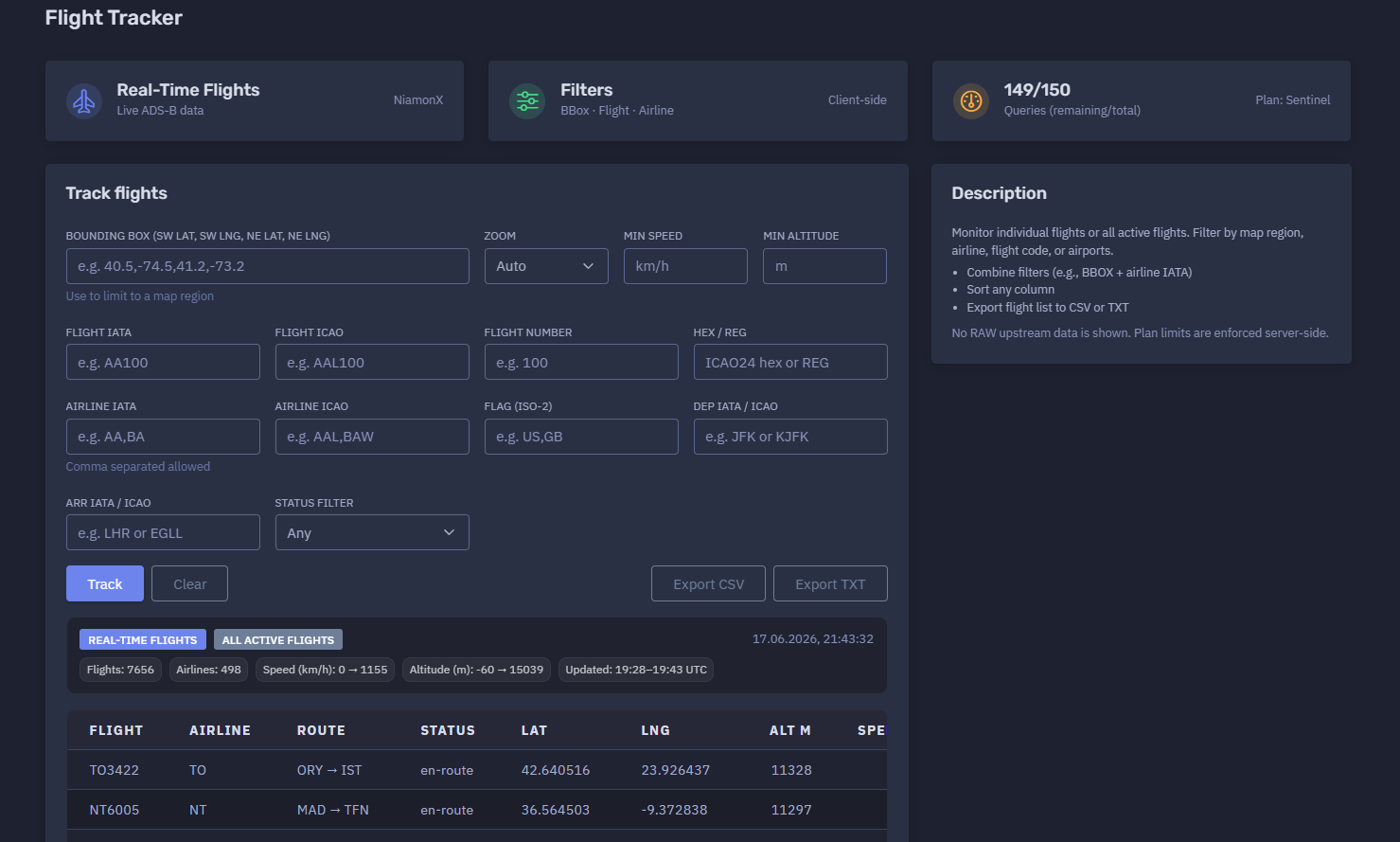
The platform available at https://dash.niamonx.io/flight_tracker — known as Flight Tracker — is a real-time flight tracking and aviation intelligence tool within the NiamonX platform. It allows users to monitor active flights using live ADS-B data and filter aircraft by map region, flight code, airline, route, aircraft identifier, speed, altitude, country flag, and operational status.
Overview of the Service
Flight Tracker is designed to provide a live operational view of active flights worldwide. The tool collects and displays real-time aircraft movement data, allowing users to track individual flights or analyze broader air traffic activity across selected regions.
Unlike static schedule tools, Flight Tracker focuses on aircraft that are currently active or recently observed through live aviation telemetry. It provides position, speed, altitude, heading, aircraft type, registration, route, airline, and update timestamp when available.
The tool is useful for:
-
Real-time aviation monitoring
-
Flight tracking
-
ADS-B intelligence
-
Airport and route observation
-
Airline fleet monitoring
-
Aviation OSINT
-
Logistics and travel awareness
-
Corporate travel visibility
-
Executive protection workflows
-
Incident response support
-
Regional airspace monitoring
No raw upstream data is shown in the interface. Results are cleaned and displayed in an analyst-friendly table.
🔍 How the Tool Works
The user can run a broad search for all active flights or narrow the query using one or more filters.
Supported filtering options include:
-
Bounding box / map region
-
Zoom level
-
Minimum speed
-
Minimum altitude
-
Flight IATA code
-
Flight ICAO code
-
Numeric flight number
-
Aircraft HEX / registration
-
Airline IATA code
-
Airline ICAO code
-
Country flag
-
Departure airport
-
Arrival airport
-
Flight status
The backend returns matching active flights, and the interface displays them in a sortable table.
Example broad search:
All active flights
Example filtered search:
Airline IATA: BA
Dep IATA / ICAO: LHR
Arr IATA / ICAO: JFK
Example regional search:
Bounding box: 40.5,-74.5,41.2,-73.2
This makes it possible to monitor either one specific aircraft or thousands of active flights across a larger region.
🧩 What Can Be Tracked
Flight Tracker can be used to track or filter flights by several aviation identifiers.
Supported search and filter types:
| Filter Type | Example | Description |
|---|---|---|
| Bounding box | 40.5,-74.5,41.2,-73.2 |
Limits results to a map region |
| Flight IATA | AA100 |
IATA-style flight code |
| Flight ICAO | AAL100 |
ICAO-style flight code |
| Flight number | 100 |
Numeric flight number |
| HEX / Reg | A1B2C3 or N123AA |
ICAO24 hex or aircraft registration |
| Airline IATA | AA,BA |
One or more airline IATA codes |
| Airline ICAO | AAL,BAW |
One or more airline ICAO codes |
| Flag | US,GB |
Aircraft or operator country flag |
| Departure airport | JFK or KJFK |
Departure airport IATA / ICAO |
| Arrival airport | LHR or EGLL |
Arrival airport IATA / ICAO |
| Status | Any |
Operational status filter |
The tool can be used for both single-flight lookups and wide-area monitoring.
⚙️ Tracking Interface
The Flight Tracker interface contains several main sections.
Controls
The controls panel shows that the tool supports:
BBox · Flight · Airline
Client-side
This means users can filter by geographic bounding box, flight identifiers, and airline-related fields.
Query Counter
The interface displays current daily query limits.
Example:
149 / 150
Queries remaining / total
Plan: Sentinel
Daily access depends on the user’s plan, and limits are enforced server-side.
Track Flights
The main tracking panel contains all filters used to search live flight data.
🗺️ Bounding Box Filter
The Bounding Box filter limits results to a selected geographic region.
Input format:
SW lat, SW lng, NE lat, NE lng
Example:
40.5,-74.5,41.2,-73.2
This means:
-
SW lat: south-west latitude
-
SW lng: south-west longitude
-
NE lat: north-east latitude
-
NE lng: north-east longitude
Bounding boxes are useful for:
-
Monitoring flights around a city
-
Watching airport approach/departure zones
-
Tracking traffic over a specific region
-
Reducing result volume
-
Improving analysis focus
-
Combining geographic filtering with airline or flight filters
Example use case:
Show active flights around New York airspace.
🔎 Zoom
The Zoom option helps control how map or regional results are interpreted.
Default value:
Auto
Auto zoom allows the interface to choose an appropriate view based on the query and returned data.
Zoom is most useful when combined with a bounding box or map-based workflow.
🚀 Minimum Speed Filter
The Min speed filter allows users to return only flights above a selected speed.
Unit:
km/h
This is useful for excluding stationary or slow-moving aircraft.
Example use cases:
-
Show only aircraft currently in flight
-
Exclude ground traffic
-
Focus on en-route flights
-
Identify high-speed active traffic
🛫 Minimum Altitude Filter
The Min altitude filter allows users to return only aircraft above a selected altitude.
Unit:
m
This is useful for:
-
Excluding ground aircraft
-
Filtering out taxiing aircraft
-
Monitoring cruise-level traffic
-
Focusing on aircraft above a selected altitude
-
Separating airport surface activity from airborne traffic
✈️ Flight Filters
Flight Tracker supports several flight-level filters.
Flight IATA
Search by IATA-style flight code.
Example:
AA100
Flight ICAO
Search by ICAO-style flight code.
Example:
AAL100
Flight Number
Search by numeric flight number only.
Example:
100
Flight number filtering is useful when the airline code is unknown or when checking possible codeshare variants.
🛩️ Aircraft HEX / Registration
The HEX / Reg field allows tracking by aircraft identifier.
Supported examples:
ICAO24 HEX
Aircraft registration
This is useful for tracking a specific aircraft rather than a scheduled flight number.
Possible use cases:
-
Fleet monitoring
-
Aircraft-specific investigation
-
Tracking a tail number
-
Comparing repeated movements
-
Executive aviation monitoring
-
Aircraft OSINT
🏢 Airline Filters
The tool supports filtering by airline IATA or ICAO codes.
Airline IATA
Example:
AA,BA
Comma-separated values are allowed.
Airline ICAO
Example:
AAL,BAW
Airline filters are useful for:
-
Monitoring one airline
-
Comparing active flights by carrier
-
Watching alliance or codeshare activity
-
Reducing large global result sets
-
Airline fleet observation
🏳️ Flag Filter
The Flag filter accepts ISO-2 country codes.
Example:
US,GB
This can help filter aircraft or flights associated with specific countries, depending on the returned aviation data.
Use cases:
-
Country-level fleet monitoring
-
Regional aviation analysis
-
Filtering by aircraft registration country
-
OSINT review by flag or jurisdiction
Flag signals should be interpreted carefully because aircraft registration country, airline nationality, and route geography may differ.
🧭 Departure and Arrival Filters
Flight Tracker supports filtering by departure and arrival airports.
Input can be IATA or ICAO.
Examples:
JFK
KJFK
LHR
EGLL
These filters are useful for:
-
Tracking all active flights from an airport
-
Tracking flights arriving at a destination
-
Monitoring a specific route
-
Combining with airline filters
-
Identifying current airborne traffic for an airport pair
📊 Real-Time Results Summary
After a query is completed, the tool displays a summary of returned live flights.
The summary may include:
-
Result mode
-
Query timestamp
-
Number of flights
-
Number of airlines
-
Minimum and maximum speed
-
Minimum and maximum altitude
-
Data update time range
Example summary:
All active flights
Flights: 7656
Airlines: 498
Speed: 0 → 1155 km/h
Altitude: -60 → 15039 m
Updated: 19:28–19:43 UTC
This summary gives users a quick overview of the size and freshness of the returned data.
📋 Results Table
The results table displays active flights in a compact operational format.
Typical columns include:
| Column | Description |
|---|---|
| Flight | Flight code |
| Airline | Airline code |
| Route | Departure and arrival airports |
| Status | Current operational status |
| Latitude | Current or last known latitude |
| Longitude | Current or last known longitude |
| Altitude | Current or last known altitude in meters |
| Speed | Current or last known speed in km/h |
| Heading | Direction of travel |
| Vertical speed | Climb or descent indicator, when available |
| Squawk | Transponder squawk code, when available |
| Aircraft type | ICAO aircraft type code |
| Registration | Aircraft registration |
| Updated | Last update timestamp |
Example row structure:
BA299 BA LHR → ORD en-route 43.225991 -82.839675 10992 698 249 0 B77W G-STBG
The table is designed for sorting, filtering, and export.
📍 Position Data
Flight Tracker returns latitude and longitude when available.
Position data helps users understand where an aircraft was last observed.
Important notes:
-
Position may be delayed.
-
Position may not be available for every aircraft.
-
ADS-B coverage varies by region.
-
Some aircraft may be filtered or privacy-restricted.
-
A result does not guarantee perfectly live location.
Position should be treated as near-real-time operational data, not as a safety-critical navigation source.
🧭 Heading
The heading value shows the aircraft’s direction of travel.
Example:
Heading: 249
Heading is usually expressed in degrees, where:
-
0 / 360 = north
-
90 = east
-
180 = south
-
270 = west
Heading is useful for understanding aircraft movement direction and confirming whether a flight is moving toward its expected destination.
🛫 Altitude
Altitude is displayed in meters.
Example:
Altitude: 10992 m
Altitude can help distinguish:
-
Aircraft on the ground
-
Climbing aircraft
-
Cruising aircraft
-
Descending aircraft
-
Approach or landing traffic
The summary may show a range such as:
Altitude: -60 → 15039 m
Negative or unusual altitude values may appear due to data source behavior, airport elevation handling, sensor anomalies, or ground-level interpretation.
🚀 Speed
Speed is displayed in kilometers per hour.
Example:
Speed: 698 km/h
Speed helps identify whether an aircraft is airborne, taxiing, stationary, climbing, cruising, or descending.
The summary may show the observed speed range across returned flights.
📡 Squawk
The squawk field displays the aircraft transponder code when available.
Squawk may be empty or unavailable for many flights.
Common interpretation:
-
Empty field: no squawk returned
-
Numeric code: transponder squawk code
-
Special codes may indicate emergency or operational situations, but they require careful validation
The tool should not be used as a sole source for emergency interpretation.
🛩️ Aircraft Type and Registration
Flight Tracker may display:
-
ICAO aircraft type code
-
Aircraft registration
Examples:
B738
A359
A21N
G-STBG
N19951
PH-BXC
Aircraft type and registration are useful for:
-
Fleet analysis
-
Aircraft identification
-
Route monitoring
-
Aviation OSINT
-
Spotting codeshare or operator differences
-
Historical movement correlation
Some aircraft may not return registration or type information.
🧠 Key Features
Real-Time ADS-B Monitoring
The tool provides live or near-live active flight data based on ADS-B-style telemetry.
Track Individual Flights
Users can filter by flight code, flight number, aircraft HEX, or registration.
Monitor All Active Flights
The tool can return a broad global list of active flights.
Bounding Box Filtering
Users can limit results to a specific map region.
Airline Filtering
Users can filter by one or more airlines.
Route Filtering
Users can filter by departure and arrival airport.
Speed and Altitude Filtering
Users can focus on aircraft above specific speed or altitude thresholds.
Country Flag Filtering
Users can filter by ISO-2 country flag when supported.
Status Filtering
Users can filter by operational status.
Sortable Table
Any column can be sorted for faster analysis.
CSV Export
Users can export the flight list to CSV.
TXT Export
Users can export flight lists to plain text.
Pagination
Large result sets are paginated for readability.
Local Request History
The last 100 queries are stored locally in the browser.
📄 Pagination
Large result sets may span multiple pages.
Example:
Showing 1–100 of 7656
1 / 77
Pagination allows the interface to handle thousands of active flights without overwhelming the browser.
📤 Export Options
Flight Tracker supports export for operational and analytical workflows.
CSV Export
CSV export is useful for:
-
Spreadsheet analysis
-
Aviation reporting
-
Airspace monitoring
-
Fleet analysis
-
Route analysis
-
Incident documentation
-
OSINT case notes
TXT Export
TXT export is useful for:
-
Plain flight lists
-
Watchlists
-
Batch checks
-
Quick sharing
-
Copying identifiers into other tools
Exported data may contain operationally sensitive flight information and should be stored responsibly.
🕓 Request History
The Request History section stores recent tracking queries locally in the user’s browser.
Example behavior:
Stores last 100 queries in your browser.
History entries may include:
-
Route filters
-
Bounding box
-
Zoom mode
-
Airline filter
-
Flight filter
-
Query timestamp
Example history entry:
— → —
BBOX: —
ZOOM: auto
Airline: any
Flight: any
17.06.2026, 21:43:32
Request history helps users repeat previous monitoring queries quickly.
Because it is stored locally, it may be cleared if the user deletes browser data or switches devices.
🚦 Query Limits and Plan Access
Flight Tracker uses plan-based query limits.
Example:
149 / 150
Queries remaining / total
Plan: Sentinel
Important points:
-
Access depends on the user’s plan.
-
Daily limits are enforced server-side.
-
Users should monitor remaining queries during repeated tracking.
-
Exporting already loaded results is different from running a new query.
🧭 IATA, ICAO, HEX, and Registration Reference
Flight IATA
IATA-style flight code.
Example:
AA100
Flight ICAO
ICAO-style flight code.
Example:
AAL100
Airline IATA
Two-character airline code.
Example:
AA
BA
DL
Airline ICAO
Three-letter airline code.
Example:
AAL
BAW
DAL
Airport IATA
Three-letter airport code.
Example:
JFK
LHR
MIA
Airport ICAO
Four-letter airport code.
Example:
KJFK
EGLL
KMIA
ICAO24 HEX
Aircraft transponder hexadecimal identifier.
Example:
A1B2C3
Registration
Aircraft tail number or national registration.
Example:
N123AA
G-STBG
PH-BXC
🧠 Result Interpretation
Flight Tracker data should be interpreted carefully.
Important interpretation rules:
-
ADS-B coverage varies by region.
-
Some aircraft may not appear due to privacy filters.
-
Position may be delayed or missing.
-
Flight status can change quickly.
-
Aircraft type or registration may be unavailable.
-
Squawk values require careful validation.
-
Speed and altitude may contain anomalies.
-
Ground aircraft may appear with low or zero speed.
-
Codeshare flights may appear under different airline identifiers.
-
A missing field does not mean the information does not exist; it may simply not be returned.
The tool is designed for monitoring and intelligence, not for safety-critical navigation or official air traffic control use.
✅ Recommended Monitoring Workflow
A practical Flight Tracker workflow should follow these steps.
1. Choose Monitoring Scope
Decide whether to monitor all active flights, a region, a route, an airline, or a specific aircraft.
2. Use Bounding Box for Regions
Enter SW and NE coordinates to limit results to a map area.
3. Add Airline or Route Filters
Use airline, departure, and arrival filters to reduce result volume.
4. Use Speed and Altitude Filters
Exclude ground traffic or focus on airborne flights.
5. Search by Flight or Registration
For a specific aircraft, use flight code, HEX, or registration.
6. Review the Summary
Check total flights, airlines, speed range, altitude range, and update time range.
7. Sort the Results
Sort by altitude, speed, updated time, airline, route, or aircraft type.
8. Review Aircraft Details
Check type, registration, route, and position.
9. Export When Needed
Export CSV for analysis or TXT for flight lists.
10. Verify Critical Findings
Confirm important operational conclusions with official aviation sources when needed.
🛡️ Security, Privacy & Responsible Use
Flight Tracker is intended for lawful aviation awareness and operational monitoring.
Acceptable use cases include:
-
Tracking active flights
-
Monitoring airspace regions
-
Airline and fleet observation
-
Airport traffic awareness
-
Travel coordination
-
Aviation OSINT
-
Logistics support
-
Corporate travel monitoring
-
Executive protection workflows
-
Incident response support
-
Research and reporting
Users should follow responsible use principles:
-
Do not use flight tracking data for stalking, harassment, or physical harm.
-
Do not misuse aircraft movement information to target individuals.
-
Do not treat ADS-B data as complete or perfectly real-time.
-
Do not use the tool for safety-critical navigation.
-
Verify critical operational details with official aviation sources.
-
Treat local request history as potentially sensitive on shared devices.
-
Store exported data responsibly.
⚙️ Technical Highlights
-
Real-time flight tracking module
-
Available at
dash.niamonx.io/flight_tracker -
Live ADS-B data
-
Supports broad active-flight monitoring
-
Supports individual flight tracking
-
Bounding box geographic filtering
-
Zoom control
-
Minimum speed filter
-
Minimum altitude filter
-
Flight IATA filter
-
Flight ICAO filter
-
Numeric flight number filter
-
HEX / registration filter
-
Airline IATA filter
-
Airline ICAO filter
-
ISO-2 flag filter
-
Departure airport filter
-
Arrival airport filter
-
Status filter
-
Client-side controls
-
Sortable result table
-
Pagination for large result sets
-
CSV export
-
TXT export
-
Local browser request history
-
Stores last 100 queries in browser
-
No raw upstream data shown
-
Plan-based query limits
-
Server-side limit enforcement
-
Suitable for ADS-B intelligence, aviation OSINT, logistics, travel monitoring, and operational awareness
📌 Usage Hints
-
Use an empty query to monitor all active flights.
-
Use a bounding box to limit results to a map region.
-
Combine BBOX with airline IATA for focused regional monitoring.
-
Use min speed to hide stationary or ground aircraft.
-
Use min altitude to focus on airborne traffic.
-
Use Flight IATA or ICAO for a known flight.
-
Use HEX / Reg to track a specific aircraft.
-
Use airline filters with comma-separated values.
-
Use departure and arrival filters for route-based tracking.
-
Sort by altitude, speed, update time, or route.
-
Export CSV for analysis.
-
Export TXT for flight lists.
-
Remember that ADS-B data may be delayed or incomplete.
-
Access depends on your plan and daily tool limits.
-
Local request history stores the last 100 queries in your browser.
📬 Contact Information
For technical, legal, abuse, privacy, or support-related inquiries, users can contact the NiamonX team directly:
support@niamonx.io — Technical Support
other@niamonx.io — General Inquiries
takedown@niamonx.io — Privacy or Data Removal Requests
legal@niamonx.io — Legal and Compliance Matters
Alternative contact channel:
🔗 Helpdesk: https://support.niamonx.io/
Summary
NiamonX Flight Tracker is a real-time ADS-B flight monitoring tool for tracking active flights worldwide. It supports broad traffic monitoring, region-based tracking, individual flight lookup, airline filtering, route filtering, speed and altitude filtering, aircraft HEX / registration search, status filtering, pagination, CSV export, TXT export, and local browser request history.
The tool is designed for aviation OSINT, operational awareness, logistics, corporate travel monitoring, airspace observation, and real-time flight intelligence. Results should be treated as near-real-time aviation signals and verified with official sources for critical decisions.