Domain WHOIS Checker | WHOIS / RDAP Domain Intelligence
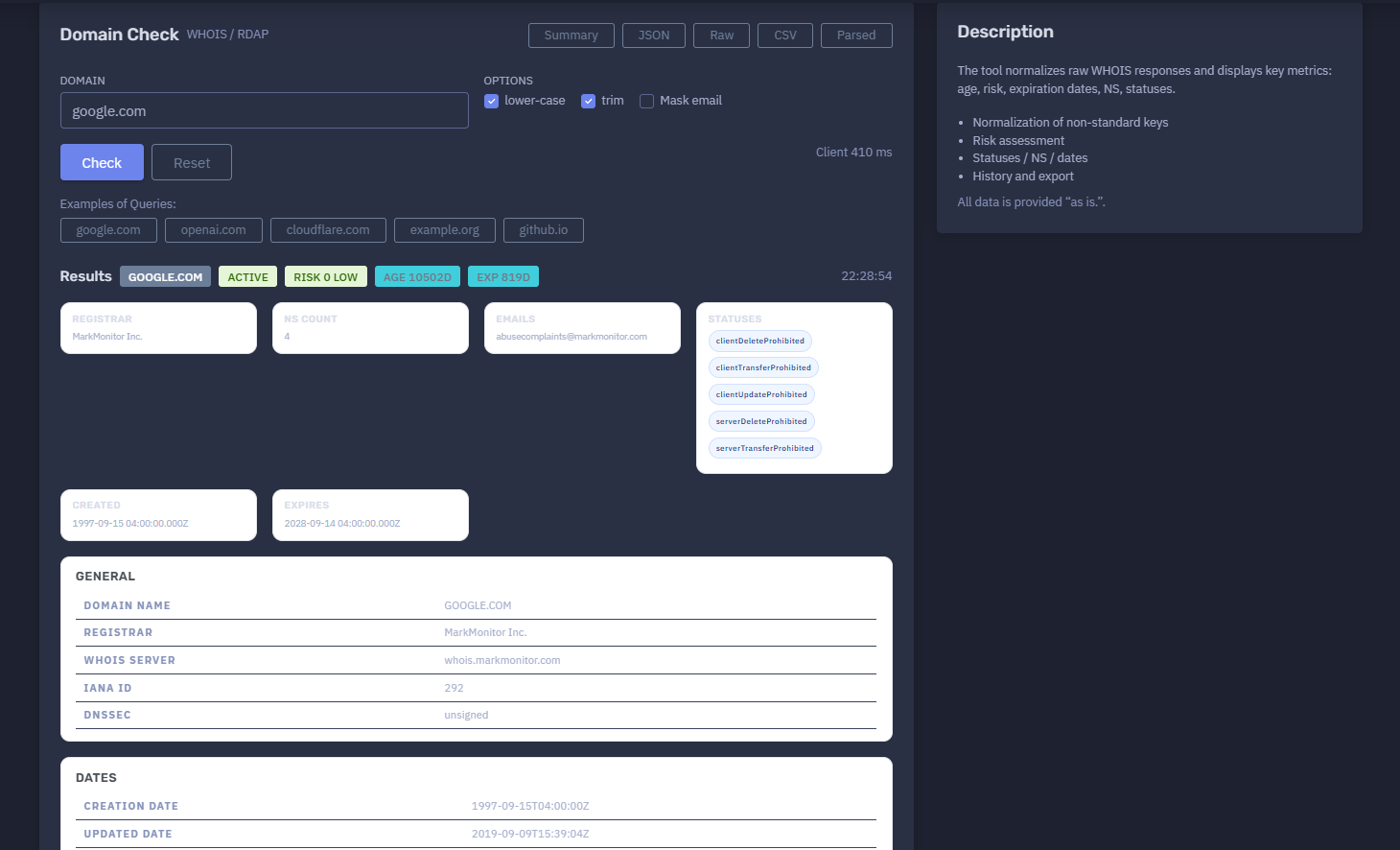
The platform available at https://dash.niamonx.io/domain_whois — known as Domain WHOIS Checker — is a domain intelligence and registration analysis tool within the NiamonX platform. It allows users to check WHOIS / RDAP information for a domain name, normalize raw registry responses, extract key ownership and registration fields, assess domain risk, and review domain age, expiration, registrar, name servers, statuses, abuse contacts, and parsed technical data.
Overview of the Service
Domain WHOIS Checker is designed to help users quickly understand the registration profile of a domain.
The tool collects and normalizes WHOIS / RDAP-style data and displays it in a clean, structured format. Instead of forcing the user to manually read raw WHOIS text, the system extracts the most important fields and presents them as a readable domain report.
The module is useful for:
-
SOC triage
-
OSINT investigation
-
Domain reputation review
-
Phishing investigation
-
Brand protection
-
Abuse reporting
-
Infrastructure analysis
-
Compliance checks
-
Threat intelligence enrichment
-
Domain lifecycle monitoring
-
Security research
The tool displays domain status, registrar, WHOIS server, IANA registrar ID, DNSSEC status, creation date, update date, expiration date, name servers, registry statuses, contact emails, raw WHOIS, extra text, and parsed JSON.
All data is provided “as is” and should be validated with official registrar or registry sources when used for critical decisions.
🔍 How the Tool Works
The user enters a domain name and selects optional normalization settings.
Example input:
google.com
The tool then performs a WHOIS / RDAP lookup and parses the returned response.
The result may include:
-
Domain name
-
Domain activity status
-
Risk score
-
Risk level
-
Domain age
-
Days until expiration
-
Registrar
-
WHOIS server
-
IANA ID
-
DNSSEC status
-
Creation date
-
Updated date
-
Expiration date
-
Name servers
-
Registry statuses
-
Abuse or contact emails
-
Raw WHOIS text
-
Extra WHOIS text
-
Parsed JSON
-
Local request history
The tool also calculates high-level metrics such as domain age and remaining expiration time, which help analysts quickly understand whether the domain appears newly registered, mature, expiring soon, or stable.
🧩 What Can Be Checked
Domain WHOIS Checker accepts domain names.
Valid examples:
google.com
cloudflare.com
niamonx.io
github.io
Invalid examples:
https://google.com
google.com/search
https://example.com/login
1.1.1.1
The tool is intended for domain names only. IP lookup, DNS resolution, reverse IP, ASN, and service intelligence are handled by separate NiamonX modules.
⚙️ Interface Structure
The Domain WHOIS Checker interface contains several main sections.
Domain
The input field where the user enters the domain name.
Example:
google.com
Options
The tool provides optional processing settings.
Available options may include:
-
lower-case
-
trim
-
Mask email
These options help normalize input and protect sensitive contact details in the displayed report.
Results
The result panel displays the normalized domain report.
General
The General section shows core WHOIS / RDAP fields.
Dates
The Dates section displays creation, update, and expiration timestamps.
Name Servers
The Name Servers section lists authoritative name servers returned by the registry or registrar.
Statuses
The Statuses section shows domain registry status flags.
Emails
The Emails section shows detected contact or abuse emails, depending on WHOIS availability and masking settings.
Raw WHOIS
Displays the original raw WHOIS response.
Extra Text
Displays additional unstructured text returned by the WHOIS source.
Parsed JSON
Displays the normalized structured representation of the WHOIS result.
Request History
Stores recent domain checks locally in the browser.
🛠️ Input Normalization Options
Domain WHOIS Checker includes options that help prepare and sanitize the input or output.
Lower-case
Converts the submitted domain to lowercase.
Example:
GOOGLE.COM → google.com
This improves consistency because domain names are case-insensitive in normal DNS usage.
Trim
Removes extra spaces before and after the domain.
Example:
google.com → google.com
This prevents accidental lookup errors caused by copied whitespace.
Mask Email
Masks or partially hides email addresses in the displayed result.
This is useful when:
-
Sharing screenshots
-
Preparing documentation
-
Publishing internal reports
-
Reducing exposure of abuse or contact addresses
-
Avoiding unnecessary display of personal or operational contact data
When full contact details are needed for an authorized workflow, users should handle them carefully.
📊 Result Summary
After a successful lookup, the tool displays a high-level summary.
Example structure:
google.com
Active
Risk 0 Low
Age 10502d
Exp 819d
Registrar: MarkMonitor Inc.
NS Count: 4
The summary helps users quickly understand:
-
Whether the domain appears active
-
Its calculated risk score
-
Its age in days
-
How many days remain until expiration
-
Which registrar manages it
-
How many name servers are configured
-
Whether emails or statuses were detected
🚦 Domain Status
The result may show a general domain state, such as:
Active
This means the domain appears to have valid registration data and is not obviously expired or unavailable in the returned WHOIS / RDAP response.
Possible domain states may include:
-
Active
-
Expired
-
Unknown
-
Suspended
-
Pending
-
Error / unavailable
The exact state depends on the registry data and parser output.
⚠️ Risk Score
Domain WHOIS Checker calculates a risk score and risk level.
Example:
Risk 0 Low
The risk score is an analytical indicator. It may consider factors such as:
-
Very new domain age
-
Expiration soon
-
Missing or unusual fields
-
Suspicious status combinations
-
Unusual registrar or WHOIS structure
-
Missing name servers
-
Domain lifecycle anomalies
-
Potentially risky registration patterns
-
Parser warnings
Risk score helps with triage, but it is not a final reputation verdict.
A low risk score does not guarantee that the domain is safe. A higher score does not automatically prove malicious activity.
📅 Domain Age
The Age metric shows how many days have passed since the domain creation date.
Example:
Age 10502d
Domain age is useful for reputation analysis.
General interpretation:
| Domain Age | Possible Interpretation |
|---|---|
| 0–30 days | Newly registered domain; review carefully |
| 31–180 days | Young domain; may require context |
| 181–365 days | Established but still relatively new |
| 1–5 years | More mature domain |
| 5+ years | Long-running domain, often lower registration-age risk |
Newly registered domains are often important in phishing, scam, malware, and impersonation investigations, but domain age alone is not proof of malicious activity.
⏳ Expiration Metric
The Exp metric shows how many days remain until the domain expiration date.
Example:
Exp 819d
Expiration data is useful for:
-
Domain lifecycle monitoring
-
Brand protection
-
Asset management
-
Security review
-
Detecting domains close to expiry
-
Preventing accidental domain loss
A domain close to expiration may represent operational risk if it belongs to an organization.
For suspicious domains, short expiration windows may indicate temporary infrastructure, but this must be interpreted with other signals.
🏢 Registrar Information
The Registrar field shows which registrar manages the domain registration.
Example:
Registrar: MarkMonitor Inc.
The General section may also show:
| Field | Description |
|---|---|
| Registrar | Registrar name |
| WHOIS Server | Registrar WHOIS server |
| IANA ID | Registrar identifier assigned by IANA |
| DNSSEC | DNSSEC status |
Example:
Whois Server: whois.markmonitor.com
IANA ID: 292
DNSSEC: unsigned
Registrar data is useful for:
-
Abuse reporting
-
Domain ownership context
-
Brand protection
-
Legal escalation
-
Investigating suspicious registrations
-
Validating domain management provider
🔐 DNSSEC Status
The DNSSEC field shows whether the domain has DNSSEC configured according to the returned data.
Example:
DNSSEC: unsigned
Possible values may include:
-
signed
-
unsigned
-
unknown
-
unavailable
DNSSEC helps protect DNS integrity by allowing cryptographic validation of DNS responses. However, lack of DNSSEC does not automatically mean a domain is malicious.
📅 Dates Section
The Dates section displays key lifecycle timestamps.
Common fields:
| Field | Description |
|---|---|
| Creation Date | When the domain was first registered |
| Updated Date | When the registration record was last updated |
| Expiration Date | When the domain is scheduled to expire |
Example:
Creation Date: 1997-09-15T04:00:00Z
Updated Date: 2019-09-09T15:39:04Z
Expiration Date: 2028-09-14T04:00:00Z
Creation Date
Useful for domain age analysis.
Updated Date
Useful for detecting recent registration changes, registrar transfers, DNS changes, or administrative updates.
Expiration Date
Useful for lifecycle monitoring and risk assessment.
🌐 Name Servers
The Name Servers section lists authoritative DNS servers for the domain.
Example:
NS1.GOOGLE.COM
NS2.GOOGLE.COM
NS3.GOOGLE.COM
NS4.GOOGLE.COM
Name servers are useful for:
-
Identifying DNS provider
-
Checking domain infrastructure
-
Detecting DNS migration
-
Reviewing hosting or CDN setup
-
Investigating suspicious domain clusters
-
Brand protection
-
Security audits
A sudden change in name servers may indicate migration, takeover, compromise, or operational change depending on context.
🏷️ Registry Statuses
Domain statuses show registry-level restrictions or lifecycle states.
Example statuses:
clientDeleteProhibited
clientTransferProhibited
clientUpdateProhibited
serverDeleteProhibited
serverTransferProhibited
serverUpdateProhibited
Common statuses include:
| Status | Meaning |
|---|---|
clientTransferProhibited |
Registrar-level transfer lock |
clientDeleteProhibited |
Registrar-level delete protection |
clientUpdateProhibited |
Registrar-level update restriction |
serverTransferProhibited |
Registry-level transfer restriction |
serverDeleteProhibited |
Registry-level delete restriction |
serverUpdateProhibited |
Registry-level update restriction |
ok |
Standard active state |
pendingDelete |
Domain is pending deletion |
redemptionPeriod |
Domain is in redemption period |
clientHold |
Domain may be prevented from resolving |
serverHold |
Registry-level hold |
Status codes help analysts understand domain protection, lifecycle, and administrative restrictions.
📧 Emails and Contacts
The tool extracts visible email addresses from the WHOIS / RDAP response when available.
Example:
abusecomplaints@example-registrar.com
Email fields may include:
-
Abuse contact
-
Registrar contact
-
Administrative contact
-
Technical contact
-
Generic WHOIS contact
Due to privacy rules and redaction practices, many WHOIS records no longer expose registrant personal email addresses.
If Mask email is enabled, emails may be hidden or partially masked in the interface.
Contact emails are useful for:
-
Abuse reports
-
Phishing takedown requests
-
Registrar escalation
-
Legal workflows
-
Security notifications
🧾 Raw WHOIS
The Raw WHOIS section displays the original unnormalized WHOIS response.
Raw WHOIS is useful when:
-
Parser output needs verification
-
Important fields are missing from the structured view
-
The registry uses unusual formatting
-
Analysts need exact source text
-
Legal or compliance workflows require raw evidence
-
Manual review is necessary
Raw WHOIS may contain unstructured text, registry disclaimers, contact fields, status lines, name servers, and timestamps.
📄 Extra Text
The Extra Text section displays additional unstructured content that may not fit into standard parsed fields.
This may include:
-
Registry disclaimers
-
Terms of use
-
Registrar notices
-
RDAP messages
-
Additional contact notes
-
Parser-unmapped fields
-
Legal text
Extra Text can be useful when investigating unusual registry responses.
🧬 Parsed JSON
The Parsed JSON section displays structured normalized data extracted from WHOIS / RDAP.
Parsed JSON may include:
-
Domain name
-
Registrar
-
WHOIS server
-
IANA ID
-
DNSSEC status
-
Dates
-
Name servers
-
Statuses
-
Emails
-
Raw text mapping
-
Risk values
-
Parser metadata
Parsed JSON is useful for:
-
API workflows
-
SOC automation
-
Case management
-
Evidence preservation
-
Technical documentation
-
Internal dashboards
-
Compliance reporting
🕓 Request History
The tool stores recent domain checks in the browser.
History entries may include:
-
Domain
-
Status
-
Risk score
-
Age
-
Expiration remaining days
-
Timestamp
Example history format:
google.com
active
R0
A:10502d
E:819d
17.06.2026, 22:28:54
History is useful for quickly repeating previous checks and comparing how domain age, expiration, and risk score change over time.
Because history is browser-local, it may be cleared when users delete browser data or switch devices.
🧠 Key Features
WHOIS / RDAP Lookup
Checks domain registration data using WHOIS / RDAP-style sources.
Normalization
Normalizes non-standard keys and inconsistent registry responses.
Risk Assessment
Calculates domain risk score and risk level.
Domain Age
Calculates how many days have passed since creation.
Expiration Tracking
Calculates how many days remain until expiration.
Registrar Information
Shows registrar, WHOIS server, and IANA ID.
DNSSEC Status
Displays DNSSEC signing state when available.
Name Server Extraction
Status Extraction
Displays registry and registrar status codes.
Email Extraction and Masking
Extracts contact emails and supports masking.
Raw WHOIS
Allows manual review of original response.
Parsed JSON
Provides structured technical data.
Request History
Stores recent checks locally in the browser.
Export Support
Supports history and result export workflows when available.
🔎 Common Use Cases
Domain WHOIS Checker supports many investigative and operational workflows.
Phishing Investigation
Check whether a suspicious domain is newly registered or has risky lifecycle signals.
Brand Protection
Monitor domains that imitate a company, product, or executive name.
Abuse Reporting
Find registrar and abuse contact information.
SOC Triage
Enrich suspicious domains from alerts, emails, logs, or SIEM events.
Domain Lifecycle Monitoring
Check expiration dates for owned or critical domains.
Infrastructure Review
Identify registrar, name servers, and DNSSEC status.
Threat Intelligence
Collect registration metadata for suspicious infrastructure.
Compliance and Documentation
Document domain ownership and registration details.
Fraud Analysis
Review domain age, registrar, and status flags for suspicious websites.
⚠️ Result Interpretation
WHOIS / RDAP data should be interpreted carefully.
Important points:
-
WHOIS data may be redacted for privacy.
-
Registrar data may differ from registry data.
-
Some fields may be missing or normalized.
-
Raw WHOIS formats vary by TLD and registrar.
-
Domain age does not prove legitimacy.
-
New domains are not automatically malicious.
-
Old domains are not automatically safe.
-
Status codes may reflect normal domain protection.
-
Expiration date may change after renewal.
-
DNSSEC unsigned does not automatically mean insecure or malicious.
-
Risk score is a heuristic, not a final verdict.
For legal, takedown, or high-impact security actions, validate with the registrar, registry, RDAP, DNS, certificate transparency, passive DNS, and content analysis.
✅ Recommended Analyst Workflow
A practical WHOIS investigation should follow these steps.
1. Enter a Clean Domain
Use only the domain name without protocol or path.
2. Enable Normalization Options
Use lower-case and trim to avoid input mistakes.
3. Enable Email Masking When Sharing
Mask email addresses before screenshots or external reports.
4. Review the Summary
Check activity status, risk, age, expiration, registrar, name server count, and detected emails.
5. Review Dates
Check creation, update, and expiration dates.
6. Review Registrar
Identify registrar, WHOIS server, and IANA ID.
7. Review Name Servers
Check whether name servers match expected infrastructure.
8. Review Status Codes
Look for transfer locks, holds, pending deletion, or lifecycle restrictions.
9. Inspect Raw WHOIS
Use raw WHOIS when parser output looks incomplete or unusual.
10. Use Parsed JSON
Use structured JSON for reports, automation, or case management.
🛡️ Security, Privacy & Responsible Use
Domain WHOIS Checker is intended for lawful domain intelligence, cybersecurity analysis, infrastructure review, and abuse reporting.
Acceptable use cases include:
-
Checking your own domains
-
Investigating suspicious domains
-
Reviewing phishing infrastructure
-
Finding registrar abuse contacts
-
Monitoring domain expiration
-
Supporting SOC triage
-
Brand protection
-
Threat intelligence enrichment
-
Compliance documentation
-
Infrastructure auditing
Users should follow responsible use principles:
-
Do not use contact information for harassment or spam.
-
Do not assume malicious intent from domain age alone.
-
Do not publish personal data from WHOIS records unnecessarily.
-
Respect privacy redaction and applicable data protection laws.
-
Validate important findings with additional sources.
-
Treat local history as sensitive on shared devices.
-
Use the tool only for lawful and ethical analysis.
⚙️ Technical Highlights
-
Domain WHOIS / RDAP checker
-
Available at
dash.niamonx.io/domain_whois -
Domain input
-
Lower-case option
-
Trim option
-
Email masking option
-
Client-side timing display
-
WHOIS / RDAP data normalization
-
Normalization of non-standard keys
-
Domain status detection
-
Risk score and risk level
-
Domain age calculation
-
Expiration remaining calculation
-
Registrar extraction
-
WHOIS server extraction
-
IANA registrar ID extraction
-
DNSSEC status
-
Creation date
-
Updated date
-
Expiration date
-
Name server extraction
-
Registry status extraction
-
Email extraction
-
Raw WHOIS viewer
-
Extra Text section
-
Parsed JSON section
-
Request history
-
Export support
-
Suitable for SOC, OSINT, phishing analysis, brand protection, compliance, and domain lifecycle monitoring
📌 Usage Hints
-
Enter only the domain name.
-
Do not include
https://, paths, query strings, or slashes. -
Use lower-case and trim for clean normalization.
-
Enable Mask email when sharing screenshots or reports.
-
Check domain age for phishing and fraud triage.
-
Check expiration for lifecycle risk.
-
Review registrar and WHOIS server for abuse escalation.
-
Review name servers for infrastructure context.
-
Review statuses to understand locks or lifecycle restrictions.
-
Use Raw WHOIS when parsed data looks incomplete.
-
Use Parsed JSON for technical workflows.
-
Remember that all data is provided “as is.”
-
Validate critical findings with additional sources.
📬 Contact Information
For technical, legal, abuse, privacy, or support-related inquiries, users can contact the NiamonX team directly:
support@niamonx.io — Technical Support
other@niamonx.io — General Inquiries
takedown@niamonx.io — Privacy or Data Removal Requests
legal@niamonx.io — Legal and Compliance Matters
Alternative contact channel:
🔗 Helpdesk: https://support.niamonx.io/
Summary
NiamonX Domain WHOIS Checker is a WHOIS / RDAP domain intelligence tool that normalizes raw registry responses and displays key domain registration metrics, including status, risk, age, expiration, registrar, WHOIS server, IANA ID, DNSSEC, name servers, statuses, emails, raw WHOIS, extra text, parsed JSON, and request history.
The tool is designed for phishing investigation, SOC triage, OSINT enrichment, brand protection, abuse reporting, domain lifecycle monitoring, compliance review, and infrastructure analysis. Results are provided “as is” and should be validated with official registrar, registry, DNS, and security sources when used for important decisions.