DNSSEC Configuration | DNSSEC Validation, Keys & Signature Analysis Tool
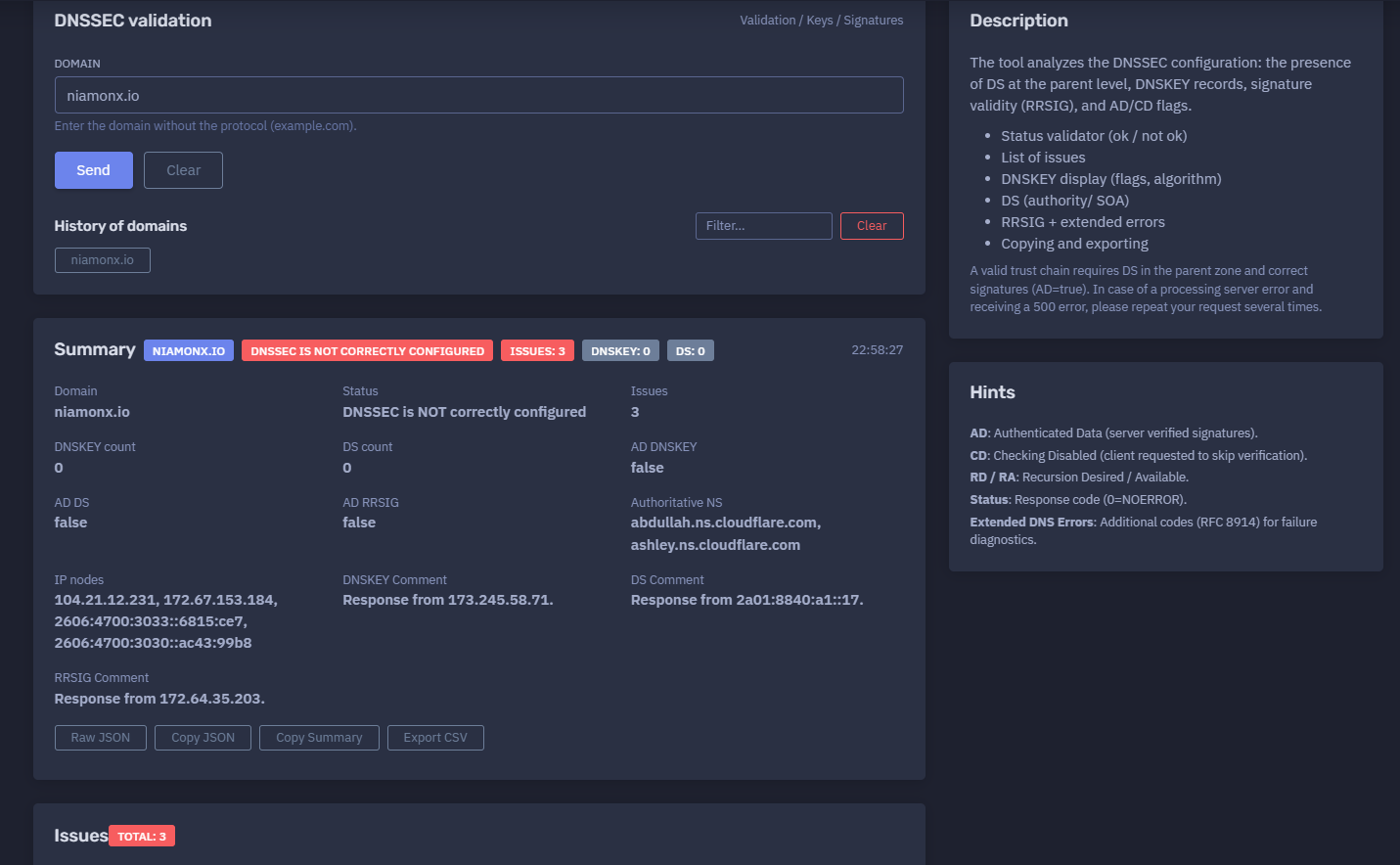
The platform available at https://dash.niamonx.io/dnssec_check — known as DNSSEC Configuration — is a DNSSEC validation and diagnostic tool within the NiamonX platform. It analyzes whether a domain is correctly protected with DNSSEC by checking DS records at the parent zone, DNSKEY records at the authoritative zone, RRSIG signatures, validation flags, DNS response status, authoritative name servers, IP nodes, and detected configuration issues.
The tool helps users understand whether a domain has a valid DNSSEC trust chain or whether DNSSEC is missing, incomplete, misconfigured, or failing validation.
Overview of the Service
DNSSEC Configuration is designed to analyze the DNSSEC state of a domain in a structured and readable way. DNSSEC helps protect DNS responses against tampering by using cryptographic signatures and a chain of trust from the parent zone to the domain’s authoritative DNS zone.
The tool checks several important parts of DNSSEC configuration:
-
DS records at the parent zone
-
DNSKEY records in the domain zone
-
RRSIG signatures
-
AD flag behavior
-
CD flag behavior
-
RD / RA recursion flags
-
DNS response status codes
-
authoritative name servers
-
resolved IP nodes
-
DNSSEC-related issues
-
extended DNS error information, when available
The module is useful for DNS administrators, DevOps engineers, security teams, SOC teams, compliance teams, incident responders, domain owners, infrastructure engineers, and OSINT analysts.
It is especially helpful when users need to answer questions such as:
-
Is DNSSEC enabled for this domain?
-
Is DNSSEC correctly configured?
-
Are DNSKEY records present?
-
Is there a DS record in the parent zone?
-
Are DNSSEC signatures validated successfully?
-
Is the AD flag set?
-
Which authoritative name servers are involved?
-
Which DNS nodes are returned?
-
What issues prevent a valid DNSSEC trust chain?
-
Are there extended DNS errors that explain the failure?
🔍 How the Tool Works
When a user enters a domain, DNSSEC Configuration performs DNSSEC-related DNS queries and analyzes the results.
Example input:
Domain: niamonx.io
Example summary result:
niamonx.io
DNSSEC is NOT correctly configured
Issues: 3
DNSKEY: 0
DS: 0
22:58:27
The tool may perform checks for:
-
DNSKEY records
-
DS records
-
RRSIG records
-
AD flag validation
-
CD flag state
-
RD / RA recursion behavior
-
authoritative name servers
-
IP nodes
-
DNS response status
-
SOA / authority records
-
extended DNS errors
The result is organized into multiple sections:
-
Summary
-
Domain status
-
Issues
-
DNSKEY query
-
DS query
-
RRSIG query
-
DNS Chain
-
Authoritative NS
-
IP nodes
-
local history
🧩 Supported Input
DNSSEC Configuration accepts domain names only.
Correct input examples:
niamonx.io
example.com
cloudflare.com
sub.example.com
Incorrect input examples:
https://niamonx.io
http://example.com
https://example.com/path
example.com/path
user@example.com
192.168.1.1
localhost
Interface guidance:
Enter the domain without the protocol (example.com).
Users should enter only the domain name, without http://, https://, path, query string, fragment, wildcard, or e-mail formatting.
📊 Summary Section
The Summary section provides a compact DNSSEC status overview.
Example:
niamonx.io
DNSSEC is NOT correctly configured
Issues: 3
DNSKEY: 0
DS: 0
22:58:27
Typical fields include:
| Field | Description |
|---|---|
| Domain | The checked domain |
| Status | DNSSEC validation result |
| Issues | Number of detected configuration problems |
| DNSKEY | Number of DNSKEY records found |
| DS | Number of DS records found |
| Time | Query or result timestamp |
The Summary section is useful for quick triage. It immediately shows whether the domain appears to have a valid DNSSEC configuration or whether further investigation is needed.
✅ Status Validator
The tool provides a clear status result.
Example:
DNSSEC is NOT correctly configured
Possible high-level outcomes may include:
-
DNSSEC is correctly configured
-
DNSSEC is not correctly configured
-
DNSSEC validation failed
-
DNSSEC data is missing
-
DNSSEC status could not be fully determined
A valid DNSSEC configuration normally requires:
DS record in the parent zone
DNSKEY record in the authoritative zone
Valid RRSIG signatures
Successful validation
AD=true
If one or more of these components are missing or invalid, the domain may fail DNSSEC validation.
🧾 Domain Details
The detailed result section shows the checked domain and DNSSEC-related values.
Example:
Domain: niamonx.io
Status: DNSSEC is NOT correctly configured
Issues: 3
DNSKEY count: 0
DS count: 0
AD DNSKEY: false
AD DS: false
AD RRSIG: false
Authoritative NS: abdullah.ns.cloudflare.com, ashley.ns.cloudflare.com
IP nodes: 104.21.12.231, 172.67.153.184, 2606:4700:3033::6815:ce7, 2606:4700:3030::ac43:99b8
This section helps users understand both the DNSSEC state and the DNS infrastructure involved in the result.
🔐 DNSSEC Trust Chain
DNSSEC depends on a chain of trust.
A simplified trust chain looks like this:
Root zone
→ TLD parent zone
→ Domain DS record
→ Domain DNSKEY record
→ Signed DNS records
→ Validated response
For DNSSEC to validate correctly:
-
The parent zone must publish a DS record for the domain.
-
The domain’s authoritative zone must publish matching DNSKEY records.
-
DNS records must be signed with valid RRSIG signatures.
-
A validating resolver must be able to verify the signatures.
-
The response should set
AD=truewhen validation succeeds.
If the DS record is missing, the chain of trust cannot be established from the parent zone.
If DNSKEY records are missing, the domain zone cannot provide the public keys needed to validate signatures.
If RRSIG records are missing or invalid, DNSSEC-signed data cannot be validated.
🚨 Issues Section
The Issues section lists detected DNSSEC problems.
Example:
Issues
Total: 3

#1 Missing DNSKEY record
#2 Missing DS record
#3 No Authenticated Data (AD flag not set)
Issues help users quickly identify what needs to be fixed.
Common issues may include:
-
missing DNSKEY record;
-
missing DS record;
-
missing RRSIG record;
-
invalid signatures;
-
expired signatures;
-
mismatched DS and DNSKEY;
-
DNSSEC chain validation failure;
-
AD flag not set;
-
unsupported algorithm;
-
broken delegation;
-
inconsistent authoritative responses;
-
resolver validation failure.
Each issue should be reviewed in the context of the domain’s DNS provider, registrar configuration, and authoritative zone settings.
🔑 DNSKEY Section
The DNSKEY section shows DNSKEY query details and DNSKEY records when available.
Example:
DNSKEY
AD: false
Status: 0
AD: false
CD: false
RD: true
RA: true
TC: false
Status 0
No DNSKEY records
DNSKEY records contain public keys used to validate DNSSEC signatures.
A DNSKEY record may include:
| Field | Description |
|---|---|
| Data | DNSKEY record data |
| Flags | Key role indicator |
| Proto | DNSSEC protocol field |
| Algo | Cryptographic algorithm |
| TTL | Time to live |
Example table when no records exist:
# Data Flags Proto Algo TTL
No DNSKEY records
If no DNSKEY records are found, the domain zone does not provide the public keys required for DNSSEC validation.
🧬 DNSKEY Flags
DNSKEY flags help identify the type of key.
Common values include:
| Flag | Meaning |
|---|---|
| 256 | Zone Signing Key, often called ZSK |
| 257 | Key Signing Key, often called KSK |
The exact DNSSEC key structure depends on the DNS provider and deployment model.
In a typical DNSSEC configuration:
-
the KSK signs the DNSKEY set;
-
the ZSK signs ordinary zone records;
-
the DS record in the parent zone is derived from the KSK.
If DNSKEY records are missing, DNSSEC cannot be validated at the domain zone level.
🧾 DS Section
The DS section shows DS query results from the parent zone or authority response.
Example:
DS
AD: false
Status: 0
AD: false
CD: false
RD: true
RA: true
TC: false
Status 0
A DS record connects the parent zone to the child domain’s DNSKEY.
A valid DS record is required for a complete DNSSEC trust chain.
If the DS record is missing, the parent zone does not delegate DNSSEC trust to the domain.
Example issue:
Missing DS record
The DS section may also show authority records such as SOA, DS, RRSIG, or NSEC/NSEC3-related data.
a0.nic.io. hostmaster.donuts.email. 1781729005 7200 900 1209600 3600
This information can help diagnose whether the parent zone returned a negative answer, an authority response, or related DNSSEC denial-of-existence data.
🧷 RRSIG Section
The RRSIG section shows signature query information.
Example:
RRSIG Query
AD: false
Status: 0
AD: false
CD: false
RD: true
RA: true
TC: false
Status 0
Response from 172.64.35.203.
RRSIG records contain cryptographic signatures for DNS records.
RRSIG is important because it proves that DNS records were signed by the domain’s DNSSEC keys.
A valid DNSSEC response generally requires:
-
signed DNS records;
-
valid signatures;
-
non-expired signatures;
-
matching DNSKEY records;
-
a valid DS chain from the parent zone;
-
successful validation by the resolver.
If RRSIG validation fails or no authenticated data is returned, the tool may show an issue such as:
No Authenticated Data (AD flag not set)
🏁 AD Flag
AD means Authenticated Data.
Interface hint:
AD: Authenticated Data (server verified signatures).
Example:
AD DNSKEY: false
AD DS: false
AD RRSIG: false
When AD=true, the validating resolver indicates that DNSSEC validation succeeded for the response.
When AD=false, it may mean:
-
the domain is not signed;
-
DNSSEC is not configured;
-
validation failed;
-
the resolver did not validate the response;
-
the trust chain is incomplete;
-
the queried data was not authenticated.
For a correctly validated DNSSEC response, AD=true is an important positive signal.
🚫 CD Flag
CD means Checking Disabled.
Interface hint:
CD: Checking Disabled (client requested to skip verification).
Example:
CD: false
When CD=true, the client asks the resolver not to perform DNSSEC validation.
When CD=false, DNSSEC validation is not intentionally disabled by the query.
The CD flag is useful for diagnosing whether DNSSEC failures are caused by validation behavior or by the underlying DNSSEC configuration.
🔁 RD and RA Flags
RD means Recursion Desired.
RA means Recursion Available.
Interface hint:
RD / RA: Recursion Desired / Available.
Example:
RD: true
RA: true
Meaning:
| Flag | Description |
|---|---|
| RD | The client requested recursive resolution |
| RA | The resolver supports recursive resolution |
These flags help users understand how the DNS query was processed.
🧯 TC Flag
TC means Truncated.
Example:
TC: false
If TC=true, the DNS response was truncated. This can happen when the response is too large for the transport method and may require retrying over TCP.
A truncated DNSSEC response can affect diagnostics because DNSSEC records may be large.
📟 DNS Status Code
The Status field shows the DNS response code.
Interface hint:
Status: Response code (0=NOERROR).
Example:
Status: 0
Common DNS response codes include:
| Code | Meaning |
|---|---|
| 0 | NOERROR |
| 1 | FORMERR |
| 2 | SERVFAIL |
| 3 | NXDOMAIN |
| 4 | NOTIMP |
| 5 | REFUSED |
A status of 0 means the DNS response itself returned NOERROR, but it does not automatically mean DNSSEC is correctly configured. DNSSEC may still be missing or unauthenticated.
🧭 Authoritative Name Servers
The DNS Chain section displays authoritative name servers for the domain.
Example:
Authoritative NS:
abdullah.ns.cloudflare.com
ashley.ns.cloudflare.com
This information is useful for:
-
identifying the DNS provider;
-
troubleshooting DNSSEC setup;
-
confirming authoritative infrastructure;
-
checking whether the correct provider is serving the zone;
-
comparing registrar and DNS provider configuration;
-
diagnosing inconsistent records.
If DNSSEC is missing or broken, the authoritative DNS provider configuration should be reviewed.
🌐 IP Nodes
The DNS Chain section may also show IP nodes associated with the domain or authoritative resolution path.
Example:
IP nodes:
104.21.12.231
172.67.153.184
2606:4700:3033::6815:ce7
2606:4700:3030::ac43:99b8
IP nodes are useful for understanding the infrastructure returned by DNS resolution.
They may represent:
-
CDN edge addresses;
-
web service addresses;
-
cloud provider infrastructure;
-
IPv4 addresses;
-
IPv6 addresses;
-
provider-managed routing endpoints.
IP nodes should not be confused with DNSSEC keys. They are infrastructure addresses, not DNSSEC trust records.
💬 Query Comments
The tool may display comments showing where a response came from.
Examples:
DNSKEY Comment: Response from 173.245.58.71.
DS Comment: Response from 2a01:8840:a1::17.
RRSIG Comment: Response from 172.64.35.203.
These comments are useful for diagnostics because they show which resolver or server returned the response.
Response comments can help analysts identify:
-
which server answered;
-
whether IPv4 or IPv6 was involved;
-
which infrastructure path was used;
-
whether different queries were answered by different nodes.
🧠 Extended DNS Errors
Extended DNS Errors provide additional diagnostic information for DNS failures.
Interface hint:
Extended DNS Errors: Additional codes (RFC 8914) for failure diagnostics.
Extended DNS Errors may help explain:
-
DNSSEC validation failure;
-
unsupported algorithm;
-
stale answer;
-
blocked query;
-
filtered response;
-
network error;
-
resolver policy issue;
-
invalid data;
-
missing signature;
-
bogus DNSSEC state.
If extended errors are present, they should be reviewed together with DNSKEY, DS, RRSIG, and response flags.
🕓 History of Domains
DNSSEC Configuration stores recently checked domains locally in the browser.
Example interface section:
History of domains
Filter...
History helps users:
-
repeat previous DNSSEC checks;
-
compare recent domain states;
-
continue troubleshooting sessions;
-
filter previously checked domains;
-
revisit domains after DNS changes.
Because history is stored locally, it may be removed when browser data is cleared, a private browsing session is used, or the user switches devices or browser profiles.
📤 Copying and Exporting
DNSSEC Configuration supports copying and exporting results.
Available actions may include:
-
copy summary;
-
copy DNSSEC issues;
-
copy DNSKEY data;
-
copy DS data;
-
copy RRSIG results;
-
copy raw diagnostic output;
-
export results for reporting.
Copying and exporting are useful for:
-
DNS troubleshooting tickets;
-
registrar support requests;
-
DNS provider support cases;
-
compliance reports;
-
SOC notes;
-
incident response documentation;
-
domain security reviews;
-
technical audit evidence.
🔎 Common Use Cases
DNSSEC Configuration Check
Verify whether a domain has DNSSEC enabled and correctly configured.
Domain Security Audit
Review DNSSEC status as part of a broader domain security assessment.
Registrar Configuration Review
Check whether DS records are published correctly at the parent zone.
DNS Provider Troubleshooting
Check whether DNSKEY and RRSIG records exist in the authoritative DNS zone.
Incident Response
Investigate whether DNS tampering protection is enabled for a domain involved in an incident.
Compliance Documentation
Document DNSSEC posture for compliance, audit, or risk management.
Migration Validation
Verify DNSSEC after changing DNS providers, registrars, nameservers, or signing configuration.
Broken DNSSEC Diagnosis
Identify whether validation failures are caused by missing DS, missing DNSKEY, invalid signatures, or resolver behavior.
Infrastructure Review
OSINT and Defensive Research
Check DNSSEC posture of domains during domain intelligence or external attack surface review.
🧠 Recommended Workflow
A practical DNSSEC Configuration workflow should follow these steps.
1. Enter the Domain
Use only the domain name.
Example:
niamonx.io
Do not enter:
https://niamonx.io
2. Review the Summary
Start with the high-level status.
Example:
DNSSEC is NOT correctly configured
Issues: 3
DNSKEY: 0
DS: 0
This quickly shows whether DNSSEC is working or requires troubleshooting.
3. Review the Issues List
Check every issue reported by the tool.
Example:
Missing DNSKEY record
Missing DS record
No Authenticated Data (AD flag not set)
The issue list provides the most direct explanation of the DNSSEC problem.
4. Check DS Records
Review whether the parent zone publishes a DS record.
Example issue:
Missing DS record
If DS is missing, DNSSEC trust cannot be established from the parent zone.
This is often configured at the domain registrar.
5. Check DNSKEY Records
Review whether DNSKEY records exist in the authoritative zone.
Example issue:
Missing DNSKEY record
If DNSKEY is missing, the domain zone is not providing public keys for DNSSEC validation.
This is usually configured at the DNS provider.
6. Check RRSIG and AD Flag
Review whether signatures are present and whether authenticated data is returned.
Example:
AD RRSIG: false
If AD=false, the response was not authenticated by the validating resolver.
7. Review Authoritative Name Servers
Confirm that the expected name servers are authoritative.
Example:
abdullah.ns.cloudflare.com
ashley.ns.cloudflare.com
If the domain recently changed DNS providers, make sure the registrar and authoritative DNS provider are aligned.
8. Review IP Nodes
Check which IP nodes were returned.
Example:
104.21.12.231
172.67.153.184
2606:4700:3033::6815:ce7
2606:4700:3030::ac43:99b8
This helps understand the visible DNS infrastructure, although these IPs are not DNSSEC records.
9. Review Extended Errors
If extended DNS errors are present, use them to diagnose the failure.
Possible reasons may include:
-
validation failure;
-
missing signature;
-
bogus DNSSEC state;
-
unsupported algorithm;
-
resolver policy issue;
-
stale DNSSEC data.
10. Export or Copy Results
Save the DNSSEC diagnostic output for troubleshooting.
Recommended record:
Domain: niamonx.io
Status: DNSSEC is NOT correctly configured
Issues: 3
DNSKEY count: 0
DS count: 0
AD DNSKEY: false
AD DS: false
AD RRSIG: false
Authoritative NS: abdullah.ns.cloudflare.com, ashley.ns.cloudflare.com
Checked at: 22:58:27
🧰 DNSSEC Troubleshooting Guide
Missing DS Record
Issue:
Missing DS record
Meaning:
The parent zone does not publish a DS record for the domain.
Possible causes:
-
DNSSEC was not enabled at the registrar;
-
DS record was not submitted;
-
DS record was removed;
-
registrar configuration is incomplete;
-
DNSSEC setup was started but not finalized;
-
domain was moved to another DNS provider without updating DS.
Recommended actions:
-
check DNSSEC settings at the registrar;
-
obtain DS record from the DNS provider;
-
publish DS at the parent zone through the registrar;
-
wait for DNS propagation;
-
rerun the DNSSEC check.
Missing DNSKEY Record
Issue:
Missing DNSKEY record
Meaning:
Possible causes:
-
DNSSEC is not enabled at the DNS provider;
-
the DNS provider does not serve signed records;
-
DNSSEC was disabled;
-
the domain uses name servers that are not configured for DNSSEC;
-
the zone is not signed.
Recommended actions:
-
enable DNSSEC at the authoritative DNS provider;
-
confirm that the zone is signed;
-
verify that DNSKEY records are published;
-
confirm that the registrar uses matching DS records;
-
rerun the check after propagation.
AD Flag Not Set
Issue:
No Authenticated Data (AD flag not set)
Meaning:
The resolver did not return authenticated DNSSEC-validated data.
Possible causes:
-
DNSSEC is not configured;
-
DNSSEC chain is incomplete;
-
signatures are missing or invalid;
-
resolver did not validate the response;
-
DS and DNSKEY do not match;
-
the response is unsigned;
-
DNSSEC validation failed.
Recommended actions:
-
check DS records;
-
check DNSKEY records;
-
check RRSIG records;
-
verify the resolver supports DNSSEC validation;
-
review extended DNS errors;
-
rerun the test after DNS changes.
Status 0 but DNSSEC Not Valid
A DNS status code of 0 means NOERROR, but this only means the DNS query succeeded.
Example:
Status: 0
This does not mean DNSSEC is correctly configured.
A domain can return NOERROR while still having:
-
no DS record;
-
no DNSKEY record;
-
no RRSIG;
-
no AD flag;
-
invalid DNSSEC chain.
Always review DNSSEC-specific fields, not only the DNS response status.
🚦 Server Errors and Retry Behavior
In some cases, the processing server may return an error.
Interface note:
In case of a processing server error and receiving a 500 error, please repeat your request several times.
A temporary server-side error may be caused by:
-
resolver timeout;
-
upstream DNS failure;
-
transient network problem;
-
DNS provider response issue;
-
processing timeout;
-
temporary backend error.
If this happens, repeat the request. If the issue continues, compare results with another DNSSEC validation method and contact support if needed.
📊 Interpreting Results Correctly
DNSSEC Configuration results should be interpreted carefully.
Important notes:
-
Missing DNSKEY means the zone does not expose DNSSEC keys.
-
Missing DS means the parent zone does not establish DNSSEC trust.
-
AD=false means the response was not authenticated by the validating resolver.
-
Status 0 means DNS query success, not DNSSEC success.
-
A domain may resolve normally even when DNSSEC is not configured.
-
DNSSEC protects DNS integrity, not website content.
-
DNSSEC does not replace HTTPS or TLS.
-
DNSSEC misconfiguration can cause resolution failures for validating resolvers.
-
DNSSEC changes may require propagation time.
-
Registrar and DNS provider settings must match.
-
DNS provider migration can break DNSSEC if DS records are not updated.
-
DNSSEC validation should be retested after changes.
DNSSEC is one layer of domain security. It should be used together with HTTPS, HSTS, secure registrar accounts, MFA, DNS change monitoring, SPF, DKIM, DMARC, and proper access control.
🧾 Recommended Reporting Format
When documenting DNSSEC status, use a consistent structure.
Example:
Domain: niamonx.io
Check time: 22:58:27

Status:
DNSSEC is NOT correctly configured

Issues:
1. Missing DNSKEY record
2. Missing DS record
3. No Authenticated Data (AD flag not set)

Counts:
DNSKEY: 0
DS: 0

Flags:
AD DNSKEY: false
AD DS: false
AD RRSIG: false

Authoritative name servers:
- abdullah.ns.cloudflare.com
- ashley.ns.cloudflare.com

IP nodes:
- 104.21.12.231
- 172.67.153.184
- 2606:4700:3033::6815:ce7
- 2606:4700:3030::ac43:99b8
For a remediation report, add:
Recommended remediation:
Enable DNSSEC signing at the authoritative DNS provider, publish DNSKEY records, add the matching DS record at the registrar or parent zone, wait for propagation, and rerun DNSSEC validation until AD=true is returned.
🛡️ Security, Privacy & Responsible Use
DNSSEC Configuration is intended for lawful DNS security analysis, infrastructure review, compliance, troubleshooting, and defensive cybersecurity workflows.
Acceptable use cases include:
-
checking your own domains;
-
auditing customer domains with authorization;
-
validating DNSSEC after DNS changes;
-
troubleshooting broken DNSSEC;
-
reviewing registrar and DNS provider configuration;
-
documenting domain security posture;
-
supporting compliance checks;
-
investigating DNS-related incidents;
-
reviewing external attack surface;
-
validating DNSSEC deployment status.
Users should follow responsible use principles:
-
Do not treat DNSSEC failure as proof of compromise.
-
Do not make attribution claims based only on DNSSEC status.
-
Validate important findings with additional DNS tools.
-
Use results as technical diagnostics, not legal conclusions.
-
Store domain security reports securely.
-
Follow authorization boundaries when auditing third-party domains.
-
Coordinate DNSSEC changes carefully to avoid outages.
-
Confirm registrar and DNS provider settings before publishing DS records.
DNSSEC misconfiguration can affect domain availability. Changes should be planned and tested carefully.
⚙️ Technical Highlights
-
DNSSEC validation tool
-
Available at
dash.niamonx.io/dnssec_check -
Checks domain DNSSEC configuration
-
Accepts domains without protocol
-
Validates DS records at parent level
-
Checks DNSKEY records
-
Checks RRSIG signatures
-
Reports AD flag state
-
Reports CD flag state
-
Reports RD and RA flags
-
Reports TC flag
-
Displays DNS response status code
-
Shows DNSKEY count
-
Shows DS count
-
Displays DNSKEY flags, protocol, algorithm, and TTL when available
-
Displays DS authority / SOA information
-
Displays RRSIG query results
-
Shows extended DNS errors when available
-
Lists DNSSEC issues
-
Shows authoritative name servers
-
Shows IP nodes
-
Provides DNS query comments
-
Supports copying and exporting
-
Maintains local domain history
-
Supports history filtering
-
Suitable for DNS administrators, DevOps, SOC, compliance, incident response, OSINT, and domain security reviews
📌 Usage Hints
-
Enter only the domain, such as
example.com. -
Do not include
https://orhttp://. -
Review the Summary section first.
-
Check whether the status is OK or not OK.
-
Review the Issues list before looking at raw DNS data.
-
A valid trust chain requires DS in the parent zone.
-
A valid zone requires DNSKEY records.
-
DNSSEC-signed records require valid RRSIG signatures.
-
AD=trueindicates authenticated data from a validating resolver. -
CD=truemeans checking was disabled. -
RD=truemeans recursion was requested. -
RA=truemeans recursion was available. -
Status 0means NOERROR, not necessarily DNSSEC success. -
Review Extended DNS Errors for failure diagnostics.
-
Check authoritative name servers when troubleshooting.
-
Retest after DNSSEC changes and propagation.
-
Repeat the request if a temporary server-side 500 error occurs.
-
Use exported results for registrar or DNS provider support cases.
-
Treat DNSSEC as one part of a broader domain security posture.
📬 Contact Information
For technical, legal, abuse, privacy, or support-related inquiries, users can contact the NiamonX team directly:
support@niamonx.io — Technical Support
other@niamonx.io — General Inquiries
takedown@niamonx.io — Privacy or Data Removal Requests
legal@niamonx.io — Legal and Compliance Matters
Alternative contact channel:
🔗 Helpdesk: https://support.niamonx.io/
Summary
NiamonX DNSSEC Configuration is a DNSSEC validation and diagnostics tool for checking whether a domain has a valid DNSSEC configuration. It analyzes DS records, DNSKEY records, RRSIG signatures, AD/CD flags, RD/RA flags, DNS response status, authoritative name servers, IP nodes, issues, comments, and extended DNS error information.
The tool is designed for DNS security audits, domain hardening, compliance checks, DNS provider troubleshooting, registrar validation, incident response, OSINT, and infrastructure review. A correct DNSSEC trust chain requires a valid DS record in the parent zone, DNSKEY records in the authoritative zone, valid signatures, and authenticated DNS responses. Results should be interpreted as DNSSEC diagnostics and combined with broader domain security checks such as HTTPS, TLS, HSTS, registrar security, SPF, DKIM, DMARC, DNS monitoring, and access control.