DNS Resolver / Reverse | Forward and Reverse DNS Resolution
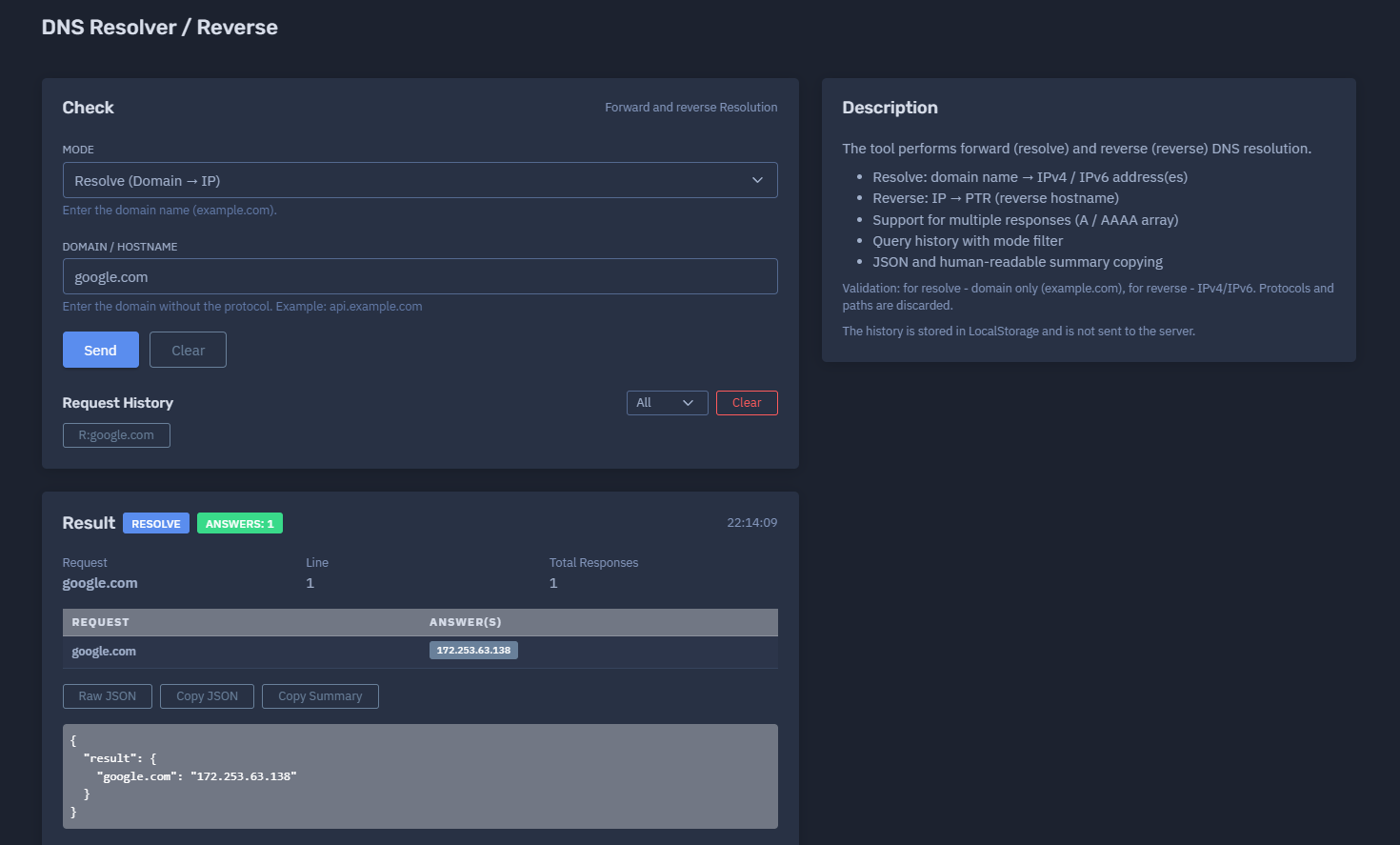
The platform available at https://dash.niamonx.io/dns_rrsv — known as DNS Resolver / Reverse — is a DNS resolution utility within the NiamonX platform. It allows users to perform forward DNS resolution from a domain name to IP address and reverse DNS resolution from an IP address to PTR hostname.
Overview of the Service
DNS Resolver / Reverse is designed for fast, simple, and structured DNS resolution checks.
The tool supports two core workflows:
-
Resolve — domain name to IPv4 / IPv6 address
-
Reverse — IP address to PTR / reverse hostname
It is useful for system administrators, SOC analysts, cybersecurity researchers, developers, DevOps engineers, infrastructure owners, incident responders, and OSINT analysts who need to quickly verify how a domain resolves or which reverse DNS name is associated with an IP address.
The tool provides both a human-readable result table and a JSON output, making it suitable for manual analysis, documentation, troubleshooting, and lightweight technical workflows.
🔍 How the Tool Works
The user selects a mode and enters the appropriate value.
In Resolve mode, the user enters a domain or hostname. The tool returns one or more IPv4 / IPv6 addresses associated with that name.
Example:
google.com → 172.253.63.138
In Reverse mode, the user enters an IPv4 or IPv6 address. The tool performs a reverse DNS lookup and returns the PTR hostname when available.
Example:
8.8.8.8 → dns.google
The output is displayed in a compact result block, a request / answer table, and raw JSON format.
The history of lookups is stored locally in the browser through LocalStorage and is not sent to the server.
🧩 Supported Modes
DNS Resolver / Reverse supports two main modes.
Resolve Mode
Resolve mode performs forward DNS resolution.
Direction:
Domain → IP
This mode accepts a clean domain or hostname.
Examples:
example.com
api.example.com
google.com
Resolve mode may return:
-
One IPv4 address
-
Multiple IPv4 addresses
-
One IPv6 address
-
Multiple IPv6 addresses
-
Mixed A / AAAA-style responses, depending on backend resolution behavior
Reverse Mode
Reverse mode performs reverse DNS resolution.
Direction:
IP → PTR
This mode accepts IPv4 or IPv6 addresses.
Examples:
8.8.8.8
1.1.1.1
2606:4700:4700::1111
Reverse mode may return a PTR hostname if one exists.
Not every IP address has reverse DNS configured. If no PTR record exists, the tool may return an empty result, error state, or no answer depending on backend behavior.
🚫 Input Rules
The tool validates input depending on the selected mode.
Resolve Mode Input
Allowed:
-
Domain names
-
Subdomains
-
Hostnames
Examples:
example.com
api.example.com
Not allowed:
https://example.com
example.com/path
example.com:443
http://api.example.com/v1
Protocols and paths are discarded or rejected depending on validation behavior. For best results, users should enter only the clean domain or hostname.
Reverse Mode Input
Allowed:
-
IPv4 addresses
-
IPv6 addresses
Examples:
1.1.1.1
2001:4860:4860::8888
Not allowed:
example.com
https://1.1.1.1
1.1.1.1:443
Reverse mode expects only a clean IP address.
⚙️ Interface Structure
The DNS Resolver / Reverse interface contains the following main elements.
Mode
The user selects the lookup mode.
Available modes:
-
Resolve
-
Reverse
Example:
Mode: Resolve (Domain → IP)
Domain / Hostname
In Resolve mode, the user enters a domain or hostname.
Example:
google.com
IP Address
In Reverse mode, the user enters an IPv4 or IPv6 address.
Example:
8.8.8.8
Request History
The interface includes local request history with mode filtering.
Users can filter history by:
-
All
-
Resolve
-
Reverse
This helps quickly review previous DNS checks.
📊 Result Summary
After a lookup is completed, the tool displays a result summary.
Example:
RESOLVE
Answers: 1
Request: google.com
Line: 1
Total Responses: 1
The summary helps users quickly understand:
-
Which mode was used
-
Whether the lookup returned answers
-
How many responses were returned
-
What value was requested
📋 Request / Answer Table
The result table displays the original request and the returned answer or answers.
Example:
| Request | Answer(s) |
|---|---|
google.com |
172.253.63.138 |
For domains with multiple results, the answer field may contain several IP addresses.
Example:
| Request | Answer(s) |
|---|---|
example.com |
93.184.216.34, 2606:2800:220:1:248:1893:25c8:1946 |
For reverse lookups, the table may show:
| Request | Answer(s) |
|---|---|
8.8.8.8 |
dns.google |
This format is designed for quick copying into tickets, reports, notes, or troubleshooting documentation.
🧾 JSON Output
The tool also provides a raw JSON-style result.
Example:
{
  "result": {
    "google.com": "172.253.63.138"
  }
}
JSON output is useful for:
-
Technical documentation
-
Automation workflows
-
Internal tools
-
Evidence capture
-
Debugging
-
SOC case notes
-
Copying structured results into reports
When multiple answers are returned, the JSON may include arrays or multiple values depending on backend output.
🔁 Forward Resolution
Forward DNS resolution maps a domain name to one or more IP addresses.
Common use cases:
-
Checking where a domain points
-
Validating DNS configuration
-
Troubleshooting domain access
-
Confirming CDN or hosting resolution
-
Checking if a hostname resolves
-
Reviewing infrastructure during migration
-
Enriching indicators during SOC triage
Example:
api.example.com → 203.0.113.10
Forward resolution may return IPv4, IPv6, or both depending on the records available.
🔄 Reverse Resolution
Reverse DNS resolution maps an IP address to a hostname using PTR records.
Common use cases:
-
Identifying server naming
-
Reviewing mail server configuration
-
Investigating suspicious IPs
-
Enriching security logs
-
Checking hosting infrastructure
-
Validating reverse DNS for outbound mail systems
-
Mapping infrastructure ownership clues
Example:
1.1.1.1 → one.one.one.one
Reverse DNS is optional. Many IP addresses do not have PTR records, and some PTR records may be generic or outdated.
🧠 Key Features
Forward DNS Resolution
Resolves a domain or hostname to IP address data.
Reverse DNS Resolution
Resolves an IP address to PTR hostname when available.
IPv4 and IPv6 Support
Reverse mode supports both IPv4 and IPv6.
Multiple Responses
The tool supports multiple returned responses, including A / AAAA-style arrays.
Human-Readable Summary
Results are displayed in a clean request / answer format.
JSON Output
Structured JSON output is available for technical workflows.
Mode-Based History
Query history can be filtered by lookup mode.
LocalStorage Privacy
History is stored locally in the browser and is not sent to the server.
Input Validation
Resolve mode validates domain input, while reverse mode validates IPv4 / IPv6 input.
🕓 Request History
The request history stores previous lookups locally in the browser.
Important behavior:
The history is stored in LocalStorage and is not sent to the server.
History may include:
-
Lookup mode
-
Requested value
-
Result summary
-
Timestamp
-
Number of answers
History is useful for repeating checks and reviewing recent troubleshooting activity.
Because it is browser-local, it may be cleared if the user clears browser data, switches devices, or uses a different browser profile.
🔎 Common Use Cases
DNS Resolver / Reverse can support many technical workflows.
Domain Troubleshooting
Check whether a domain or subdomain resolves to an IP address.
Reverse DNS Verification
Check whether an IP address has a PTR hostname.
Mail Server Review
Verify reverse DNS for mail infrastructure.
SOC Triage
Enrich suspicious domains or IPs during alert analysis.
Incident Response
Quickly map domains to IPs or IPs to hostnames.
Infrastructure Migration
Validate whether DNS changes resolve as expected.
OSINT Enrichment
Collect basic resolution data for public indicators.
Developer Debugging
Confirm whether an application hostname resolves correctly.
📬 Mail and Reverse DNS
Reverse DNS is especially important for email infrastructure.
Mail servers often require properly configured PTR records to improve deliverability and reduce spam classification risk.
Example checks:
mail.example.com → 203.0.113.25
203.0.113.25 → mail.example.com
A clean forward-confirmed reverse DNS setup can help validate that the hostname and IP align.
However, this tool performs direct resolve and reverse checks only. Full mail authentication review should also include MX, SPF, DKIM, DMARC, and SMTP banner validation.
⚠️ Result Interpretation Notes
DNS resolution results should be interpreted carefully.
Important points:
-
DNS answers may change over time.
-
CDN-backed domains may return different IPs from different resolvers.
-
Some domains return multiple A or AAAA records.
-
Reverse DNS may not exist for every IP.
-
PTR records can be outdated or generic.
-
A resolved IP does not prove exclusive ownership.
-
A reverse hostname does not always identify the real service.
-
DNS caching can affect repeated results.
-
Forward and reverse DNS may not match perfectly.
-
A single lookup is a snapshot, not continuous monitoring.
For critical infrastructure decisions, users should compare results with authoritative DNS data and multiple resolvers.
✅ Recommended Workflow
A practical DNS resolution workflow should follow these steps.
1. Choose the Correct Mode
Use Resolve for domain-to-IP checks and Reverse for IP-to-hostname checks.
2. Enter a Clean Value
Use only a domain in Resolve mode or only an IP in Reverse mode.
3. Review the Summary
Check mode, answer count, request value, and total responses.
4. Review the Table
Copy the request / answer pair if needed.
5. Check JSON Output
Use JSON for structured documentation or technical workflows.
6. Compare With Other DNS Tools
For critical results, verify using authoritative DNS or multi-location DNS tools.
7. Review Local History
Use the mode filter to find previous checks.
8. Clear History on Shared Devices
Remove LocalStorage history if the lookup values are sensitive.
🛡️ Security, Privacy & Responsible Use
DNS Resolver / Reverse is intended for lawful DNS troubleshooting, system administration, cybersecurity analysis, OSINT enrichment, and infrastructure review.
Acceptable use cases include:
-
Checking your own domains
-
Resolving public hostnames
-
Reviewing PTR records
-
Investigating suspicious IPs
-
Supporting SOC workflows
-
Debugging network applications
-
Validating infrastructure changes
-
Creating technical documentation
Users should follow responsible use principles:
-
Do not use DNS data for phishing, impersonation, or targeting.
-
Do not assume ownership from a single DNS answer.
-
Do not treat missing reverse DNS as proof of malicious activity.
-
Validate important conclusions with additional sources.
-
Treat local lookup history as potentially sensitive on shared devices.
-
Use the tool only for lawful and ethical analysis.
⚙️ Technical Highlights
-
Forward and reverse DNS resolution tool
-
Available at
dash.niamonx.io/dns_rrsv -
Resolve mode: domain name to IPv4 / IPv6 address
-
Reverse mode: IP address to PTR hostname
-
Supports multiple responses
-
Supports A / AAAA-style arrays
-
Human-readable result table
-
JSON result output
-
Summary copying support
-
JSON copying support
-
Query history with mode filter
-
Resolve validation: domain only
-
Reverse validation: IPv4 / IPv6 only
-
Protocols and paths are discarded or rejected
-
History stored locally in browser LocalStorage
-
History is not sent to the server
-
Suitable for DNS troubleshooting, SOC triage, OSINT enrichment, infrastructure review, and DevOps workflows
📌 Usage Hints
-
Use Resolve mode for domain-to-IP checks.
-
Use Reverse mode for IP-to-PTR checks.
-
Enter domains without
https://, paths, or slashes. -
Enter only IPv4 or IPv6 in Reverse mode.
-
Review multiple answers when returned.
-
Use JSON output for technical documentation.
-
Use request history mode filters to find previous checks.
-
Remember that reverse DNS is optional and may be missing.
-
DNS answers may differ by resolver, geography, and cache.
-
Use GeoDNS for multi-location DNS comparison.
-
Use GlobeLine DNS for record-type-specific DNS checks.
-
Clear local history on shared devices.
📬 Contact Information
For technical, legal, abuse, privacy, or support-related inquiries, users can contact the NiamonX team directly:
support@niamonx.io — Technical Support
other@niamonx.io — General Inquiries
takedown@niamonx.io — Privacy or Data Removal Requests
legal@niamonx.io — Legal and Compliance Matters
Alternative contact channel:
🔗 Helpdesk: https://support.niamonx.io/
Summary
NiamonX DNS Resolver / Reverse is a lightweight DNS utility for forward and reverse resolution. It resolves domains and hostnames to IPv4 / IPv6 addresses, resolves IP addresses to PTR hostnames, supports multiple responses, displays results in both human-readable and JSON formats, and stores lookup history locally in the browser.
The tool is designed for DNS troubleshooting, infrastructure validation, SOC triage, OSINT enrichment, mail server review, DevOps workflows, and technical documentation.