ULP (Infostealer Logs)
ULP (Infostealer Logs)
- Public Breached ULP Search | Email / Username Leak Intelligence
- Public Breached ULP Domain / IP Search | Domain and IP Breach Intelligence
Public Breached ULP Search | Email / Username Leak Intelligence
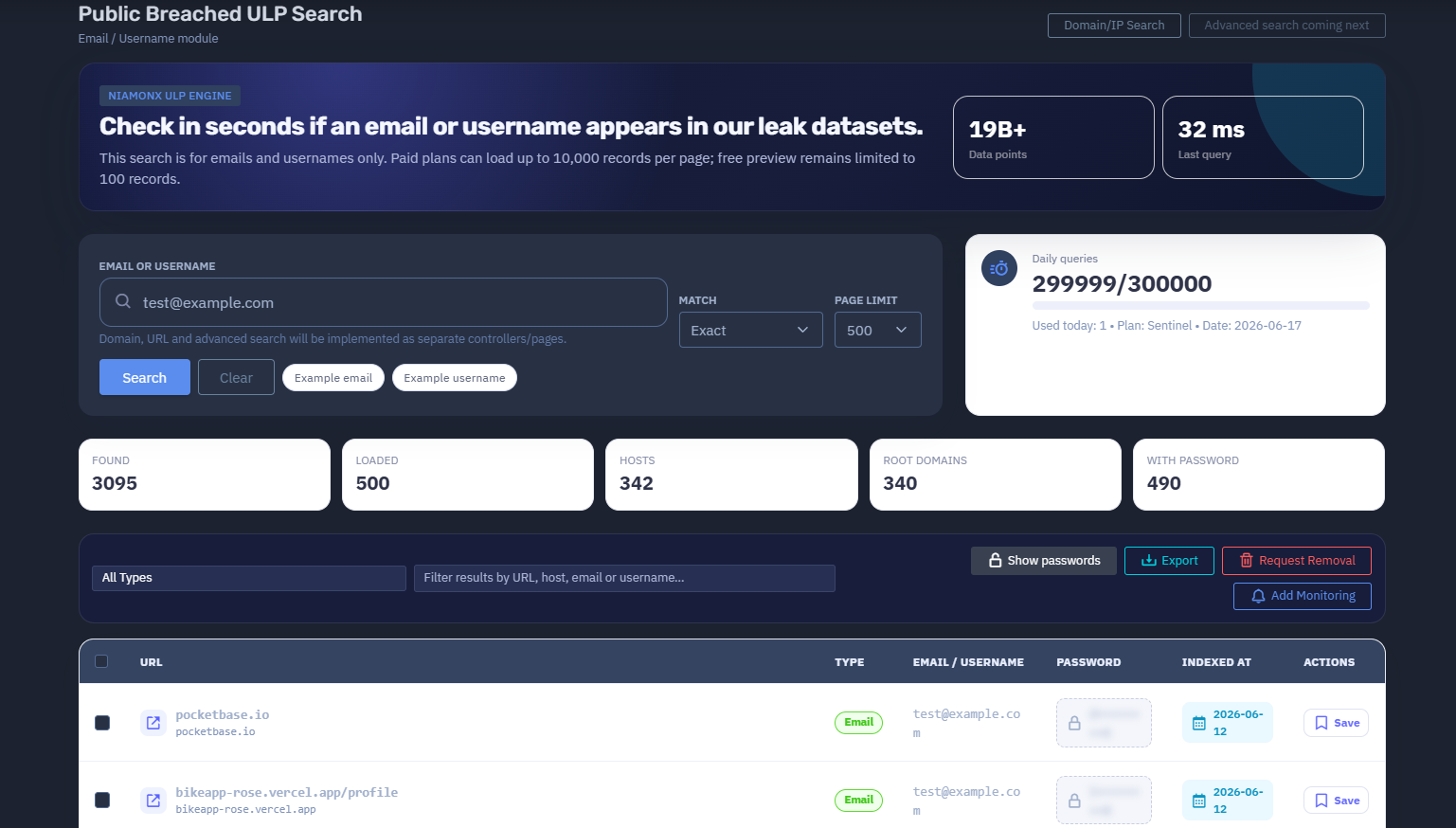
The platform available at dash.niamonx.io/ulp_account_search
Overview of the Service
Public Breached ULP Search is a dedicated NiamonX search module designed to check whether an email address or username appears in public leak datasets processed by the NiamonX ULP Engine.
The tool allows users to quickly verify exposure in large-scale public breach collections, with a focus on records related to emails, usernames, URLs, hosts, and associated credentials.
This module is specifically optimized for email and username lookups only. Domain search, URL search, and advanced search will be implemented separately through dedicated controllers and pages.
Public Breached ULP Search is intended for individuals, security analysts, SOC teams, compliance departments, and organizations that need to verify whether accounts, employees, or user identifiers have appeared in public leaked datasets.
🔍 How the Search Works
When a user enters an email address or username, the system performs a lookup through the NiamonX ULP Engine.
The search checks whether the submitted identifier appears in indexed public leak records. If matches are found, the system displays structured results containing related fields such as:
-
URL
-
Host
-
Email or username
-
Password
-
Indexed date
-
Record type
-
Available actions
The search is designed to return results in seconds and supports large result pages for paid plans.
Free preview access remains limited, while paid plans can load significantly more records per page.
🧩 What Can Be Searched
Public Breached ULP Search currently supports only two main identifier types:
-
Email address
-
Username
Examples:
test@example.org
username
This module does not support the following search types inside the current page:
-
Domain search
-
URL search
-
IP search
-
Phone search
-
Full name search
-
Password search
-
Composite queries
-
Advanced multi-field queries
These features may be available through separate NiamonX tools or future dedicated search pages.
⚙️ Search Interface
The interface contains several key search and filtering controls.
Email or Username
The main input field where the user enters an email address or username.
Example values:
-
test@example.org -
johnsmith -
company.employee -
security.user
Match Mode
The current matching mode is:
-
Exact
Exact matching helps reduce noise and ensures that results are directly related to the submitted email address or username.
Page Limit
The user can define how many records should be loaded per page.
Example:
Page limit: 500
Paid plans can load up to 10,000 records per page.
Free preview access remains limited to 100 records.
Example Email
A quick-fill example for testing email-based search.
Example Username
A quick-fill example for testing username-based search.
📊 Dataset Scale
Public Breached ULP Search is powered by the NiamonX ULP Engine and currently works with a large-scale leak intelligence index.
Main dataset indicator:
19B+ Data points
This means the system can check identifiers against more than 19 billion indexed data points related to public leak datasets.
The number may grow over time as new data is processed, cleaned, normalized, and indexed by the platform.
🧠 Key Features
Email and Username Search
The tool is focused specifically on checking whether an email or username appears in public leak datasets.
NiamonX ULP Engine
The module is powered by the internal NiamonX ULP Engine, which processes and indexes large-scale leak records for fast lookup.
Fast Lookup
Users can check exposure in seconds, depending on dataset size, search value, and current system load.
Exact Match Mode
Exact matching helps ensure that the returned records directly correspond to the searched identifier.
Large Page Limits for Paid Plans
Paid users can load up to 10,000 records per page, making the tool suitable for large-scale security investigations and enterprise workflows.
Free Preview Mode
Free preview access is limited to 100 records, allowing users to verify the presence of results before upgrading.
Structured Results Table
Search results are displayed in a structured table with fields such as URL, type, email or username, password, indexed date, and actions.
Password Visibility Control
Passwords are visible by default during a secured session and can be hidden with one click.
This allows analysts to verify exposure while still maintaining control over sensitive display fields.
Filtering System
Users can filter loaded results by:
-
URL
-
Host
-
Email
-
Username
-
Record type
Saved Records
Important records can be saved for later review and investigation.
Daily Query Limits
The tool displays daily query usage based on the user’s current plan.
Example:
Daily queries
300000 / 300000
Used today: 0
Plan: Sentinel
Date: 2026-06-17
📋 Results Table
After a successful search, results are displayed in a table.
Main columns include:
| Column | Description |
|---|---|
| URL | The URL connected to the leaked record |
| Type | The detected record type |
| Email / Username | The matched email address or username |
| Password | Associated password field, if available |
| Indexed at | Date or timestamp when the record was indexed |
| Actions | Available actions for the record |
If no search has been performed, the interface displays:
Run a search to see breach records.
No results loaded.
📈 Search Statistics
The interface provides quick summary indicators after a search.
Available statistics include:
Found
Shows the total number of matching records discovered.
Loaded
Shows the number of records currently loaded into the interface.
Hosts
Shows the number of unique hosts connected to the results.
Root Domains
Shows the number of unique root domains identified in the loaded records.
With Password
Shows how many matched records contain a password field.
These counters help users quickly understand the scope and severity of the exposure.
🔎 Filtering and Record Review
The tool includes a filtering field for quickly narrowing down results.
Users can filter by:
-
URL
-
Host
-
Email
-
Username
This is useful when a single email or username appears across many records and the analyst needs to focus on specific services, domains, or data types.
Example use cases:
-
Find all results from a specific host
-
Filter results related to one service
-
Check whether passwords are present
-
Identify repeated exposure across multiple websites
-
Review only records connected to corporate systems
🔐 Password Handling
Some records may include associated password fields.
In this secured session, passwords are visible by default and can be hidden with one click.
Users must handle password data carefully.
Passwords must only be used for defensive verification, account recovery, password reset decisions, or authorized security investigations.
Users must not:
-
Reuse leaked passwords
-
Attempt unauthorized account access
-
Share passwords publicly
-
Export passwords without authorization
-
Use leaked credentials for credential stuffing, phishing, fraud, or social engineering
Recommended defensive actions:
-
Reset exposed passwords immediately
-
Enable multi-factor authentication
-
Check whether the same password was reused elsewhere
-
Review account login history
-
Notify affected users where appropriate
-
Monitor for suspicious activity
🛡️ Security, Privacy & Ethics
Public Breached ULP Search is designed for lawful defensive cybersecurity work.
Acceptable use cases include:
-
Checking your own email or username
-
Verifying employee exposure with authorization
-
Investigating corporate account leaks
-
Supporting incident response
-
Performing compliance and security audits
-
Detecting credential reuse risks
-
Helping users secure compromised accounts
Users must follow strict ethical rules:
-
Search only identifiers you own or are authorized to investigate.
-
Do not use the tool to target, stalk, harass, or deanonymize people.
-
Do not use exposed credentials for unauthorized access.
-
Do not redistribute leaked personal data.
-
Do not publish passwords or private records.
-
Do not attempt to bypass platform limits or access controls.
-
Treat all results as sensitive security intelligence.
-
Validate findings before taking operational or legal action.
Abuse of the system may result in account restriction, suspension, or termination.
⚙️ Technical Highlights
-
Powered by NiamonX ULP Engine
-
Dedicated email and username search module
-
More than 19B+ indexed data points
-
Exact match search mode
-
Fast lookup in seconds
-
Paid plans support up to 10,000 records per page
-
Free preview limited to 100 records
-
Structured result table
-
URL, host, email, username, password, and indexing metadata
-
Result filtering by URL, host, email, or username
-
Password visibility toggle
-
Saved records
-
Daily query usage counter
-
Plan-based access limits
-
Separate future controllers for domain, URL, and advanced search
🚦 Plan Limits and Access
The module uses plan-based limits for daily queries and result loading.
Example plan information:
Daily queries: 300000 / 300000
Used today: 0
Plan: Sentinel
Date: 2026-06-17
Access differences may include:
| Access Level | Limitation |
|---|---|
| Free preview | Up to 100 records |
| Paid plans | Up to 10,000 records per page |
| Plan-based access | Daily query limits depend on subscription |
These limits help protect system stability, prevent abuse, and ensure fair access to large-scale breach intelligence.
📌 Usage Hints
-
Use this module only for emails and usernames.
-
Use exact values for the best results.
-
Do not enter domains or URLs in this module.
-
Use separate NiamonX tools for domain, URL, or advanced search.
-
Check the “Found” counter to understand total exposure.
-
Check “With password” to identify credential-related risk.
-
Use filters to narrow results by URL, host, email, or username.
-
Hide password fields when screen sharing or working in public environments.
-
Save important records for later investigation.
-
Treat all results as sensitive security data.
📬 Contact Information
For technical, legal, abuse, privacy, or takedown-related inquiries, users can contact the NiamonX team directly:
support@niamonx.io — Technical Support
other@niamonx.io — General Inquiries
takedown@niamonx.io — Data Removal / Privacy Takedown Requests
legal@niamonx.io — Legal and Compliance Matters
Alternative contact channel:
🔗 Helpdesk: https://support.niamonx.io/
Summary
NiamonX Public Breached ULP Search is a dedicated email and username leak intelligence module powered by the NiamonX ULP Engine.
It allows users to check in seconds whether an email address or username appears in large-scale public leak datasets containing more than 19 billion indexed data points.
The tool supports exact matching, structured results, password visibility control, filtering, saved records, plan-based daily query limits, and large page sizes for paid plans.
It is designed for lawful security checks, credential exposure validation, incident response, compliance reviews, and defensive cybersecurity investigations.
Public Breached ULP Domain / IP Search | Domain and IP Breach Intelligence
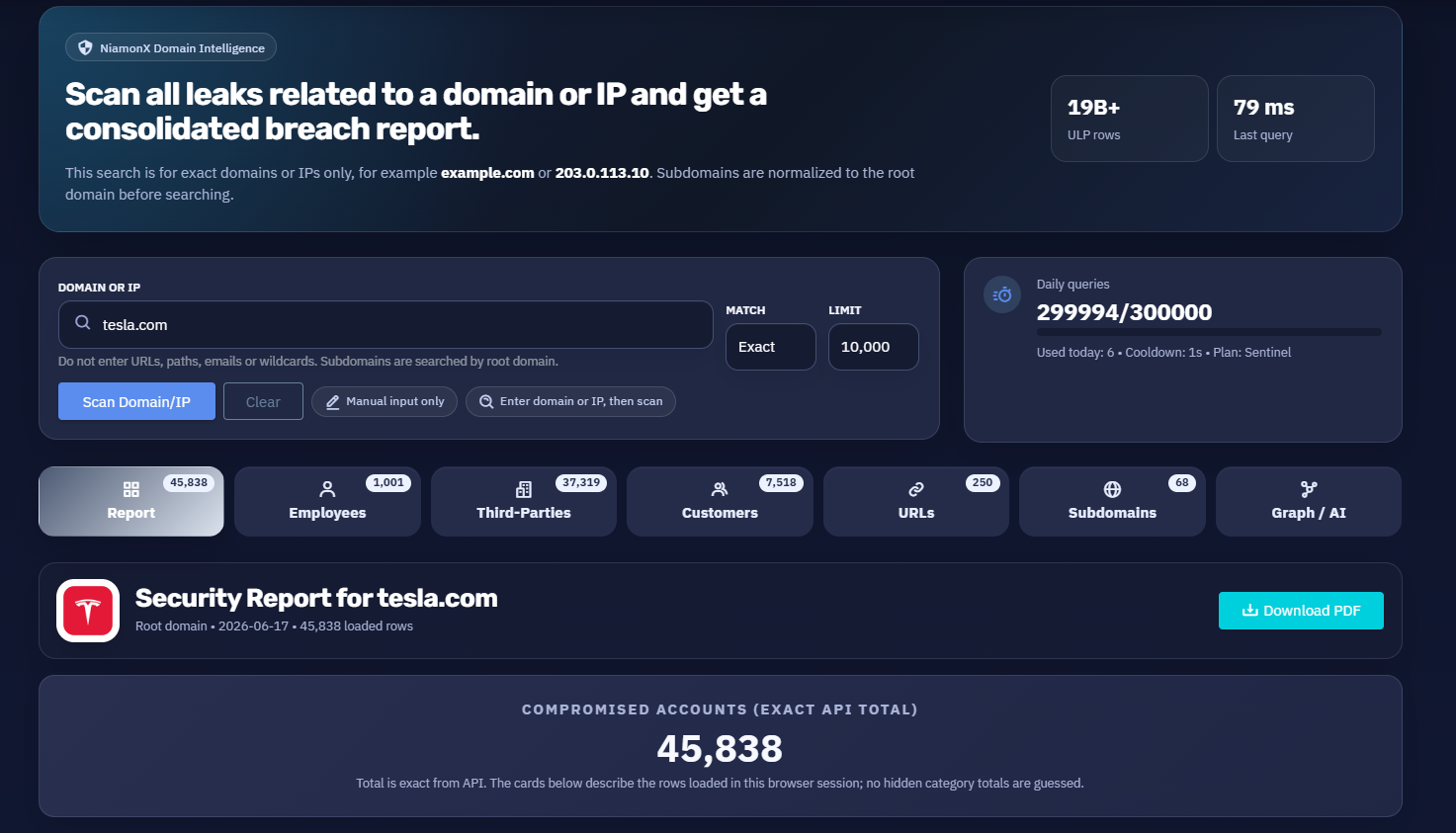
The platform available at dash.niamonx.io/ulp_domain_ip_search
Overview of the Service
Public Breached ULP Domain / IP Search is a consolidated breach intelligence module within the NiamonX platform. It is designed to scan public leak datasets for records related to a specific domain or IP address and generate a structured security report.
The tool is powered by NiamonX Domain Intelligence and the NiamonX ULP Engine, allowing users to analyze compromised accounts, exposed URLs, affected subdomains, employee-related records, third-party identities, customer-style username records, and password-related exposure.
This module is intended for companies, SOC teams, security analysts, incident response teams, compliance departments, and authorized cybersecurity researchers who need to understand whether a corporate domain or IP address appears in large-scale public leak datasets.
The search is focused on exact domains and IP addresses only.
Examples:
example.com
203.0.113.10
Users must not enter full URLs, URL paths, emails, wildcards, or unrelated search values in this module.
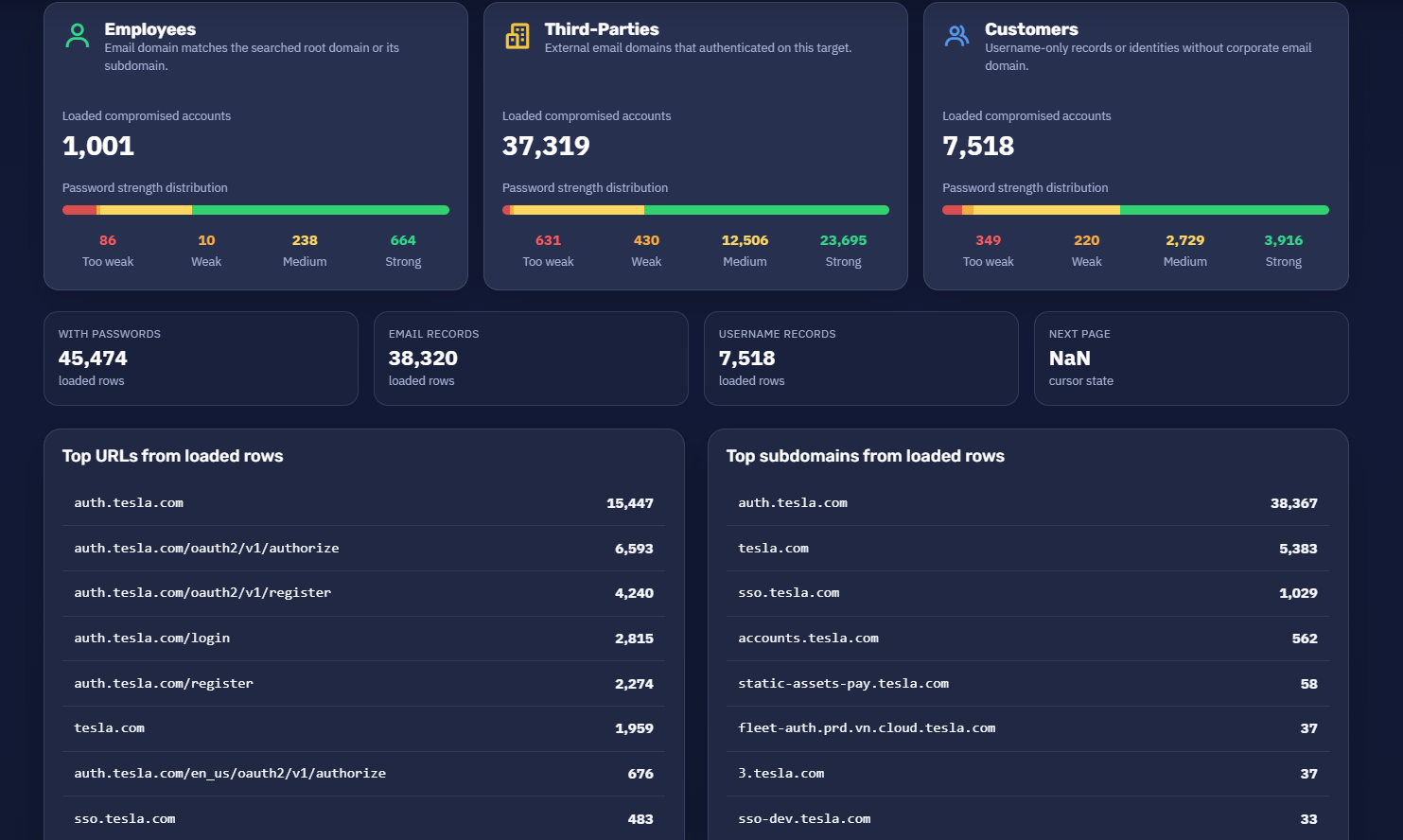
🔍 How the Search Works
When a user enters a domain or IP address, the system performs an exact search across indexed ULP leak records.
For domain-based searches, subdomains are automatically normalized to the root domain before searching.
For example:
auth.example.com
is normalized and searched as:
example.com
This allows the system to consolidate breach intelligence across all related subdomains and hosts under the same root domain.
The search returns a consolidated report that may include:
-
Total compromised accounts
-
Loaded rows in the current browser session
-
Unique hosts
-
Unique URLs
-
Subdomains
-
Employee-related records
-
Third-party records
-
Customer or username-only records
-
Password strength distribution
-
Records with passwords
-
Email records
-
Username records
-
Top URLs
-
Top subdomains
-
Graph and AI analysis
The total number of compromised accounts is taken directly from the API when available, while category cards describe only the rows loaded in the current browser session. Hidden category totals are not guessed.
🧩 What Can Be Searched
This module supports only exact domain and IP address searches.
Supported values:
-
Root domains
-
Subdomains, normalized to root domain
-
IPv4 addresses
-
IPv6 addresses, if supported by the backend index
Examples of valid searches:
example.com
company.org
203.0.113.10
Examples of invalid input for this module:
https://example.com/login
example.com/login
user@example.com
*.example.com
example
Domain, URL, email, username, and advanced search are handled through separate NiamonX modules or dedicated pages.
⚙️ Search Interface
The interface contains several core controls and report indicators.
Domain or IP
The main input field where the user enters an exact domain or IP address.
Example:
tesla.com
The field is intended only for domains or IP addresses. Users should not enter URLs, paths, emails, or wildcards.
Match Mode
The current match mode is:
Exact
Exact matching helps reduce noise and ensures that the report is generated around the submitted domain, normalized root domain, or IP address.
Limit
The result limit controls how many rows can be loaded into the current browser session.
Example:
10,000
The report may show an exact total from the API while loading only a limited number of rows into the current session.
Daily Queries
The interface displays daily query limits based on the user’s plan.
Example:
Daily queries
299998 / 300000
Used today: 2
Cooldown: 1s
Plan: Sentinel
Daily limits help control usage, ensure platform stability, and prevent abuse.
📊 Dataset Scale
Public Breached ULP Domain / IP Search is powered by a large-scale ULP intelligence dataset.
Main dataset indicator:
19B+ ULP rows
This means the module can search across more than 19 billion indexed ULP rows related to public leak datasets.
The dataset may include records containing URLs, hosts, emails, usernames, passwords, timestamps, and other leak-related metadata.
🧠 Key Features
Domain and IP Intelligence
The module provides consolidated breach intelligence for a specific domain or IP address.
Root Domain Normalization
Subdomains are normalized to the root domain before searching, allowing the tool to detect exposure across related hosts.
Exact Match Search
Exact matching helps ensure that the report is focused on the selected domain or IP address.
Consolidated Security Report
The tool generates a structured security report with key metrics, categories, and exposure indicators.
Exact API Total
The total number of compromised accounts can be displayed as an exact value from the API.
Loaded Session Rows
The report clearly separates the exact total from the rows currently loaded in the browser session.
Employee Detection
The system identifies employee-related records where the email domain matches the searched root domain or its subdomains.
Third-Party Detection
The system identifies external email domains that authenticated on the target domain or related services.
Customer / Username-Only Records
The module separates username-only records or identities without a corporate email domain.
Password Strength Distribution
Loaded compromised accounts are grouped by password strength.
Common categories include:
-
Too weak
-
Weak
-
Medium
-
Strong
URL and Host Analysis
The report highlights top URLs, unique endpoints, unique hosts, and subdomains discovered in loaded records.
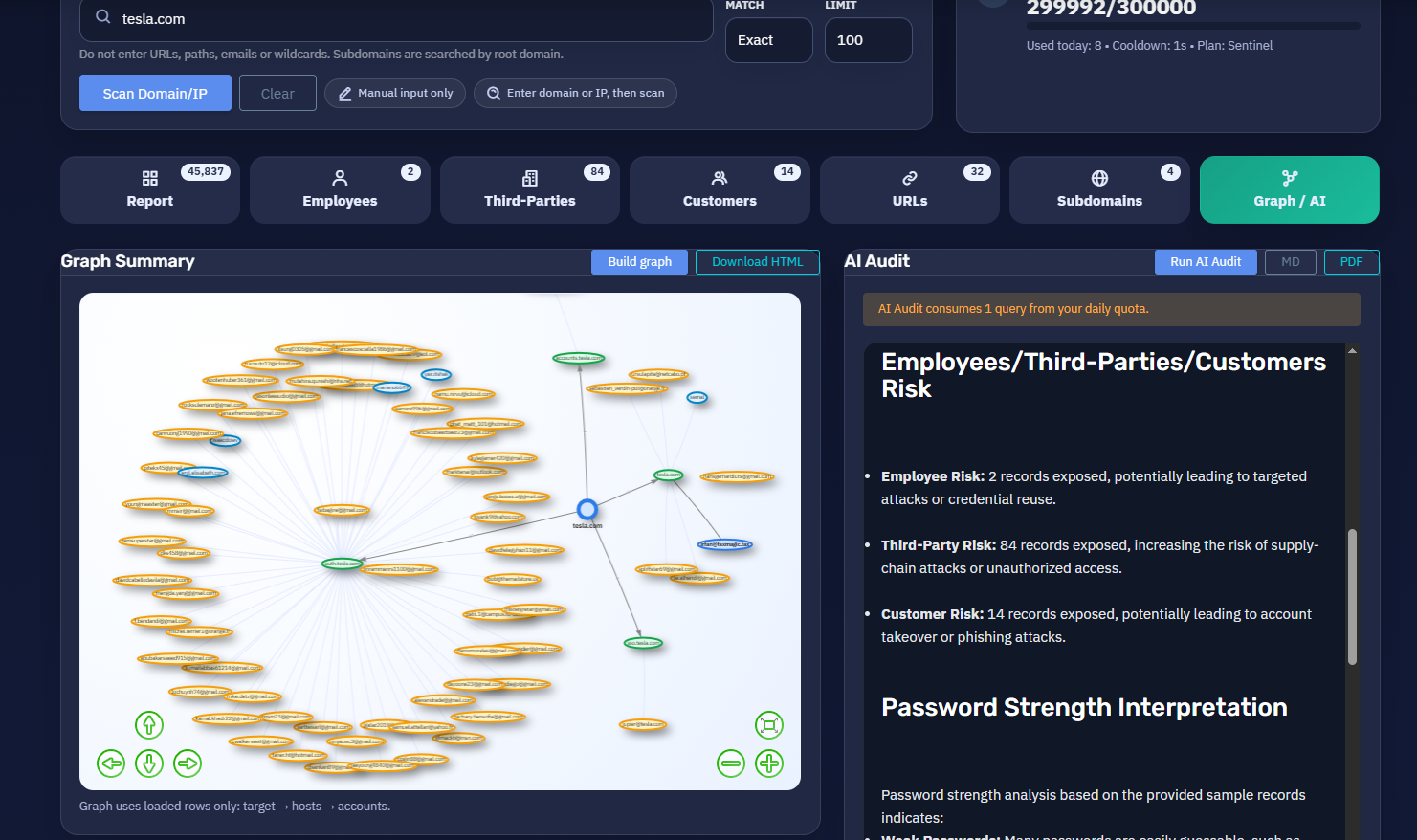
Graph and AI Module
The tool includes a Graph / AI section for visual analysis and AI-assisted interpretation of the breach report.
Saved Records
Important records can be saved for later review and investigation.
📈 Security Report Structure
After a search is completed, the module generates a structured report.
Example report header:
Security Report for example.com
Root domain • 2026-06-17 • 10,000 loaded rows
The report may include the following cards and sections.
📌 Compromised Accounts
The Compromised Accounts card shows the total number of compromised accounts related to the searched domain or IP.
Example:
Compromised Accounts (Exact API Total)
45,837
This value represents the exact total returned by the API.
The category cards below the total describe only the rows loaded in the current browser session. The system does not guess hidden category totals.
📥 Loaded Rows
The Loaded rows card shows how many records are currently loaded in the browser session.
Example:
Loaded rows
10,000
current cursor session
This is important because the full API total may be higher than the number of records loaded into the interface.
For large reports, users may need to load additional pages or use cursor-based pagination.
🌐 Unique Hosts, URLs, and Subdomains
The report summarizes infrastructure-related indicators.
Unique Hosts
Shows how many unique hosts were parsed from URL hosts.
Example:
Unique hosts
41
URLs
Shows how many unique endpoints were found.
Example:
URLs
250
Subdomains
Shows how many unique subdomains or hosts were detected in the loaded rows.
Example:
Subdomains
41
These indicators help analysts understand which services, login pages, applications, or infrastructure components are most commonly associated with leaked records.
👥 Employee Exposure
The Employees section identifies records where the email domain matches the searched root domain or one of its subdomains.
Example:
Employees
Loaded compromised accounts: 221
Employee records are important because they may indicate direct corporate account exposure.
The section may also include password strength distribution:
| Password Strength | Description |
|---|---|
| Too weak | Very risky passwords that may be simple, reused, or easily guessed |
| Weak | Low-strength passwords requiring urgent review |
| Medium | Moderate-strength passwords that may still require reset depending on context |
| Strong | Stronger passwords, but still considered exposed if found in leaks |
Example distribution:
| Strength | Count |
|---|---|
| Too weak | 22 |
| Weak | 3 |
| Medium | 50 |
| Strong | 146 |
Even strong passwords should be reset if they appear in breach records.
🏢 Third-Party Exposure
The Third-Parties section identifies external email domains that authenticated on the searched target.
Example:
Third-Parties
Loaded compromised accounts: 8,127
These records may represent:
-
Contractors
-
Vendors
-
Partners
-
External users
-
Customers using third-party emails
-
SSO or login activity involving non-corporate domains
-
Accounts created with external identities
Third-party exposure is important because attackers may use compromised external accounts to access company systems, partner portals, support panels, or customer-facing services.
Example password strength distribution:
| Strength | Count |
|---|---|
| Too weak | 148 |
| Weak | 82 |
| Medium | 2,769 |
| Strong | 5,113 |
👤 Customer and Username-Only Records
The Customers section includes username-only records or identities without a corporate email domain.
Example:
Customers
Loaded compromised accounts: 1,652
These records may represent:
-
Customer accounts
-
Username-only logins
-
Non-email identities
-
Legacy accounts
-
Application-specific usernames
-
Records where email data is missing
Example password strength distribution:
| Strength | Count |
|---|---|
| Too weak | 84 |
| Weak | 60 |
| Medium | 594 |
| Strong | 843 |
This section helps organizations understand user exposure beyond direct employee email accounts.
🔐 Password Exposure
The report highlights how many loaded records contain passwords.
Example:
With passwords
9,914
loaded rows
Password exposure is one of the most important risk indicators.
If passwords are present, users should treat the affected records as sensitive security intelligence.
Recommended actions:
-
Reset exposed passwords.
-
Check whether the password is still active.
-
Check whether the same password was reused elsewhere.
-
Enforce multi-factor authentication.
-
Review login history.
-
Investigate suspicious access events.
-
Notify affected users if required.
-
Disable or lock high-risk accounts if necessary.
Passwords must never be used for unauthorized access, credential stuffing, phishing, fraud, or social engineering.
📧 Email and Username Records
The report separates loaded rows by identity type.
Example:
Email records
8,348
loaded rows
Username records
1,652
loaded rows
Email records usually provide stronger identity correlation because they are connected to a specific domain or user account.
Username records may require additional validation because usernames can be reused across multiple services and may not always uniquely identify one person.
🔗 Top URLs from Loaded Rows
The report displays the most common URLs found in the loaded records.
Example:
| URL | Count |
|---|---|
| auth.example.com | 3,299 |
| auth.example.com/oauth2/v1/authorize | 1,463 |
| auth.example.com/oauth2/v1/register | 941 |
| auth.example.com/login | 609 |
| auth.example.com/register | 506 |
| example.com | 424 |
| sso.example.com | 104 |
This section helps analysts identify the most affected endpoints.
Common findings may include:
-
Login pages
-
OAuth endpoints
-
Registration pages
-
SSO portals
-
Customer portals
-
Admin panels
-
Application dashboards
-
API authentication endpoints
High counts on authentication endpoints may indicate credential exposure involving login flows.
🧭 Top Subdomains from Loaded Rows
The report also displays the most common subdomains or hosts found in loaded records.
Example:
| Subdomain | Count |
|---|---|
| auth.example.com | 8,328 |
| example.com | 1,215 |
| sso.example.com | 239 |
| accounts.example.com | 109 |
| apps.example.com | 10 |
| toolbox.example.com | 6 |
This section helps security teams identify which parts of the organization’s infrastructure are most represented in public leak data.
High-risk subdomains may include:
-
Authentication systems
-
SSO portals
-
Employee portals
-
Payment systems
-
Admin panels
-
Developer tools
-
Customer account systems
-
Internal application gateways
🧠 Graph / AI Analysis
The Graph / AI section provides visual and AI-assisted analysis of the domain or IP exposure.
It may help users understand:
-
Relationships between hosts and leaked accounts
-
Clusters of exposed users
-
Common authentication endpoints
-
Employee vs third-party exposure
-
High-risk password patterns
-
Repeated infrastructure exposure
-
Potentially affected services
-
Prioritized remediation areas
The AI component can assist with summarizing the report and highlighting important risks, but it should not replace manual analyst validation.
💾 Saved Records
The Saved records section allows users to store important findings for later review.
Saved records may be useful for:
-
Incident response tracking
-
Compliance documentation
-
Internal reporting
-
Rechecking high-risk accounts
-
Preparing remediation lists
-
Monitoring repeated exposure
-
Reviewing specific URLs or users
Saved records should be handled as sensitive security data.
🚦 Pagination and Cursor State
Large reports may contain more records than are loaded into the current browser session.
The interface may show cursor-related information, such as:
Next page
NaN
cursor state
This indicates the current pagination or cursor state for loading additional records.
The exact API total and the currently loaded rows should always be interpreted separately.
Example:
Exact API Total: 45,837
Loaded rows: 10,000
This means the API reports 45,837 total compromised accounts, while the browser currently displays and analyzes 10,000 rows.
🛡️ Security, Privacy & Ethics
Public Breached ULP Domain / IP Search is designed for lawful defensive cybersecurity and authorized breach intelligence analysis.
Acceptable use cases include:
-
Checking your own company domain
-
Investigating authorized corporate assets
-
Reviewing employee credential exposure
-
Assessing third-party login exposure
-
Supporting incident response
-
Supporting compliance audits
-
Monitoring exposed authentication endpoints
-
Identifying password reuse risk
-
Preparing remediation actions
Users must follow strict ethical rules:
-
Search only domains, IPs, and assets you own or are authorized to investigate.
-
Do not use the tool to target companies, employees, customers, or individuals without authorization.
-
Do not use exposed credentials for unauthorized access.
-
Do not redistribute leaked passwords or personal data.
-
Do not publish sensitive records.
-
Do not perform credential stuffing, phishing, fraud, extortion, or social engineering.
-
Do not attempt to bypass access controls, rate limits, or plan restrictions.
-
Validate all findings before taking operational, legal, or security action.
-
Treat all reports as sensitive security intelligence.
Abuse of the platform may result in account restriction, suspension, or termination.
✅ Recommended Remediation Workflow
When exposure is found, security teams should follow a structured remediation process.
1. Validate the Report
Confirm that the domain or IP belongs to the organization and that the records are relevant.
2. Prioritize Employee Accounts
Employee records should be reviewed first because they may represent direct corporate access risk.
3. Check Password Exposure
Focus on records with passwords, especially weak and very weak passwords.
4. Enforce Password Resets
Reset exposed passwords and prevent reuse through password policy controls.
5. Enable MFA
Require multi-factor authentication for affected accounts and critical systems.
6. Review Login Logs
Check SIEM, IAM, VPN, SSO, email, and application logs for suspicious activity.
7. Investigate Affected URLs
Review the top URLs and subdomains to identify exposed authentication surfaces.
8. Review Third-Party Exposure
Check whether external accounts belong to vendors, partners, contractors, or customers.
9. Notify Stakeholders
Inform internal security, legal, compliance, and affected users where appropriate.
10. Monitor Continuously
Repeat checks periodically and monitor for new exposure.
⚙️ Technical Highlights
-
Powered by NiamonX Domain Intelligence
-
Uses the NiamonX ULP Engine
-
Searches across 19B+ ULP rows
-
Exact domain and IP search
-
Root domain normalization for subdomains
-
Consolidated breach report
-
Exact compromised account total from API
-
Loaded-row analysis for current browser session
-
Employee, third-party, and customer categorization
-
Password strength distribution
-
Unique host detection
-
Unique URL and endpoint analysis
-
Subdomain extraction
-
Email vs username record separation
-
Records with password counter
-
Top URLs from loaded rows
-
Top subdomains from loaded rows
-
Graph / AI analysis
-
Saved records
-
Cursor-based pagination
-
Plan-based daily query limits
-
Cooldown protection
-
Suitable for SOC, compliance, incident response, and domain exposure monitoring
📌 Usage Hints
-
Enter only an exact domain or IP address.
-
Do not enter full URLs, paths, emails, or wildcards.
-
Subdomains are normalized to the root domain before searching.
-
Use the exact API total to understand full exposure.
-
Use loaded-row cards to analyze the currently loaded browser session.
-
Review employee records first for direct corporate risk.
-
Review third-party records for vendor, partner, and external identity exposure.
-
Review customer and username-only records separately.
-
Prioritize records with passwords.
-
Check top URLs to identify the most affected authentication endpoints.
-
Check top subdomains to understand infrastructure exposure.
-
Use Graph / AI for faster triage, but validate findings manually.
-
Save important records for investigation and reporting.
-
Treat all downloaded or saved records as sensitive security material.
📬 Contact Information
For technical, legal, abuse, privacy, or takedown-related inquiries, users can contact the NiamonX team directly:
support@niamonx.io — Technical Support
other@niamonx.io — General Inquiries
takedown@niamonx.io — Data Removal / Privacy Takedown Requests
legal@niamonx.io — Legal and Compliance Matters
Alternative contact channel:
🔗 Helpdesk: https://support.niamonx.io/
Summary
NiamonX Public Breached ULP Domain / IP Search is a consolidated domain and IP breach intelligence module designed to scan public leak datasets and generate a structured security report.
It searches across more than 19 billion ULP rows, normalizes subdomains to the root domain, calculates exact compromised account totals from the API, and analyzes loaded rows by employees, third parties, customers, URLs, hosts, subdomains, password exposure, and password strength.
The tool is built for lawful defensive cybersecurity, domain exposure monitoring, SOC workflows, incident response, and compliance investigations. All findings should be validated before action and handled as sensitive security intelligence.