OSINT Tools
- Visual Osint (FotoForensics / ExifTool / Risk Score)
- Social Media Search
- Brand Reputation
- Reverse Image Search 18+ (OSINT) | Adult Public Model Image Intelligence
- Exif Remove and Metadata Privacy | Local Image Metadata Cleaner
- Flight Information | Flight Search & Aviation Intelligence
- Flight Schedules | Departures, Arrivals & Airline Schedule Intelligence
- Flight Delay | Real-Time Flight Delay Monitoring
- Flight Tracker | Real-Time ADS-B Flight Monitoring
Visual Osint (FotoForensics / ExifTool / Risk Score)
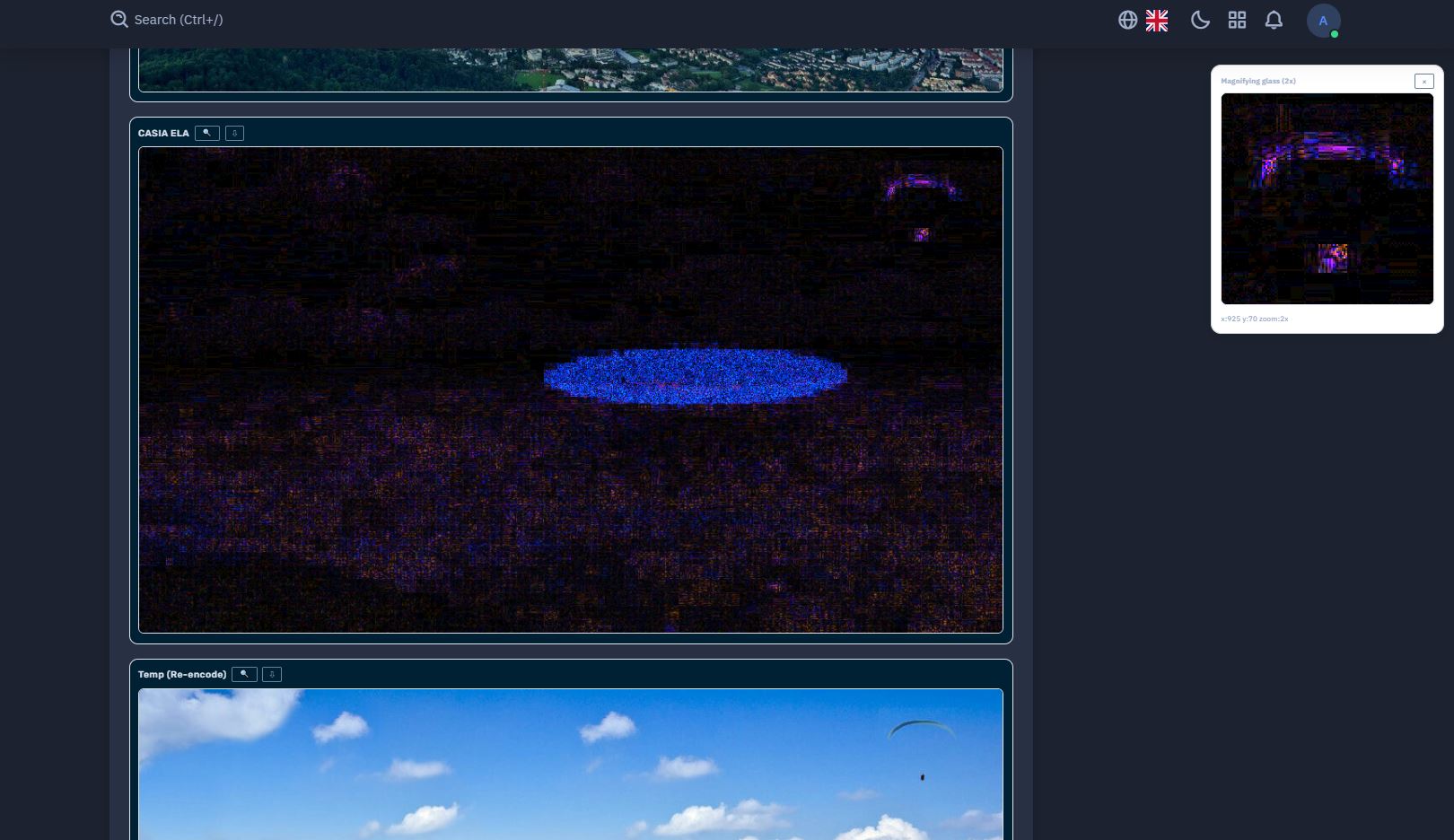
Overview of the Service
The Visual OSINT module — available as part of the NiamonX investigation suite — is an advanced photo forensics and metadata analysis tool that helps identify image manipulation, origin, and authenticity indicators.
It integrates multiple forensic technologies — including FotoForensics-style artifact analysis, ExifTool-based metadata extraction, and CASIA AI prediction — to deliver a complete visual intelligence assessment for investigators, journalists, and security analysts.
🧩 What the Tool Does
Visual OSINT performs a deep, server-side forensic analysis of uploaded images, combining pixel-level inspection, metadata parsing, and AI-driven anomaly detection.
Supported file types: JPEG, PNG, WebP (up to 25 MB).
Each file is securely uploaded to NiamonX’s processing server, analyzed through a FotoForensics-like API, and returned with visual and statistical breakdowns.
The system enforces a cooldown of 30 seconds per request and allows up to 90 seconds for processing.
🔍 Core Analysis Features
-
Image Forensics (Visual Analysis)
The tool generates multiple forensic artifacts and comparisons:-
Original / Compressed Copy
-
Diff & Amplified Diff (highlights pixel-level differences)
-
Overlay & Artifact Grid (visualizes edited regions)
-
ELA (Error Level Analysis) — identifies compression and tampering zones
-
Noise Map — isolates sensor and noise inconsistencies
-
CASIA Prediction — AI model inference from CASIA dataset to detect manipulation patterns
-
-
EXIF & Metadata Extraction
Metadata is extracted using PHP EXIF and ExifTool modules, including:-
Camera and software data
-
Creation timestamps
-
GPS coordinates (if embedded)
-
Editing traces and unusual tags
-
Hidden text or string data (binary text extraction)
-
-
String Analysis
The tool detects embedded ASCII or Unicode strings, sometimes hidden within images.
Long strings can indicate metadata injection or hidden payloads. -
GPS & Geolocation
If available, GPS coordinates are extracted and highlighted for quick mapping or cross-verification.
⚖️ Risk Score System
Each image receives a heuristic Risk Score, assessing the likelihood of manipulation or sensitive content presence:
-
High Risk:
GPS data present, strong ELA/diff indicators, suspicious or inconsistent tags. -
Medium Risk:
Rich EXIF metadata, CASIA neutral or borderline prediction, potential editing hints. -
Low Risk:
Minimal tags, no GPS, stable compression, and no visible tampering evidence.
⚠️ The score is heuristic — not absolute proof — and should be interpreted as an analytical indicator rather than forensic certification.
🧠 Tips for Use
-
Hover the mouse over artifact thumbnails to use the built-in magnifying glass (4x zoom).
-
Enable auto-scroll to jump to results automatically after processing.
-
Some files may return partial artifacts depending on compression level or EXIF structure.
-
Long embedded strings or missing ELA layers can be signals of steganography or format re-encoding.

💾 Request History
-
Stored locally only (up to 50 entries).
-
Records include: filename, file size, GPS presence, calculated risk score, and main detected features.
-
No data or images are stored on NiamonX servers after processing completion.
🛡️ Security & Privacy
All image uploads and forensic analyses are processed via secure, encrypted channels.
The service never retains or shares the uploaded files or results.
Each request is isolated and deleted after processing to maintain strict data confidentiality and user privacy.
Users are encouraged to perform analyses only on legally obtained images and to respect privacy and consent regulations when handling visual materials.

📬 Contact Information
For inquiries, assistance, or data-related requests, contact the NiamonX team:
-
support @ niamonx.io — Technical Support
-
other @ niamonx.io — General Questions
-
takedown @ niamonx.io — Requests for Data Removal / Privacy Takedowns
-
legal @ niamonx.io — Legal or Compliance Matters
Alternative contact channel:
🔗 Helpdesk: https://support.niamonx.io/
In summary, NiamonX Visual OSINT is a comprehensive image forensics platform combining traditional EXIF metadata inspection, advanced artifact visualization, and AI-driven manipulation detection.
It provides investigators with reliable insights into image authenticity and integrity — while maintaining the highest standards of security, privacy, and digital ethics.
Social Media Search

Social Media Search — NiamonX
Link: https://dash.niamonx.io/social_msearch
Key functionality
-
Tab-based network filtering: Switch between tabs for individual social networks (8 supported networks) or run in All mode to cover multiple platforms at once.
-
Query types supported: username, email, keywords, hashtags, mentions, and free-text phrases.
-
Smart query generation: The interface auto-builds site: and domain-specific queries for each social network using GPSE and NiamonX heuristics.
-
Modifiers & presets: Use exact-phrase (
"..."),@user,#tag,-excludedwordand other modifiers to refine results. Quick presets speed up common searches. -
Heuristic scoring: Results are scored/filtered by a heuristic engine that highlights higher-probability matches (based on signal strength, domain match, recency and pattern matching).
-
History & local storage: Recent queries are stored locally in the browser (history, filters) for convenience — nothing is pushed to public indexes by the tool itself.
-
Copying & export: Ability to copy results and export structured lists for reporting or follow-up analysis.
-
Token parameter: An optional random token parameter can be appended to bypass aggressive caching (note: may reduce relevance).
How the search works (high level)
-
You enter a basic query (username, email, keywords).
-
NiamonX constructs network-aware GPSE queries (site:facebook.com “username”, site:twitter.com @user, etc.) and applies modifiers you selected.
-
GPSE executes the search and returns results; NiamonX post-processes them with heuristic filters and presents ranked results in the UI.
-
You can switch tabs to view results restricted to a given social domain or view aggregated results in All mode.
Because the tool relies on Google’s index, results depend on what Google has crawled and indexed for each social network.
What you can search for
-
Public profiles by username or handle.
-
Mentions or posts containing emails or keywords.
-
Hashtags and topical content (
#tag). -
Exact phrases (use quotes) and exclusion filters (
-word). -
Quick multi-network scans (All mode) for footprint discovery.
Limitations & important notes
-
Depends on Google index: not a replacement for direct API access to private or rate-limited platform data. If something isn’t on Google, the tool won’t find it.
-
No protected-data access: does not access private profiles or bypass platform protections.
-
Token cache-bypass: using the random token can force fresher Google results but may lower result relevance.
-
Respect platform TOS: you must comply with Google’s and target platforms’ terms of service. Abuse may result in blocked access.
-
Local history only: history is kept in the browser (not shared publicly); sensitive searches should be handled carefully.
Best-practice tips
-
Use quotation marks for exact phrase matches.
-
Combine
@usernameand"username"to cover different forms and variations. -
Use
-wordto remove noisy sources from results. -
Try All mode first for broad reconnaissance, then switch to a specific network tab to drill down.
-
If results look stale, re-run the query or tweak modifiers (Google index freshness varies).
Privacy & security
-
The tool generates queries and shows results via GPSE; it does not harvest private data or bypass access controls.
-
Query history resides in the user’s browser. NiamonX post-processing applies heuristics but does not expose private platform data.
-
Use the tool only for lawful, authorized investigations and with respect for privacy.
Contact / support
For any questions, reporting issues, or compliance requests, contact the NiamonX team:
-
support @ niamonx.io — Technical Support
-
other @ niamonx.io — General Inquiries
-
takedown @ niamonx.io — Data removal / privacy takedowns
-
legal @ niamonx.io — Legal / compliance
Alternative channel: Helpdesk → https://support.niamonx.io/
Brand Reputation
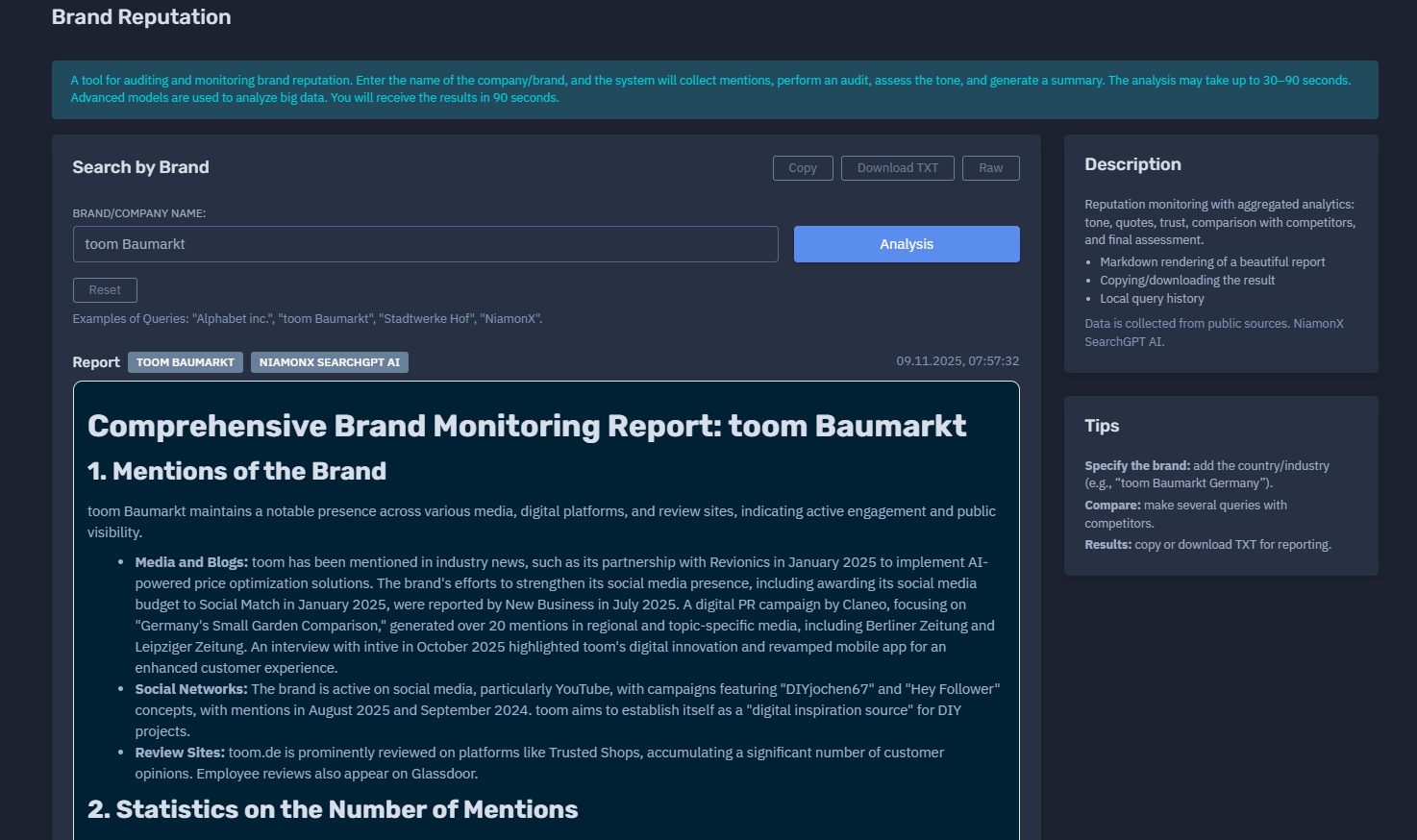
Brand Reputation — NiamonX
Link: https://dash.niamonx.io/brand_reputation
What it is
The Brand Reputation module is a next-generation AI-powered system for brand perception auditing, sentiment tracking, and trust assessment. It automatically gathers and analyzes public mentions of any company or brand name, evaluates overall tone and credibility, and generates a structured analytical report in under 90 seconds.
Built on top of NiamonX SearchGPT AI, it processes large datasets from multiple open sources, performing sentiment analysis, contextual clustering, and reputation scoring — all securely and locally processed with end-to-end encryption.
Key Functionality
-
Automated Brand Intelligence: Enter a brand or company name; the system collects public mentions from online sources and performs semantic tone analysis.
-
Tone and Sentiment Detection: Determines whether general sentiment is positive, neutral, or negative across aggregated mentions.
-
Trust and Risk Analysis: Evaluates credibility of sources, consistency of tone, and potential risks to brand trust.
-
Comparative Analysis: Allows comparing your brand’s score with competitors (e.g., “toom Baumarkt Germany” vs. “OBI Germany”).
-
Comprehensive Report Generation: Produces a Markdown-formatted summary with sections for tone overview, key quotes, trends, competitor metrics, and final evaluation.
-
Local Query History: Stores up to 200 recent searches locally (brand names and short previews only — no personal or external data).
-
Copy & Download Options: Instantly copy or export the report in
.txtformat for presentations or documentation.
How It Works
-
You enter a brand or company name (e.g., “Alphabet Inc.” or “NiamonX”).
-
The engine collects relevant mentions from public data sources.
-
NiamonX AI performs a multi-layer audit: text clustering, tone detection, quote extraction, and trust scoring.
-
Within 30–90 seconds, you receive a detailed Markdown report summarizing findings with sentiment breakdown, trend indicators, and confidence ratings.
What You Can Analyze
-
Corporate and consumer brands (e.g., “IKEA”, “Tesla”, “Lufthansa”).
-
Institutions or municipalities (e.g., “Stadtwerke Hof”).
-
Startups and emerging brands (e.g., “NiamonX”).
-
Cross-regional or industry-specific brands (“toom Baumarkt Germany”, “Volksbank Berlin”).
Report Contents
-
Summary Overview — concise snapshot of brand tone and reputation level.
-
Tone Analysis — positive, neutral, negative tone distribution with percentages.
-
Quotes & Mentions — key extracted phrases and examples.
-
Trust & Source Evaluation — assessment of data credibility and bias level.
-
Competitor Comparison — optional comparison with rival brands.
-
Final Assessment — heuristic reputation score from 0–100 (aggregated).
Markdown rendering ensures each report is visually clear, structured, and ready for presentation.
Privacy & Security
-
Data is collected only from public sources — no hidden APIs or unauthorized data scraping.
-
All queries and results are processed through a secure encrypted channel.
-
Local browser storage is used for history; no external telemetry or analytics.
-
Generated reports are transient — not shared or indexed anywhere.
Tips for Best Results
-
Add geographical or industry context to the query (e.g., “toom Baumarkt Germany”, “Airbus Aerospace”).
-
Compare multiple competitors for benchmarking.
-
Export results as
.txtor copy Markdown directly into reports. -
Wait the full 90 seconds for the analysis to complete; large datasets require deep semantic evaluation.
Example Use Cases
-
PR & Marketing Teams: Track brand health, press tone, and audience sentiment.
-
Corporate Analysts: Monitor changes in brand perception or response to public events.
-
Investors: Assess brand stability and public trust before funding decisions.
-
Reputation Management Firms: Automate large-scale audits using AI-based contextual scoring.
Contact / Support
For issues, assistance, or legal inquiries:
Helpdesk: https://support.niamonx.io
Reverse Image Search 18+ (OSINT) | Adult Public Model Image Intelligence
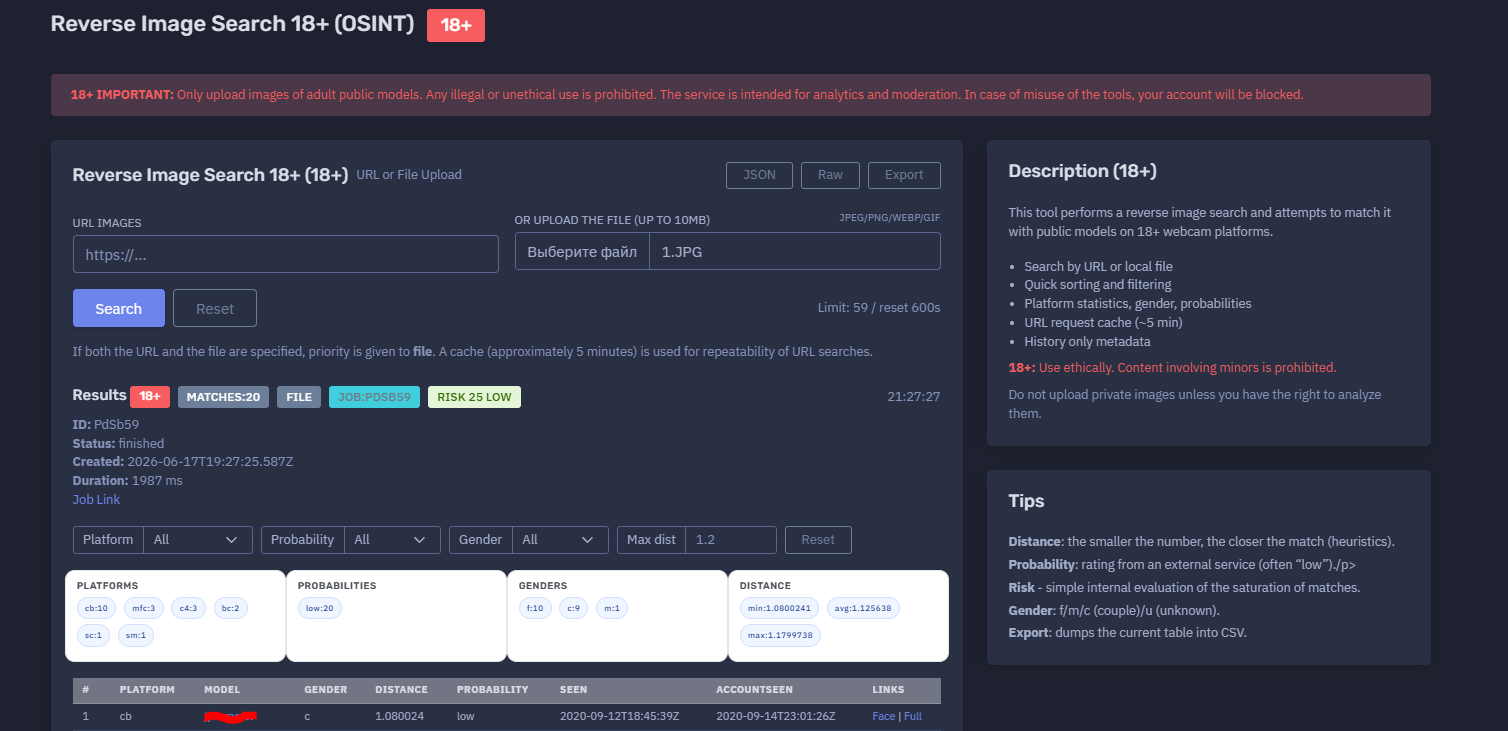
The platform available at https://dash.niamonx.io/reverse_image_search — known as Reverse Image Search 18+ (OSINT) — is a specialized 18+ image intelligence module within the NiamonX platform. It is designed to perform reverse image search against public adult-model sources and return structured, analyst-friendly matches for moderation, brand protection, content verification, and lawful OSINT analysis.
18+ Important Notice
Reverse Image Search 18+ is strictly limited to adult public-model analysis.
Users may only upload or submit images when they have a lawful and ethical right to analyze them. Any illegal, abusive, non-consensual, exploitative, or privacy-invasive use is strictly prohibited.
The service is intended for:
-
Adult-content analytics
-
Platform moderation
-
Public model verification
-
Duplicate or repost detection
-
Brand and creator protection
-
Authorized OSINT investigation
-
Safety and compliance workflows
The service must not be used for stalking, harassment, doxxing, deanonymization of private individuals, non-consensual identification, or analysis of minors. Any content involving minors is strictly prohibited. Misuse of the tool may result in immediate account blocking or termination.
Overview of the Service
Reverse Image Search 18+ (OSINT) allows users to search for visual matches across public adult webcam and model-related platforms. The tool accepts either an image URL or a local file upload and attempts to find visually similar public model records.
The system returns a structured report containing potential matches, platform statistics, gender indicators, probability ratings, distance metrics, seen timestamps, account-seen timestamps, risk score, and links to available match views.
The tool is built for analysts who need a clean, controlled, and reviewable interface for checking whether an adult public-model image appears across supported 18+ sources.
Results are heuristic and should be interpreted carefully. A visual match does not automatically prove identity, ownership, consent status, or account control.
🔍 How the Search Works
A user can start a search in one of two ways:
-
Submit an image URL
-
Upload a local image file
Supported upload formats include:
-
JPEG
-
PNG
-
WebP
-
GIF
Maximum file size:
10 MB
If both a URL and a file are specified, the uploaded file has priority.
For URL-based searches, the system may use a short cache window of approximately five minutes. This improves repeatability and avoids unnecessary repeated processing of the same URL.
After the request is submitted, the backend creates a search job, processes the image, compares it against supported public 18+ model sources, and returns a ranked list of possible matches.
🧩 What Can Be Searched
The tool supports reverse image analysis for adult public-model content only.
Accepted inputs:
| Input Type | Description |
|---|---|
| Image URL | Direct or supported image URL |
| Local file upload | JPEG, PNG, WebP, or GIF file |
| Adult public-model images | Images that the user is authorized to analyze |
Unsupported or prohibited inputs:
-
Images of minors
-
Private images without permission
-
Non-consensual intimate images
-
Images used for harassment or stalking
-
Images of private individuals for identification
-
Illegal sexual content
-
Screenshots or images submitted to bypass platform rules
-
Files larger than the supported limit
-
Unsupported file formats
Users must ensure that every submitted image is lawful, authorized, and appropriate for adult-public-model analysis.
⚙️ Search Interface
The main search interface includes several core controls.
URL Images
Users can paste an image URL.
Example format:
https://...
URL searches may use short-term caching for repeatability.
File Upload
Users can upload a local image file.
Supported formats:
jpeg / png / webp / gif
Maximum size:
10 MB
If both URL and file are provided, the file upload is processed first.
Search Limit
The interface displays the current request limit and reset time.
Example:
Limit: 59 / reset 600s
This helps users understand remaining availability and rate-limit reset timing.
📊 Results Section
After a job is completed, the tool displays a structured results panel.
Possible result fields include:
| Field | Description |
|---|---|
| Matches | Total number of returned matches |
| Job ID | Unique backend job identifier |
| Status | Processing status, such as finished |
| Created | Job creation timestamp |
| Duration | Backend processing duration |
| Risk | Internal risk score |
| Risk level | Low, medium, high, or another internal level |
| Platform statistics | Match distribution by platform |
| Probability distribution | Probability summary |
| Gender distribution | f / m / c / u indicators |
| Distance metrics | Minimum, average, and maximum distance |
| Job link | Link to the job report, when available |
Example status structure:
Status: finished
Duration: 1987 ms
Matches: 20
Risk: 25 Low
The results should be treated as investigative leads and manually reviewed.
🧠 Key Features
Reverse Image Search for 18+ OSINT
The tool performs visual search against public adult-model sources and returns possible matches.
URL or File Search
Users can submit an image URL or upload a local file.
File Priority Logic
If both URL and file are submitted, the uploaded file is prioritized.
Short-Term URL Cache
URL searches may use an approximately five-minute cache window to improve repeatability and reduce unnecessary repeated processing.
Job-Based Processing
Each search creates a backend job with its own status, ID, creation timestamp, duration, and result set.
Platform Statistics
The system summarizes matches by source platform.
Example platform statistics may appear in a compact format such as:
cb:10 mfc:3 c4:3 bc:2 sc:1 sm:1
Platform labels are internal or source-specific abbreviations and should be interpreted according to the platform documentation or analyst context.
Distance Metrics
The tool provides distance values to help estimate visual similarity.
The smaller the distance value, the closer the match according to the system’s heuristic.
Probability Rating
The probability field shows an external or backend-provided rating.
This value may often be “low” and should not be treated as a final confidence conclusion by itself.
Risk Score
The risk score is a simple internal evaluation based on the saturation and characteristics of returned matches.
It is intended for triage and prioritization, not as a legal or identity conclusion.
Filtering
Users can filter results by:
-
Platform
-
Probability
-
Gender
-
Maximum distance
Export
The current results table can be exported to CSV for internal review or case documentation.
Metadata-Only History
Request history stores only metadata such as URL hash or file hash. Images are not saved.
📋 Results Table
The results table displays potential visual matches in a structured format.
Main columns may include:
| Column | Description |
|---|---|
| # | Result position |
| Platform | Source platform abbreviation |
| Model | Public model/account name returned by the system |
| Gender | Gender indicator |
| Distance | Visual similarity distance |
| Probability | Probability rating |
| Seen | First or related seen timestamp |
| AccountSeen | Account-level seen timestamp |
| Links | Available match views, such as Face or Full |
Example link types:
-
Face — face-focused match view
-
Full — full-image or full-result view
These links are intended for analyst review and should be accessed only for lawful, authorized purposes.
📏 Distance Interpretation
The Distance value is one of the most important technical indicators in the report.
General interpretation:
| Distance | Meaning |
|---|---|
| Lower value | Closer visual match |
| Higher value | Weaker visual similarity |
| Similar range | Requires manual comparison |
Distance is heuristic. It does not prove identity, model ownership, account control, consent, or exact duplication.
Analysts should compare multiple factors before making conclusions:
-
Face similarity
-
Full-image similarity
-
Platform source
-
Model/account name
-
Seen timestamp
-
AccountSeen timestamp
-
Probability rating
-
Result rank
-
Visual context
-
Duplicate patterns across platforms
🎯 Probability Interpretation
The Probability field reflects an external or backend-provided rating.
Common values may include:
-
Low
-
Medium
-
High
-
Unknown
In many cases, returned results may be marked as “low,” even when the visual distance is close. Probability should therefore be interpreted together with distance, source platform, result rank, and manual review.
A low probability does not automatically mean the result is irrelevant. A high probability does not automatically prove identity.
🚦 Risk Score
The Risk value is an internal evaluation that helps summarize the saturation and possible relevance of returned matches.
Example:
Risk 25 Low
Risk may consider signals such as:
-
Number of matches
-
Platform distribution
-
Distance range
-
Probability spread
-
Repeated model/account appearances
-
Density of similar results
-
Availability of face and full-image links
Risk is intended for triage. It should not be used as a final judgment.
🧬 Gender Indicators
The results may include gender indicators.
Common values:
| Indicator | Meaning |
|---|---|
| f | Female |
| m | Male |
| c | Couple |
| u | Unknown |
Gender indicators are source or model metadata signals and may not always be accurate. They should be treated as descriptive metadata, not identity verification.
🌐 Platform Statistics
The platform statistics section summarizes how results are distributed across supported source platforms.
Example:
Platforms
cb:10 mfc:3 c4:3 bc:2 sc:1 sm:1
This helps analysts understand whether matches are concentrated on one source or spread across multiple platforms.
A high number of matches on one platform may suggest repeated appearances, duplicate records, or platform-specific similarity clustering.
A broad spread across multiple platforms may require closer manual review.
🕒 Seen and AccountSeen
The report may include two timestamp fields.
Seen
The Seen value usually refers to when a specific visual match, image, or record was observed by the source system.
AccountSeen
The AccountSeen value usually refers to when the related account or model profile was observed.
These timestamps are useful for understanding historical presence and recency.
They do not prove that the account is currently active.
🔗 Face and Full Links
Results may provide links such as:
-
Face
-
Full
These links help analysts review the matched content from different perspectives.
Face
A face-focused view may help compare facial similarity.
Full
A full-image view may help compare broader context, body position, background, outfit, image composition, or duplicated content.
Analysts should use both views when available and avoid relying on a single visual cue.
💾 Request History
The Request History (18+) section stores previous search metadata.
Important privacy behavior:
Only stores search metadata (URL SHA1 / file SHA1). Images are not saved.
History may include:
-
Source type
-
Job ID
-
Number of matches
-
Platform summary
-
Top match names
-
File hash or URL hash
-
Risk score
-
Timestamp
This allows users to review past searches without storing the original uploaded images.
Request history should still be treated as sensitive metadata because it may reveal investigative activity.
📤 Export
The export function dumps the current results table into CSV.
CSV export may include:
-
Platform
-
Model/account name
-
Gender
-
Distance
-
Probability
-
Seen timestamp
-
AccountSeen timestamp
-
Links
Exported files should be stored securely and shared only with authorized recipients.
When used for moderation, compliance, or investigation, exports should follow internal data-handling policies.
✅ Recommended Analyst Workflow
A careful review process should follow these steps.
1. Confirm Authorization
Before uploading any image, confirm that the image is lawful to analyze and belongs to an adult public model or an authorized moderation workflow.
2. Choose Input Method
Use either a URL or a local file. If both are submitted, remember that the file takes priority.
3. Run the Search
Submit the request and wait for the job to finish.
4. Review the Summary
Check match count, job status, duration, risk score, platform distribution, probability distribution, gender distribution, and distance range.
5. Sort by Distance
Prioritize lower-distance results for manual review.
6. Check Face and Full Views
Use both visual perspectives where available.
7. Compare Context
Compare visual details, platform names, timestamps, and repeated matches.
8. Avoid Overclaiming
Use cautious language such as “possible match,” “visual similarity,” or “candidate result” unless verified by additional evidence.
9. Export Only When Needed
Export CSV only for authorized internal workflows.
10. Store Evidence Securely
Treat all results, links, hashes, and exports as sensitive investigation material.
🛡️ Security, Privacy & Ethics
Reverse Image Search 18+ is a sensitive tool and must be used responsibly.
Strictly prohibited use includes:
-
Uploading images of minors
-
Searching for private individuals without consent or lawful basis
-
Uploading non-consensual intimate images
-
Harassment, stalking, or doxxing
-
Deanonymizing private people
-
Publishing or redistributing sensitive matches
-
Using results for blackmail, extortion, impersonation, or abuse
-
Attempting to bypass platform restrictions
-
Misrepresenting heuristic matches as verified identity proof
Acceptable use cases include:
Users must manually verify results and interpret them as technical similarity signals, not final identity conclusions.
⚙️ Technical Highlights
-
18+ reverse image search module
-
Designed for adult public-model OSINT only
-
Available at
dash.niamonx.io/reverse_image_search -
Supports image URL search
-
Supports local file upload
-
Supported formats: JPEG, PNG, WebP, GIF
-
Maximum upload size: 10 MB
-
File upload takes priority over URL when both are provided
-
URL request cache of approximately five minutes
-
Job-based backend processing
-
Job ID, status, creation time, and duration display
-
Match count
-
Internal risk score
-
Platform statistics
-
Probability distribution
-
Gender distribution
-
Distance metrics
-
Filters by platform, probability, gender, and maximum distance
-
Result table with platform, model, gender, distance, probability, timestamps, and links
-
Face and Full review links
-
CSV export
-
Request history stores only metadata
-
Images are not saved in request history
-
Intended for analytics, moderation, and authorized OSINT
📌 Usage Hints
-
Upload only lawful adult public-model images.
-
Do not upload private images unless you have the right to analyze them.
-
Never upload or analyze images involving minors.
-
Use lower distance values as stronger visual-similarity candidates.
-
Treat probability as an additional rating, not a final conclusion.
-
Use risk score for triage only.
-
Filter by platform, gender, probability, or maximum distance when reviewing many results.
-
Compare both Face and Full views when available.
-
Export CSV only for authorized internal use.
-
Remember that request history stores hashes and metadata, not images.
-
Treat all matches as investigative leads until manually verified.
📬 Contact Information
For technical, legal, abuse, privacy, or takedown-related inquiries, users can contact the NiamonX team directly:
support@niamonx.io — Technical Support
other@niamonx.io — General Inquiries
takedown@niamonx.io — Data Removal / Privacy Takedown Requests
legal@niamonx.io — Legal and Compliance Matters
Alternative contact channel:
🔗 Helpdesk: https://support.niamonx.io/
Summary
NiamonX Reverse Image Search 18+ (OSINT) is a specialized reverse image search tool for adult public-model intelligence, analytics, and moderation. It supports URL and file-based searches, compares images against supported public 18+ model sources, and returns structured results with platform statistics, visual distance metrics, probability ratings, gender indicators, risk score, timestamps, and review links.
The tool is designed for lawful, ethical, adult-only analysis. It must never be used for private-person identification, non-consensual searches, minors, harassment, doxxing, or abuse. All matches should be treated as heuristic visual-similarity leads and manually verified before any conclusion or action.
Exif Remove and Metadata Privacy | Local Image Metadata Cleaner

The platform available at https://dash.niamonx.io/exif_remove — known as Exif Remove and Metadata Privacy — is a privacy-focused image metadata inspection and cleaning tool within the NiamonX platform. It allows users to view, assess, export, and remove EXIF / metadata from images directly inside the browser, without sending image files to the server.
Overview of the Service
Exif Remove and Metadata Privacy is designed to help users protect themselves from accidental metadata exposure before publishing or sharing images online.
Images often contain hidden technical metadata, including device model, camera settings, software name, creation date, orientation, thumbnails, GPS coordinates, serial numbers, and editing history. This information can reveal sensitive details about the person, device, location, or workflow behind the image.
The tool allows users to inspect this metadata locally, assess privacy risk, remove metadata, optionally re-encode the image, and download a cleaned version.
The main privacy advantage of this module is that processing happens locally in the user’s browser. Images are not uploaded to the NiamonX server for metadata extraction or deletion.
🔍 How the Tool Works
When a user selects or drags an image into the tool, the browser reads the file locally and extracts available metadata.
The tool then displays detected tags, risk indicators, file type, file size, and metadata categories. The user can review the information before cleaning the file.
When metadata removal is requested, the tool redraws the image through the browser Canvas API. This creates a new image output without the original embedded EXIF metadata.
Depending on the selected output settings, the tool can:
-
Keep the original format when possible
-
Convert to JPEG, PNG, or WebP
-
Adjust JPEG / WebP quality
-
Limit the long side of the image
-
Apply auto-orientation
-
Preserve transparency when supported
-
Remove metadata without unnecessary transcoding when the format matches
-
Export detected metadata as JSON
-
Process multiple files in bulk
The cleaned file can then be downloaded and safely used for publishing, sharing, reporting, or documentation.
🧩 Supported File Types
Exif Remove and Metadata Privacy supports common web image formats.
Supported formats:
-
JPEG
-
PNG
-
WebP
The interface may also accept common browser-supported image representations depending on browser capabilities, but the recommended formats are JPEG, PNG, and WebP.
Recommended file size:
Up to approximately 50 MB per file
Unsupported or limited formats:
-
HEIC
-
RAW camera formats
-
Some proprietary image formats
-
Formats not supported by browser-side Canvas processing
Newer formats such as HEIC and RAW are not supported on the Canvas side.
📁 Uploading Images
The upload area allows users to drag files into the interface or click to select files manually.
Example interface text:
Drag files here or click to select
Metadata is extracted locally after the file is selected.
Important privacy behavior:
Images are not sent to the server.
Metadata is extracted locally.
This makes the tool suitable for privacy-sensitive workflows where users need to inspect image metadata before publishing or transferring files.
⚙️ Output Settings
The tool provides several output configuration options.
Output Format
Users can choose how the cleaned file should be saved.
Typical option:
As the Original (auto)
This means the tool attempts to preserve the original format where possible.
Other possible output formats may include:
-
JPEG
-
PNG
-
WebP
Format choice affects file size, quality, transparency, and compatibility.
Quality
For JPEG and WebP outputs, users can select image quality.
Example:
92%
Recommended privacy-friendly and quality-balanced range:
90–95%
Higher quality preserves more visual detail but may produce larger files. Lower quality reduces size but can introduce compression artifacts.
Limit the Long Side
Users can resize the image by limiting its longest side in pixels.
Example:
Without scaling
A practical option before publishing online is to reduce the long side to a value such as:
2048 px
This can reduce file size and limit unnecessary visual detail while preserving enough quality for web publishing.
Auto-Orientation
The tool can apply image orientation based on the original Orientation metadata.
This is important because many photos rely on EXIF Orientation to display correctly. If metadata is removed without applying orientation, the image may appear rotated incorrectly.
Auto-orientation helps preserve the visible appearance of the image after cleaning.
Keep Transparency
For images with transparency, such as PNG files, the tool can preserve alpha transparency when possible.
Important note:
If PNG is converted to JPEG, transparency is lost because JPEG does not support alpha channels.
Recommended behavior:
-
Use PNG or WebP when transparency must be preserved.
-
Use JPEG when transparency is not required and smaller file size is preferred.
Delete Only
The “Delete only” option avoids unnecessary transcoding when the output format matches the original format.
This is useful when the user wants to remove metadata with minimal visual change.
However, depending on the browser and image format, some re-encoding may still be required to fully remove embedded metadata.
📊 File Summary
After upload, the tool displays a quick summary.
Example structure:
Files: 1
Cleaned: 0
Tags: 15
For each image, the interface may show:
-
File name
-
MIME type
-
File size
-
Metadata tag count
-
Original metadata
-
Cleaned status
-
Risk category
-
Detected sensitive fields
Example file information:
Type: image/jpeg
Size: 1.2 MB
Metadata: 15 tags
🧾 Metadata Viewer
The metadata viewer displays detected EXIF and image metadata in a structured format.
Possible metadata fields include:
-
Orientation
-
Resolution
-
Resolution unit
-
Software
-
EXIF version
-
Color space
-
Pixel dimensions
-
Scene capture type
-
Thumbnail data
-
GPS coordinates
-
Device manufacturer
-
Device model
-
Lens information
-
Serial number
-
Creation date and time
-
Modification date and time
-
Editing software
-
Embedded preview or thumbnail
Example metadata categories:
Software
Orientation
PixelXDimension
PixelYDimension
thumbnail
The metadata view is useful because it allows users to understand exactly what hidden information exists before removing it.
🚨 Why Metadata Removal Matters
Image metadata can reveal more information than expected.
Possible privacy-sensitive metadata:
| Metadata Type | Privacy Risk |
|---|---|
| GPS coordinates | Can reveal home, workplace, travel route, or private location |
| Device model | Can identify the camera or phone used |
| Serial number | Can link multiple images to the same physical device |
| Creation date/time | Can reveal when the photo was taken |
| Software name | Can reveal editing tools or workflow |
| Embedded thumbnail | Can contain an older version of the image |
| Orientation and dimensions | Usually low risk but still technical metadata |
| Author or copyright fields | Can reveal identity or organization |
| File history | May reveal editing or export chain |
Before publishing images online, it is strongly recommended to check for GPS coordinates, serial numbers, device model, and creation time.
🧠 Risk Assessment
The tool includes a metadata risk assessment system.
Risk levels help users understand how sensitive the detected metadata may be.
High Risk
High-risk metadata may include:
-
GPS coordinates
-
Exact location data
-
Serial number
-
Exact time combined with device identifiers
-
Sensitive embedded thumbnails
-
Private author or owner fields
Example risk interpretation:
High: GPS coordinates, exact time + serial number
High-risk images should be cleaned before publishing or sharing.
Medium Risk
Medium-risk metadata may include:
-
Device model
-
Camera manufacturer
-
Software name
-
Creation date
-
Editing date
-
Lens or device details
Example risk interpretation:
Medium: Device model, software, creation date
Medium-risk fields may not reveal location directly, but they can still support tracking, correlation, or device fingerprinting.
Info
Informational metadata may include:
-
File size
-
Orientation
-
Resolution
-
Basic image dimensions
-
Color profile
-
Non-sensitive technical tags
Example risk interpretation:
Info: Size, orientation, basic tags
Informational metadata is usually lower risk but can still be removed for maximum privacy.
🧹 Metadata Removal Method
Exif Remove and Metadata Privacy removes metadata by redrawing the image in the browser Canvas.
This process creates a clean image output from pixel data rather than copying the original file structure with embedded metadata.
In practice, this helps remove:
Important note:
Some browser-generated outputs may still contain minimal format-level information required for valid images, but sensitive EXIF metadata is removed through the redraw/export process.
🔐 Local Processing and Privacy
The tool is designed around local browser-side processing.
Main privacy guarantees:
-
Images are processed locally in the browser.
-
Metadata extraction happens locally.
-
Metadata removal happens locally.
-
Images are not uploaded to the server.
-
Metadata is not sent to the server.
-
Request history is stored locally in the browser.
This makes the tool suitable for privacy-conscious users, journalists, investigators, security teams, and anyone who needs to clean images before sharing them.
🕓 Request History
The tool includes a local request history panel.
Important behavior:
Stored only locally in the browser.
No files or metadata are sent to the server.
The history may store up to a limited number of recent entries, such as:
Up to 50 entries
History entries may include:
-
File name
-
File size
-
Risk level
-
Detected metadata categories
-
Processing timestamp
Example categories shown in history may include:
-
Info
-
Medium
-
Date
-
Device
-
Software
The history is useful for reviewing recent local cleaning activity, but it should still be treated as sensitive local metadata on shared devices.
📤 JSON Export
The tool can export detected metadata as JSON.
This is useful for:
-
Documentation
-
Security review
-
Privacy audits
-
Before/after comparison
-
Evidence preservation
-
Developer testing
-
Internal reporting
JSON exports may contain sensitive metadata. They should be stored securely and deleted when no longer needed.
📦 ZIP Upload and Bulk Processing
The tool supports ZIP upload or bulk processing workflows when available.
Bulk processing is useful when users need to clean multiple images before:
-
Publishing a gallery
-
Sending documentation
-
Uploading screenshots
-
Sharing evidence
-
Preparing website assets
-
Submitting images to public platforms
When cleaning many files, users should still review high-risk images manually, especially those that may contain GPS or device identifiers.
📉 Size Comparison
After cleaning or re-encoding images, the tool can help compare original and output file sizes.
Size differences may occur because of:
-
Metadata removal
-
JPEG / WebP quality settings
-
Image resizing
-
Format conversion
-
Transparency preservation
-
Canvas re-encoding
-
Thumbnail removal
A cleaned image may be much smaller if the original file contained large embedded metadata or thumbnail previews.
🖼️ Format and Quality Considerations
JPEG
Best for photos and general publishing.
Pros:
-
Small file size
-
Broad compatibility
-
Adjustable quality
Cons:
-
Lossy compression
-
No transparency
-
Repeated compression can reduce quality
PNG
Best for screenshots, logos, graphics, and transparency.
Pros:
-
Supports transparency
-
Lossless visual quality
-
Good for UI images and graphics
Cons:
-
Larger file size for photos
-
May not be ideal for large camera images
WebP
Best for modern web publishing.
Pros:
-
Good compression
-
Supports transparency
-
Often smaller than JPEG or PNG
Cons:
-
Compatibility depends on platform or workflow
-
Some older tools may not support it
⚠️ Re-Compression Warning
Repeated compression can degrade image quality.
For best results:
-
Clean and save the image once.
-
Avoid repeatedly opening and exporting the same JPEG.
-
Use quality around 90–95% for JPEG/WebP.
-
Keep the original private copy separately if needed.
-
Use PNG or WebP when transparency must be preserved.
✅ Recommended Privacy Workflow
A careful image-cleaning workflow should follow these steps.
1. Upload the Image Locally
Drag the file into the tool or select it manually.
2. Review Metadata
Check all detected metadata before cleaning.
3. Look for High-Risk Tags
Prioritize GPS, serial number, device model, creation time, and embedded thumbnails.
4. Choose Output Settings
Select format, quality, orientation, resizing, and transparency options.
5. Remove Metadata
Generate the cleaned image.
6. Compare File Size
Review whether the cleaned image size changed significantly.
7. Download the Cleaned File
Use the cleaned version for publishing or sharing.
8. Recheck If Needed
Upload the cleaned image again to confirm that metadata was removed.
9. Store Originals Safely
Keep original images private if they contain sensitive metadata.
10. Clear Local History on Shared Devices
🛡️ Security, Privacy & Ethics
Exif Remove and Metadata Privacy is designed for privacy protection, responsible publishing, and safe image sharing.
Acceptable use cases include:
-
Removing GPS coordinates before publishing photos
-
Cleaning screenshots before sharing them
-
Protecting device information
-
Preparing images for public websites
-
Reducing metadata exposure in reports
-
Sanitizing investigation images
-
Removing editing history from exported graphics
-
Checking images before social media upload
-
Cleaning images before sending to third parties
Users should use the tool responsibly:
-
Do not rely on metadata removal to hide illegal activity.
-
Do not alter evidence in contexts where original metadata must be preserved.
-
Keep original files when forensic integrity is required.
-
Do not publish sensitive images without consent.
-
Do not remove metadata from files that must remain legally auditable.
-
Use proper evidence-handling workflows for legal, compliance, or forensic cases.
For forensic or legal investigations, metadata removal should be performed only on working copies, never on original evidence.
⚙️ Technical Highlights
-
EXIF and metadata viewer
-
Metadata removal for images
-
Local browser-side processing
-
Images are not sent to the server
-
Metadata is not sent to the server
-
Supports JPEG, PNG, and WebP
-
Recommended size up to approximately 50 MB per file
-
Output format selection
-
JPEG / WebP quality control
-
Long-side resize option
-
Auto-orientation support
-
Transparency preservation for PNG / WebP workflows
-
Delete-only mode when format matches
-
Metadata tag counter
-
Risk assessment system
-
JSON metadata export
-
Size comparison
-
Local request history
-
History stored only in browser local storage
-
Up to 50 local history entries
-
Bulk / ZIP workflow support
-
Canvas-based metadata deletion
-
HEIC and RAW not supported on Canvas side
📌 Usage Hints
-
Always check for GPS before publishing photos.
-
Check device model, serial numbers, software, and creation time.
-
Use quality 90–95% for JPEG/WebP in most cases.
-
Reduce the long side, such as 2048 px, for web publishing.
-
Preserve transparency when cleaning PNG logos or screenshots.
-
Avoid PNG to JPEG conversion if transparency matters.
-
Avoid repeated recompression.
-
Save only once when possible.
-
Re-upload the cleaned file to verify metadata removal.
-
Clear local history on shared devices.
-
Keep original evidence unchanged if forensic integrity matters.
📬 Contact Information
For technical, legal, abuse, privacy, or takedown-related inquiries, users can contact the NiamonX team directly:
support@niamonx.io — Technical Support
other@niamonx.io — General Inquiries
takedown@niamonx.io — Data Removal / Privacy Takedown Requests
legal@niamonx.io — Legal and Compliance Matters
Alternative contact channel:
🔗 Helpdesk: https://support.niamonx.io/
Summary
NiamonX Exif Remove and Metadata Privacy is a local browser-based privacy tool for inspecting and removing EXIF / metadata from JPEG, PNG, and WebP images.
It helps users detect sensitive metadata such as GPS coordinates, device model, serial number, software, creation time, thumbnails, and other hidden tags before publishing images online.
The tool processes files locally, does not send images or metadata to the server, supports output format and quality control, provides risk assessment, enables JSON export, and stores only local browser history. It is designed for privacy protection, safer publishing, security workflows, and responsible image handling.
Flight Information | Flight Search & Aviation Intelligence
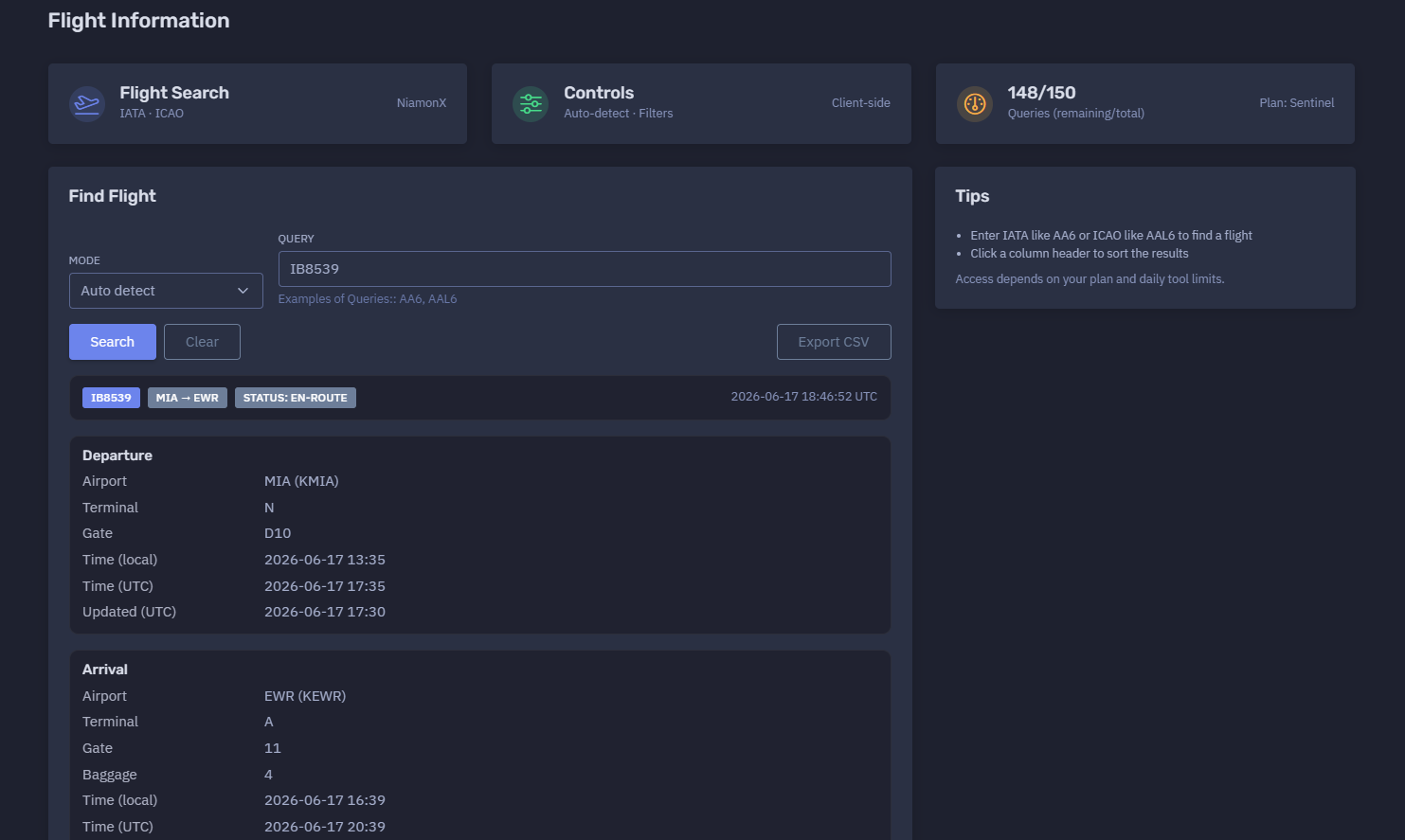
The platform available at https://dash.niamonx.io/flightinfo — known as Flight Information — is an aviation intelligence and flight lookup tool within the NiamonX platform. It allows users to search for flight information by IATA or ICAO flight number and receive a structured report with route, status, departure details, arrival details, aircraft data, telemetry fields, timestamps, and local browser-based request history.
Overview of the Service
Flight Information is designed to help users quickly check the current or recent status of a commercial or private flight using standard aviation flight identifiers.
The tool supports both IATA and ICAO flight number formats and can automatically detect the correct query mode. It returns a clean, structured flight summary that is useful for aviation monitoring, travel verification, logistics coordination, OSINT workflows, executive protection, airport operations review, and general flight status checks.
The interface is built to be simple and fast. A user enters a flight number, selects or keeps auto-detection mode, and receives a readable flight report containing departure and arrival airports, gates, terminals, scheduled or updated times, status, route, and available aircraft or telemetry fields.
Access depends on the user’s plan and daily tool limits.
🔍 How the Search Works
When a user enters a flight number, the tool checks the query using the selected mode.
Available modes include:
-
Auto detect
-
IATA
-
ICAO
In Auto detect mode, the system attempts to determine whether the entered value is an IATA-style or ICAO-style flight number.
Examples:
AA6
AAL6
The backend then returns available flight information and displays it in a structured format.
If the flight is found, the report may include:
-
Flight number
-
Route
-
Current status
-
Departure airport
-
Departure terminal
-
Departure gate
-
Departure local time
-
Departure UTC time
-
Departure update timestamp
-
Arrival airport
-
Arrival terminal
-
Arrival gate
-
Baggage belt
-
Arrival local time
-
Arrival UTC time
-
Arrival update timestamp
-
Aircraft registration
-
Aircraft type
-
Aircraft model
-
Aircraft manufacturer
-
Engine information
-
Build year and age
-
Aircraft HEX
-
MSN
-
Telemetry fields
-
Request history entry
🧩 What Can Be Searched
Flight Information is intended for flight number lookup.
Supported query types:
| Query Type | Example | Description |
|---|---|---|
| IATA flight number | AA6 |
Airline IATA code + flight number |
| ICAO flight number | AAL6 |
Airline ICAO code + flight number |
| Auto-detected flight number | IB8539 |
The system detects the likely mode |
The user should enter only the flight identifier.
Recommended input examples:
IB8539
SK2624
SAS2624
Unsupported input examples:
Miami to Newark
MIA EWR 17 June
https://example.com/flight/IB8539
American Airlines flight from Miami tomorrow
For best results, users should enter a clean IATA or ICAO flight number.
⚙️ Controls and Interface
The Flight Information interface includes several core sections.
Controls
The controls area shows search mode, filters, query limits, and client-side interface status.
Example indicators:
Auto-detect · Filters
Client-side
Query Counter
The query counter shows remaining and total daily requests.
Example:
148 / 150
Queries remaining / total
Plan: Sentinel
This helps users understand how many flight searches remain under the current plan.
Find Flight
The Find Flight section is the main search area.
It contains:
-
Mode selector
-
Query input
-
Example queries
-
Search action
Example:
Mode: Auto detect
Query: IB8539
📊 Flight Result Summary
After a successful lookup, the tool displays the flight route and status.
Example structure:
IB8539
MIA → EWR
Status: en-route
2026-06-17 18:46:52 UTC
The summary helps the user quickly understand:
-
Which flight was found
-
Origin and destination
-
Current flight status
-
Last report or lookup time
Common flight statuses may include:
-
Scheduled
-
En-route
-
Landed
-
Delayed
-
Cancelled
-
Unknown
-
Diverted
The exact statuses depend on the data returned by the backend source.
🛫 Departure Section
The Departure section contains information about the origin airport and departure event.
Possible fields include:
| Field | Description |
|---|---|
| Airport | Departure airport in IATA and ICAO format |
| Terminal | Departure terminal |
| Gate | Departure gate |
| Time local | Local departure time at the airport |
| Time UTC | Departure time converted to UTC |
| Updated UTC | Last update timestamp for departure data |
Example departure structure:
Airport: MIA (KMIA)
Terminal: N
Gate: D10
Time local: 2026-06-17 13:35
Time UTC: 2026-06-17 17:35
Updated UTC: 2026-06-17 17:30
This section is useful for confirming where the flight departed from, whether gate or terminal information is available, and whether departure timing has been updated.
🛬 Arrival Section
The Arrival section contains information about the destination airport and arrival event.
Possible fields include:
| Field | Description |
|---|---|
| Airport | Arrival airport in IATA and ICAO format |
| Terminal | Arrival terminal |
| Gate | Arrival gate |
| Baggage | Baggage belt or claim area |
| Time local | Local arrival time at the airport |
| Time UTC | Arrival time converted to UTC |
| Updated UTC | Last update timestamp for arrival data |
Example arrival structure:
Airport: EWR (KEWR)
Terminal: A
Gate: 11
Baggage: 4
Time local: 2026-06-17 16:39
Time UTC: 2026-06-17 20:39
Updated UTC: 2026-06-17 20:23
This section is especially useful for travel coordination, passenger pickup planning, logistics, and airport operations review.
✈️ Aircraft Section
The Aircraft section displays available aircraft-related information.
Possible fields include:
| Field | Description |
|---|---|
| Registration | Aircraft tail number or registration |
| ICAO Type | ICAO aircraft type code |
| Model | Aircraft model |
| Manufacturer | Aircraft manufacturer |
| Engines | Engine information |
| Built / Age | Build year and aircraft age |
| HEX | Aircraft Mode-S / ADS-B hex identifier |
| MSN | Manufacturer serial number |
Some fields may be unavailable depending on the data provider, flight type, aircraft tracking availability, or privacy restrictions.
If aircraft details are unavailable, the interface may show:
—
This means the field was not returned or could not be confirmed for the selected flight.
📡 Telemetry Section
The Telemetry section displays live or recent aircraft movement data when available.
Possible telemetry fields include:
| Field | Description |
|---|---|
| Position | Current or last known position |
| Heading | Direction of travel |
| Altitude | Current or last known altitude |
| Speed | Ground speed or reported speed |
| V-Speed | Vertical speed |
| Squawk | Transponder squawk code |
Telemetry availability can depend on:
-
Aircraft ADS-B visibility
-
Data provider support
-
Flight status
-
Privacy filtering
-
Regional coverage
-
Time since last update
-
Aircraft type
-
Military, private, or restricted flight settings
Telemetry should be treated as informational and may not always be real-time.
🧾 Result Table
The tool may also display a compact row-based result table.
A row may include:
-
Flight number
-
Route
-
Status
-
Departure UTC time
-
Arrival UTC time
-
Aircraft fields
-
Lookup timestamp
Example compact format:
IB8539 MIA → EWR en-route 2026-06-17 17:35 2026-06-17 20:39
The table can help users compare repeated lookups or scan recent results quickly.
Users can click a column header to sort results when sorting is available in the interface.
🕓 Request History
The Request History section stores recent searches locally in the user’s browser.
Example history behavior:
Stores last 100 queries in your browser.
History entries may include:
-
Search mode
-
Original query
-
Normalized flight number
-
Route
-
Lookup timestamp
-
Flight status
-
Result metadata
Example history item:
auto
IB8539
MIA → EWR
17.06.2026, 21:35:37
Request history is useful for quickly revisiting previous flight checks without retyping the flight number.
Because the history is stored in the browser, it may be cleared if the user deletes browser data, switches devices, or uses another browser profile.
🧠 Key Features
IATA and ICAO Search
The tool supports both common flight identifier formats.
Auto-Detection
Auto mode attempts to detect whether the query is IATA or ICAO.
Structured Flight Report
Results are displayed in a readable layout with departure, arrival, aircraft, and telemetry sections.
Local and UTC Times
The report shows both local airport time and UTC time when available.
Gate, Terminal, and Baggage Details
The tool can display airport operation details such as terminal, gate, and baggage claim.
Aircraft Details
When available, the report includes aircraft registration, type, model, manufacturer, engines, HEX, and MSN.
Telemetry Fields
The tool can display position, heading, altitude, speed, vertical speed, and squawk when available.
Client-Side Controls
Filtering and interface controls are handled client-side for a fast user experience.
Request History
The last 100 queries are stored locally in the browser.
Plan-Based Access
Daily query limits depend on the user’s plan.
🚦 Daily Queries and Plan Limits
Flight Information uses plan-based daily query limits.
Example:
148 / 150
Queries remaining / total
Plan: Sentinel
Limits help control usage, protect backend availability, and provide predictable access across user plans.
Users should monitor the remaining query counter when performing multiple searches.
🧭 IATA vs ICAO
Flight Information supports both IATA and ICAO flight identifiers.
IATA Flight Number
IATA flight numbers usually use a two-character airline code followed by a flight number.
Example:
AA6
ICAO Flight Number
ICAO flight numbers usually use a three-letter airline code followed by a flight number.
Example:
AAL6
Auto Detect
Auto-detect mode tries to determine the correct format automatically.
If the result seems incorrect or no flight is found, users can manually switch between IATA and ICAO mode.
🧠 Result Interpretation
Flight data should be interpreted carefully.
Important interpretation notes:
-
Flight status can change quickly.
-
Gate and terminal assignments may change before departure or arrival.
-
Arrival times may be estimated and updated during flight.
-
Aircraft information may be unavailable for some flights.
-
Telemetry may be delayed, missing, or privacy-filtered.
-
Local times are based on airport time zones.
-
UTC times are useful for cross-region comparison.
-
A missing field does not always mean the information does not exist; it may simply not be returned by the provider.
The tool is useful for fast lookup and monitoring, but critical operational decisions should be confirmed with the airline, airport, or official aviation data source when necessary.
✅ Recommended Workflow
A practical flight lookup workflow should follow these steps.
1. Enter the Flight Number
Use a clean IATA or ICAO flight number.
2. Start With Auto Detect
Use Auto detect first unless you already know the identifier type.
3. Review the Route
Confirm that the origin and destination match the expected flight.
4. Check the Status
Look for status such as scheduled, en-route, landed, delayed, or cancelled.
5. Review Departure Details
Check departure airport, terminal, gate, local time, UTC time, and update timestamp.
6. Review Arrival Details
Check arrival airport, terminal, gate, baggage belt, local time, UTC time, and update timestamp.
7. Check Aircraft and Telemetry
Use aircraft and telemetry fields when available, but remember that they may be incomplete.
8. Save or Reuse History
Use local request history to revisit previous queries.
9. Verify Critical Details
For time-sensitive travel, logistics, or operational decisions, confirm with official airline or airport sources.
🛡️ Security, Privacy & Responsible Use
Flight Information is intended for lawful aviation information lookup and operational awareness.
Acceptable use cases include:
-
Checking your own flight
-
Travel planning
-
Passenger pickup coordination
-
Logistics monitoring
-
Aviation OSINT
-
Airport operations review
-
Corporate travel monitoring
-
Incident response support
-
Executive protection workflows
-
Historical query review
Users should follow responsible use principles:
-
Do not use flight information for stalking, harassment, or physical harm.
-
Do not misuse aircraft or route data to target individuals.
-
Do not assume telemetry is perfectly live or complete.
-
Do not make safety-critical decisions from a single data point.
-
Verify important travel or operational details with official sources.
-
Treat local request history as potentially sensitive on shared devices.
⚙️ Technical Highlights
-
Flight lookup module
-
Available at
dash.niamonx.io/flightinfo -
Supports IATA flight numbers
-
Supports ICAO flight numbers
-
Auto-detect mode
-
Client-side controls and filters
-
Plan-based daily query limits
-
Structured flight report
-
Route display
-
Flight status display
-
Departure airport, terminal, gate, local time, UTC time, and update timestamp
-
Arrival airport, terminal, gate, baggage, local time, UTC time, and update timestamp
-
Aircraft registration, type, model, manufacturer, engines, build year, age, HEX, and MSN when available
-
Telemetry fields for position, heading, altitude, speed, vertical speed, and squawk when available
-
Sortable result table
-
Local browser request history
-
Stores last 100 queries in the browser
-
Suitable for travel, logistics, OSINT, corporate monitoring, and aviation awareness workflows
📌 Usage Hints
-
Enter IATA flight numbers like
AA6. -
Enter ICAO flight numbers like
AAL6. -
Use Auto detect when unsure.
-
If a result looks wrong, manually switch between IATA and ICAO mode.
-
Check both local and UTC times.
-
Review update timestamps to understand data freshness.
-
Gate, terminal, and baggage details can change.
-
Telemetry may be unavailable or delayed.
-
Click column headers to sort result tables when available.
-
Access depends on your plan and daily tool limits.
-
Request history is stored locally in the browser.
-
Clear browser data on shared devices if flight history is sensitive.
📬 Contact Information
For technical, legal, abuse, privacy, or support-related inquiries, users can contact the NiamonX team directly:
support@niamonx.io — Technical Support
other@niamonx.io — General Inquiries
takedown@niamonx.io — Privacy or Data Removal Requests
legal@niamonx.io — Legal and Compliance Matters
Alternative contact channel:
🔗 Helpdesk: https://support.niamonx.io/
Summary
NiamonX Flight Information is a flight lookup and aviation intelligence tool that allows users to search for flights by IATA or ICAO identifier and receive a structured report with route, status, departure details, arrival details, aircraft fields, telemetry fields, timestamps, and local request history.
The tool is designed for travel verification, logistics support, aviation OSINT, corporate monitoring, passenger coordination, and operational awareness. Results should be treated as informational and verified with official airline or airport sources for critical decisions.
Flight Schedules | Departures, Arrivals & Airline Schedule Intelligence
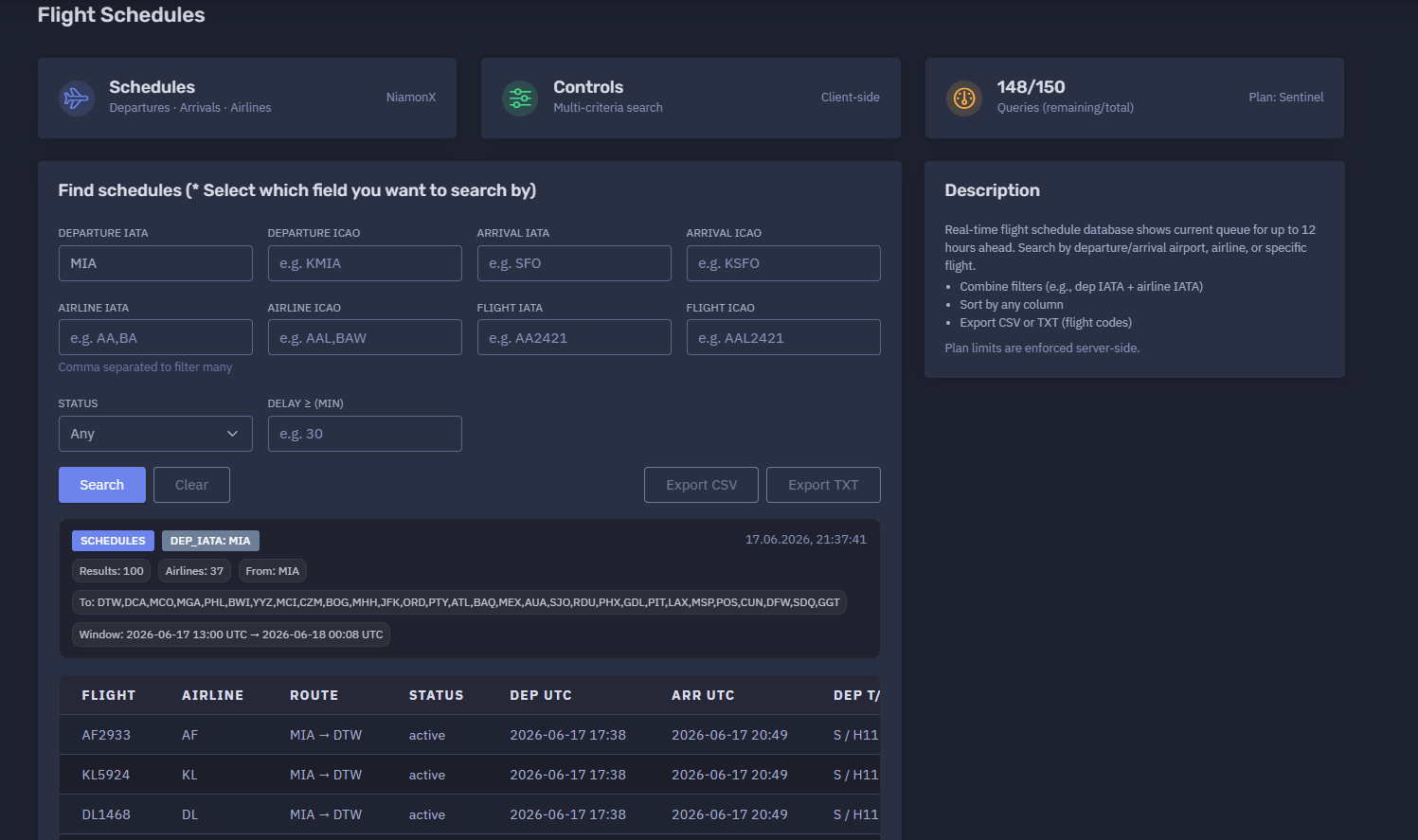
The platform available at https://dash.niamonx.io/flight_schedules — known as Flight Schedules — is a flight schedule intelligence tool within the NiamonX platform. It allows users to search real-time airport schedules by departure airport, arrival airport, airline, specific flight number, flight status, and delay filters.
Overview of the Service
Flight Schedules provides a structured view of current and near-future flight movements. The tool is designed to show departure and arrival queues for up to approximately 12 hours ahead, depending on the available data source and selected filters.
Unlike a single-flight lookup tool, Flight Schedules is built for broader schedule monitoring. It helps users analyze groups of flights from or to a specific airport, filter by airline, search for a specific flight, review operational status, identify delays, and export results for further analysis.
The module is useful for travel coordination, logistics, aviation OSINT, airport monitoring, corporate travel tracking, incident response support, executive protection workflows, and operational awareness.
Access depends on the user’s plan and daily tool limits.
🔍 How the Search Works
The user selects one or more search fields and submits a schedule query. The system then searches the flight schedule database and returns matching flights in a structured table.
The tool supports multi-criteria search, meaning users can combine multiple filters to narrow results.
Example search combinations:
-
Departure airport only
-
Arrival airport only
-
Departure airport + airline
-
Arrival airport + airline
-
Departure airport + arrival airport
-
Specific flight number
-
Airport + flight status
-
Airport + minimum delay
-
Airline + status
-
Airline + route
For example, a user can search all departures from Miami International Airport using:
Departure IATA: MIA
Or combine filters such as:
Departure IATA: MIA
Airline IATA: AA
Status: active
The result is a schedule table with flight numbers, route, airline, status, departure and arrival times, terminal and gate details, flight duration, and delay indicators when available.
🧩 What Can Be Searched
Flight Schedules supports several search fields.
Departure Airport
Users can search by departure airport using either IATA or ICAO code.
Examples:
MIA
KMIA
Arrival Airport
Users can search by arrival airport using either IATA or ICAO code.
Examples:
SFO
KSFO
Airline
Users can filter by airline using IATA or ICAO airline code.
Examples:
AA
AAL
Multiple airlines can be entered as a comma-separated list.
Example:
AA,BA,DL
Flight Number
Users can search for a specific flight by IATA or ICAO flight number.
Examples:
AA2421
AAL2421
Status
Users can filter schedules by operational status.
Possible values may include:
-
Any
-
Active
-
Scheduled
-
Landed
-
Cancelled
-
Delayed
-
Unknown
The exact available statuses depend on backend data.
Delay Filter
Users can search for flights with delay greater than or equal to a selected number of minutes.
Example:
Delay ≥ 30
This is useful for quickly identifying disrupted flights.
⚙️ Search Interface
The Flight Schedules interface contains several main search controls.
Departure IATA
Search by departure airport IATA code.
Example:
MIA
Departure ICAO
Search by departure airport ICAO code.
Example:
KMIA
Arrival IATA
Search by arrival airport IATA code.
Example:
SFO
Arrival ICAO
Search by arrival airport ICAO code.
Example:
KSFO
Airline IATA
Filter by one or more airline IATA codes.
Example:
AA,BA
Airline ICAO
Filter by one or more airline ICAO codes.
Example:
AAL,BAW
Flight IATA
Search by IATA-style flight number.
Example:
AA2421
Flight ICAO
Search by ICAO-style flight number.
Example:
AAL2421
Status
Filter by flight status.
Default value:
Any
Delay ≥
Filter flights with a delay greater than or equal to the selected number of minutes.
Example:
30
📊 Schedule Results
After a successful search, the tool displays a schedule summary and a table of matching flights.
The summary may include:
-
Search filter used
-
Timestamp of the query
-
Number of results
-
Number of airlines
-
Departure airport
-
Destination airports
-
Time window
-
Result table
Example summary structure:
DEP_IATA: MIA
Results: 100
Airlines: 37
From: MIA
To: DTW, DCA, MCO, MGA, PHL, BWI, YYZ
Window: 2026-06-17 13:00 UTC → 2026-06-18 00:08 UTC
This gives users a fast overview of the searched airport schedule and the range of returned flights.
📋 Results Table
The main results table displays flight records in a compact operational format.
Typical columns may include:
| Column | Description |
|---|---|
| Flight | Flight number |
| Airline | Airline IATA code |
| Route | Departure and arrival airports |
| Status | Flight status |
| Departure time | Scheduled or updated departure time |
| Arrival time | Scheduled or updated arrival time |
| Departure terminal / gate | Departure terminal and gate |
| Arrival terminal / gate | Arrival terminal and gate |
| Duration | Flight duration in minutes |
| Departure delay | Departure delay, if available |
| Arrival delay | Arrival delay, if available |
Example row:
AA3310 AA MIA → DCA active 2026-06-17 17:41 2026-06-17 20:25 N / D38 2 / C32 164
The table is intended for quick scanning and comparison.
Users can click column headers to sort results when sorting is available.
🛫 Departures
When searching by departure airport, the tool shows flights leaving the selected airport within the current schedule window.
Departure-focused use cases:
-
Checking airport departure queue
-
Monitoring outbound flights
-
Reviewing gate assignments
-
Checking airline activity from an airport
-
Identifying delayed departures
-
Tracking specific outbound routes
-
Exporting airport departure lists
Example:
Departure IATA: MIA
This returns flights departing from Miami International Airport.
🛬 Arrivals
When searching by arrival airport, the tool shows flights arriving at the selected airport within the current schedule window.
Arrival-focused use cases:
-
Passenger pickup planning
-
Airport arrival monitoring
-
Logistics coordination
-
Delay tracking
-
Airline arrival filtering
-
Destination airport analysis
Example:
Arrival IATA: EWR
This returns flights arriving at Newark Liberty International Airport.
🏢 Airline Filtering
The tool supports airline filtering by IATA or ICAO code.
This is useful when users need to focus on one airline or a group of airlines.
Example:
Airline IATA: AA,BA
This can return only flights operated or listed under American Airlines and British Airways codes, depending on backend data.
Airline filtering is especially useful for:
-
Airline operations review
-
Codeshare analysis
-
Corporate travel monitoring
-
Disruption analysis
-
Airport activity by carrier
✈️ Flight Number Search
Users can search for a specific flight using IATA or ICAO flight number fields.
Examples:
Flight IATA: EK164
Flight ICAO: UAE164
This is useful when a user wants schedule-table context for one specific flight rather than a full airport queue.
If the exact flight is not found, users should verify whether the flight number is IATA or ICAO and try the matching field.
⏱️ Time Window
Flight Schedules shows the current queue for up to approximately 12 hours ahead.
The result summary may show the schedule window in UTC.
Example:
Window: 2026-06-17 13:00 UTC → 2026-06-18 00:08 UTC
The time window helps users understand which period is covered by the returned results.
Important interpretation notes:
-
The schedule window may shift depending on current time and backend data.
-
Results may include active, landed, scheduled, or delayed flights.
-
UTC is useful for cross-time-zone comparison.
-
Local airport times may differ from the displayed UTC values depending on interface configuration.
🧠 Key Features
Multi-Criteria Search
Users can combine departure airport, arrival airport, airline, flight number, status, and delay filters.
Departure and Arrival Monitoring
The tool supports both outbound and inbound schedule analysis.
Airline Filtering
Users can filter by one or more airlines using comma-separated codes.
Specific Flight Lookup
The module supports direct flight number filtering.
Status Filtering
Users can narrow results by operational status.
Delay Filtering
The delay filter helps identify flights with disruption above a selected threshold.
Sortable Results
Users can sort schedule rows by table columns.
CSV Export
Schedule results can be exported to CSV for spreadsheets, reporting, or operational workflows.
TXT Export
Flight codes can be exported as TXT for simple lists, scripts, or copy-paste workflows.
Local Request History
The last 100 schedule queries are stored locally in the browser.
Plan-Based Limits
Daily query limits depend on the user’s subscription plan and are enforced server-side.
📤 Export Options
Flight Schedules supports export for operational and analytical workflows.
CSV Export
CSV export is useful for:
-
Spreadsheet analysis
-
Reporting
-
Airport operations review
-
Logistics planning
-
Delay tracking
-
Airline comparison
-
Internal documentation
TXT Export
TXT export can provide a plain list of flight codes.
This is useful for:
-
Quick sharing
-
Batch checking
-
Operational watchlists
-
Copying flight numbers into another tool
-
Lightweight reporting
Exported files should be stored appropriately when they contain operationally sensitive travel information.
🕓 Request History
The Request History section stores the last 100 queries in the user’s browser.
History entries may include:
-
Departure filter
-
Arrival filter
-
Airline filter
-
Flight filter
-
Query timestamp
-
Route summary
-
Search mode or selected fields
Example history entry:
MIA → —
Airlines: any
Flight: any
17.06.2026, 21:37:41
Request history is stored locally and helps users quickly repeat previous searches.
Because it is browser-based, history may be cleared when the user deletes local browser data or switches devices.
🚦 Daily Queries and Plan Limits
Flight Schedules uses plan-based query limits.
Example:
148 / 150
Queries remaining / total
Plan: Sentinel
Important points:
-
Access depends on the user’s plan.
-
Daily tool limits are enforced server-side.
-
Users should monitor remaining queries when performing many searches.
-
Exporting already loaded data does not necessarily require a new schedule query.
🧭 IATA and ICAO Codes
The tool supports both IATA and ICAO code formats.
Airport Codes
IATA airport codes are usually three letters.
Examples:
MIA
SFO
EWR
ICAO airport codes are usually four letters.
Examples:
KMIA
KSFO
KEWR
Airline Codes
IATA airline codes are usually two characters.
Examples:
AA
BA
DL
ICAO airline codes are usually three letters.
Examples:
AAL
BAW
DAL
Flight Numbers
IATA flight numbers usually start with an IATA airline code.
Example:
AA2421
ICAO flight numbers usually start with an ICAO airline code.
Example:
AAL2421
Using the correct code type improves result accuracy.
🧠 Result Interpretation
Flight schedule data should be interpreted as operational information that may change quickly.
Important notes:
-
Gates can change before departure or arrival.
-
Terminals can change due to operational conditions.
-
Delay values may update frequently.
-
Codeshare flights may appear as multiple flight numbers for the same physical flight.
-
Airline filters may include codeshare or marketing flight numbers depending on backend data.
-
A missing field does not always mean the information does not exist; it may simply not be returned.
-
Schedule windows are time-limited and should not be interpreted as a full-day flight list.
-
For critical travel or logistics decisions, confirm with official airline or airport sources.
✅ Recommended Workflow
A practical schedule search workflow should follow these steps.
1. Choose the Search Field
Select whether you want to search by departure, arrival, airline, flight number, status, or delay.
2. Enter Airport or Airline Codes
Use IATA or ICAO codes depending on the field.
3. Combine Filters When Needed
For example, use departure airport plus airline code to narrow results.
4. Review the Summary
Check number of results, airlines, route coverage, and time window.
5. Sort the Table
Sort by departure time, arrival time, status, airline, route, or delay.
6. Identify Codeshares
Look for rows with identical route and times but different airline codes.
7. Check Delays
Use the delay filter or delay columns to identify disruptions.
8. Export Results
Export CSV for structured analysis or TXT for flight code lists.
9. Use History for Repeated Queries
Open recent searches from browser history when checking the same airport repeatedly.
10. Verify Critical Data
Confirm important travel or operational decisions through official sources.
🛡️ Security, Privacy & Responsible Use
Flight Schedules is intended for lawful aviation schedule lookup and operational awareness.
Acceptable use cases include:
-
Airport departure monitoring
-
Airport arrival monitoring
-
Travel planning
-
Passenger pickup coordination
-
Logistics planning
-
Airline schedule review
-
Aviation OSINT
-
Corporate travel monitoring
-
Incident response support
-
Executive protection workflows
-
Delay analysis
-
Exporting operational flight lists
Users should follow responsible use principles:
-
Do not use schedule data for stalking, harassment, or physical harm.
-
Do not misuse flight data to target individuals.
-
Do not treat schedule data as perfectly real-time or complete.
-
Do not make safety-critical decisions based only on one source.
-
Verify important travel, airport, or operational data with official sources.
-
Treat local request history as potentially sensitive on shared devices.
⚙️ Technical Highlights
-
Flight schedule search module
-
Available at
dash.niamonx.io/flight_schedules -
Real-time schedule database
-
Shows current queue for up to approximately 12 hours ahead
-
Supports departures and arrivals
-
Supports airport IATA and ICAO filters
-
Supports airline IATA and ICAO filters
-
Supports specific flight IATA and ICAO filters
-
Supports status filtering
-
Supports minimum delay filtering
-
Multi-criteria search
-
Comma-separated airline filtering
-
Client-side controls
-
Sortable result table
-
CSV export
-
TXT export for flight codes
-
Local browser request history
-
Stores last 100 queries in the browser
-
Plan-based daily query limits
-
Server-side limit enforcement
-
Suitable for aviation monitoring, travel coordination, logistics, OSINT, and operational awareness
📌 Usage Hints
-
Select which field you want to search by.
-
Use Departure IATA for airport departure queues.
-
Use Arrival IATA for airport arrival queues.
-
Use ICAO codes when IATA results are ambiguous.
-
Combine filters, such as departure airport plus airline IATA.
-
Use comma-separated airline codes to filter multiple carriers.
-
Use status filtering to focus on active, landed, scheduled, or delayed flights.
-
Use Delay ≥ to find disrupted flights.
-
Sort by any column for faster analysis.
-
Export CSV for full schedule analysis.
-
Export TXT when you only need flight codes.
-
Remember that schedule data can change quickly.
-
Access depends on your plan and daily tool limits.
-
Local request history stores the last 100 queries in your browser.
📬 Contact Information
For technical, legal, abuse, privacy, or support-related inquiries, users can contact the NiamonX team directly:
support@niamonx.io — Technical Support
other@niamonx.io — General Inquiries
takedown@niamonx.io — Privacy or Data Removal Requests
legal@niamonx.io — Legal and Compliance Matters
Alternative contact channel:
🔗 Helpdesk: https://support.niamonx.io/
Summary
NiamonX Flight Schedules is a real-time flight schedule intelligence tool for searching departures, arrivals, airlines, specific flights, statuses, and delays.
It supports multi-criteria search by airport IATA / ICAO, airline IATA / ICAO, flight IATA / ICAO, operational status, and minimum delay. The tool returns structured schedule tables with routes, times, terminals, gates, durations, delays, result summaries, export options, and browser-based request history.
Flight Schedules is designed for travel coordination, airport monitoring, aviation OSINT, logistics, corporate travel visibility, and operational awareness. Results should be treated as informational and verified with official airline or airport sources when used for critical decisions.
Flight Delay | Real-Time Flight Delay Monitoring
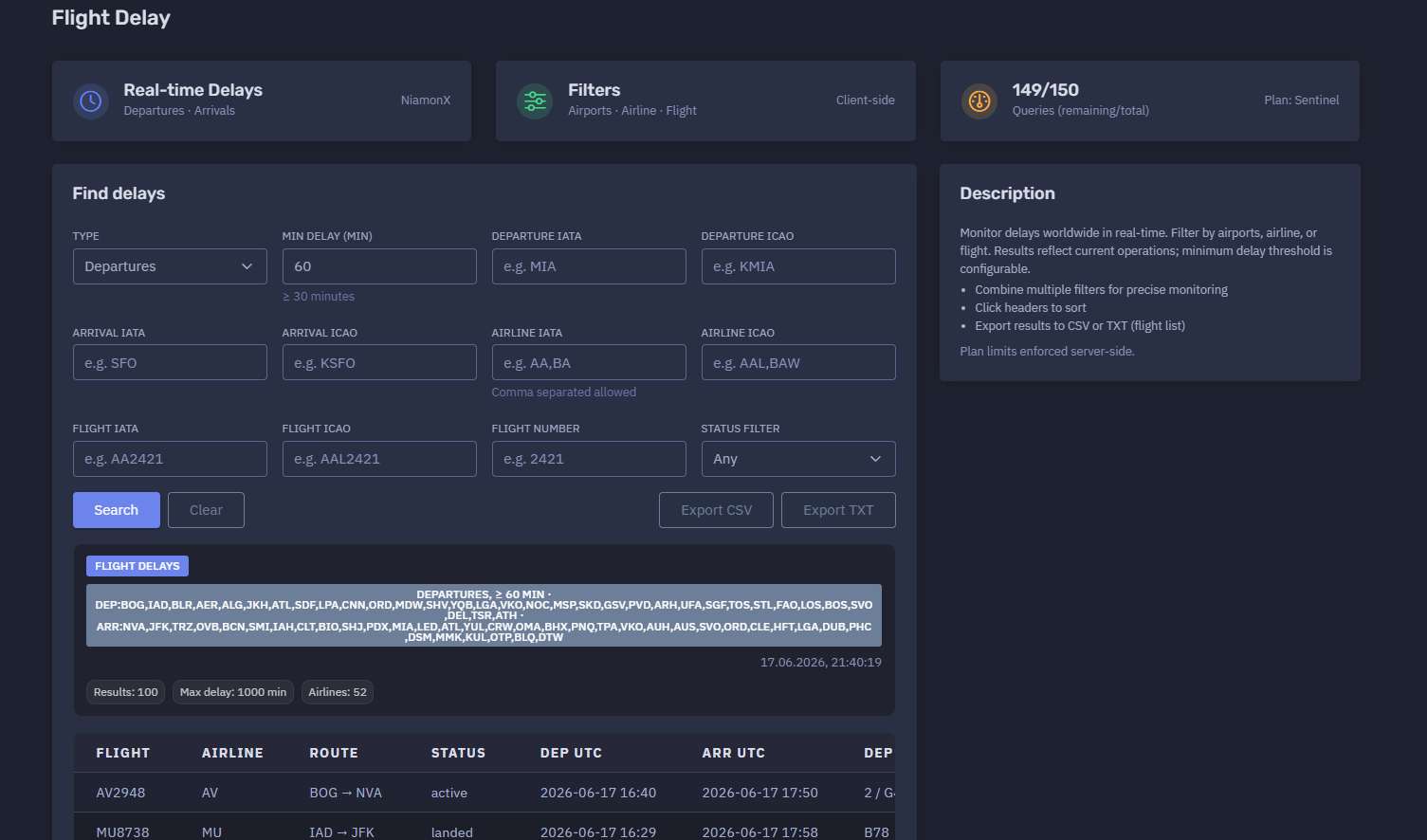
The platform available at https://dash.niamonx.io/flight_delay — known as Flight Delay — is a real-time aviation delay monitoring tool within the NiamonX platform. It allows users to track delayed departures and arrivals worldwide, filter results by airport, airline, flight number, status, and minimum delay threshold, and export delay intelligence for operational analysis.
Overview of the Service
Flight Delay is designed to help users monitor current flight disruptions in real time. The tool provides a structured view of delayed flights and allows users to focus on departures, arrivals, specific airports, airlines, routes, or individual flight numbers.
Unlike general flight search, which focuses on one flight, and flight schedules, which shows a broader airport queue, Flight Delay is optimized for disruption monitoring. It highlights flights affected by delay conditions and helps analysts quickly identify where operational problems are occurring.
The tool is useful for:
-
Airport operations monitoring
-
Airline disruption analysis
-
Passenger coordination
-
Logistics and cargo planning
-
Corporate travel monitoring
-
Aviation OSINT
-
Executive protection workflows
-
Incident response support
-
Travel risk monitoring
-
Delay trend analysis
Results reflect current operations and should be treated as operational intelligence that may change quickly.
🔍 How the Tool Works
The user selects whether they want to monitor Departures or Arrivals, sets a minimum delay threshold, and optionally adds filters such as airport, airline, flight number, or status.
The system then searches real-time delay data and returns matching flights in a structured table.
Example search configuration:
Type: Departures
Min delay: 60 minutes
Status: Any
The result table may include flights from many airports and airlines when no specific airport filter is applied. When airport, airline, or flight filters are added, the output becomes more focused.
The tool supports multi-criteria filtering, so users can combine several conditions for precise monitoring.
Example combinations:
Departures
Minimum delay: 60 minutes
Departure IATA: MIA
Airline IATA: AA
Arrivals
Minimum delay: 30 minutes
Arrival IATA: JFK
Status: active
Departures
Flight number: 2421
Minimum delay: 30 minutes
🧩 What Can Be Monitored
Flight Delay can monitor delayed flights using several types of filters.
Supported monitoring dimensions:
-
Departure delays
-
Arrival delays
-
Departure airport
-
Arrival airport
-
Airline
-
Flight IATA code
-
Flight ICAO code
-
Numeric flight number
-
Operational status
-
Minimum delay threshold
This allows users to monitor delays globally or narrow the view to a specific route, airline, airport, or flight.
⚙️ Filter Interface
The Flight Delay interface contains a set of filter controls.
Type
The user selects the delay type to monitor.
Available modes:
-
Departures
-
Arrivals
Departures focuses on delayed outbound flights.
Arrivals focuses on delayed inbound flights.
Min Delay
The minimum delay threshold determines which flights appear in the results.
Example:
Min delay: 60
This means only flights with a delay greater than or equal to 60 minutes should be returned.
The interface may also show quick helper text such as:
≥ 30 minutes
Common threshold examples:
| Threshold | Use Case |
|---|---|
| 15 minutes | Minor delay monitoring |
| 30 minutes | Standard disruption monitoring |
| 60 minutes | Significant delay monitoring |
| 90 minutes | Serious operational disruption |
| 120+ minutes | Major delay review |
A higher threshold produces fewer but more severe results.
Departure IATA
Filters results by departure airport using a three-letter IATA airport code.
Example:
MIA
Use this when monitoring delays for flights departing from a specific airport.
Departure ICAO
Filters results by departure airport using a four-letter ICAO airport code.
Example:
KMIA
ICAO codes are useful when IATA codes are ambiguous or when working with aviation-specific systems.
Arrival IATA
Filters results by arrival airport using a three-letter IATA airport code.
Example:
SFO
Use this when monitoring delayed flights arriving at a specific airport.
Arrival ICAO
Filters results by arrival airport using a four-letter ICAO airport code.
Example:
KSFO
Airline IATA
Filters results by airline using one or more IATA airline codes.
Example:
AA,BA
Comma-separated values are allowed, which makes it possible to monitor several airlines in one query.
Airline ICAO
Filters results by airline using one or more ICAO airline codes.
Example:
AAL,BAW
This is useful for aviation analysts who work with ICAO identifiers.
Flight IATA
Filters results by a full IATA-style flight code.
Example:
AA2421
Flight ICAO
Filters results by a full ICAO-style flight code.
Example:
AAL2421
Flight Number
Filters results by the numeric flight number only.
Example:
2421
This can be useful when the airline code is uncertain or when comparing codeshare flights.
Status Filter
Filters flights by operational status.
Default value:
Any
Possible status values may include:
-
Any
-
Active
-
Scheduled
-
Landed
-
Cancelled
-
Delayed
-
Unknown
The exact returned statuses depend on the backend aviation data source.
📊 Delay Results Summary
After a search is completed, the tool displays a summary of the returned delay data.
The summary may include:
-
Search type
-
Minimum delay threshold
-
Departure airports represented in the result set
-
Arrival airports represented in the result set
-
Query timestamp
-
Number of returned results
-
Maximum delay
-
Number of airlines
Example summary structure:
DEPARTURES, ≥ 60 min
Results: 100
Max delay: 1000 min
Airlines: 52
This summary helps users quickly understand the scale of current delays and whether the result set is broad or focused.
📋 Results Table
The results table displays delayed flights in a compact operational format.
Typical columns include:
| Column | Description |
|---|---|
| Flight | Flight code |
| Airline | Airline IATA code |
| Route | Departure and arrival airport |
| Status | Current operational status |
| Departure time | Scheduled or updated departure time |
| Arrival time | Scheduled or updated arrival time |
| Departure terminal / gate | Departure terminal and gate, if available |
| Arrival terminal / gate | Arrival terminal and gate, if available |
| Duration | Flight duration or scheduled travel time in minutes |
| Departure delay | Departure delay in minutes |
| Arrival delay | Arrival delay in minutes |
Example row format:
AA5395 AA SDF → CLT landed 2026-06-17 16:00 2026-06-17 17:37 B2 E43 102 102 95
The table is designed for fast scanning, sorting, and export.
🛫 Departure Delay Monitoring
When the type is set to Departures, the tool focuses on delayed outbound flights.
This mode is useful for:
-
Monitoring airport departure disruptions
-
Tracking delayed outbound routes
-
Checking departure gate impact
-
Identifying airlines with active delays
-
Reviewing large airport disruption events
-
Supporting passenger and crew coordination
-
Exporting delayed departure lists
Example use case:
Show all departures delayed by at least 60 minutes.
With additional filters:
Show all MIA departures delayed by at least 60 minutes.
🛬 Arrival Delay Monitoring
When the type is set to Arrivals, the tool focuses on delayed inbound flights.
This mode is useful for:
-
Passenger pickup planning
-
Airport arrival flow monitoring
-
Destination airport disruption analysis
-
Ground transport coordination
-
Hotel and transfer planning
-
Executive arrival monitoring
-
Cargo receiving workflows
Example use case:
Show all arrivals into JFK delayed by at least 30 minutes.
🏢 Airline Delay Filtering
The tool supports airline-based filtering using IATA or ICAO airline codes.
This is useful for identifying whether delays are concentrated around a specific carrier.
Example:
Airline IATA: AA,BA,DL
Airline filtering can help with:
-
Airline operations monitoring
-
Codeshare delay analysis
-
Corporate travel risk review
-
Carrier performance checks
-
Disruption response
-
Customer support workflows
✈️ Flight-Specific Delay Search
Users can filter by a specific flight using:
-
Flight IATA
-
Flight ICAO
-
Numeric flight number
Examples:
Flight IATA: AA2421
Flight ICAO: AAL2421
Flight number: 2421
This is useful when monitoring a particular flight that may be delayed, cancelled, or affected by operational changes.
⏱️ Delay Values
Delay values are shown in minutes.
The table may include several delay-related columns, depending on the returned data.
Common delay indicators:
| Delay Field | Meaning |
|---|---|
| Main delay | Overall delay value used for filtering |
| Departure delay | Delay affecting departure |
| Arrival delay | Delay affecting arrival |
For departures, the departure delay is usually most relevant.
For arrivals, the arrival delay is usually most relevant.
However, both values can be useful because a flight may depart late and recover some time en route, or depart with a small delay and arrive with a larger delay due to routing, congestion, weather, or holding patterns.
🚨 Max Delay
The summary may show a maximum delay value.
Example:
Max delay: 1000 min
This helps users quickly identify the severity of the largest delay in the current result set.
A very high delay value should be reviewed carefully because it may indicate:
-
Major operational disruption
-
Schedule rollover
-
Data-source anomaly
-
Cancelled or rescheduled service
-
Long ground delay
-
Airport disruption
-
Weather event
-
Regional traffic flow issue
For critical use, high-delay records should be validated with official airline or airport sources.
🧠 Key Features
Real-Time Delay Monitoring
The tool monitors current delayed flights and returns operationally relevant results.
Departures and Arrivals
Users can choose whether to focus on delayed departures or delayed arrivals.
Configurable Delay Threshold
Minimum delay can be adjusted to focus on minor, moderate, or severe disruptions.
Airport Filters
Users can filter by departure or arrival airport using IATA or ICAO codes.
Airline Filters
Users can filter by one or more airlines using comma-separated IATA or ICAO codes.
Flight Filters
Users can search by full IATA flight code, full ICAO flight code, or numeric flight number.
Status Filtering
Results can be filtered by operational status.
Sortable Table
Users can click table headers to sort results.
CSV Export
Results can be exported to CSV for structured analysis.
TXT Export
Flight lists can be exported to TXT for quick operational use.
Local Request History
Recent queries are stored locally in the browser.
Plan-Based Limits
Daily query limits are enforced server-side according to the user’s plan.
📤 Export Options
Flight Delay supports export for operational and analytical workflows.
CSV Export
CSV export is useful for:
-
Spreadsheet analysis
-
Delay reporting
-
Airline disruption review
-
Airport operations dashboards
-
Logistics documentation
-
Incident response records
-
Corporate travel reporting
TXT Export
TXT export is useful when users need a plain list of delayed flight numbers.
Possible use cases:
-
Watchlists
-
Batch checks
-
Quick sharing with operations teams
-
Copying into other aviation tools
-
Internal notifications
Exported delay data may contain operationally sensitive travel information and should be stored appropriately.
🕓 Request History
The Request History section stores recent delay searches locally in the browser.
Example behavior:
Stores last 100 queries in your browser.
History entries may include:
-
Search type
-
Route filters
-
Delay threshold
-
Airline filter
-
Flight filter
-
Query timestamp
Example history format:
DEPARTURES
— → —
≥ 60 min
Airline: any
Flight: any
17.06.2026, 21:40:19
Local history helps users repeat common monitoring queries quickly.
Because it is browser-local, history may be cleared by deleting browser data or using another device.
🚦 Query Limits and Plan Access
Flight Delay uses plan-based query limits.
Example:
149 / 150
Queries remaining / total
Plan: Sentinel
Important points:
-
Access depends on the user’s plan.
-
Daily tool limits are enforced server-side.
-
The user should monitor remaining query count during repeated searches.
-
Exporting already loaded results is separate from running new delay queries.
🧭 IATA and ICAO Reference
The tool supports both IATA and ICAO identifiers.
Airport IATA
Three-letter airport code.
Examples:
MIA
JFK
SFO
Airport ICAO
Four-letter airport code.
Examples:
KMIA
KJFK
KSFO
Airline IATA
Two-character airline code.
Examples:
AA
BA
DL
Airline ICAO
Three-letter airline code.
Examples:
AAL
BAW
DAL
Flight IATA
IATA airline code plus flight number.
Example:
AA2421
Flight ICAO
ICAO airline code plus flight number.
Example:
AAL2421
Using the correct identifier type improves result accuracy.
🧠 Result Interpretation
Flight delay data should be interpreted carefully because flight operations change quickly.
Important interpretation rules:
-
A delay value can change as the flight status updates.
-
A landed flight may still appear if it met the delay threshold.
-
Active flights can recover time en route.
-
Scheduled flights may show expected delay before departure.
-
Codeshare flights may appear as separate rows with identical times and routes.
-
A missing terminal or gate does not always mean the information is unavailable at the airport; it may simply not be returned.
-
Very high delay values should be validated.
-
Status and delay fields may differ depending on provider logic.
-
Operational decisions should be confirmed with official airline or airport sources.
The tool is designed for monitoring and analysis, not as a single source of truth for safety-critical decisions.
✅ Recommended Monitoring Workflow
A practical delay monitoring workflow should follow these steps.
1. Select Delay Type
Choose Departures or Arrivals depending on the monitoring objective.
2. Set Minimum Delay
Use 30 minutes for general disruption monitoring or 60+ minutes for more serious delay analysis.
3. Add Airport Filters
Use departure or arrival IATA / ICAO codes to focus on a specific airport.
4. Add Airline Filters
Use airline filters to monitor one or more carriers.
5. Add Flight Filters When Needed
Use full flight codes or numeric flight number for a specific flight.
6. Review Summary
Check result count, maximum delay, airlines, and route spread.
7. Sort the Table
Sort by delay, departure time, arrival time, route, airline, or status.
8. Identify Codeshares
Look for identical routes, times, and delays under different flight numbers.
9. Export Results
Use CSV for structured analysis or TXT for simple flight lists.
10. Verify Critical Cases
Confirm severe delays, cancellations, and passenger-impacting events with official sources.
🛡️ Security, Privacy & Responsible Use
Flight Delay is intended for lawful aviation monitoring and operational awareness.
Acceptable use cases include:
-
Monitoring delayed departures
-
Monitoring delayed arrivals
-
Airport disruption analysis
-
Airline delay tracking
-
Travel coordination
-
Passenger pickup planning
-
Logistics and cargo planning
-
Corporate travel monitoring
-
Aviation OSINT
-
Executive protection workflows
-
Incident response support
-
Operational reporting
Users should follow responsible use principles:
-
Do not use delay information for stalking, harassment, or physical harm.
-
Do not misuse flight data to target individuals.
-
Do not assume delay data is perfectly real-time or complete.
-
Do not make safety-critical decisions based only on one source.
-
Verify important travel and operational details with official sources.
-
Treat local request history as potentially sensitive on shared devices.
-
Use exports responsibly and store them securely when they contain operationally sensitive information.
⚙️ Technical Highlights
-
Real-time flight delay monitoring
-
Available at
dash.niamonx.io/flight_delay -
Supports departure delay monitoring
-
Supports arrival delay monitoring
-
Configurable minimum delay threshold
-
Airport filters by IATA and ICAO
-
Airline filters by IATA and ICAO
-
Comma-separated airline filtering
-
Flight filters by IATA, ICAO, and numeric flight number
-
Status filtering
-
Client-side filters and controls
-
Sortable result table
-
CSV export
-
TXT export for flight lists
-
Local browser request history
-
Stores last 100 queries in the browser
-
Plan-based query limits
-
Server-side limit enforcement
-
Suitable for aviation monitoring, travel coordination, logistics, OSINT, and operational awareness
📌 Usage Hints
-
Select Departures to monitor outbound delays.
-
Select Arrivals to monitor inbound delays.
-
Use 30 minutes for general delay monitoring.
-
Use 60 minutes or more for significant disruption tracking.
-
Use airport IATA codes such as
MIA,JFK, orSFO. -
Use airport ICAO codes such as
KMIA,KJFK, orKSFO. -
Use comma-separated airline codes to monitor several airlines.
-
Use flight IATA or ICAO for exact flight tracking.
-
Use the numeric flight number when the airline code is uncertain.
-
Click table headers to sort results.
-
Export CSV for analysis.
-
Export TXT for flight lists.
-
Confirm critical delay data with official airline or airport sources.
-
Access depends on your plan and daily tool limits.
-
Local request history stores the last 100 queries in your browser.
📬 Contact Information
For technical, legal, abuse, privacy, or support-related inquiries, users can contact the NiamonX team directly:
support@niamonx.io — Technical Support
other@niamonx.io — General Inquiries
takedown@niamonx.io — Privacy or Data Removal Requests
legal@niamonx.io — Legal and Compliance Matters
Alternative contact channel:
🔗 Helpdesk: https://support.niamonx.io/
Summary
NiamonX Flight Delay is a real-time delay monitoring tool for tracking delayed departures and arrivals worldwide.
It supports configurable minimum delay thresholds, airport filters, airline filters, flight filters, status filtering, sortable tables, CSV export, TXT flight-list export, local browser history, and plan-based query limits.
The tool is designed for aviation operations, travel coordination, airport disruption monitoring, logistics, corporate travel visibility, aviation OSINT, and incident response support. Results should be treated as current operational intelligence and verified with official airline or airport sources for critical decisions.
Flight Tracker | Real-Time ADS-B Flight Monitoring
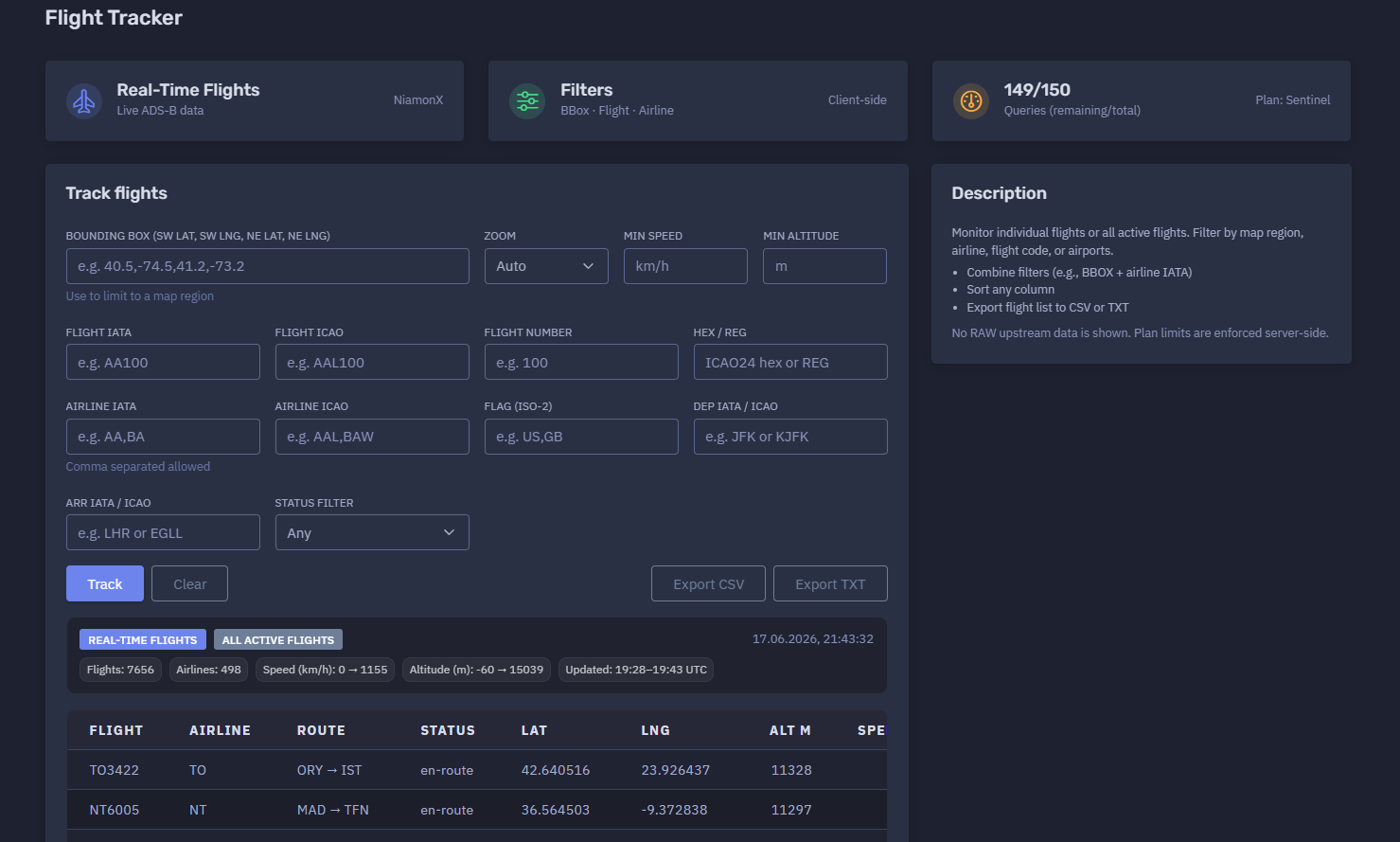
The platform available at https://dash.niamonx.io/flight_tracker — known as Flight Tracker — is a real-time flight tracking and aviation intelligence tool within the NiamonX platform. It allows users to monitor active flights using live ADS-B data and filter aircraft by map region, flight code, airline, route, aircraft identifier, speed, altitude, country flag, and operational status.
Overview of the Service
Flight Tracker is designed to provide a live operational view of active flights worldwide. The tool collects and displays real-time aircraft movement data, allowing users to track individual flights or analyze broader air traffic activity across selected regions.
Unlike static schedule tools, Flight Tracker focuses on aircraft that are currently active or recently observed through live aviation telemetry. It provides position, speed, altitude, heading, aircraft type, registration, route, airline, and update timestamp when available.
The tool is useful for:
-
Real-time aviation monitoring
-
Flight tracking
-
ADS-B intelligence
-
Airport and route observation
-
Airline fleet monitoring
-
Aviation OSINT
-
Logistics and travel awareness
-
Corporate travel visibility
-
Executive protection workflows
-
Incident response support
-
Regional airspace monitoring
No raw upstream data is shown in the interface. Results are cleaned and displayed in an analyst-friendly table.
🔍 How the Tool Works
The user can run a broad search for all active flights or narrow the query using one or more filters.
Supported filtering options include:
-
Bounding box / map region
-
Zoom level
-
Minimum speed
-
Minimum altitude
-
Flight IATA code
-
Flight ICAO code
-
Numeric flight number
-
Aircraft HEX / registration
-
Airline IATA code
-
Airline ICAO code
-
Country flag
-
Departure airport
-
Arrival airport
-
Flight status
The backend returns matching active flights, and the interface displays them in a sortable table.
Example broad search:
All active flights
Example filtered search:
Airline IATA: BA
Dep IATA / ICAO: LHR
Arr IATA / ICAO: JFK
Example regional search:
Bounding box: 40.5,-74.5,41.2,-73.2
This makes it possible to monitor either one specific aircraft or thousands of active flights across a larger region.
🧩 What Can Be Tracked
Flight Tracker can be used to track or filter flights by several aviation identifiers.
Supported search and filter types:
| Filter Type | Example | Description |
|---|---|---|
| Bounding box | 40.5,-74.5,41.2,-73.2 |
Limits results to a map region |
| Flight IATA | AA100 |
IATA-style flight code |
| Flight ICAO | AAL100 |
ICAO-style flight code |
| Flight number | 100 |
Numeric flight number |
| HEX / Reg | A1B2C3 or N123AA |
ICAO24 hex or aircraft registration |
| Airline IATA | AA,BA |
One or more airline IATA codes |
| Airline ICAO | AAL,BAW |
One or more airline ICAO codes |
| Flag | US,GB |
Aircraft or operator country flag |
| Departure airport | JFK or KJFK |
Departure airport IATA / ICAO |
| Arrival airport | LHR or EGLL |
Arrival airport IATA / ICAO |
| Status | Any |
Operational status filter |
The tool can be used for both single-flight lookups and wide-area monitoring.
⚙️ Tracking Interface
The Flight Tracker interface contains several main sections.
Controls
The controls panel shows that the tool supports:
BBox · Flight · Airline
Client-side
This means users can filter by geographic bounding box, flight identifiers, and airline-related fields.
Query Counter
The interface displays current daily query limits.
Example:
149 / 150
Queries remaining / total
Plan: Sentinel
Daily access depends on the user’s plan, and limits are enforced server-side.
Track Flights
The main tracking panel contains all filters used to search live flight data.
🗺️ Bounding Box Filter
The Bounding Box filter limits results to a selected geographic region.
Input format:
SW lat, SW lng, NE lat, NE lng
Example:
40.5,-74.5,41.2,-73.2
This means:
-
SW lat: south-west latitude
-
SW lng: south-west longitude
-
NE lat: north-east latitude
-
NE lng: north-east longitude
Bounding boxes are useful for:
-
Monitoring flights around a city
-
Watching airport approach/departure zones
-
Tracking traffic over a specific region
-
Reducing result volume
-
Improving analysis focus
-
Combining geographic filtering with airline or flight filters
Example use case:
Show active flights around New York airspace.
🔎 Zoom
The Zoom option helps control how map or regional results are interpreted.
Default value:
Auto
Auto zoom allows the interface to choose an appropriate view based on the query and returned data.
Zoom is most useful when combined with a bounding box or map-based workflow.
🚀 Minimum Speed Filter
The Min speed filter allows users to return only flights above a selected speed.
Unit:
km/h
This is useful for excluding stationary or slow-moving aircraft.
Example use cases:
-
Show only aircraft currently in flight
-
Exclude ground traffic
-
Focus on en-route flights
-
Identify high-speed active traffic
🛫 Minimum Altitude Filter
The Min altitude filter allows users to return only aircraft above a selected altitude.
Unit:
m
This is useful for:
-
Excluding ground aircraft
-
Filtering out taxiing aircraft
-
Monitoring cruise-level traffic
-
Focusing on aircraft above a selected altitude
-
Separating airport surface activity from airborne traffic
✈️ Flight Filters
Flight Tracker supports several flight-level filters.
Flight IATA
Search by IATA-style flight code.
Example:
AA100
Flight ICAO
Search by ICAO-style flight code.
Example:
AAL100
Flight Number
Search by numeric flight number only.
Example:
100
Flight number filtering is useful when the airline code is unknown or when checking possible codeshare variants.
🛩️ Aircraft HEX / Registration
The HEX / Reg field allows tracking by aircraft identifier.
Supported examples:
ICAO24 HEX
Aircraft registration
This is useful for tracking a specific aircraft rather than a scheduled flight number.
Possible use cases:
-
Fleet monitoring
-
Aircraft-specific investigation
-
Tracking a tail number
-
Comparing repeated movements
-
Executive aviation monitoring
-
Aircraft OSINT
🏢 Airline Filters
The tool supports filtering by airline IATA or ICAO codes.
Airline IATA
Example:
AA,BA
Comma-separated values are allowed.
Airline ICAO
Example:
AAL,BAW
Airline filters are useful for:
-
Monitoring one airline
-
Comparing active flights by carrier
-
Watching alliance or codeshare activity
-
Reducing large global result sets
-
Airline fleet observation
🏳️ Flag Filter
The Flag filter accepts ISO-2 country codes.
Example:
US,GB
This can help filter aircraft or flights associated with specific countries, depending on the returned aviation data.
Use cases:
-
Country-level fleet monitoring
-
Regional aviation analysis
-
Filtering by aircraft registration country
-
OSINT review by flag or jurisdiction
Flag signals should be interpreted carefully because aircraft registration country, airline nationality, and route geography may differ.
🧭 Departure and Arrival Filters
Flight Tracker supports filtering by departure and arrival airports.
Input can be IATA or ICAO.
Examples:
JFK
KJFK
LHR
EGLL
These filters are useful for:
-
Tracking all active flights from an airport
-
Tracking flights arriving at a destination
-
Monitoring a specific route
-
Combining with airline filters
-
Identifying current airborne traffic for an airport pair
📊 Real-Time Results Summary
After a query is completed, the tool displays a summary of returned live flights.
The summary may include:
-
Result mode
-
Query timestamp
-
Number of flights
-
Number of airlines
-
Minimum and maximum speed
-
Minimum and maximum altitude
-
Data update time range
Example summary:
All active flights
Flights: 7656
Airlines: 498
Speed: 0 → 1155 km/h
Altitude: -60 → 15039 m
Updated: 19:28–19:43 UTC
This summary gives users a quick overview of the size and freshness of the returned data.
📋 Results Table
The results table displays active flights in a compact operational format.
Typical columns include:
| Column | Description |
|---|---|
| Flight | Flight code |
| Airline | Airline code |
| Route | Departure and arrival airports |
| Status | Current operational status |
| Latitude | Current or last known latitude |
| Longitude | Current or last known longitude |
| Altitude | Current or last known altitude in meters |
| Speed | Current or last known speed in km/h |
| Heading | Direction of travel |
| Vertical speed | Climb or descent indicator, when available |
| Squawk | Transponder squawk code, when available |
| Aircraft type | ICAO aircraft type code |
| Registration | Aircraft registration |
| Updated | Last update timestamp |
Example row structure:
BA299 BA LHR → ORD en-route 43.225991 -82.839675 10992 698 249 0 B77W G-STBG
The table is designed for sorting, filtering, and export.
📍 Position Data
Flight Tracker returns latitude and longitude when available.
Position data helps users understand where an aircraft was last observed.
Important notes:
-
Position may be delayed.
-
Position may not be available for every aircraft.
-
ADS-B coverage varies by region.
-
Some aircraft may be filtered or privacy-restricted.
-
A result does not guarantee perfectly live location.
Position should be treated as near-real-time operational data, not as a safety-critical navigation source.
🧭 Heading
The heading value shows the aircraft’s direction of travel.
Example:
Heading: 249
Heading is usually expressed in degrees, where:
-
0 / 360 = north
-
90 = east
-
180 = south
-
270 = west
Heading is useful for understanding aircraft movement direction and confirming whether a flight is moving toward its expected destination.
🛫 Altitude
Altitude is displayed in meters.
Example:
Altitude: 10992 m
Altitude can help distinguish:
-
Aircraft on the ground
-
Climbing aircraft
-
Cruising aircraft
-
Descending aircraft
-
Approach or landing traffic
The summary may show a range such as:
Altitude: -60 → 15039 m
Negative or unusual altitude values may appear due to data source behavior, airport elevation handling, sensor anomalies, or ground-level interpretation.
🚀 Speed
Speed is displayed in kilometers per hour.
Example:
Speed: 698 km/h
Speed helps identify whether an aircraft is airborne, taxiing, stationary, climbing, cruising, or descending.
The summary may show the observed speed range across returned flights.
📡 Squawk
The squawk field displays the aircraft transponder code when available.
Squawk may be empty or unavailable for many flights.
Common interpretation:
-
Empty field: no squawk returned
-
Numeric code: transponder squawk code
-
Special codes may indicate emergency or operational situations, but they require careful validation
The tool should not be used as a sole source for emergency interpretation.
🛩️ Aircraft Type and Registration
Flight Tracker may display:
-
ICAO aircraft type code
-
Aircraft registration
Examples:
B738
A359
A21N
G-STBG
N19951
PH-BXC
Aircraft type and registration are useful for:
-
Fleet analysis
-
Aircraft identification
-
Route monitoring
-
Aviation OSINT
-
Spotting codeshare or operator differences
-
Historical movement correlation
Some aircraft may not return registration or type information.
🧠 Key Features
Real-Time ADS-B Monitoring
The tool provides live or near-live active flight data based on ADS-B-style telemetry.
Track Individual Flights
Users can filter by flight code, flight number, aircraft HEX, or registration.
Monitor All Active Flights
The tool can return a broad global list of active flights.
Bounding Box Filtering
Users can limit results to a specific map region.
Airline Filtering
Users can filter by one or more airlines.
Route Filtering
Users can filter by departure and arrival airport.
Speed and Altitude Filtering
Users can focus on aircraft above specific speed or altitude thresholds.
Country Flag Filtering
Users can filter by ISO-2 country flag when supported.
Status Filtering
Users can filter by operational status.
Sortable Table
Any column can be sorted for faster analysis.
CSV Export
Users can export the flight list to CSV.
TXT Export
Users can export flight lists to plain text.
Pagination
Large result sets are paginated for readability.
Local Request History
The last 100 queries are stored locally in the browser.
📄 Pagination
Large result sets may span multiple pages.
Example:
Showing 1–100 of 7656
1 / 77
Pagination allows the interface to handle thousands of active flights without overwhelming the browser.
📤 Export Options
Flight Tracker supports export for operational and analytical workflows.
CSV Export
CSV export is useful for:
-
Spreadsheet analysis
-
Aviation reporting
-
Airspace monitoring
-
Fleet analysis
-
Route analysis
-
Incident documentation
-
OSINT case notes
TXT Export
TXT export is useful for:
-
Plain flight lists
-
Watchlists
-
Batch checks
-
Quick sharing
-
Copying identifiers into other tools
Exported data may contain operationally sensitive flight information and should be stored responsibly.
🕓 Request History
The Request History section stores recent tracking queries locally in the user’s browser.
Example behavior:
Stores last 100 queries in your browser.
History entries may include:
-
Route filters
-
Bounding box
-
Zoom mode
-
Airline filter
-
Flight filter
-
Query timestamp
Example history entry:
— → —
BBOX: —
ZOOM: auto
Airline: any
Flight: any
17.06.2026, 21:43:32
Request history helps users repeat previous monitoring queries quickly.
Because it is stored locally, it may be cleared if the user deletes browser data or switches devices.
🚦 Query Limits and Plan Access
Flight Tracker uses plan-based query limits.
Example:
149 / 150
Queries remaining / total
Plan: Sentinel
Important points:
-
Access depends on the user’s plan.
-
Daily limits are enforced server-side.
-
Users should monitor remaining queries during repeated tracking.
-
Exporting already loaded results is different from running a new query.
🧭 IATA, ICAO, HEX, and Registration Reference
Flight IATA
IATA-style flight code.
Example:
AA100
Flight ICAO
ICAO-style flight code.
Example:
AAL100
Airline IATA
Two-character airline code.
Example:
AA
BA
DL
Airline ICAO
Three-letter airline code.
Example:
AAL
BAW
DAL
Airport IATA
Three-letter airport code.
Example:
JFK
LHR
MIA
Airport ICAO
Four-letter airport code.
Example:
KJFK
EGLL
KMIA
ICAO24 HEX
Aircraft transponder hexadecimal identifier.
Example:
A1B2C3
Registration
Aircraft tail number or national registration.
Example:
N123AA
G-STBG
PH-BXC
🧠 Result Interpretation
Flight Tracker data should be interpreted carefully.
Important interpretation rules:
-
ADS-B coverage varies by region.
-
Some aircraft may not appear due to privacy filters.
-
Position may be delayed or missing.
-
Flight status can change quickly.
-
Aircraft type or registration may be unavailable.
-
Squawk values require careful validation.
-
Speed and altitude may contain anomalies.
-
Ground aircraft may appear with low or zero speed.
-
Codeshare flights may appear under different airline identifiers.
-
A missing field does not mean the information does not exist; it may simply not be returned.
The tool is designed for monitoring and intelligence, not for safety-critical navigation or official air traffic control use.
✅ Recommended Monitoring Workflow
A practical Flight Tracker workflow should follow these steps.
1. Choose Monitoring Scope
Decide whether to monitor all active flights, a region, a route, an airline, or a specific aircraft.
2. Use Bounding Box for Regions
Enter SW and NE coordinates to limit results to a map area.
3. Add Airline or Route Filters
Use airline, departure, and arrival filters to reduce result volume.
4. Use Speed and Altitude Filters
Exclude ground traffic or focus on airborne flights.
5. Search by Flight or Registration
For a specific aircraft, use flight code, HEX, or registration.
6. Review the Summary
Check total flights, airlines, speed range, altitude range, and update time range.
7. Sort the Results
Sort by altitude, speed, updated time, airline, route, or aircraft type.
8. Review Aircraft Details
Check type, registration, route, and position.
9. Export When Needed
Export CSV for analysis or TXT for flight lists.
10. Verify Critical Findings
Confirm important operational conclusions with official aviation sources when needed.
🛡️ Security, Privacy & Responsible Use
Flight Tracker is intended for lawful aviation awareness and operational monitoring.
Acceptable use cases include:
-
Tracking active flights
-
Monitoring airspace regions
-
Airline and fleet observation
-
Airport traffic awareness
-
Travel coordination
-
Aviation OSINT
-
Logistics support
-
Corporate travel monitoring
-
Executive protection workflows
-
Incident response support
-
Research and reporting
Users should follow responsible use principles:
-
Do not use flight tracking data for stalking, harassment, or physical harm.
-
Do not misuse aircraft movement information to target individuals.
-
Do not treat ADS-B data as complete or perfectly real-time.
-
Do not use the tool for safety-critical navigation.
-
Verify critical operational details with official aviation sources.
-
Treat local request history as potentially sensitive on shared devices.
-
Store exported data responsibly.
⚙️ Technical Highlights
-
Real-time flight tracking module
-
Available at
dash.niamonx.io/flight_tracker -
Live ADS-B data
-
Supports broad active-flight monitoring
-
Supports individual flight tracking
-
Bounding box geographic filtering
-
Zoom control
-
Minimum speed filter
-
Minimum altitude filter
-
Flight IATA filter
-
Flight ICAO filter
-
Numeric flight number filter
-
HEX / registration filter
-
Airline IATA filter
-
Airline ICAO filter
-
ISO-2 flag filter
-
Departure airport filter
-
Arrival airport filter
-
Status filter
-
Client-side controls
-
Sortable result table
-
Pagination for large result sets
-
CSV export
-
TXT export
-
Local browser request history
-
Stores last 100 queries in browser
-
No raw upstream data shown
-
Plan-based query limits
-
Server-side limit enforcement
-
Suitable for ADS-B intelligence, aviation OSINT, logistics, travel monitoring, and operational awareness
📌 Usage Hints
-
Use an empty query to monitor all active flights.
-
Use a bounding box to limit results to a map region.
-
Combine BBOX with airline IATA for focused regional monitoring.
-
Use min speed to hide stationary or ground aircraft.
-
Use min altitude to focus on airborne traffic.
-
Use Flight IATA or ICAO for a known flight.
-
Use HEX / Reg to track a specific aircraft.
-
Use airline filters with comma-separated values.
-
Use departure and arrival filters for route-based tracking.
-
Sort by altitude, speed, update time, or route.
-
Export CSV for analysis.
-
Export TXT for flight lists.
-
Remember that ADS-B data may be delayed or incomplete.
-
Access depends on your plan and daily tool limits.
-
Local request history stores the last 100 queries in your browser.
📬 Contact Information
For technical, legal, abuse, privacy, or support-related inquiries, users can contact the NiamonX team directly:
support@niamonx.io — Technical Support
other@niamonx.io — General Inquiries
takedown@niamonx.io — Privacy or Data Removal Requests
legal@niamonx.io — Legal and Compliance Matters
Alternative contact channel:
🔗 Helpdesk: https://support.niamonx.io/
Summary
NiamonX Flight Tracker is a real-time ADS-B flight monitoring tool for tracking active flights worldwide. It supports broad traffic monitoring, region-based tracking, individual flight lookup, airline filtering, route filtering, speed and altitude filtering, aircraft HEX / registration search, status filtering, pagination, CSV export, TXT export, and local browser request history.
The tool is designed for aviation OSINT, operational awareness, logistics, corporate travel monitoring, airspace observation, and real-time flight intelligence. Results should be treated as near-real-time aviation signals and verified with official sources for critical decisions.