Data Breach Search
- Public Breached Search | Public Breaches (140+ Billion Records)
- ULP (Infostealer Logs) | Public Breached ULP Search
- PBS v2 (Beta Search) | Public Breached Search V2
- Public Breached Search Fast (80+B) | Fast Public Breach Intelligence Search
- Dark Web Search | Underground Threat Intelligence Monitoring
Public Breached Search | Public Breaches (140+ Billion Records)
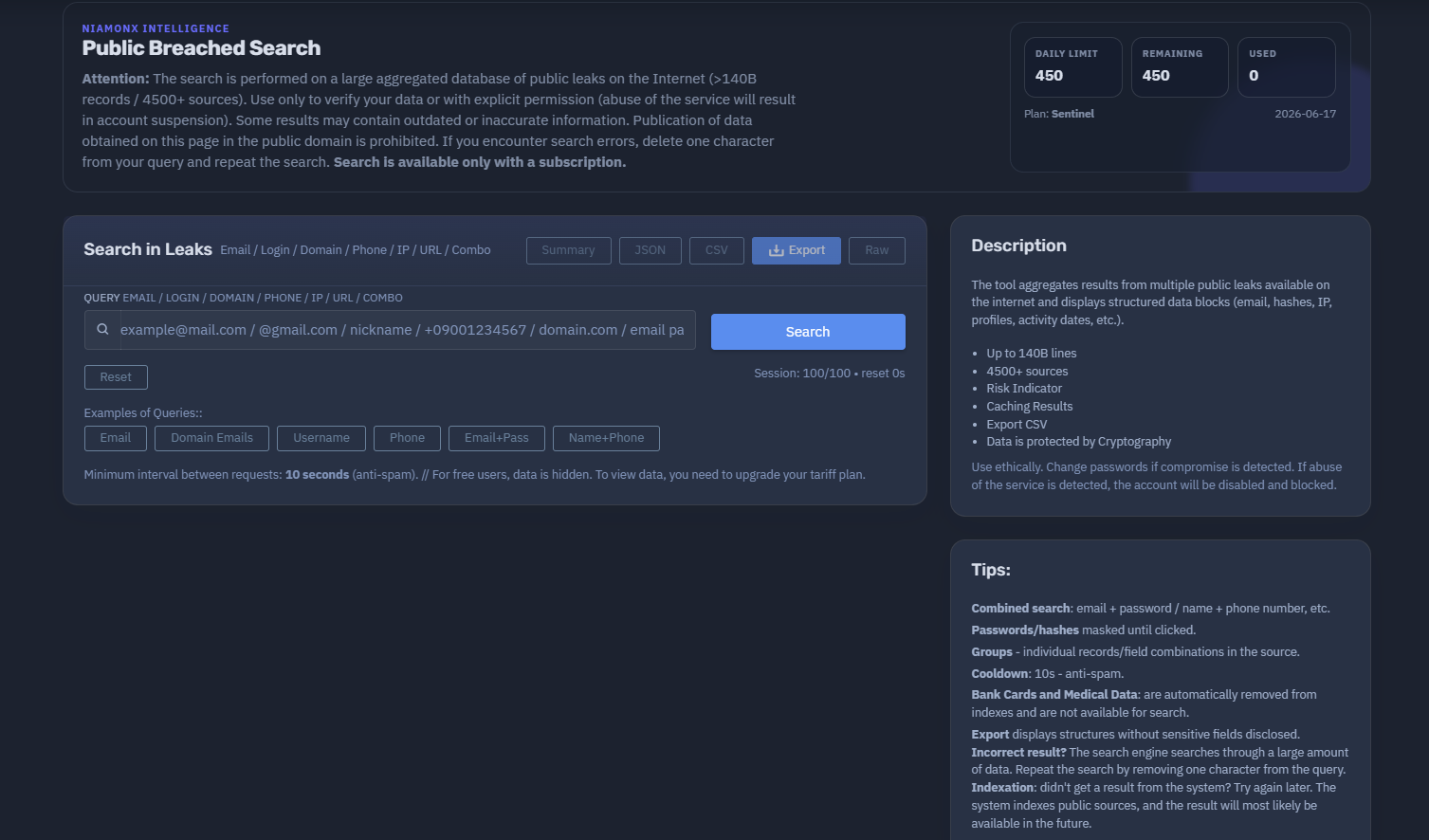
Overview of the Service
The platform available at dash.niamonx.io/breaches_search is a professional-grade Public Breached Data Search System designed for verifying whether specific personal identifiers have appeared in any known public data leaks across the Internet.
It operates on an aggregated dataset exceeding 140 billion records collected from over 4,500 public breach sources, making it one of the most extensive publicly searchable breach databases in existence.
🔍 How the Search Works
When a user enters a query — such as an email address, username, phone number, IP, or domain — the system performs a real-time lookup across its encrypted, indexed data clusters.
The query is normalized, tokenized, and securely matched against hashed or pseudonymized datasets to locate potential breach entries.
The search engine uses multi-vector indexing optimized for text, numeric, and composite keys (e.g., email + password, name + city), allowing flexible combined searches.
To maintain integrity and performance:
-
Each user request is subject to a 10-second cooldown (anti-spam policy).
-
Partial queries can improve recall; deleting one character may trigger a broader match.
-
Cached results are used for frequent queries to improve response time.
🧩 What Can Be Searched
You can look up:
-
Emails and logins
-
Phone numbers (international format)
-
Domains or URLs
-
IP addresses
-
Full names or social network identifiers
-
“Combo” lines (e.g., email + password pairs from public leaks)
The system structures results into logical “groups” that may include:
-
Email or login identifiers
-
Hashed or masked passwords
-
IP and domain references
-
Profiles and related metadata
-
First/last seen activity dates
Sensitive fields like passwords remain masked until explicitly revealed by the user.
🛡️ Security & Ethics
All stored data and query logs are encrypted using modern cryptographic algorithms.
Only aggregated metadata — not full confidential strings — is retained in request history for transparency and analytics.
Additional safeguards:
-
Bank card and medical information are automatically excluded from indexing.
-
Publication of retrieved data is strictly forbidden.
-
Detected abuse leads to account suspension and IP blocking.
The service is intended for ethical use only — such as checking whether your credentials or company assets appear in public leaks and taking appropriate security measures (e.g., password changes, MFA setup).
📊 Extra Features
-
Risk indicator: assesses the exposure level of each result.
-
Result caching: speeds up repeated lookups.
-
CSV export: allows structured export without revealing sensitive fields.
-
Ongoing index updates: new sources are continuously crawled and normalized.
In summary, NiamonX Breach Search acts as a secure, encrypted intelligence platform that enables professionals and individuals to verify their exposure in public breaches responsibly. It prioritizes data protection, cryptographic integrity, and ethical transparency, providing actionable insights while maintaining user and data privacy.
📬 Contact Information
For any inquiries, users can contact the project team directly:
-
support @ niamonx.io — Technical Support
-
other @ niamonx.io — General Inquiries
-
takedown @ niamonx.io — Requests for Data Removal / Privacy Takedowns
-
legal @ niamonx.io — Legal Matters
An alternative contact channel is the official Helpdesk:
🔗 https://support.niamonx.io/
ULP (Infostealer Logs) | Public Breached ULP Search

Overview of the Service
The platform available at dash.niamonx.io/ulp_search — known as ULP Search — is a specialized Data Breach Search Engine developed by NiamonX for identifying credential exposures in public and infostealer leak datasets.
It provides professionals and security researchers with a structured, secure, and ethical way to verify whether specific login credentials have been compromised online.
The ULP database currently indexes over 19 billion credential records, continuously updated and refined through automated pipelines, ensuring freshness, accuracy, and de-duplication.
🧩 What is ULP?
ULP stands for URL · LOGIN · PASSWORD, representing a credential triple extracted from public or infostealer data sources.
Each record typically contains:
-
URL — the website, endpoint, or domain where credentials were used (e.g.,
example.com/login) -
LOGIN — the associated username or email address
-
PASSWORD — the captured or leaked password (masked by default for security)
This triplet allows correlation between breached accounts, reused passwords, and compromised domains, forming the foundation of forensic credential analysis within NiamonX’s breach intelligence system.
🔍 How the Search Works
Users can query the database using any of the following parameters:
-
Email address or username
-
Domain or URL
-
Password (masked matching supported)
The system automatically detects the query type (Auto mode) or allows manual selection for more specific searches.
Searches are conducted in real-time against encrypted datasets, and results are filtered and ranked by confidence and relevance.
Key operational details:
-
Exact match can be enabled for precise email or username lookups.
-
Domain-based searches support suffix logic to detect subdomains (e.g., searching
example.comwill also includemail.example.com). -
URL searches accept partial paths, ideal for endpoint-level tracing.
-
Result limits: up to 1,000 records per request.
-
Anti-abuse control: all queries are encrypted and rate-limited.
If search performance temporarily decreases, it may indicate active deduplication or dataset reindexing — repeating the search after a few minutes ensures access to the freshest possible data.
🧠 Key Features
-
AI Audit System: enhances search precision and filters false positives through pattern-based validation and contextual AI analysis.
-
Result History & Filtering: users can save searches, view historical queries, and filter by host, login, or URL.
-
Masked Passwords: sensitive data remains hidden by default to prevent misuse.
-
Secure Export Options: structured result exports with sensitive fields excluded.
-
Regular Updates: continuous ingestion of verified breach data ensures up-to-date intelligence.
🛡️ Security, Privacy & Ethics
Every search request is fully encrypted end-to-end, ensuring that user queries and results remain private.
The system never shares, resells, or exposes query data — even internally.
Ethical principles:
-
Only perform searches for data you own or have explicit authorization to analyze.
-
Keep results confidential and never redistribute them.
-
Immediately change any exposed passwords and enable multi-factor authentication (MFA) if compromise is detected.
-
Publication of retrieved data in open sources is strictly prohibited.
📈 Technical Highlights
-
19B+ credential records
-
Real-time encrypted search
-
Periodic deduplication & refresh cycles
-
Adaptive caching for faster repeated queries
-
Multi-type query engine (Email / Domain / URL / Password)
📬 Contact Information
For support, inquiries, or privacy-related requests, the NiamonX team can be reached directly via:
-
support @ niamonx.io — Technical Support
-
other @ niamonx.io — General Inquiries
-
takedown @ niamonx.io — Personal Data Removal Requests
-
legal @ niamonx.io — Legal or Compliance Matters
Alternative contact channel:
🔗 Helpdesk: https://support.niamonx.io/
In summary, NiamonX ULP Search is a cryptographically secure and ethically governed breach intelligence system designed for professional credential analysis.
It provides deep visibility into compromised login data from billions of records — while maintaining the highest standards of security, privacy, and responsible use.
PBS v2 (Beta Search) | Public Breached Search V2
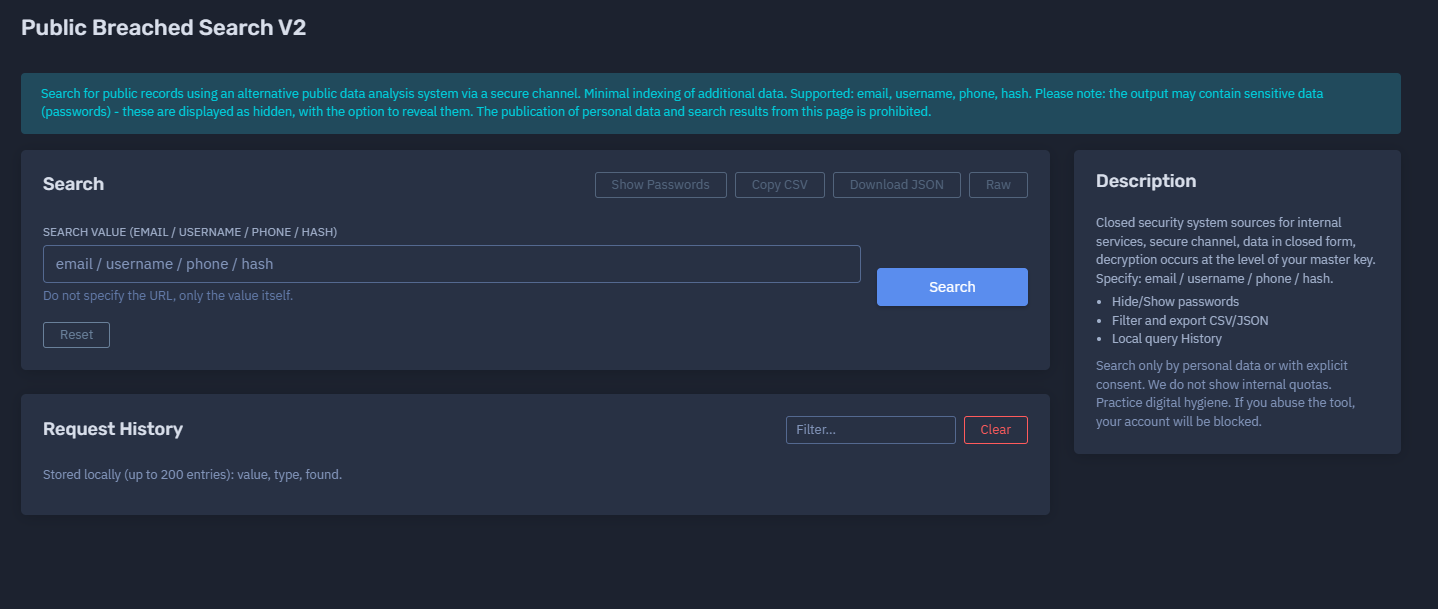
Overview of the Service
The platform available at dash.niamonx.io/breaches_s_v2 — known as Public Breached Search V2 — is an advanced, security-focused version of the NiamonX breach intelligence engine.
It enables users to safely and privately search for publicly available leaked records (emails, usernames, phone numbers, or hashes) through a fully encrypted channel, using an enhanced privacy-preserving architecture.
This system is designed for individuals, analysts, and cybersecurity teams who need to verify whether specific identifiers have been compromised — without exposing their search queries or retrieved data.
🔍 How the Search Works
When a user submits a query — such as an email address, username, phone number, or hash — the system performs a real-time lookup across an alternative, minimized index of public breach data.
The search is executed through a closed security network using end-to-end encryption and a master key–based decryption layer. This ensures that:
-
All transmitted data remains encrypted at every step.
-
Decryption occurs only on the client side, not on NiamonX servers.
-
The system never stores sensitive results or full identifiers in plain form.
This approach provides maximum privacy, ensuring that no third party — including NiamonX infrastructure — can access raw search data or results.
🧩 What Can Be Searched
Supported input types:
-
Email address
-
Username / Login
-
Phone number (international format)
-
Hash (MD5 / SHA1 / SHA256 and similar)
Unlike the standard Breached Search engine, V2 does not support URLs, domains, or combined queries. It focuses exclusively on personal identifiers and cryptographic hashes to maintain precision and data hygiene.
Passwords found in results are hidden (masked) by default. Users may reveal them manually if needed for verification, but they must not redistribute or publicly display that information.
🧠 Key Features
-
Encrypted Communication Channel: every search request and response is transmitted securely.
-
Client-side Decryption: sensitive content is decrypted locally using the user’s master key.
-
Minimal Indexing: only essential metadata is stored to ensure fast lookups while reducing exposure.
-
Local Query History: recent searches (up to 200 entries) are stored locally in the browser, not on the server.
-
Flexible Export: results can be exported in CSV or JSON format, excluding confidential fields.
-
Password Visibility Control: toggle to hide or show masked password fields.
-
Filtering System: refine results by data type or source metadata.
🛡️ Security, Privacy & Ethics
The service is built with security-first architecture and strict privacy guarantees:
-
All communication is conducted through a secure, encrypted channel.
-
Data is stored and processed in a closed system environment.
-
No internal quotas or usage metrics are publicly displayed to prevent misuse.
-
Searches must only be performed on your own data or with explicit permission.
-
Abuse or attempts to deanonymize datasets will result in account termination.
-
Publication of personal or sensitive data retrieved from the system is strictly forbidden.
Users are strongly encouraged to practice digital hygiene — for example, by changing passwords, enabling MFA, and avoiding credential reuse.
⚙️ Technical Highlights
-
Alternative breach dataset with minimal indexing
-
Closed internal security infrastructure
-
End-to-end encryption with client-side decryption
-
Local storage of query history (no server retention)
-
Supports: email / username / phone / hash
-
Output masking for passwords and sensitive fields
-
CSV/JSON export with filtering tools
📬 Contact Information
For any technical, legal, or privacy-related inquiries, users can reach the NiamonX team directly via:
-
support @ niamonx.io — Technical Support
-
other @ niamonx.io — General Inquiries
-
takedown @ niamonx.io — Requests for Data Removal / Privacy Takedowns
-
legal @ niamonx.io — Legal or Compliance Matters
Alternative contact channel:
🔗 Helpdesk: https://support.niamonx.io/
In summary, NiamonX Public Breached Search V2 is a secure, privacy-preserving intelligence system that enables safe and encrypted lookup of breach data.
It prioritizes user confidentiality, cryptographic protection, and ethical operation, ensuring that every search remains private, traceable only to the authorized user, and never exposed beyond their secure session.
Public Breached Search Fast (80+B) | Fast Public Breach Intelligence Search
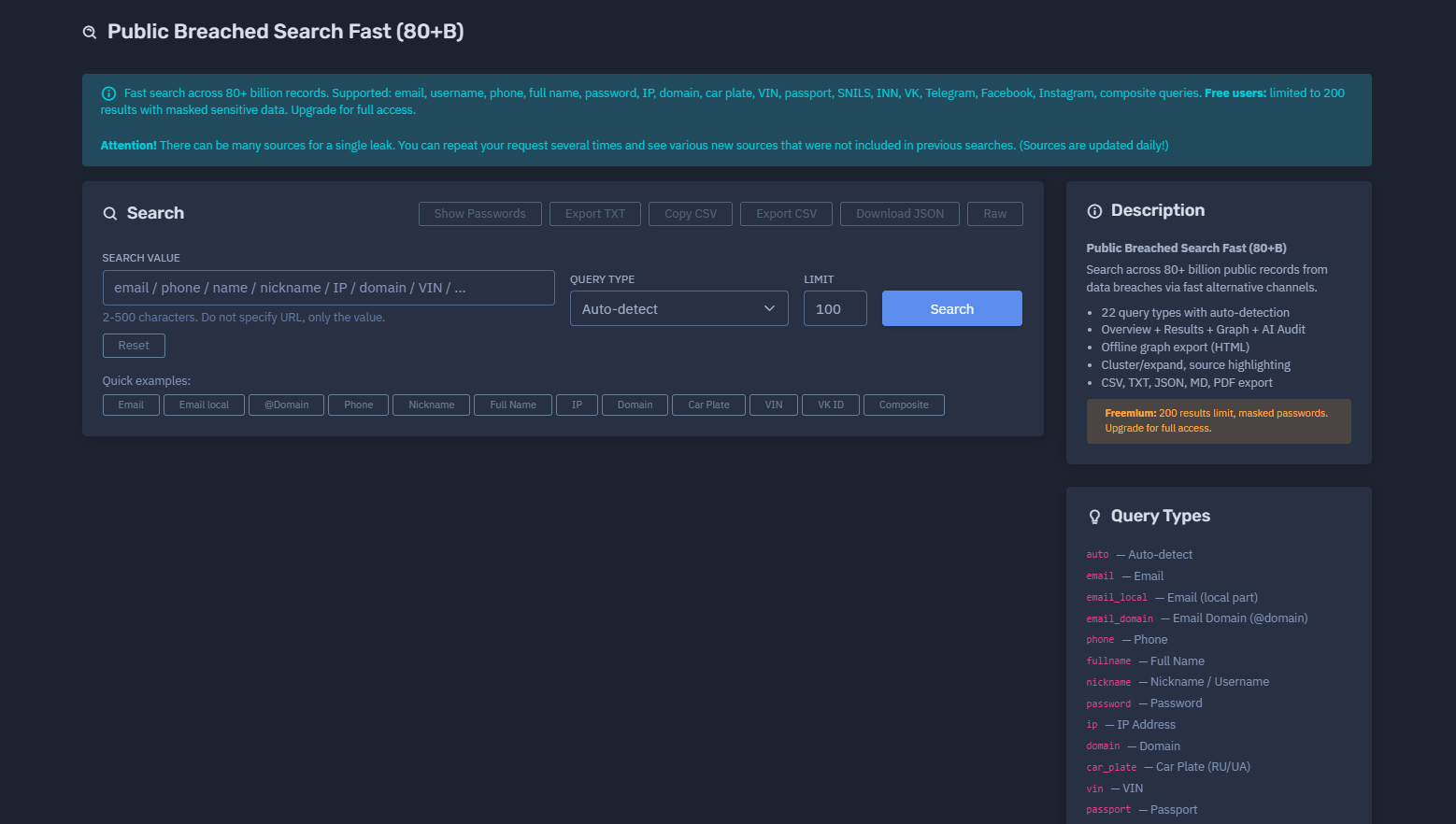
The platform available at dash.niamonx.io/breaches_search_fast
Overview of the Service
Public Breached Search Fast (80+B) is a high-speed breach intelligence tool available within the NiamonX platform. It enables users to search across 80+ billion public records collected from publicly available breach datasets and alternative intelligence channels.
The system is designed for individuals, analysts, security researchers, compliance teams, and cybersecurity departments that need to quickly verify whether specific identifiers, accounts, or technical indicators appear in compromised public datasets.
Unlike the encrypted PBS v2 engine, Public Breached Search Fast focuses on speed, broad query coverage, source diversity, graph analysis, and flexible exports. It supports a wide range of identifiers, including emails, usernames, phone numbers, names, domains, IP addresses, vehicle identifiers, social media IDs, and composite queries.
The service is intended strictly for lawful security analysis, personal data verification, incident response, and defensive investigations.
🔍 How the Search Works
When a user enters a search value, the system performs a fast lookup across a large alternative breach index containing more than 80 billion public records.
The user can either allow the system to automatically detect the query type or manually select a specific type, such as email, phone number, domain, VIN, passport, Telegram, VK, or composite query.
The platform then returns available matches, grouped and structured by source, data type, and related metadata.
Important behavior:
-
The same leak may have multiple source references.
-
A single query can return different source combinations across repeated searches.
-
Sources are updated daily.
-
Repeating a request may reveal additional sources that were not included in previous results.
-
Free users are limited to 200 results.
-
Sensitive fields, including passwords, are masked for free users.
-
Full access requires an upgraded account.
This approach allows the system to prioritize both speed and broad source discovery while keeping sensitive information controlled.
🧩 What Can Be Searched
Public Breached Search Fast supports 22 query types with automatic detection.
Supported query types:
-
auto— Auto-detect -
email— Email address -
email_local— Email local part -
email_domain— Email domain -
phone— Phone number -
fullname— Full name -
nickname— Nickname or username -
password— Password -
ip— IP address -
domain— Domain -
car_plate— Car plate -
vin— Vehicle Identification Number -
passport— Passport -
snils— SNILS -
inn— INN -
vk— VKontakte identifier -
telegram— Telegram identifier -
facebook— Facebook identifier -
instagram— Instagram identifier -
composite— Multi-field composite query -
fullname_dob— Full name with date of birth -
numeric_id— Numeric identifier
The search input supports values from 2 to 500 characters.
Users should enter only the value itself, not a full URL. For example, enter a domain name instead of a full website address.
⚙️ Search Interface
The search interface includes the following main fields:
Search Value
The identifier or value to search for.
Examples of supported values:
-
Email address
-
Phone number
-
Full name
-
Nickname
-
IP address
-
Domain
-
VIN
-
Car plate
-
Passport number
-
Social media identifier
-
Composite query
Query Type
The user may select a specific query type or use Auto-detect.
Auto-detection helps identify the most likely input type and route the search through the correct lookup logic.
Limit
The user can specify the maximum number of results to retrieve.
Free users are limited to 200 visible results with sensitive information masked. Paid users may access higher result limits and full visibility depending on their subscription level and permissions.
🧠 Key Features
Fast Search Across 80+ Billion Records
The system is optimized for quick lookups across a very large public breach index.
22 Query Types
Public Breached Search Fast supports a wide range of identifiers, including personal, technical, vehicle-related, and social media identifiers.
Auto-Detection
The platform can automatically detect the type of query entered by the user.
Overview Section
Search results include a structured overview of discovered matches, source distribution, and available metadata.
Results View
Matched records are displayed in a readable format with source highlighting and structured fields.
Graph View
The tool can visualize relationships between identifiers, sources, and connected records using graph-based analysis.
AI Audit
The AI Audit feature helps summarize and interpret the search results from a security and risk perspective.
Offline Graph Export
Users can export graph analysis as an offline HTML file for local review, reporting, or internal investigations.
Cluster and Expand
The system can cluster related records and expand connected entities to help analysts understand relationships between data points.
Source Highlighting
Sources are visually highlighted to make it easier to identify where specific records were found.
Flexible Export
Results can be exported in multiple formats:
-
CSV
-
TXT
-
JSON
-
Markdown
-
PDF
Export functionality is intended for lawful internal use, incident response, compliance checks, and security reporting.
📊 Results, Graph, and AI Audit
Public Breached Search Fast provides multiple result analysis layers.
Overview
The overview section summarizes key information about the query, such as:
-
Number of discovered records
-
Related data categories
-
Available source groups
-
Detected query type
-
Possible risk indicators
Results
The results section displays matching records from available public breach sources.
Depending on the user’s access level, some sensitive fields may be masked.
Graph
The graph view helps users analyze relationships between identifiers and sources.
This is useful for:
-
Account compromise investigations
-
Identity exposure analysis
-
Infrastructure correlation
-
Reused identifier detection
-
Source relationship mapping
AI Audit
The AI Audit feature provides an automated interpretation of the findings.
It may help identify:
-
Potential account compromise
-
Reused credentials
-
Risky exposure patterns
-
Multiple-source appearances
-
High-risk identifiers
-
Recommended defensive actions
AI Audit is intended to support analyst decision-making and should not be treated as a final legal or forensic conclusion.
📤 Export Options
Public Breached Search Fast supports several export formats:
-
CSV — for spreadsheets and structured analysis
-
TXT — for simple plain-text review
-
JSON — for technical workflows and integrations
-
MD — for documentation and reporting
-
PDF — for formal reports and sharing with authorized parties
-
HTML graph export — for offline graph visualization
Sensitive fields may be masked or excluded depending on account permissions, subscription level, and platform security rules.
Users must not redistribute personal or sensitive data obtained from the system.
⚠️ Important Notes About Sources
A single leak may have many different source references.
Because sources are updated daily, repeated searches may show different or additional sources that were not included in earlier results.
This behavior is normal and reflects the dynamic nature of the breach intelligence index.
Users should treat results as intelligence indicators and verify important findings through proper security, legal, or compliance workflows before taking action.
🛡️ Security, Privacy & Ethics
Public Breached Search Fast is built for defensive cybersecurity, personal security verification, and lawful intelligence analysis.
Users must follow strict ethical rules:
-
Search only your own data or data you are legally authorized to investigate.
-
Do not use the system to stalk, harass, deanonymize, or target individuals.
-
Do not publish personal or sensitive data retrieved from the platform.
-
Do not redistribute passwords, identity documents, phone numbers, private addresses, or other confidential information.
-
Do not use breach data for account takeover, credential stuffing, fraud, spam, phishing, or social engineering.
-
Do not attempt to bypass masking, limits, access controls, or platform protections.
-
Use discovered exposure only for remediation, reporting, and defensive security actions.
Recommended security actions after discovering exposed data:
-
Change affected passwords immediately.
-
Enable multi-factor authentication.
-
Avoid credential reuse.
-
Review account login history.
-
Monitor suspicious activity.
-
Notify affected users or internal teams when legally appropriate.
-
Request takedown or removal where applicable.
Abuse of the system may result in account restriction, suspension, or termination.
⚙️ Technical Highlights
-
Search across 80+ billion public records
-
Fast alternative breach intelligence channels
-
22 supported query types
-
Automatic query type detection
-
Supports email, username, phone, name, password, IP, domain, VIN, car plate, passport, SNILS, INN, social media identifiers, and composite queries
-
Overview, Results, Graph, and AI Audit modules
-
Offline graph export in HTML format
-
Cluster and expand functionality
-
Source highlighting
-
CSV, TXT, JSON, Markdown, PDF export
-
Freemium access model
-
Free users limited to 200 results
-
Sensitive data masking for free users
-
Daily source updates
📌 Query Types Reference
| Query Type | Description |
|---|---|
auto |
Auto-detect |
email |
|
email_local |
Email local part |
email_domain |
Email domain |
phone |
Phone |
fullname |
Full name |
nickname |
Nickname / Username |
password |
Password |
ip |
IP address |
domain |
Domain |
car_plate |
Car plate |
vin |
VIN |
passport |
Passport |
snils |
SNILS |
inn |
INN |
vk |
VKontakte |
telegram |
Telegram |
facebook |
|
instagram |
|
composite |
Composite multi-field query |
fullname_dob |
Full name + date of birth |
numeric_id |
Numeric ID |
📬 Contact Information
For technical, legal, abuse, privacy, or takedown-related inquiries, users can contact the NiamonX team directly:
support@niamonx.io — Technical Support
other@niamonx.io — General Inquiries
takedown@niamonx.io — Data Removal / Privacy Takedown Requests
legal@niamonx.io — Legal and Compliance Matters
Alternative contact channel:
🔗 Helpdesk: https://support.niamonx.io/
Summary
NiamonX Public Breached Search Fast (80+B) is a high-speed public breach intelligence tool designed for fast, broad, and structured searches across more than 80 billion public records.
It supports 22 query types, automatic detection, source highlighting, graph analysis, AI-assisted audit, offline graph export, and multiple export formats.
The tool is intended for lawful cybersecurity investigations, personal exposure checks, compliance workflows, and defensive threat intelligence. It combines speed, large-scale coverage, and flexible analysis features while enforcing masking, access control, and ethical usage requirements.
Dark Web Search | Underground Threat Intelligence Monitoring
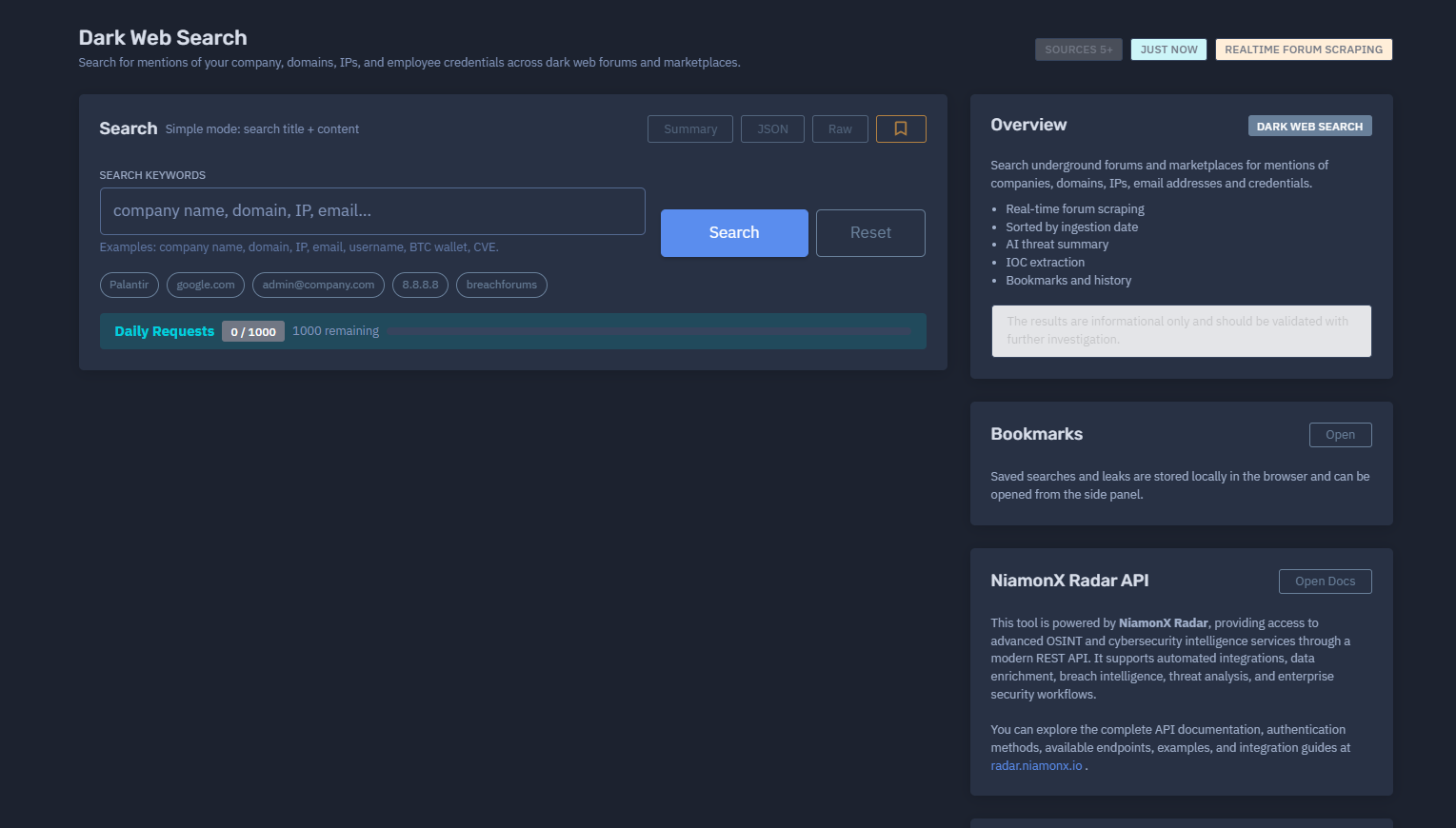
The platform available at dash.niamonx.io/dark_web_search
Overview of the Service
Dark Web Search is a cybersecurity intelligence tool within the NiamonX platform designed to search for mentions of companies, domains, IP addresses, employee credentials, usernames, email addresses, cryptocurrency wallets, CVEs, and other security-relevant indicators across underground forums, dark web communities, and marketplace-related sources.
The tool helps organizations detect early signs of exposure, leaked credentials, threat actor discussions, infrastructure mentions, and possible compromise indicators.
It is designed for security teams, SOC analysts, threat intelligence researchers, compliance departments, and company owners who need to monitor whether their organization, assets, or employees are being discussed or exposed in underground environments.
The results are informational and should always be validated through further investigation before taking operational, legal, or security actions.
🔍 How the Search Works
When a user submits a search query, such as a company name, domain, IP address, email address, username, BTC wallet, or CVE identifier, the system searches across indexed dark web and underground forum data.
In Simple Mode, the tool searches both:
-
Post titles
-
Post content
Results are sorted by ingestion date, meaning the newest collected items appear first.
The platform uses real-time forum scraping and NiamonX Radar intelligence capabilities to detect fresh mentions and newly ingested underground content.
Supported search examples include:
-
Company name
-
Domain
-
IP address
-
Email address
-
Username
-
Employee credential
-
BTC wallet
-
CVE identifier
-
Product or project name
-
Internal keyword
-
Brand name
The system is intended to help users identify possible risks, not to provide final conclusions without manual validation.
🧩 What Can Be Searched
Dark Web Search supports keyword-based searches related to organizational and technical exposure.
Common searchable values include:
-
Company names
-
Brand names
-
Domains
-
Subdomains
-
IP addresses
-
Corporate email addresses
-
Employee usernames
-
Credentials
-
Cryptocurrency wallets
-
CVE identifiers
-
Internal project names
-
Product names
-
Infrastructure keywords
-
Threat actor references
-
Leak titles
-
Forum post keywords
The tool is flexible and can be used for both broad monitoring and focused investigation.
For example:
-
Searching a company name may reveal forum discussions or leak mentions.
-
Searching a domain may reveal exposed credentials or infrastructure references.
-
Searching an email may reveal account exposure or credential leaks.
-
Searching a CVE may reveal underground discussions about exploitation.
-
Searching a BTC wallet may reveal links to ransomware, scams, or threat actor activity.
🧠 Key Features
Real-Time Forum Scraping
The tool continuously collects and processes data from monitored underground sources, allowing users to discover recently ingested mentions.
Search Across Dark Web Forums and Marketplaces
Dark Web Search helps identify mentions across underground communities, forums, marketplaces, and related intelligence sources.
5+ Source Groups
The platform currently provides access to more than five monitored source groups, with collected data updated through the NiamonX Radar intelligence infrastructure.
Simple Search Mode
Simple Mode searches across both post titles and post content, making it easier to find relevant mentions without advanced query syntax.
Ingestion Date Sorting
Results are sorted by ingestion date, allowing analysts to focus on the newest discovered content first.
AI Threat Summary
The platform can generate an AI-assisted threat summary to help users quickly understand the possible risk, context, and relevance of discovered mentions.
IOC Extraction
The system can extract Indicators of Compromise from discovered content.
Possible IOCs may include:
-
IP addresses
-
Domains
-
URLs
-
Email addresses
-
Hashes
-
Cryptocurrency wallets
-
CVEs
-
Usernames
-
Infrastructure indicators
Risk Score
The risk score is calculated based on signals such as:
-
Number of leak mentions
-
Verified hits
-
Credential presence
-
IOC density
-
Relevance of detected content
-
Possible relationship to the searched entity
The score is intended as an analyst support metric and should not be treated as a final determination.
Bookmarks
Users can save searches and individual leak records as bookmarks.
Bookmarks are stored locally in the browser and can be opened from the side panel.
Search History
The tool keeps local browser-based history for easier access to previous searches.
Daily Request Limits
Daily request limits depend on the user’s current plan.
For example, a plan may include:
-
1000 daily requests
-
Remaining request counter
-
Usage tracking by plan limit
📊 Results and Threat Context
Dark Web Search results are designed to help analysts quickly understand what was found and why it may matter.
A result may include:
-
Source name or source group
-
Title
-
Content snippet
-
Ingestion date
-
Detected indicators
-
Risk score
-
Related credentials
-
Extracted IOCs
-
AI-generated summary
-
Bookmark option
The system helps users identify whether the discovered mention is likely related to:
-
Credential exposure
-
Company targeting
-
Data sale or leak discussion
-
Infrastructure reconnaissance
-
Vulnerability exploitation
-
Threat actor activity
-
Brand abuse
-
Fraud or phishing activity
-
Ransomware-related intelligence
All findings should be reviewed manually and correlated with internal logs, SIEM data, EDR alerts, access history, and other trusted security sources.
🤖 AI Threat Summary
The AI Threat Summary feature helps convert raw underground data into readable intelligence.
It may assist with:
-
Explaining the context of the mention
-
Highlighting possible risks
-
Identifying exposed entities
-
Summarizing credential-related findings
-
Detecting relevant IOCs
-
Suggesting defensive investigation steps
-
Prioritizing high-risk results
AI-generated summaries are intended to support human analysts and should not replace professional review.
🧬 IOC Extraction
Dark Web Search can automatically extract security indicators from discovered content.
Extracted indicators may include:
| IOC Type | Description |
|---|---|
| IP address | Possible infrastructure, victim system, or attacker-controlled host |
| Domain | Mentioned corporate, phishing, malware, or infrastructure domain |
| Exposed account, contact, or credential-related identifier | |
| Hash | Malware, file, or credential-related hash |
| CVE | Vulnerability identifier discussed in underground content |
| Wallet | Cryptocurrency wallet connected to scams, ransomware, or illicit activity |
| Username | Forum handle, employee account, or leaked login |
| URL | Mentioned website, panel, leak page, or infrastructure reference |
IOC extraction helps analysts move from raw search results to actionable threat intelligence.
🔖 Bookmarks and Local Storage
The bookmark system allows users to save important findings for later review.
Bookmarks may include:
-
Search queries
-
Individual leak records
-
Relevant dark web mentions
-
Investigation leads
-
High-risk findings
Saved searches and leaks are stored locally in the browser and can be opened from the side panel.
This allows analysts to keep track of investigations without relying on external notes or repeated manual searches.
🚦 Daily Requests and Plan Limits
Dark Web Search uses daily request limits based on the user’s subscription plan.
The interface may show:
-
Daily requests used
-
Total daily request allowance
-
Remaining requests
Example:
Daily Requests
0 / 1000
1000 remaining
These limits help control usage, protect infrastructure stability, and prevent abuse of the intelligence system.
🧠 Risk Score Logic
The risk score is calculated using several intelligence signals.
Main scoring factors include:
-
Number of leak mentions
-
Number of verified hits
-
Presence of credentials
-
Density of extracted IOCs
-
Recency of ingested content
-
Relevance to the searched company, domain, or identifier
-
Possible exposure severity
-
Underground source context
A higher risk score may indicate stronger relevance, higher exposure, or more urgent investigation priority.
However, risk scores should be interpreted as guidance, not as absolute proof of compromise.
🛡️ Security, Privacy & Ethics
Dark Web Search is intended for defensive cybersecurity, threat intelligence, brand monitoring, and lawful corporate security investigations.
Users must follow strict ethical and legal rules:
-
Search only for assets, companies, domains, accounts, or indicators that you are authorized to investigate.
-
Do not use the tool to stalk, harass, deanonymize, or target individuals.
-
Do not attempt to purchase, trade, or distribute stolen data.
-
Do not interact with threat actors based solely on search results.
-
Do not redistribute leaked credentials, personal information, or sensitive material.
-
Do not use discovered credentials for unauthorized access.
-
Do not use dark web intelligence for fraud, phishing, extortion, or social engineering.
-
Validate all findings before taking action.
-
Follow applicable data protection, privacy, and cybersecurity laws.
Recommended defensive actions after discovering relevant mentions:
-
Validate the finding using internal security logs.
-
Check whether exposed credentials are active.
-
Force password resets where appropriate.
-
Enable or enforce multi-factor authentication.
-
Review access logs for suspicious activity.
-
Investigate affected systems or accounts.
-
Notify internal security, legal, or compliance teams.
-
Preserve evidence according to company procedures.
-
Request takedown where legally applicable.
-
Monitor for repeated mentions or escalation.
Abuse of the platform may result in account restriction, suspension, or termination.
⚙️ Technical Highlights
-
Dark web and underground forum search
-
Real-time forum scraping
-
Search across 5+ monitored source groups
-
Simple Mode search across titles and content
-
Results sorted by ingestion date
-
AI threat summary
-
IOC extraction
-
Risk score calculation
-
Bookmarks for searches and individual leaks
-
Local browser-based bookmark storage
-
Search history
-
Daily request limits based on plan
-
Powered by NiamonX Radar API
-
Suitable for SOC, threat intelligence, compliance, and security monitoring workflows
🔌 NiamonX Radar API
Dark Web Search is powered by NiamonX Radar, an advanced OSINT and cybersecurity intelligence API.
NiamonX Radar provides access to modern intelligence services through a REST API and supports automated security workflows.
The API can be used for:
-
Automated integrations
-
Data enrichment
-
Breach intelligence
-
Threat intelligence analysis
-
Dark web monitoring
-
IOC enrichment
-
Enterprise security workflows
-
Internal SOC automation
-
Risk monitoring
-
Compliance support
Developers and security teams can explore the full API documentation, authentication methods, available endpoints, examples, and integration guides at:
📌 Usage Hints
-
Simple Mode searches both title and content.
-
Use company names, domains, IPs, emails, usernames, BTC wallets, or CVEs as search keywords.
-
Risk score is calculated from leak counts, verified hits, credentials, and IOC density.
-
Bookmarks can store both search queries and individual leaks.
-
Saved searches and leaks are stored locally in the browser.
-
Daily requests are based on the user’s plan limits.
-
Results are informational and should be validated through further investigation.
-
Newer results are prioritized by ingestion date.
-
AI summaries help triage findings but do not replace analyst review.
📬 Contact Information
For technical, legal, abuse, privacy, or takedown-related inquiries, users can contact the NiamonX team directly:
support@niamonx.io — Technical Support
other@niamonx.io — General Inquiries
takedown@niamonx.io — Data Removal / Privacy Takedown Requests
legal@niamonx.io — Legal and Compliance Matters
Alternative contact channel:
🔗 Helpdesk: https://support.niamonx.io/
Summary
NiamonX Dark Web Search is a threat intelligence and monitoring tool that helps users detect mentions of companies, domains, IP addresses, employee credentials, wallets, CVEs, and other security indicators across underground forums and marketplace-related sources.
It provides real-time forum scraping, ingestion-date sorting, AI threat summaries, IOC extraction, bookmarks, local history, risk scoring, and integration support through the NiamonX Radar API.
The tool is designed for lawful defensive cybersecurity, corporate monitoring, incident response, threat intelligence, and exposure validation. All results should be treated as intelligence leads and confirmed through further investigation before taking action.