NiamonX API Docs
Description of API tools.
Introduction to the API service | NiamonX API
π How to Create and Use Your NiamonX API Key
This guide explains how to create your API key, keep it secure, and start making requests to the NiamonX API v2.
1. Requirements
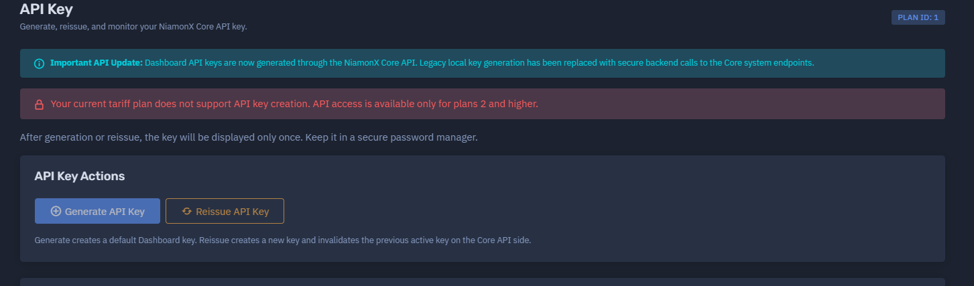
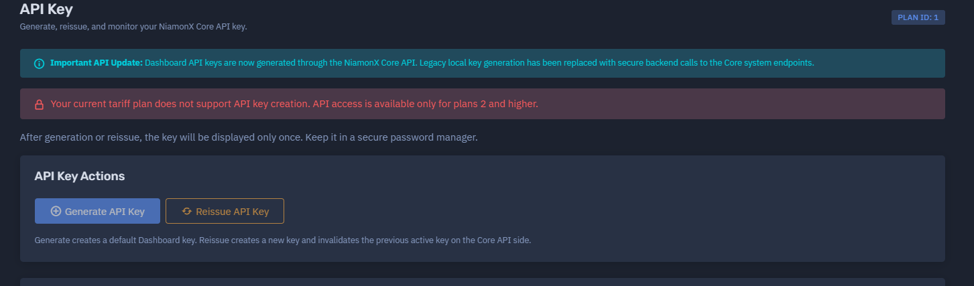
To generate an API key, you must have an active paid plan.
Free-tier users cannot create or use API keys.
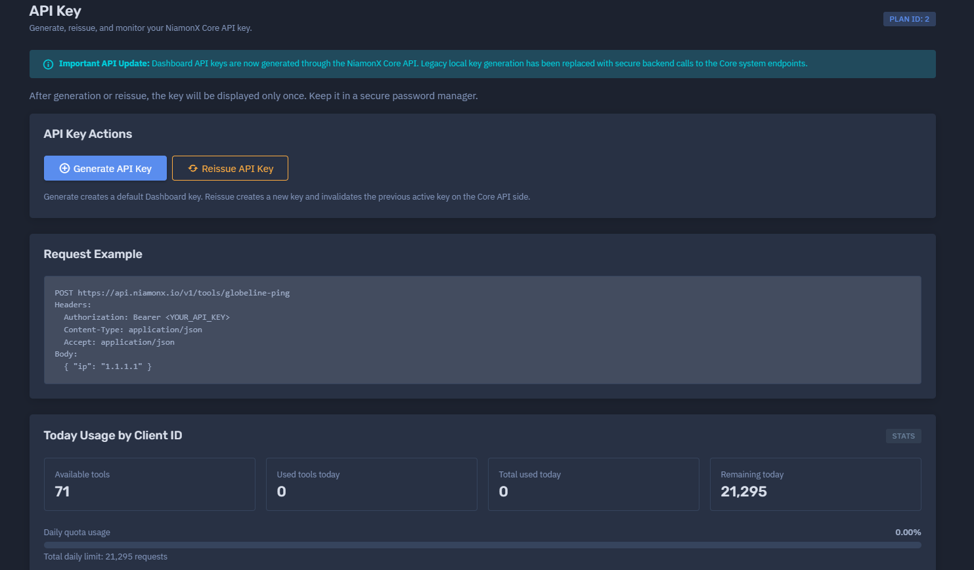
2. Creating an API Key
Visit the official key generation page:
π https://dash.niamonx.io/api-key
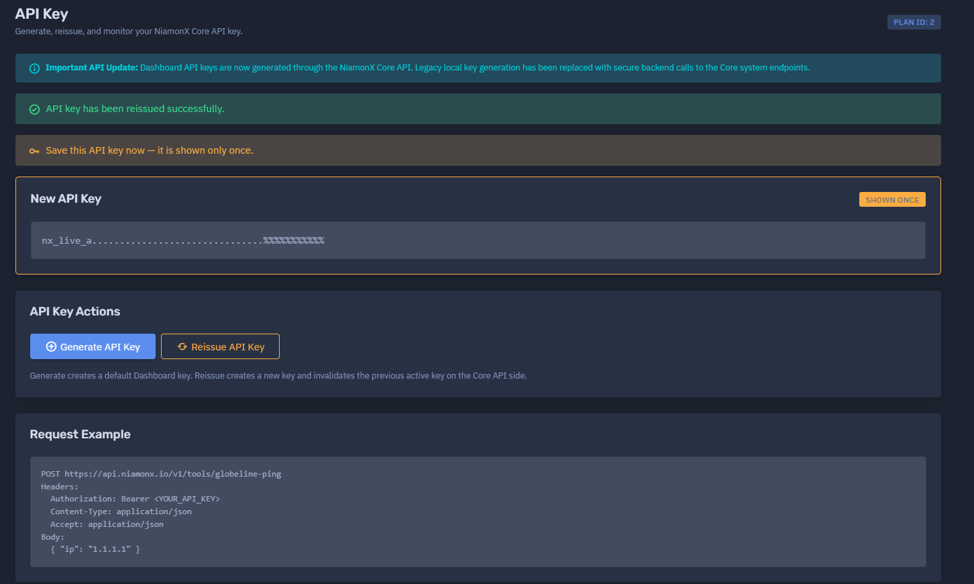
Once your subscription is active, clickΒ βCreate API Key.β
β οΈ Important:
After generation, the key will not be displayed again.
It is securely stored in the database as a SHA-256 hash, meaning even NiamonX staff cannot recover it.
Keep your key safe β store it in an encrypted password manager or an environment variable.
3. API Key Dashboard Information
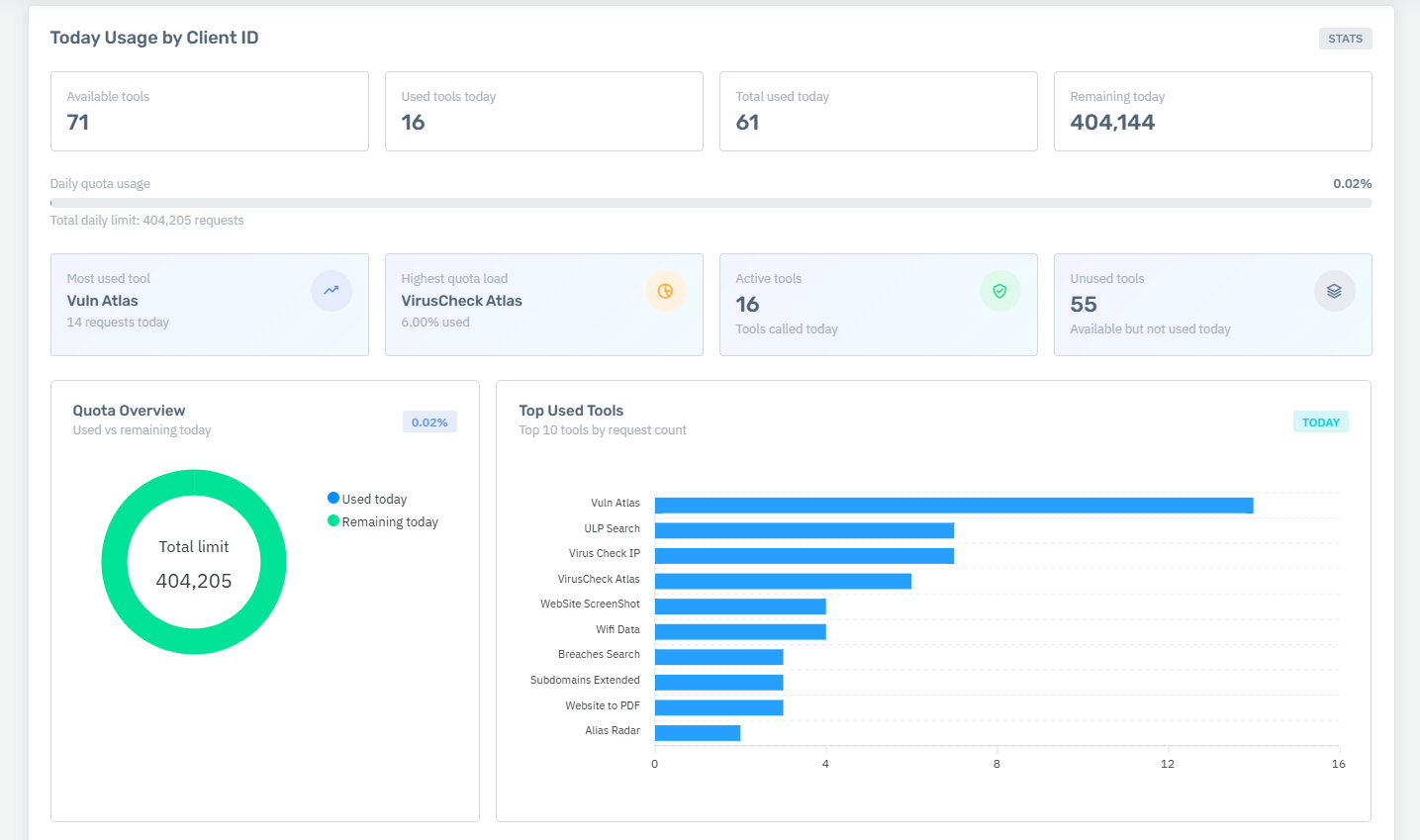
After creating the key, you will see the following details:
These fields update automatically as you start using your key.
4. Main Endpoint
All API requests go through the main entry point:
5. Example Request
Basic Health Check (gl_ping)
Headers:
Body:
6. Possible Responses
| HTTP Code | Description |
|---|---|
| 200 | β
success: true, data: {...} β request completed successfully |
| 400 | β Invalid input data (validation error) |
| 401 | π« Invalid or missing API key |
| 403 | β The requested tool is disabled |
| 404 | β Unknown tool or endpoint |
| 405 | βοΈ Method not allowed (use POST) |
| 429 | β³ Cooldown or daily request limit exceeded (message from ToolService) |
7. Security Recommendations
β
Youβre ready to start!
With your key securely stored and your first test request working, you can now explore the full NiamonX API toolkit.
Data Breach Search API
Data Breach Search NiamonX
API - Public Breaches Search (140+ Billion Records)
π§ NiamonX API β Public Breaches Search (140+ Billion Records)
Comprehensive API documentation for searching public data breaches aggregated from 4,500+ sources.
β οΈ Important Notice
The Public Breaches Search API allows you to query a massive database of publicly available leaks (>140 billion records).
Use it only for legitimate purposes β such as verifying your own data or with explicit authorization.
β Abuse or publication of obtained data will lead to account suspension and permanent API ban.
Some results may contain outdated or incomplete data.
π§© API Endpoint
Main URL:
Headers:
Body Example:
{ "query": "test@example.com" }
Example Request via cURL
curl -X POST https://dash.niamonx.io/api/v2/breaches_search \
-H "Content-Type: application/json" \
-H "X-API-Key: YOUR_API_KEY" \
-d '{"query":"test@example.com"}'
π§ Query Parameters
| Field | Type | Description | Example |
|---|---|---|---|
query |
string |
Search term (email, phone, domain, IP, username, etc.) | "example@mail.com" |
Supported Search Types
-
Email:
john.doe@gmail.com -
Login or Username:
nickname123 -
Domain:
domain.com -
IP address:
1.1.1.1 -
Combo (e.g. βemail passwordβ or βname phoneβ)
-
Full name, city, social ID
π‘ Tip: If you get an empty response, try deleting one character from the query and repeat the request β it refreshes the search pipeline.
βοΈ Response Structure
β When Data Is Found
HTTP 200
{
"success": true,
"data": {
"query": "niamonx",
"task_id": "50bab956-4a9c-4548-83ff-a0451be1b18e",
"status": "ok",
"detail": "file_downloaded",
"meta": {
"blocks_total": 3,
"emails": ["test@niamonx.io"],
"names": ["NiaMonx"],
"first_seen": "2021-01-21T05:32:31+00:00",
"last_seen": "2021-01-22T01:51:31+00:00"
},
"risk": {
"score": 9,
"level": "Low"
},
"blocks": [
{
"id": "p1",
"title": "TestNia",
"description": "In November 2021, the TestNia website...",
"groups_normalized": [
{
"fields_map": {
"email": "test@niamonx.io",
"nick": "NiaMonx",
"ip": "2800:***:9824"
}
}
]
}
],
"rate": {
"remaining": 99,
"reset_in_sec": 600
},
"cooldown_sec": 10
}
}
π³οΈ When No Results Found
HTTP 200
{
"success": true,
"data": {
"query": "not_found@niamonx.io",
"status": "not_found",
"detail": "no results found",
"meta": { "blocks_total": 0 },
"risk": { "score": 0, "level": "Low" }
}
}
π When Data Is Protected
HTTP 200
{
"success": true,
"data": {
"success": false,
"error": "[NiamonX | DataGuard] This data has been removed and is no longer indexed by our search engine at the request of the copyright holder."
}
}
π HTTP Status Codes
| Code | Meaning |
|---|---|
| 200 | Success β request processed |
| 400 | Invalid input or malformed body |
| 401 | Invalid or missing API key |
| 403 | Tool disabled for your account |
| 404 | Unknown endpoint or invalid tool name |
| 405 | Wrong method β use POST |
| 429 | Cooldown or daily limit reached |
π§± Features Summary
-
π 140+ billion records
-
π 4500+ aggregated sources
-
π Cryptographically protected data
-
π§ Risk Indicator (numeric + level)
-
β‘ Cached results for faster response
-
π§― Automatic data removal for sensitive categories (bank/medical)
π» Code Examples
1. Python (requests)
import requests
url = "https://dash.niamonx.io/api/v2/breaches_search"
headers = {
"Content-Type": "application/json",
"X-API-Key": "YOUR_API_KEY"
}
payload = { "query": "example@mail.com" }
response = requests.post(url, json=payload, headers=headers)
print(response.status_code)
print(response.json())
2. JavaScript (Node.js / Axios)
import axios from "axios";
const API_KEY = "YOUR_API_KEY";
const url = "https://dash.niamonx.io/api/v2/breaches_search";
async function searchLeak(query) {
try {
const res = await axios.post(
url,
{ query },
{
headers: {
"Content-Type": "application/json",
"X-API-Key": API_KEY
}
}
);
console.log(res.data);
} catch (err) {
console.error("Error:", err.response?.data || err.message);
}
}
searchLeak("example@mail.com");
3. PHP (cURL)
<?php
$api_key = "YOUR_API_KEY";
$url = "https://dash.niamonx.io/api/v2/breaches_search";
$data = ["query" => "example@mail.com"];
$options = [
CURLOPT_URL => $url,
CURLOPT_RETURNTRANSFER => true,
CURLOPT_POST => true,
CURLOPT_HTTPHEADER => [
"Content-Type: application/json",
"X-API-Key: $api_key"
],
CURLOPT_POSTFIELDS => json_encode($data)
];
$ch = curl_init();
curl_setopt_array($ch, $options);
$response = curl_exec($ch);
curl_close($ch);
echo $response;
?>
4. Go (net/http)
package main
import (
"bytes"
"fmt"
"io"
"net/http"
)
func main() {
apiKey := "YOUR_API_KEY"
jsonBody := []byte(`{"query":"example@mail.com"}`)
req, _ := http.NewRequest("POST", "https://dash.niamonx.io/api/v2/breaches_search", bytes.NewBuffer(jsonBody))
req.Header.Set("Content-Type", "application/json")
req.Header.Set("X-API-Key", apiKey)
client := &http.Client{}
resp, err := client.Do(req)
if err != nil {
panic(err)
}
defer resp.Body.Close()
body, _ := io.ReadAll(resp.Body)
fmt.Println("Status:", resp.Status)
fmt.Println(string(body))
}
π§ Best Practices
-
Wait 3 seconds between requests to respect cooldown (anti-spam).
-
Combine parameters intelligently:
-
"email password" -
"name phone"
-
-
Do not republish or share results publicly.
-
If you detect compromised credentials β change passwords immediately.
-
Sensitive datasets (bank cards, healthcare) are automatically excluded.
π§Ύ Summary
| Feature | Description |
|---|---|
| Endpoint | https://dash.niamonx.io/api/v2/breaches_search |
| Method | POST |
| Authentication | X-API-Key |
| Cooldown | 3 seconds |
| Rate Limit Info | Returned in rate object |
| Data Types Supported | Email, phone, IP, domain, username |
| Data Protection | SHA-256 & DataGuard Compliance |
β Now you can safely integrate the NiamonX Public Breaches API into your OSINT tools, cybersecurity dashboards, or monitoring systems β with full ethical and legal compliance.
ULP (Infostealer Logs) Public Breached ULP Search | NiamonX API
π§© NiamonX API β ULP (Infostealer Logs) Public Breached Search
Comprehensive API documentation for searching ULP datasets (URL Β· LOGIN Β· PASSWORD) extracted from public infostealer logs and credential leaks.
π What Is ULP?
ULP stands for URL Β· LOGIN Β· PASSWORD β a triple that represents evidence of compromised credentials captured in stealer logs or public leaks.
Each ULP record links:
-
URL: the website or endpoint where the credential was used (e.g.,
example.com/login) -
LOGIN: the username or email associated with the site
-
PASSWORD: the stolen or leaked password (masked by default for privacy)
This API enables you to search across massive datasets for specific entries by email, username, domain, URL, or password.
β οΈ Usage & Ethics
By using this endpoint, you confirm that:
-
You own the data or have explicit permission to process it.
-
You will not share results publicly or misuse obtained data.
-
You will act responsibly β change any compromised credentials and enable MFA.
All queries are end-to-end encrypted, and NiamonX never logs or shares search data.
π§ Endpoint
π₯ Request Structure
Headers
Body Example
{ "action": "search", "value": "test@example.com", "type": "auto", "exact": true, "limit": 200 }
βοΈ Request Parameters
| Field | Type | Description | Example |
|---|---|---|---|
| action | string |
Must be "search" |
"search" |
| value | string |
Your search query (email, domain, password, etc.) | "user@mail.com" |
| type | string |
Search type (see below) | "email" |
| exact | boolean |
Whether to match exactly (recommended for emails) | true |
| limit | integer |
Max number of records (1β1000) | 200 |
Available type values:
-
auto(default) -
email -
username -
domain -
url -
password
π§ Example cURL Request
curl -X POST https://dash.niamonx.io/api/v2/ulp_search \
-H "Content-Type: application/json" \
-H "X-API-Key: YOUR_API_KEY" \
-d '{"action":"search","value":"test@example.com","type":"auto","exact":true,"limit":200}'
π§Ύ Successful Response
HTTP 200
{
"success": true,
"data": {
"query": {
"value": "test@niamonx.io",
"type": "email",
"exact": true,
"limit": 200
},
"stats": {
"total": 1,
"unique_hosts": 1,
"with_password": 1
},
"records": [
{
"id": "ac22b9424f8aab6011fb526c9798e7c3898652d4c7a6eb8c0253212d94a9fec4",
"url": "niamonx.io/login/index",
"host": "niamonx.io",
"login": "test@niamonx.io",
"pass": "NiaMon750H",
"score": 8.840368
}
],
"status": "ok",
"cached": false,
"fetched_at": "2025-11-09T21:50:31+00:00",
"api_timing_ms": 75
}
}
π³οΈ When Nothing Is Found
HTTP 200
{
"success": true,
"data": {
"query": {
"value": "not_found",
"type": "username",
"exact": true,
"limit": 200
},
"stats": {
"total": 0,
"unique_hosts": 0,
"with_password": 0
},
"records": [],
"status": "ok",
"cached": false,
"fetched_at": "2025-11-09T21:51:56+00:00",
"api_timing_ms": 63
}
}
π Protected Data Response
HTTP 200
{
"success": true,
"data": {
"success": false,
"error": "[NiamonX | DataGuard] This data has been removed and is no longer indexed by our search engine at the request of the copyright holder."
}
}
π HTTP Status Codes
| Code | Description |
|---|---|
| 200 | Success β request processed |
| 400 | Invalid input or malformed request |
| 401 | Invalid or missing API key |
| 403 | Tool disabled for your account |
| 404 | Unknown endpoint or invalid tool |
| 405 | Wrong HTTP method (use POST) |
| 429 | Cooldown or daily limit exceeded (ToolService message) |
π‘ Tips & Notes
-
β³ Limit: up to 1000 results per request
-
π§― Cooldown: few seconds between requests to prevent spam
-
π Domain search: finds subdomains automatically
-
π§© Duplicate removal and periodic reindexing ensure fresh results
-
π If results seem incomplete, retry in several minutes for updated data
π» Code Examples
1. Python (requests)
import requests
import json
url = "https://dash.niamonx.io/api/v2/ulp_search"
headers = {
"Content-Type": "application/json",
"X-API-Key": "YOUR_API_KEY"
}
payload = {
"action": "search",
"value": "test@example.com",
"type": "auto",
"exact": True,
"limit": 200
}
response = requests.post(url, headers=headers, json=payload)
print(response.status_code)
print(json.dumps(response.json(), indent=2))
2. JavaScript (Node.js / Axios)
import axios from "axios";
const API_KEY = "YOUR_API_KEY";
const url = "https://dash.niamonx.io/api/v2/ulp_search";
async function searchULP(query) {
try {
const res = await axios.post(
url,
{
action: "search",
value: query,
type: "auto",
exact: true,
limit: 200
},
{
headers: {
"Content-Type": "application/json",
"X-API-Key": API_KEY
}
}
);
console.log(JSON.stringify(res.data, null, 2));
} catch (err) {
console.error("Error:", err.response?.data || err.message);
}
}
searchULP("test@example.com");
3. PHP (cURL)
<?php
$apiKey = "YOUR_API_KEY";
$url = "https://dash.niamonx.io/api/v2/ulp_search";
$data = [
"action" => "search",
"value" => "test@example.com",
"type" => "auto",
"exact" => true,
"limit" => 200
];
$options = [
CURLOPT_URL => $url,
CURLOPT_RETURNTRANSFER => true,
CURLOPT_POST => true,
CURLOPT_HTTPHEADER => [
"Content-Type: application/json",
"X-API-Key: $apiKey"
],
CURLOPT_POSTFIELDS => json_encode($data)
];
$ch = curl_init();
curl_setopt_array($ch, $options);
$response = curl_exec($ch);
curl_close($ch);
echo $response;
?>
4. Go (net/http)
package main
import (
"bytes"
"fmt"
"io"
"net/http"
)
func main() {
apiKey := "YOUR_API_KEY"
body := []byte(`{"action":"search","value":"test@example.com","type":"auto","exact":true,"limit":200}`)
req, _ := http.NewRequest("POST", "https://dash.niamonx.io/api/v2/ulp_search", bytes.NewBuffer(body))
req.Header.Set("Content-Type", "application/json")
req.Header.Set("X-API-Key", apiKey)
client := &http.Client{}
resp, err := client.Do(req)
if err != nil {
panic(err)
}
defer resp.Body.Close()
result, _ := io.ReadAll(resp.Body)
fmt.Println("Status:", resp.Status)
fmt.Println(string(result))
}
π§ Summary
| Feature | Description |
|---|---|
| Endpoint | https://dash.niamonx.io/api/v2/ulp_search |
| Method | POST |
| Auth Header | X-API-Key |
| Limit | up to 1000 records |
| Cooldown | Short delay between requests |
| Sensitive Data | Passwords masked, removed on request |
| Security | Encrypted E2E, DataGuard compliant |
| Data Source | Public infostealer logs and breach repositories |
β With the ULP API, you can ethically and securely analyze exposure of credentials from public infostealer datasets β empowering your investigations, threat intelligence, and personal data protection workflows.
PBS v2 | Public Breached Search V2 | NiamonX API
π Public Breached Search V2 β NiamonX API Guide
The Public Breached Search V2 endpoint allows you to search for publicly available breach records in the NiamonX secure data analysis system.
It operates through a private, encrypted channel and uses a minimal indexing model to protect sensitive data.
Supported identifiers include:
-
Email
-
Username
-
Phone
-
Hash
All requests must be made securely and responsibly.
Never share or publish personal results β doing so may violate data protection laws and lead to account suspension.
π§ API Endpoint
Headers:
Body:
{ "value": "test@example.com", "type": "auto" }
Available types:auto, email, username, phone, hash
π‘ Description
This API searches closed and anonymized datasets for breached credential evidence.
Decryption happens at the client level using your master key, ensuring full end-to-end security.
Additional features:
β Example Successful Response
{
"success": true,
"data": {
"query": {
"value": "test@niamonx.io",
"type": "auto"
},
"stats": {
"found": 2,
"returned": 2,
"with_passwords": 2,
"unique_sources": 1,
"earliest_month": null,
"latest_month": null
},
"records": [
{
"source": {
"name": "Stealer Logs",
"breach_date": null,
"unverified": 0,
"passwordless": 0,
"compilation": 1
},
"account": "test@niamonx.io",
"email": "test@niamonx.io",
"username": null,
"phone": null,
"hash": null,
"password": "z8NiAmOn50H",
"fields": [
"password",
"origin",
"email"
]
},
{
"source": {
"name": "Stealer Logs",
"breach_date": null,
"unverified": 0,
"passwordless": 0,
"compilation": 1
},
"account": "test@niamonx.io",
"email": "test@niamonx.io",
"username": null,
"phone": null,
"hash": null,
"password": "ViptraNiA!",
"fields": [
"password",
"origin",
"email"
]
}
],
"niamonx_success": true,
"status": "ok",
"fetched_at": "2025-11-09T22:04:00+00:00",
"api_timing_ms": 146
}
}
β οΈ Possible Outcomes
No Matches Found
{
"success": true,
"data": {
"success": false,
"status": "error",
"error": "HTTP 400",
"query": {
"value": "not_found",
"type": "auto"
}
}
}
DataGuard Protection
{
"success": true,
"data": {
"success": false,
"error": "[NiamonX | DataGuard] This data has been removed and is no longer indexed by our search engine at the request of the copyright holder."
}
}
π HTTP Status Codes
| Code | Meaning |
|---|---|
| 200 | β Successful response (check data object) |
| 400 | β Validation error in input data |
| 401 | π« Invalid or missing API key |
| 403 | β Tool disabled or unavailable |
| 404 | β Unknown endpoint |
| 405 | βοΈ Method not allowed (use POST) |
| 429 | β³ Cooldown / daily limit reached |
π§© Example Implementations
1. cURL
curl -X POST https://dash.niamonx.io/api/v2/breaches_s_v2 \
-H "Content-Type: application/json" \
-H "X-API-Key: YOUR_API_KEY" \
-d '{"value":"test@example.com","type":"auto"}'
2. Python (using requests)
import requests
url = "https://dash.niamonx.io/api/v2/breaches_s_v2"
headers = {
"Content-Type": "application/json",
"X-API-Key": "YOUR_API_KEY"
}
data = {
"value": "test@example.com",
"type": "auto"
}
response = requests.post(url, json=data, headers=headers)
print(response.json())
3. JavaScript (Node.js, using axios)
import axios from "axios";
const url = "https://dash.niamonx.io/api/v2/breaches_s_v2";
const headers = {
"Content-Type": "application/json",
"X-API-Key": "YOUR_API_KEY"
};
const data = {
value: "test@example.com",
type: "auto"
};
axios.post(url, data, { headers })
.then(res => console.log(res.data))
.catch(err => console.error(err.response?.data || err.message));
4. PHP
<?php
$url = "https://dash.niamonx.io/api/v2/breaches_s_v2";
$headers = [
"Content-Type: application/json",
"X-API-Key: YOUR_API_KEY"
];
$body = json_encode([
"value" => "test@example.com",
"type" => "auto"
]);
$ch = curl_init($url);
curl_setopt($ch, CURLOPT_RETURNTRANSFER, true);
curl_setopt($ch, CURLOPT_POST, true);
curl_setopt($ch, CURLOPT_POSTFIELDS, $body);
curl_setopt($ch, CURLOPT_HTTPHEADER, $headers);
$response = curl_exec($ch);
curl_close($ch);
echo $response;
?>
5. Go
package main
import (
"bytes"
"encoding/json"
"fmt"
"net/http"
"io/ioutil"
)
func main() {
url := "https://dash.niamonx.io/api/v2/breaches_s_v2"
body := map[string]string{
"value": "test@example.com",
"type": "auto",
}
jsonData, _ := json.Marshal(body)
req, _ := http.NewRequest("POST", url, bytes.NewBuffer(jsonData))
req.Header.Set("Content-Type", "application/json")
req.Header.Set("X-API-Key", "YOUR_API_KEY")
client := &http.Client{}
resp, _ := client.Do(req)
defer resp.Body.Close()
respBody, _ := ioutil.ReadAll(resp.Body)
fmt.Println(string(respBody))
}
π‘οΈ Security Recommendations
-
Keep your API key private; never hard-code it in shared repositories.
-
Use HTTPS exclusively β no plain HTTP connections are allowed.
-
If your key is compromised, revoke it immediately.
-
Store credentials in environment variables or encrypted vaults.
-
Do not reshare or republish search results publicly.
β
Youβre all set!
With your NiamonX API Key and this Public Breached Search V2 guide, you can perform encrypted and privacy-compliant breach lookups safely and efficiently.